


 Video Converter Ultimate
 Skjermopptaker
 Videoreparasjon
Nyeste lydbok-metadataredigerer tilgjengelig online og offline
Jeg lurer på om jeg kan endre lydbokens metadata for å gi dem riktige koder? Hvis ja, har du noen forslag til hva jeg bør bruke? Det vil være til stor hjelp hvis du gir meg en liste over kompatibel på nettet og nedlastbar programvare som kan brukes.
Har du det samme spørsmålet? I så fall er du på helt rett sted. I dag skal vi introdusere ulike nett‑ og skrivebordsverktøy du kan bruke til å oppdatere, endre eller fjerne metadata på lydboken din. I tillegg går vi gjennom andre spesifikasjoner, funksjoner, kompatibilitet og mer for å se hvilket verktøy som passer best til dine behov. Uten flere forsinkelser gir vi deg en fullstendig oversikt over all informasjonen du trenger for å avgjøre hvilken lydbok‑tagredigerer du bør bruke.

Del 1. Ultimate Audiobook Metadata Editor Tilgjengelig på Windows og Mac
Anta at du trenger et verktøy som vil dekke dine behov for redigering eller fjerning av lydbokmetadata på Windows og Mac. I så fall er det utvilsomt at FVC Video Converter Ultimate er et perfekt valg. Denne tag-editoren kan raskt hjelpe deg å manuelt overstyre å legge til metadata på alle mediefiler, inkludert lydbøker, når som helst. Med dette verktøyet kan du legge til mange imponerende data til lydboken på mindre enn ett minutt.
Hva mer? La oss anta at du vil dele lydboken med noen; ved hjelp av dette verktøyet kan du raskt dele det uten å bekymre deg for at metadataene går tapt. Er ikke verktøyet fantastisk? Ærlig talt, vi la til trinn for bruk av den beste lydbok-tag-editoren nedenfor for å vise deg hva dette verktøyet er i stand til; følg trinnene deretter og nyt.
Trinn 1. Klikk på nedlastingsknappen nedenfor, og velg hvilket operativsystem du bruker. Klikk deretter på filen du har lastet ned for å installere den raskt, følg veiledningen, og åpne verktøyet for å begynne å bruke det.
Gratis nedlastingFor Windows 7 eller nyereSikker nedlasting
Gratis nedlastingFor MacOS 10.7 eller nyereSikker nedlasting
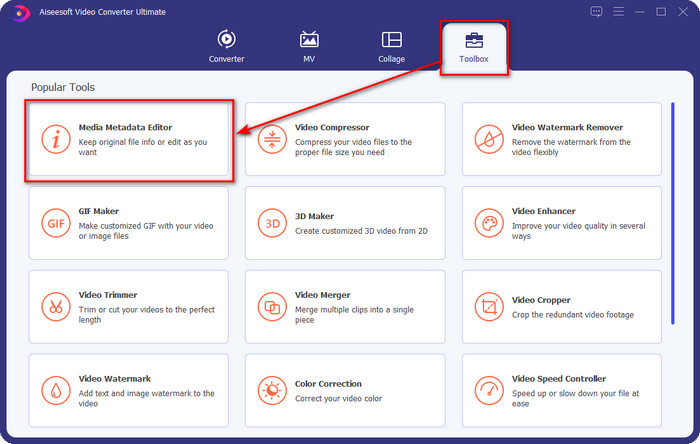
Trinn 2. Trykk på delen Verktøykasse, finn Media Metadata Editor, og klikk på den.
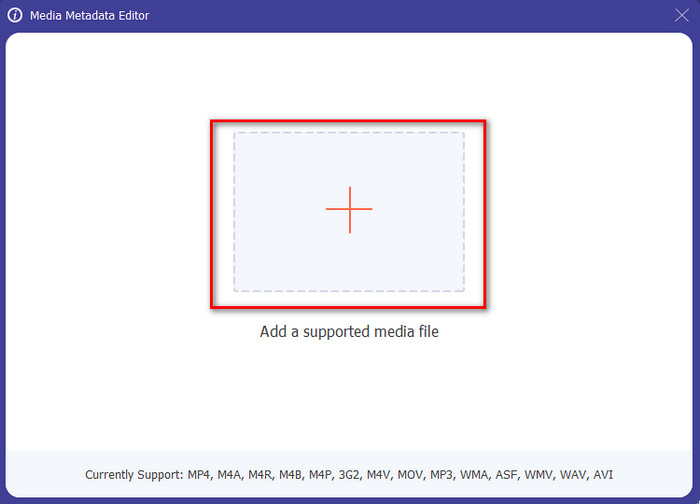
Trinn 3. Etter at du har klikket på den, vises et nytt vindu. Trykk på +-knappen, og en mappe vises på skjermen. Velg lydbokfilen og trykk Åpne.
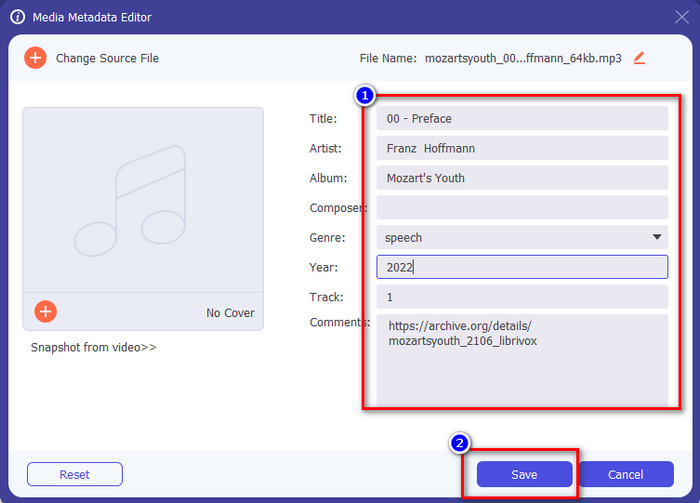
Trinn 4. Når den er åpnet, kan du oppdatere taggene til lydboken ved å endre innholdet i tekstboksene, men du kan også fjerne dem etter eget ønske. Ikke glem å klikke Lagre for å lagre de oppdaterte dataene når du er ferdig.
Del 2. 3 Beste lydbok-metadataredigerer tilgjengelig på nettet
TagMP3.net
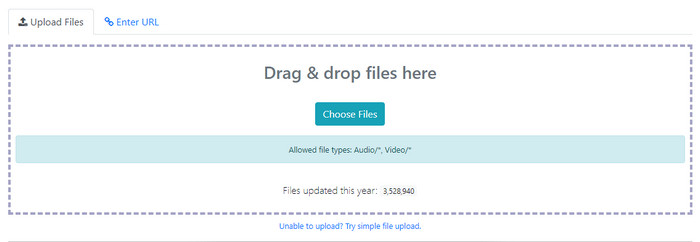
TagMP3.net er et gratis nettsted du kan bruke til enkelt å endre ID3‑tagger og albumillustrasjon på lydbøker. Det er et nettbasert verktøy du kan bruke direkte i favorittnettleseren din når som helst og hvor som helst med internettilgang. Med sitt lettfattelige grensesnitt bruker mange dette til å legge til metatagger på lydboken eller videoen de har. Selv om nettverktøyet kan endre eller fjerne metadata eller tagger på filen din, støtter det bare vanlige formater å laste opp, og informasjonen du kan legge til, er ikke like detaljert som i andre redigeringsverktøy. Det er også mange annonser i webgrensesnittet, men hvis du ikke har noe imot å se disse annonsene, kan dette verktøyet passe for deg.
Fordeler
- Gratis tilgang på nettet.
- Den støtter enkelt å legge til og fjerne tagger.
- Den støtter gjennomsnittlige lyd- og videofiler.
Ulemper
- Annonser i grensesnittet.
- Færre metakoder å sette inn eller redigere.
- Å laste opp en fil tar tid fordi den trenger internett.
MP3 ID3 Tag Editor
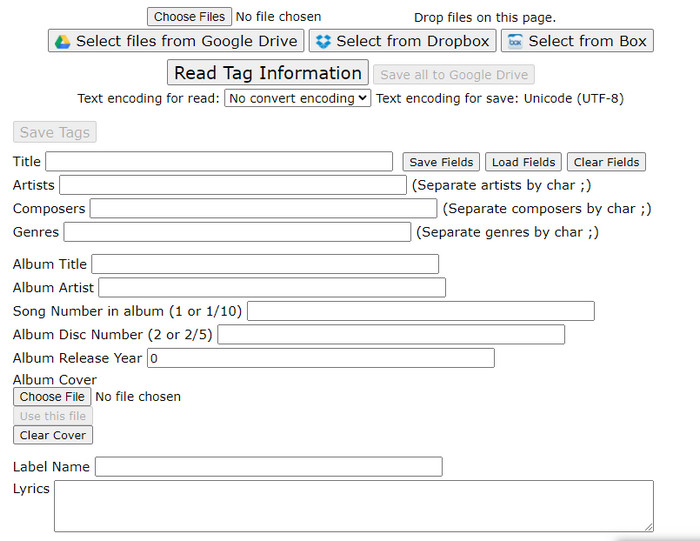
En annen metadata‑redigerer for lydbøker du fritt kan bruke på nettet, er MP3 ID3 Tag Editor. Dette verktøyet gir deg mer informasjon om filen din enn den første nettredigereren. Nettgrensesnittet er enkelt, men tilbyr likevel mange ulike informasjonsfelter du kan fylle ut. Selv om webappen er enkel, er det mange plagsomme annonser i grensesnittet, som på TagMP3.net. Å bruke dette nettverktøyet til å oppdatere taggene i filen din er ikke særlig behagelig på grunn av annonsene. I tillegg er funksjonene ikke organisert like ryddig som i andre redigeringsverktøy. Noen brukere synes det er litt vanskelig å bruke verktøyet av denne grunn.
Fordeler
- Tilgjengelig på forskjellige nettlesere for å få tilgang til den.
- Den støtter mer detaljerte metadata og koder enn det andre webverktøyet.
- Gratis å bruke.
Ulemper
- Nettgrensesnittet er ganske rotete.
- Annonser er tilgjengelige hvis du får tilgang til dem.
Maztr – Metadataredigerer
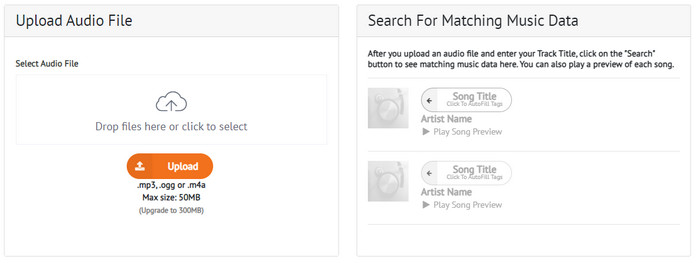
Maztr – Metadata Editor er en rask og brukervennlig lydbok‑tagredigerer som du kan bruke gratis på nettet. Dette verktøyet støtter tre hovedlydformater: MP3, OGG og M4A. Selv om verktøyet bare støtter tre formater, er det likevel tilstrekkelig til å endre metadataene i lydfilen din. I tillegg kan du bare laste opp lydfiler som er mindre enn 50 MB, men hvis du vil øke grensen til 300 MB, må du abonnere på verktøyet for å få tilgang til flere funksjoner.
Fordeler
- Den har et bedre web-GUI.
- Den har en autofyll-funksjon.
- Legg til, rediger eller fjern tagger fra lydfilen enkelt på nettet.
Ulemper
- Den støtter begrensede lydformater.
- Du kan ikke bruke dette nettverktøyet hvis du trenger å endre metadata med en filstørrelse på mer enn 50 MB.
Del 3. Vanlige spørsmål om Audiobook Tag Editor
Hva er en lydbok?
En lydbok er et begrep som brukes på de innspilte lydfilene som leser et kapittel av en bok høyt. Det ble populært for folk som ikke hadde tid til å lese bøker. Hvis du ikke er en fan av å lese en bok, kan lyd passe deg fordi du ikke trenger å lese en bok, men du vil lytte til personen som leser den høyt for deg.
Hvorfor må jeg endre taggen på lydboken min?
Det er mange grunner til at du må endre taggen på lydboken din. Først av alt, må du oppdatere lydboken for å ordne dem riktig i henhold til kapitlene, episodene eller noe spesifikt. Neste er å forstå innholdet i lydboken før du lytter til den. Til slutt er det å oppdatere hva som er inne i den lydboken. Dette er bare et utvalg av årsaker. Det er mange forskjellige grunner til at du trenger å endre taggene, men vi lister opp de vanligste årsakene til brukerne.
Hva er den beste appen å spille inn for en lydbok på telefoner?
Hvis du har lyst til å prøve å lage en lydbok, anbefaler vi at du leser denne artikkelen, der vi forklarer de ulike egenskapene ved lydopptakere du kan bruke til å lage en lydbok. Så uten videre, klikk på denne lenken og se Topp 5 lydopptakere på mobile enheter.
Konklusjon
Nå som vi har presentert tag‑redigererne du kan bruke, er det på tide å velge hvilken som passer best for deg. De har alle ulike funksjoner for tagredigering å tilby brukere som deg. Men spørsmålet er: Hvilket verktøy er det beste? Uten tvil er det FVC Video Converter Ultimate. Hvis vi sammenligner dette ultimate verktøyet med de nettbaserte redigererne, ser vi at det tilbyr langt mer til brukerne. Du kan også bruke lydbok‑metadataredigereren på Mac, så hva venter du på? Last det ned nå for å løse dette problemet med det beste verktøyet!
-
 4 av de beste metadatavisningene online og frakoblet ['Oppdatert 2025]
 Kan jeg sjekke metadataene til filen min? Ja, det kan du, ved hjelp av dette innlegget vil vi introdusere deg de forskjellige metadataviserne du kan bruke.
-
 5 enkleste måter å fjerne metadata i alle mediefiler
 Hvordan fjerne metadata? Er det vanskelig å gjøre det? Må jeg kjøpe eller bruke et gratisverktøy for å fjerne tagger? Alle disse spørsmålene har svar i denne artikkelen.
-
 Topp 5 metadatauttrekkere tilgjengelig online og offline [2025]
 Du kan finne flere metadatauttrekkere på markedet, men i dag velger vi kun de fem mest valgte tagekstraktorene i henhold til publikum.
