


 Video Converter Ultimate
 Skjermopptaker
 Videoreparasjon
 Sikker nedlasting
Kraftig videohastighetskontroller - DaVinci Resolve Speed Editor
Hvis du vil bruke en kraftig redigerer for videohastighet, vil du sannsynligvis bruke dette verktøyet. DaVinci Resolve Speed Editor er et verktøy for endring av videohastighet som bruker et USB‑tastatur. Denne speed‑editoren gir deg tilpasset maskinvarekontroll som gjør det enkelt å endre hastigheten på videoen din. Så hvis du lurer på hva mer dette verktøyet kan gjøre, kan du lese denne artikkelen for å lære mer om DaVinci Resolve Speed Editor.

Del 1. Grunnleggende informasjon, funksjoner, funksjoner og pris på DaVinci Resolve Speed Editor
Mange profesjonelle klippere bruker DaVinci Resolve Speed Editor for å endre hastigheten på videoene sine. Og hvis du er ny når det gjelder å bruke DaVinci Resolve Speed Editor, vil du sannsynligvis vite mer om informasjonen, funksjonene og prisen på dette verktøyet. I denne delen får du vite grunnleggende informasjon, funksjoner og pris på denne speed‑editoren.
Grunnleggende informasjon
DaVinci Resolve er et USB-tastatur som lar deg redigere filen din. Hvis du vil ha et verktøy som kan endre hastigheten på videoen din, er dette verktøyet det beste for deg. DaVinci Resolve gir en raskere og enklere måte å redigere videoer på. Det er mer enn bare et tastatur fordi det har mange redigeringsfunksjoner som du kan bruke, inkludert et videohastighetsredigeringsprogram, søkeoppringingskontroll, legg til/fjern effekter, synkronisering av multikameravalg og mer. I tillegg til det har dette hastighetsredigeringsverktøyet også en trådløs versjon.
Når du kjøper et DaVinci Resolve-tastatur, vil du se en USB-kabel og en batteriindikator. Når du fjerner USB-kabelen fra baksiden av enheten, vil Bluetooth automatisk prøve å pare på enheten.
Videre, hvis du ber om hastighetsredigereren til dette verktøyet, kan du bruke joggehjulskontrollene, avspillingskontrollene og redigerings- og trimkontrollene på tastaturet.
Funksjoner og funksjoner
Hvis du lurer på hva funksjonene og funksjonene til DaVinci Resolve er, presenterer vi nedenfor de vanligste funksjonene til dette verktøyet.
Speed Editor
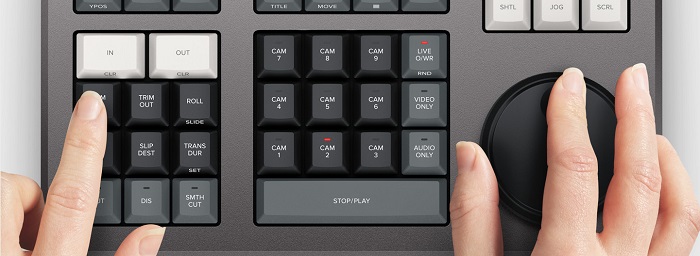
DaVinci Resolve Speed Editor er laget for profesjonelle klippere som ønsker bedre overgangseffekter i videoene sine. Ved å bruke denne videohastighetskontrolleren kan du senke eller øke bildefrekvensen (fps) på videoen din og fremheve de beste scenene. Det finnes mange måter å bruke DaVinci Resolve til å øke hastigheten på et klipp.
◆ Bruk In and Out-punktene ved ganske enkelt å rulle på søkehjulet og plassere inn- og ut‑punktene på videotidslinjen, og deretter gå til redigeringsfunksjonene for å redigere videoen din.
◆ Bruk knappene Trim in and Trim out ved å holde inne trim‑knappene og rotere søkehjulet. Den smarte indikatoren på tidslinjen lar deg se hvilken del du trimmer.
Legg til og fjern effekter
Med DaVinci Resolve Speed Editor kan du også legge til og fjerne effekter i videoen din. Den smarte indikatoren på tidslinjen avgjør hvilket redigeringspunkt du jobber på. Trykk på CUT-tasten for å fjerne en effekt på redigeringspunktet. Og hvis du vil legge til en oppløsning (dissolve) på redigeringspunktet på tidslinjen, trykk på DIS (dissolve)-tasten. I tillegg, hvis du vil ha en smooth cut-overgang på redigeringspunktet, trykker du på SMTH CUT (smooth cut).



Farge
Denne funksjonen lar deg endre kontrast, temperatur, mellomtone, metning og annet. Fargesiden er en av de mest likte funksjonene til DaVinci Resolve og kan enkelt brukes av nybegynnere.
Sync Bin
Sync bin er en funksjon der du kan finne videoer eller opptak som er synkronisert inn på redigeringstidslinjen. Deretter kan du bruke kameraknappene til å velge et alternativt opptak og redigere det inn på tidslinjen.
Lydnivå og markør
DaVinci Resolve kan også justere lyden i videoen din. For å stille inn lydnivåene på klippet holder du nede tasten og justerer lydnivået med søkehjulet. Hvis du dobbelttrykker på lydnivå‑tasten, legges det til en markør. Og hvis du dobbelttrykker på tasten og holder den inne, kan du angi fargen på markørene.
Fullskjermsvisning og gjennomgang
Denne tasten lar deg gjøre seeren om til fullskjerm. Den har en rød farge slik at du lett kan finne den. Hvis du dobbelttrykker på denne tasten, vil den be fra din siste redigering.
Legg til overganger
Ved å bruke Transition-tasten legger du til en tilpasset overgang i videoen din. Dette ligner nesten på Cut- og Smooth Cut‑knappene.
Snapper og visning
Ved å trykke på Snap-tasten aktiverer du snapping på tidslinjen. Og hvis du trykker og holder inne Snap-tasten, justeres størrelsen på visningen.
Ripple Delete
Ripple delete lar deg fjerne klippet i avspillingspunktet; det kruser tidslinjen for å fjerne gapet mellom de to klippene. Ripple-sletting er en god måte å redusere tidslinjevarigheten til videoen din.
Pris
Du kan kjøpe DaVinci Resolve Speed Editor for $395. Og hvis du ser etter en programvareversjon av dette verktøyet, kan du laste det ned gratis på Windows, Mac og Linux. Imidlertid er programvareversjonen av dette verktøyet komplisert å bruke.
Alternativ for DaVinci Resolve Video Speed Editor
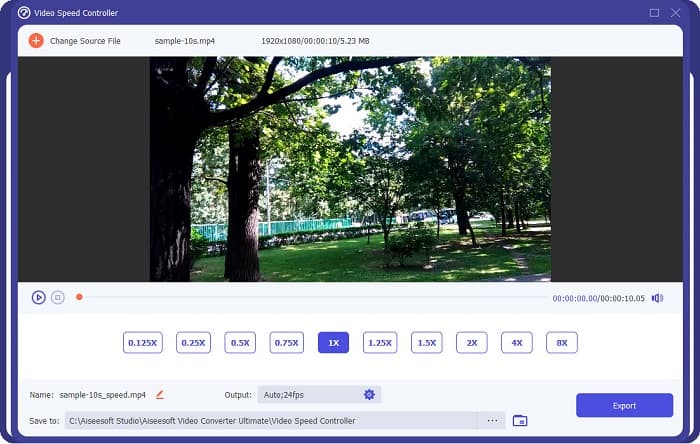
Hvis du vil ha en enklere måte å redigere hastigheten på videoen din på, kan du bruke FVC Video Converter Ultimate. Dette programmet lar deg enkelt øke eller senke hastigheten på videoen din. Med sin raske arbeidsflyt bruker du ikke mye tid på å redigere hastigheten på videoen. I tillegg finnes det mange forhåndsinnstillinger for hastighet du kan velge mellom til videoen din. Og hvis du lurer på hva mer det kan gjøre, har dette verktøyet mange redigeringsfunksjoner, inkludert lydkompressor, videokompressor, redigeringsverktøy for videometadata og mer. Det støtter også en rekke filformater, som MP4, MKV, MOV, AVI, FLV, WMV og over 1000 andre formater. For å lære mer om dette programmet, les beskrivelsene nedenfor.
Fordeler med å bruke FVC Video Converter Ultimate:
1. Den har et intuitivt brukergrensesnitt.
2. Den lar deg endre videohastigheten fra forhåndsinnstillinger på 0,125x, 0,50x, 0,75x, 1,25x, 1,5x, 2x, 4x og 8x hastighet.
3. Den har mange avanserte redigeringsfunksjoner å bruke, som en videotrimmer, videosammenslåing, 3D-maker og mer.
4. Tilgjengelig på alle medieplattformer, inkludert Windows, Mac og Linux.
Del 2. Vanlige spørsmål om DaVinci Resolve Video Speed Editor
Er DaVinci Resolve Video Speed Editor verdt det?
Med sin pris er dette videohastighetsredigeringsverktøyet verdt å bruke fordi det kan produsere utdata av høy kvalitet og har mange redigeringsfunksjoner å bruke.
Er DaVinci Video Speed Editor kompatibel med alle formater?
Den støtter ikke alle filformater. Imidlertid kan den støtte en rekke filformater, inkludert MOV, MXF, DNG, DCP, ARI, MTS, etc.
Har DaVinci Resolve Video Speed Editor en gratisversjon?
DaVinci Resolve Video Speed Editor har en gratis prøveversjon kun i en begrenset periode. For å bruke det hele livet, kjøp verktøyet for $395.
Konklusjon
Alle spørsmålene dine om DaVinci Resolve Video Speed Editor er nå besvart. Med verktøyet som er beregnet for redigering av videohastighet kan du enkelt senke eller øke hastigheten på videoen og lage vakre overganger. Men hvis du er på jakt etter et mer praktisk og enklere verktøy å bruke, kan du prøve FVC Video Converter Ultimate gratis!
-
 Hvordan spole fremover en video på iPhone – Juster videohastighet
 Hvordan kan jeg spole frem en video på iPhone? Hvordan spole fremover en video på iPhone ved hjelp av iMovie? Lær 3 måter å øke hastigheten på en video på iPhone- og iPad-enheter.
-
 Hvordan øke hastigheten på video i Premiere Pro og med dens alternativer
 Vil du vite hvordan du bruker premiere pro for å øke hastigheten på en video? Da er du inne i den riktige artikkelen da vi tilbyr trinn og andre rimelige alternativer.
-
 2 uanstrengte måter å øke hastigheten på en video på TikTok
 Vil du vite hemmeligheten om hvordan du kan øke hastigheten på video på TikTok? Les deretter denne artikkelen for å få ideen om hvordan du gjør det og vite hva som er de to andre verktøyene som vil hjelpe deg.
