


 Video Converter Ultimate
 Skjermopptaker
 Videoreparasjon
 Sikker nedlasting
3 av de beste FLAC-metadataredaktørene du bør kjenne til i 2025
Vi vet at FLAC er det beste tapsfrie musikkfilformatet, og det er et ideelt format for ripping av lyd fra CD-er fordi det ikke mister den rå lyden dersom det er dette formatet du velger. Blant de tapsfrie lydfilene er dette det beste valget siden det er kompatibelt med nesten alle enheter. Det gir en komprimeringsgrad på 30 til 50 prosent uten tap av original kvalitet. Med dette lydformatet kan du ha metadata, albumomslag og rask spoling på én gang. Det kan likevel oppstå problemer, som for eksempel feilaktige tagger i FLAC-filen, fordi formatet ikke er perfekt, akkurat som andre formater. På under fem minutter vil du bli kjent med ulike FLAC-metadataredigerere på Mac og Windows som du kan bruke til å løse problemet.

Del 1. Beste FLAC Metadata Editor for Mac og Windows – FVC Video Converter Ultimate
FVC Video Converter Ultimate er den mest effektive programvaren du bør ha når det gjelder dette problemet med redigering av metadata. Dette verktøyet har et profesjonelt og lettfattelig brukergrensesnitt som hjelper alle brukere med en smidig prosess for å endre eller rette opp metadata uten problemer. Du kan også legge til flere typer informasjon eller tagger i FLAC-filen din, som tittel, forfatternavn, dato, albumomslag og mye mer. Konkurrentene innen metadataredigering fokuserer ofte bare på å endre metadata på noen få lyd- og videoformater. Men med denne programvaren kan du enkelt laste opp FLAC, MP3, WMA, WMV og over 1000 andre formater og redigere metadataene deres like enkelt som 1-2-3.
Dessuten er dette verktøyet ikke bare i stand til å endre, fikse eller slette metadataene; den kan også brukes som en løsning på ethvert video-lydrelatert problem. Og med det kan vi forsikre deg om at når du først bruker verktøyet, er det ingen grunn til å bekymre deg for å støte på det samme problemet igjen, fordi du har den beste løsningen. Vil du bruke den førsteklasses FLAC-metadataredigereren på Mac og Windows? I så fall, fortsett å lese trinnene nedenfor ettersom vi gir deg den enkle opplæringen og fullfører oppgaven effektivt.
Trinn 1. Du kan installere denne ultimate programvaren på datamaskinen din ved å klikke på riktig operativsystem for å laste ned korrekt versjon. Fortsett installasjonsprosessen ved å åpne filen du har lastet ned, og trykk Start Now for å gå videre.
Gratis nedlastingFor Windows 7 eller nyereSikker nedlasting
Gratis nedlastingFor MacOS 10.7 eller nyereSikker nedlasting
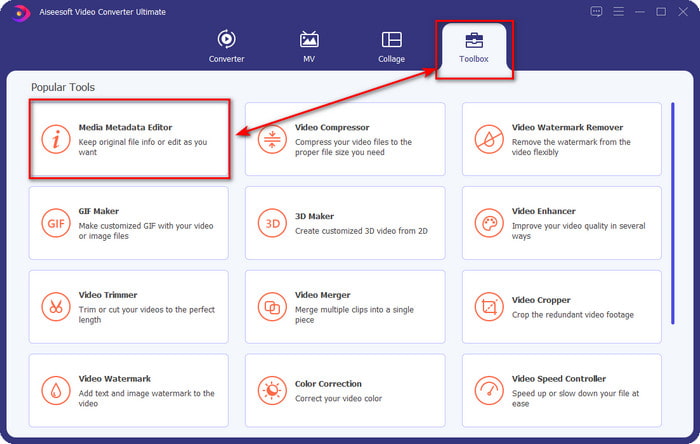
Trinn 2. Klikk på Media Metadata Editor for å åpne taggredigeringsfunksjonen i Toolbox-delen.
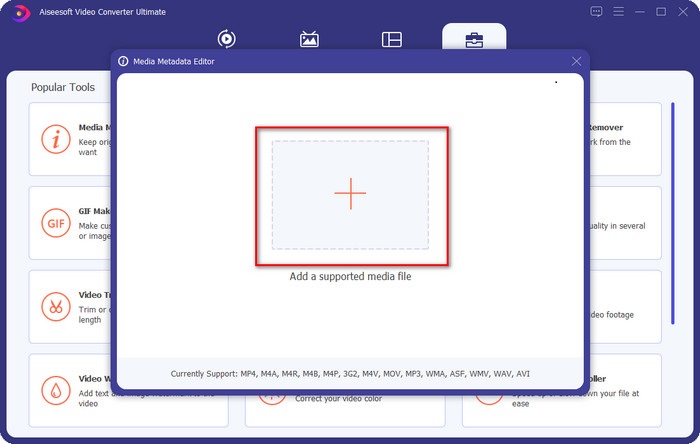
Trinn 3. Du må klikke på +-knappen for å legge til filen, finne den i mappen som dukker opp, og klikke Open for å legge til FLAC-filen.
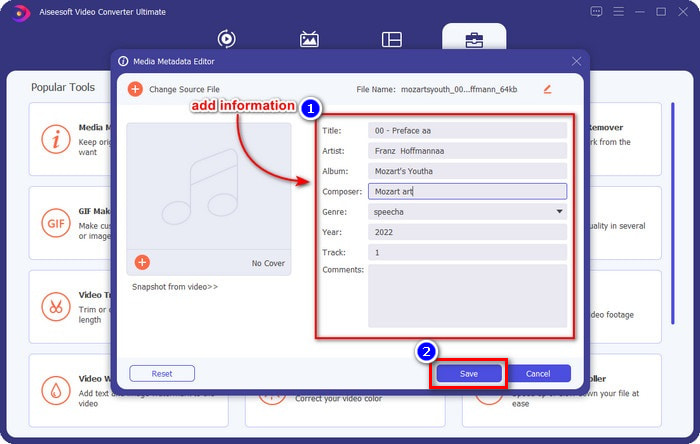
Trinn 4. I dette panelet kan du nå endre metadataene i FLAC-filen i hver textbox. Klikk deretter på Save for å lagre endringene du har gjort i programvaren. Så enkelt er det å legge til og rette opp tagger i FLAC-filen med hjelp av dette ultimate verktøyet.
Fordeler
- Det er det beste valget for redigering av metadata på FLAC, MP4, WMA, WAV, TTA, OGG og 1000+ flere formater.
- Den støtter flere redigeringsfunksjoner du kan bruke under Verktøykasse-delen.
- Intuitivt grafisk brukergrensesnitt, og det er enkelt å bruke.
- Kan lastes ned på Windows og Mac-operativsystemer.
Ulemper
- Å kjøpe verktøyet er et must for å benytte de utrolige funksjonene til en lav pris.
Del 2. Andre 2 beste gratis FLAC-metadataredigerere for Windows
Fregatt 3
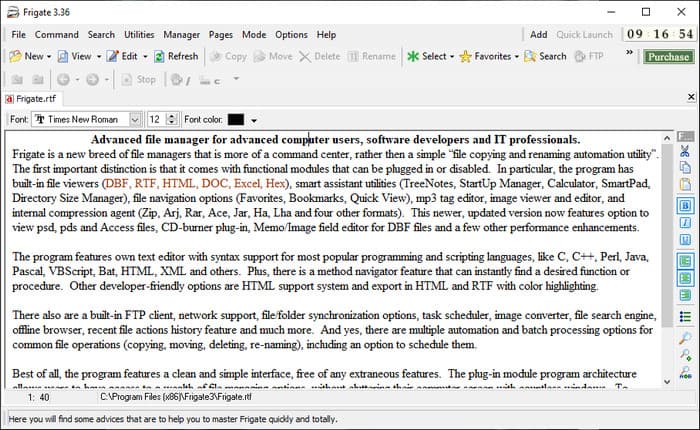
Frigate3 er en FLAC-metadataredigerer du vil like å bruke på Windows. Med dette verktøyet kan du enkelt justere taggene du har på datamaskinen. Men før du laster det ned, bør du se på de to alternativene som tilbys: standard- og pro-versjonen. Standardversjonen av dette verktøyet inneholder bare de grunnleggende funksjonene du får mens du bruker det. Hvis du laster ned standardversjonen, vil filstørrelsen være mindre enn pro-versjonen.
Mens, hvis du har lastet ned pro-versjonen av den i stedet, vil du ha alle funksjonene som denne programvaren gir som ikke er på standarden, men filstørrelsen er mye større enn standarden. Til tross for at det er en gratis Windows-programvare, kan vi fortsatt se at verktøyet er litt vanskelig å forstå, og dets GUI ser ikke så bra ut som den andre programvaren på markedet. Selv om dette er et problem, anses det fortsatt som et effektivt verktøy for å håndtere denne oppgaven.
Fordeler
- Gratis å laste ned på Windows.
- Den støtter standard- og proversjonene av verktøyet.
- Kan legge til plug-ins.
Ulemper
- GUI-en er ikke bra som den andre metadata-editoren.
- Noen ganger er verktøyet vanskelig å starte.
- Nettverket er usikret når du går inn på den offisielle nettsiden til verktøyet.
MusicBrainz PiCard
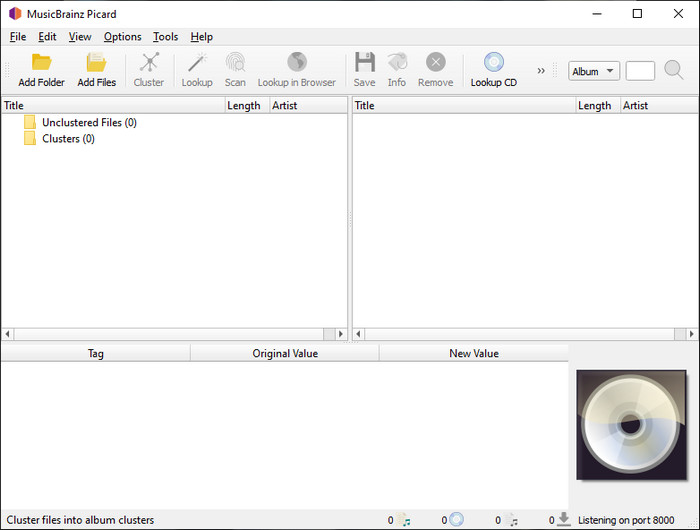
MusicBrainz Picard er en Windows-basert FLAC-metadataredigerer du fritt kan laste ned til datamaskinen din for å gjøre ferdig arbeidet med å legge inn metadata. Hvis lydfilen har en oppføring i databasen, kan du hente inn taggene eller oppdatere dem ved hjelp av dette verktøyet. I motsetning til andre verktøy kan denne programvaren legge til mer detaljert informasjon, som utøvere og instrumenter brukt i musikken. Men husk at taggene i MusicBrainz-databasen er samlet inn av frivillige.
Videre er denne programvaren en dedikert lydkoderedigerer, noe som betyr at den bare støtter de fleste lydformatene, enten de er tapsfrie, tapsfrie eller begge deler. Selv om det er et omfattende musikk-tag-leksikon og gjør det brukbart for publikum, er noen tags det gir upålitelige, så du må legge dem til manuelt. Ikke desto mindre er verktøyet brukervennlig og bedre enn Frigate3, men det er ikke like bra som det ultimate verktøyet.
Fordeler
- Den har en innebygd database for lydetiketter.
- Enkelt brukergrensesnitt.
- Det er enkelt å lære å bruke det.
Ulemper
- Noen ganger er metadataene samlet på databasen upålitelige.
- Det er bare begrenset til lydfiler.
Del 3. Vanlige spørsmål om FLAC Metadata Editor
Kan jeg ta opp FLAC av høy kvalitet?
Ja, absolutt – du kan ta opp lyd i dette formatet, men husk at ikke alle lydopptakere støtter dette formatet, og ikke alle kan ta opp lyd i høy kvalitet. Hvis du ikke vet hvordan du tar opp høykvalitets tapsfri FLAC-lyd, bør du klikke på denne lenken for å lære mer om emnet.
Hva er den beste programvaren for å konvertere FLAC?
Uten tvil er FVC Video Converter den beste FLAC-konverteren du kan bruke for å gjøre FLAC kompatibel med de andre enhetene uten å miste den originale kvaliteten. Med dette verktøyet kan du konvertere flere FLAC samtidig, men husk, hvis du vil ha mer enn en konverteringsnedlasting, er det ultimate verktøyet et must.
Støtter talememo FLAC som lydutgang?
Taleopptak (Voice Memo) bruker M4A i stedet for FLAC til å lagre lydopptak. Hvis du vil vite mer om taleopptak, kan du lese den detaljerte gjennomgangen vi har gjort av den innebygde appen; les den nøye for å finne ut om dette er den beste lydopptakeren på iOS-enheter ved å klikke på denne lenken.
Konklusjon
FLAC er ikke bare et lydformat – det er ett av de beste lydformatene du bør bruke for å lagre lyd i høy kvalitet på enhetene dine. Så hvis du vil organisere .flac-filene i biblioteket ditt, kan verktøyene vi har omtalt hjelpe deg med å utføre oppgaven effektivt. Hvis du er Windows-bruker, anbefaler vi at du leser om programvaren vi fant for å legge til metadata på Windows i del 2. Men hvis du vil ha et mer pålitelig og profesjonelt verktøy for å legge til metadata i FLAC-filer, anbefaler vi at du bruker FVC Video Converter Ultimate i stedet. Med et slikt verktøy kan du gjøre profesjonell redigering av tagger som de andre Windows-verktøyene vi presenterer, ikke kan tilby. Hvis du vil vite mer om den beste FLAC-metadataredigereren på Mac og Windows, bør du laste det ned for å oppdage de andre funksjonene.
-
 Topp 5 videometadataredigerere for 2025 [Ubiased review]
 Vil du se videometadataene dine? I så fall, les detaljene nedenfor for å forstå emnet fullt ut og vite hvilket verktøy som passer deg best.
-
 7 populære musikktag-redigerere på Windows, Mac og mobile enheter
 Musikkkoder er populære å bruke for å arrangere musikken i biblioteket ditt i henhold til dataene inne. Hva om du vil endre det? Les detaljene nedenfor for å vite mer.
-
 5 øverste MP4-metadataredigerere [Oppdatert 2025]
 Hvordan kan jeg endre MP4-metadataene mine? Den beste måten å endre metadataene til MP4-en din på er å bruke en tag-editor som støtter MP4-formatet, som eksempelet vi viser nedenfor.
