


 Video Converter Ultimate
 Skjermopptaker
 Videoreparasjon
 Sikker nedlasting
Top Watermark Remover for å enkelt fjerne Adobe Stock Watermark fra video
Visste du at Adobe har et nettsted for fotografi‑stock? Her er Adobe Stock, et av de største nettstedene som tilbyr all slags grafisk design du kan trenge uten uforutsette konsekvenser, siden det bruker royaltyfri lisensiering. Du kan laste ned HD‑videoer gratis, men med en vannmerke eller stempel hvis du ikke har kjøpt kreditter eller abonnement. Kanskje du lurer på om det er mulig å fjerne Adobe Stock‑vannmerket fra videoen, og det er det! La oss bruke den beste vannmerkefjerneren du noen gang vil trenge i neste del; les denne artikkelen for å bli bedre kjent med den!

Del 1. Slik fjerner du Adobe Stock Watermark fra video ved å beskjære
FVC Video Converter Ultimate er en komplett og enkel bildeeditor som støtter både Windows‑ og Mac‑versjoner. Denne programvaren har en kraftig beskjæringsfunksjon som lar deg lagre video fra Adobe Stock uten vannmerke. Den kan også beskjære hva som helst i videoene dine, for eksempel et objekt, stempel, vannmerke, dato og klokkeslett.
Selv om du er uerfaren med beskjæring, kan du fortsatt klare å gjøre det når du er ferdig med å følge opplæringen vi la til nedenfor. Likevel er ikke dette trinnet ideelt hvis vannmerket er midt i videoen fordi du endrer størrelsen på dimensjonen og kutter unødvendige faktiske opptak.
Slik beskjærer du videovannmerke med FVC Video Converter Ultimate:
Trinn 1. Klikk på riktig nedlastingsknapp nedenfor for å få riktig versjon av denne videoeditoren på skrivebordet ditt. Følg installasjons‑ og oppsettprosessen, og klikk deretter Start nå for å åpne editoren på systemet ditt.
Gratis nedlastingFor Windows 7 eller nyereSikker nedlasting
Gratis nedlastingFor MacOS 10.7 eller nyereSikker nedlasting
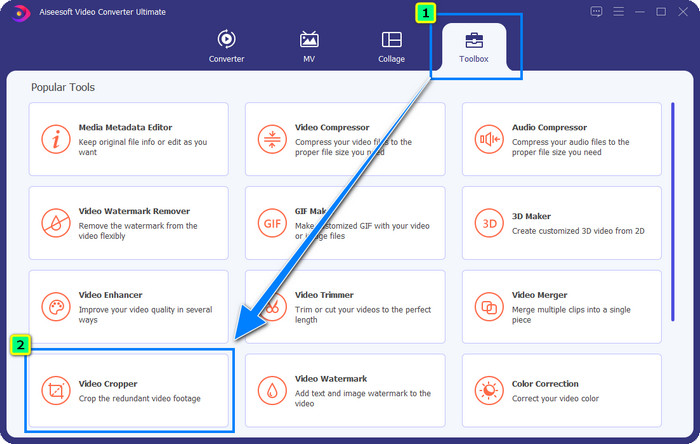
Trinn 2. Nå som verktøyet er åpent, går du til Verktøykasse og velger Videobeskjærer.
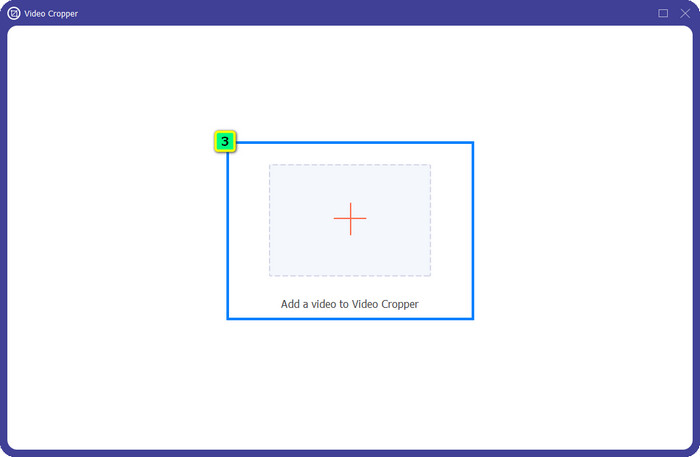
Trinn 3. Et nytt verktøyvindu vises på skjermen; trykk på +-knappen for å laste opp videoen du vil beskjære.
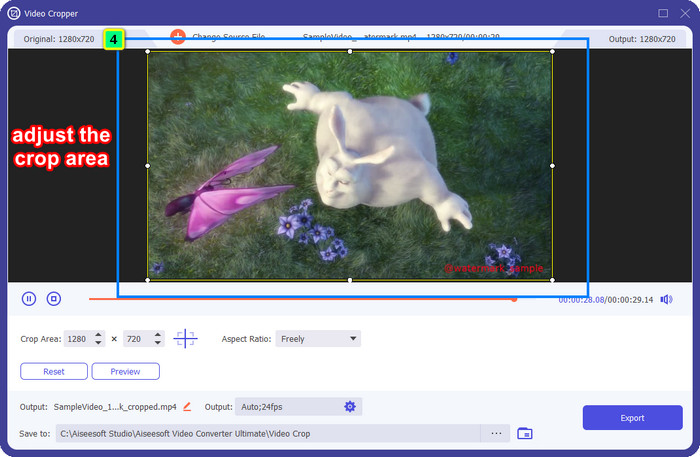
Trinn 4. Juster beskjæringsområdet etter eget ønske; sørg for at vannmerket ikke er innenfor rammen, slik at det ikke blir med når du lagrer videoen.
Trinn 5. Etter at du har redigert bildet, er det på tide å eksportere sluttresultatet. Trykk på Lagre til og velg hvor filen skal lagres etter lagring, og klikk deretter Eksporter for å laste ned sluttresultatet til den lokale harddisken din.
Del 2. Slik fjerner du Adobe Stock Watermark fra video uten å beskjære
Liker du ikke å fjerne Adobe Stock‑vannmerket ved hjelp av beskjæringsfunksjonen? Da kan du bruke denne ultimate konvertererens vannmerkefjerner; den er kraftig og vil ikke etterlate noen spor av vannmerket når den er ferdig. FVC Video Converter Ultimate er en pålitelig app som støtter ulike funksjoner du fritt kan bruke uten å laste ned ekstra utvidelser. Den nyeste oppdateringen har en videovannmerkefjerner som gjør at alle med vannmerkeproblemer på video enkelt og effektivt kan løse dette.
I motsetning til beskjæringsfunksjonen, fjerner funksjonen for fjerning av vannmerke vannmerket på videoen din uten å etterlate en flekker av det endelige resultatet. Det endrer ikke noe på utseendet, for det kutter og forskyver ikke videoens dimensjon og kvalitet. Så hvis du er interessert i hvordan du fjerner Adobe Stock-vannmerket fra en video, kan du følge trinnene som vi inkluderer neste gang.
Trinn 1. Hvis du allerede har lastet ned programvaren, kan du gå videre til neste trinn. Hvis ikke, kan du klikke på denne nedlastingsknappen, installere den og starte editoren.
Gratis nedlastingFor Windows 7 eller nyereSikker nedlasting
Gratis nedlastingFor MacOS 10.7 eller nyereSikker nedlasting
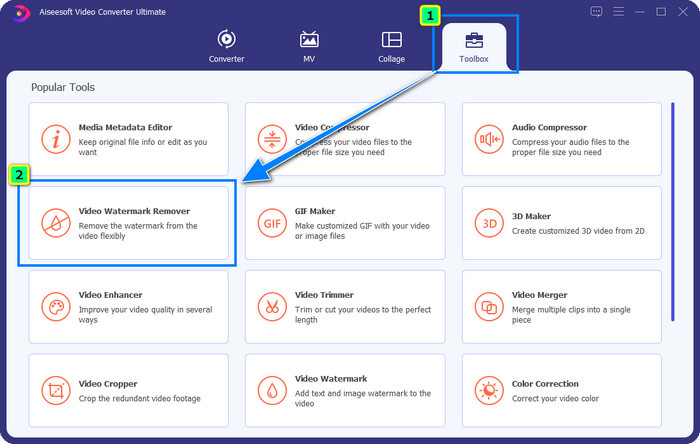
Trinn 2. Nå som verktøyet kjører på skrivebordet ditt, klikker du på Verktøykasse og velger funksjonen Videovannmerkefjerner som denne programvaren støtter.
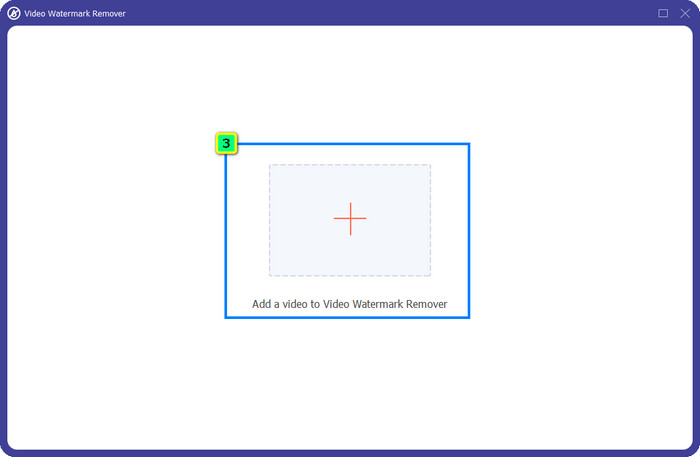
Trinn 3. Trykk på pluss-knappen, så vises en mappe på skjermen. Last opp Adobe Stock‑videoen du har lastet ned, og trykk Åpne.
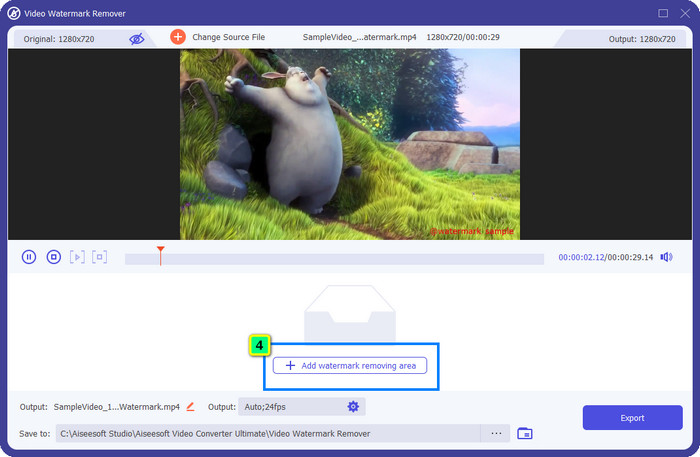
Trinn 4. Trykk på Legg til område for fjerning av vannmerke for å fjerne vannmerket i videoen din.
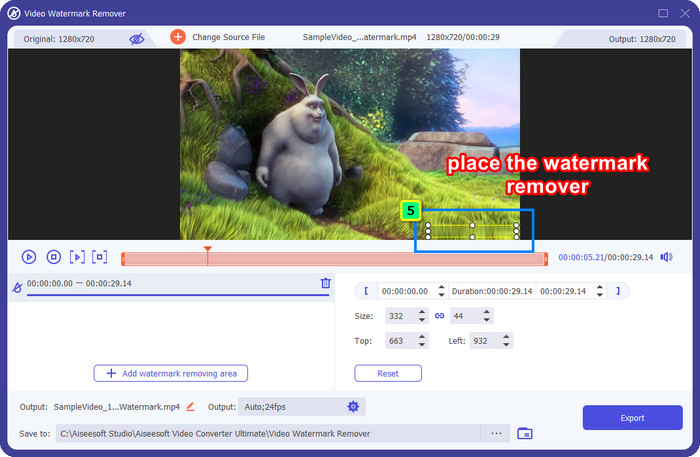
Trinn 5. Plasser rammen over området med vannmerket, og juster den fritt slik at den passer akkurat over vannmerket som er lagt til i videoen.
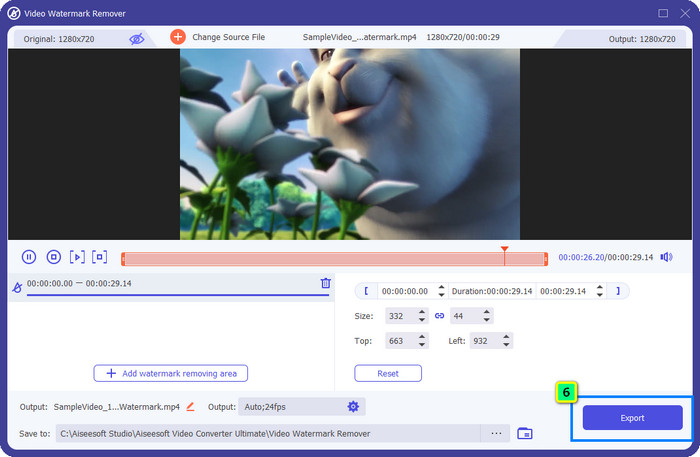
Trinn 6. Til slutt klikker du Eksporter, og du kan bruke videoen uten vannmerke, så enkelt er det.
Bonus: Hvordan fjerne Adobe Stock Watermark på bilder online gratis
FVC Free Watermark Remover er en effektiv vannmerkefjerner du kan bruke på bilder direkte på nettet. Så hvis du har et vannmerkeproblem på et bilde du har lastet ned eller lagret på enheten din, kan du begynne å bruke denne programvaren. Deretter kan du følge veiledningen vi har lagt til nedenfor for å fjerne Adobe Stock‑vannmerket fra bilder på nett.
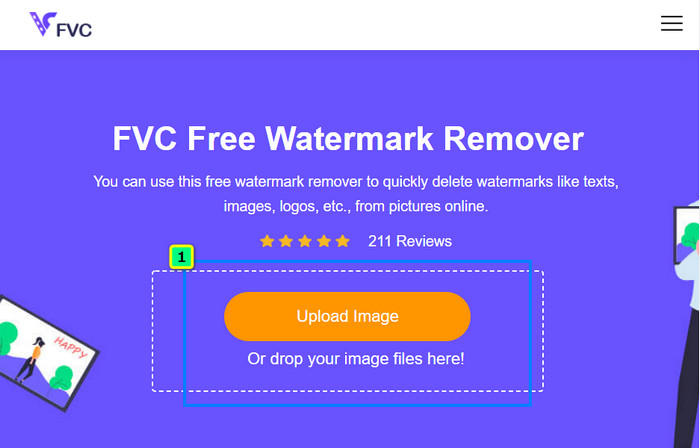
Trinn 1. For å åpne denne vannmerkefjerneren på nett kan du klikke på denne lenken.
Trinn 2. Trykk Last opp bilde for å legge til bildet med vannmerket du vil redigere her.
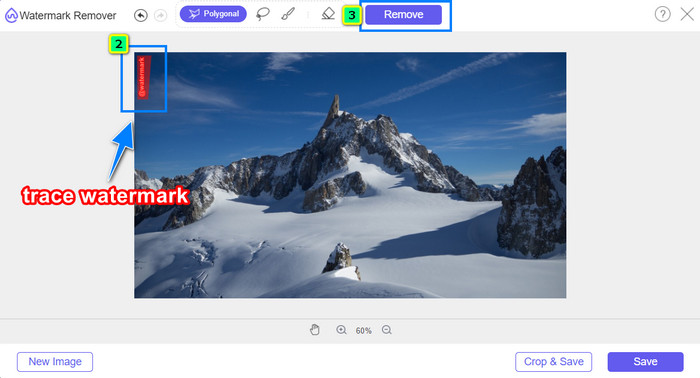
Trinn 3. Bruk polygonverktøyet til å spore vannmerket punkt for punkt ved å trykke på venstre museklikk. Trykk deretter Fjern når du har merket det, og AI‑en vil behandle fjerningen av vannmerket for deg.
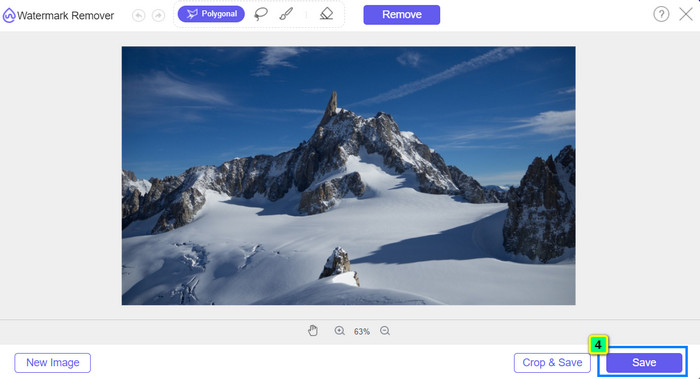
Trinn 4. Når du er fornøyd med resultatet og klar til å laste ned bildet, klikker du på Lagre-knappen for å lagre det direkte på skrivebordet ditt.
Mer lesing:
Nyeste måte å fjerne objekter fra bilder på [6 metoder]
Slik gjør du bildet skarpere i foto ved hjelp av 3 metoder [hurtigveiledning]
Del 3. Vanlige spørsmål om hvordan du fjerner Adobe Stock Watermark fra video
Blir kvaliteten dårligere hvis du fjerner Adobe Stock-vannmerket fra videoen?
Noen ganger, når du har fjernet vannmerket på videoen, gjør verktøyet du bruker videoutgangen verre. Men hvis du bruker FVC Video Converter Ultimate, vil du ikke oppleve dette problemet. Faktisk kan du justere videokvalitetsinnstillingen til en mye høyere for å øke kvaliteten.
Hvor kan jeg kjøpe Adobe Stock-kreditter?
Åpne den offisielle nettsiden til Adobe Stock, og gå deretter til Priser. Under Planer og priser vil du se ulike kredittpakker du kan kjøpe. Jo mer kreditt, jo dyrere kan det bli. Klikk hvor mange du vil ha, trykk Kjøp nå, legg til betalingsinformasjonen, og klikk deretter Plasser sikret bestilling.
Hvorfor er planer på Adobe Stock veldig dyre?
Det kan virke veldig dyrt på grunn av prisen på hvert tilgjengelig produkt på Adobe Stock. I tillegg til prisen er økningen at utvikleren Adobe bygget et rykte. Du kjøper produktet med navnet på det.
Konklusjon
Med den ultimate vannmerkefjerneren i denne artikkelen kan du nå fullføre fjerningen av Adobe Stock‑vannmerket fra videoen du har lastet ned fra det offisielle nettstedet. Men hvilken metode tror du fungerer best? Er det beskjæring eller fjerning av vannmerke? Begge deler fungerer og gir utmerkede resultater. Men hvis dimensjonene blir kuttet eller endret, bør du heller bruke funksjonen Videovannmerkefjerner i FVC Video Converter Ultimate. I tillegg tilbyr FVC også fjerning av vannmerker på bilder du har, ved hjelp av et nettbasert verktøy som kan åpnes i enhver nettleser på skrivebordet ditt. Vi håper du liker informasjonen vi har delt med deg. Hvis du vil vite mer, kan du lese de andre artiklene nedenfor.
-
 Hvordan fjerne vannmerke fra video ved hjelp av Final Cut Pro [Komplett veiledning]
 Har du problemer med vannmerket på videoer? Sa ikke mer, for vi ga en veiledning om hvordan du fjerner vannmerke fra video ved hjelp av Final Cut Pro.
-
 Fjern DaVinci Resolve Watermark på eksporterte videoer med komplett opplæring
 For å fjerne Davinci Resolve-vannmerket må du bruke et verktøy eller kjøpe den offisielle versjonen av det, fortsett å lese dette for å vite mer.
-
 Hvordan fjerne vannmerket i Lunapic med trinn inkludert [3 måter]
 Vet hvordan du fjerner vannmerket på Lunapic med måtene vi legger til i denne bloggen. Fortsett å lese informasjonen for å vite den bedre.
