


 Video Converter Ultimate
 Skjermopptaker
 Videoreparasjon
 Sikker nedlasting
Uutfordrende metoder for hvordan du fjerner iSkysoft-logoen fra video
iSkysoft er et utmerket program med mange flotte funksjoner som gjør at det skiller seg ut fra andre alternativer. Det er et enkelt program som lar deg konvertere videoformat til et annet format og gjøre noe grunnleggende videoredigering. Den tristeste delen med denne programvaren er imidlertid at du får et stort iSkysoft-vannmerke på videoene dine etter at du har brukt programmet. Det er ikke tilfredsstillende å se på en video med et stort vannmerke/logo. Heldigvis finnes det pålitelige programmer du kan bruke til å fjerne forstyrrende elementer som iSkysoft-logoen/vannmerket. Du bør lese dette innlegget hvis du er ivrig etter å finne de beste metodene for å fjerne iSkysoft-logoen fra videoen din.

Del 1: Fjern iSkysoft-logoen fra video på skrivebordet
iSkysoft-logoen på skjermen er veldig irriterende, spesielt når du ser på favorittvideoene dine. Men du trenger ikke å bekymre deg lenger. Du kan bli kvitt logoen ved å bruke Video Converter Ultimate. Denne pålitelige programvaren kan hjelpe deg med å fjerne iSkysoft-logoen fra videoene dine på to enkle måter: verktøyet Video Watermark Remover og verktøyet Video Cropper. Med disse verktøyene kan du enkelt fjerne iSkysoft-logoen fra videoen din. Hvis iSkysoft-logoen er i hjørnet av videoen, anbefales det å bruke verktøyet Video Cropper. Men hvis logoen er plassert midt på, kan du bruke verktøyet Video Watermark Remover. På denne måten kan du se favorittfilmer eller -videoer uten å bli irritert av logoen.
I tillegg til å fjerne vannmerker fra videoene dine, har Video Converter Ultimate flere funksjoner. Den har en videoforsterker, videosammenslåing, cropper, trimmer, rotator, omformer og mer. I tillegg er en av hovedfunksjonene til denne applikasjonen å konvertere forskjellige videofilformater. Ikke-profesjonelle brukere kan også bruke denne applikasjonen fordi den har et enkelt grensesnitt. Hvis du ønsker å lære hvordan du fjerner iSkysoft-logoen fra videoen din, vil vi vise deg de to enkle måtene denne applikasjonen tilbyr.
Bruke Video Watermark Remover
Trinn 1: Du må først laste ned Video Converter Ultimate på datamaskinen din for å bruke denne flotte programvaren. Etter at du har lastet den ned, følger du installasjonsprosessen og starter programmet.
Gratis nedlastingFor Windows 7 eller nyereSikker nedlasting
Gratis nedlastingFor MacOS 10.7 eller nyereSikker nedlasting
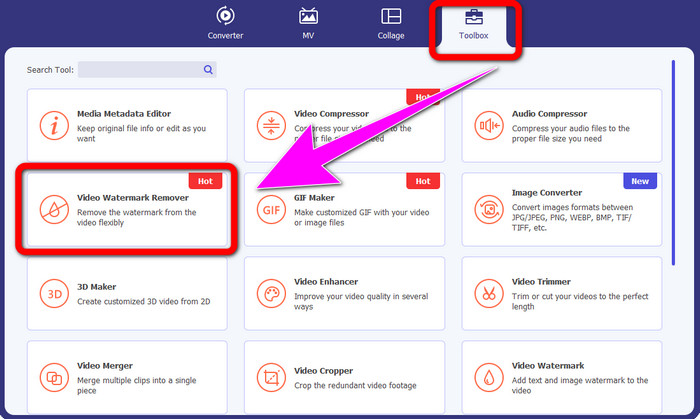
Trinn 2: Når du allerede har startet programvaren, går du videre til Verktøykasse-fanen og velger verktøyet Video Watermark Remover. Forvent at et nytt vindu vil dukke opp på skjermen.
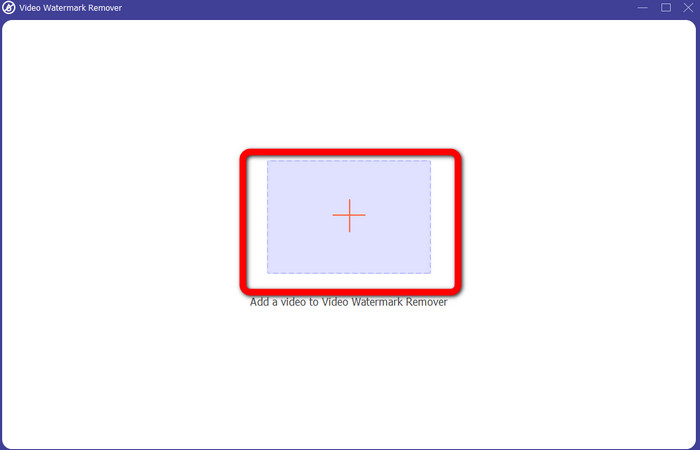
Trinn 3: Når du ser det nye grensesnittet, klikker du på plussikonet og legger til videoen din med iSkysoft-logoen du vil fjerne.
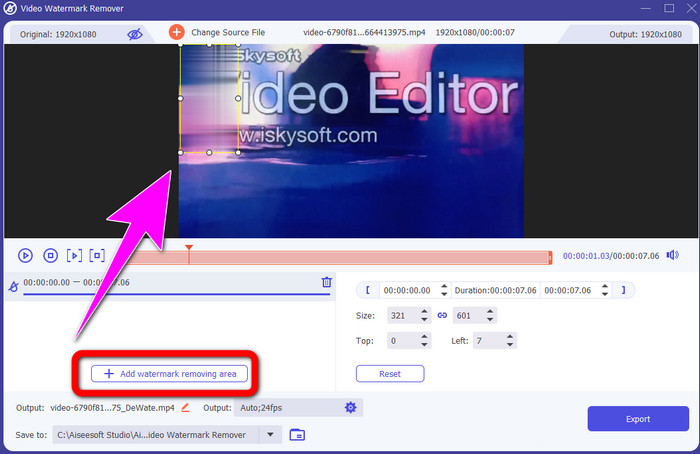
Trinn 4: Klikk deretter på knappen Add Watermark Removing Area. Flytt boksen på videoen din og dekk til iSkysoft-logoen.
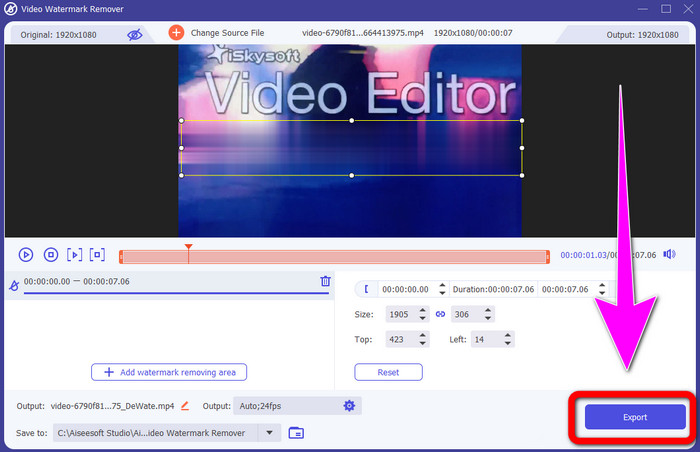
Trinn 5: Til slutt klikker du på knappen Export for å lagre den ferdige videoen.
Bruke Video Cropper
I denne delen vil vi vise deg hvordan du fjerner iSkysoft-logoen fra videoen din ved å bruke Video Cropper-verktøyet.
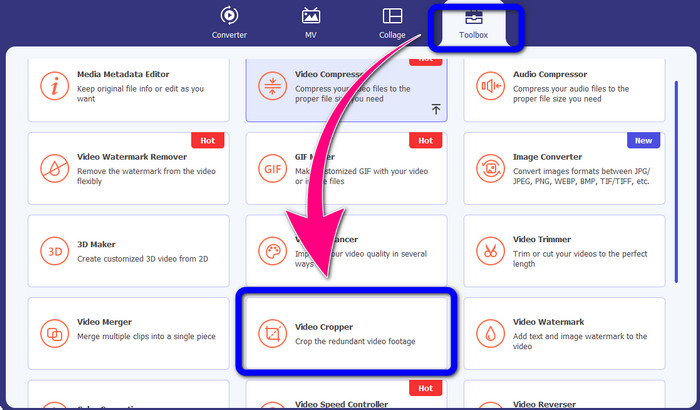
Trinn 1: Kjør programmet på datamaskinen din. Under fanen Toolbox bør du klikke på verktøyet Video Cropper. Akkurat som med verktøyet ovenfor, kan du forvente at et nytt vindu vil vises på skjermen.
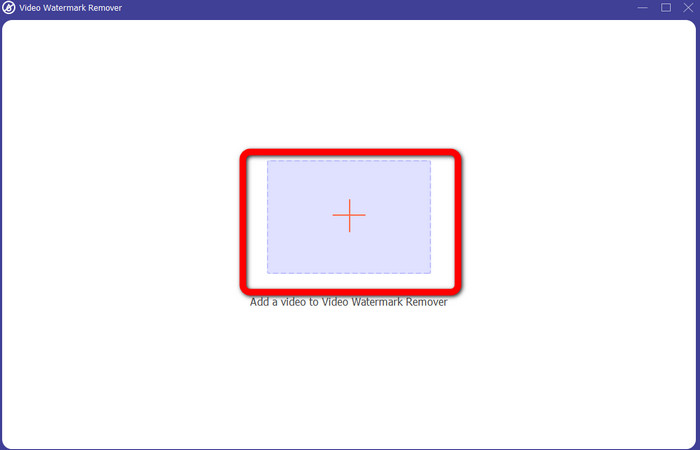
Trinn 2: Klikk på knappen Plus for å importere videoen din med iSkysoft-logoen.
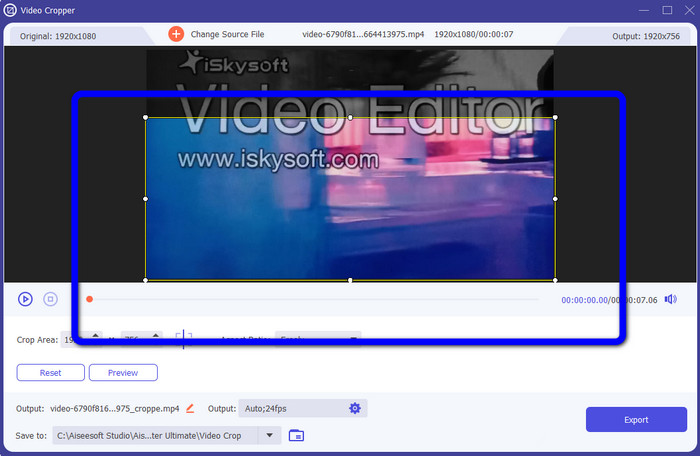
Trinn 3: I denne delen kan du nå beskjære videoen for å fjerne iSkysoft-logoen fra videoen. Bruk musen til å flytte kanten på videoen.
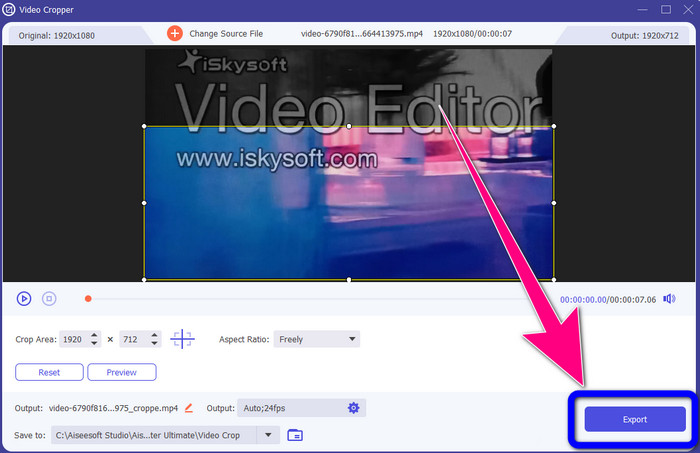
Trinn 4: For det siste trinnet klikker du på knappen Export og lagrer resultatet på datamaskinen.
Del 2: Slik fjerner du iSkysoft-logoen fra video online
Bruker HitPaw
Du kan også fjerne iSkysoft-logoen på nettet. Ett av de beste verktøyene du kan bruke er HitPaw. Dette nettbaserte programmet kan enkelt fjerne logoen fra videoen din. Du kan bruke det både på datamaskin og online, noe som er praktisk for alle. I tillegg er HitPaw trygt å bruke. Det sørger for at videoer kan redigeres og bare ses av deg selv. Dessuten trenger du ikke å bekymre deg for begrensningene i denne programvaren. Det er ingen grenser når det gjelder å fjerne logoer fra videoene dine. Du trenger ikke å kjøpe dette programmet fordi det er gratis. Men hvis du fjerner logoen eller noe
unødvendige elementer fra videoen din, må du vente litt lenger. Denne applikasjonen har en langsom fjerningsprosedyre, som er tidkrevende for brukerne. Det avhenger også av internettforbindelsen din. Det vil fungere bra hvis du har en rask tilkobling. Men hvis du har en treg tilkobling, så forvent litt forsinkelse. Følg de enkle trinnene nedenfor for å eliminere iSkysoft-logoen fra videoene dine.
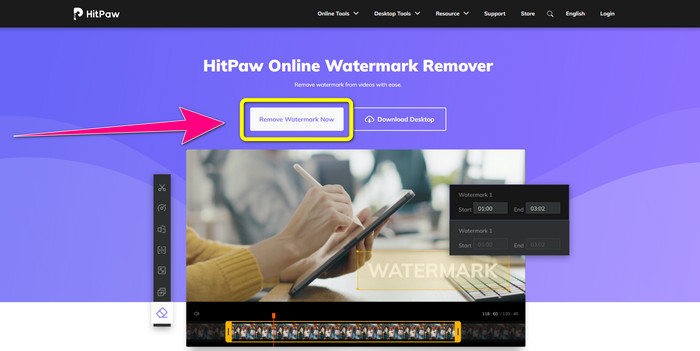
Trinn 1: Gå til HitPaw-nettstedet. Klikk på knappen Remove Watermark Now - Choose File for å sette inn videoen din med iSkysoft-logoen du vil fjerne.
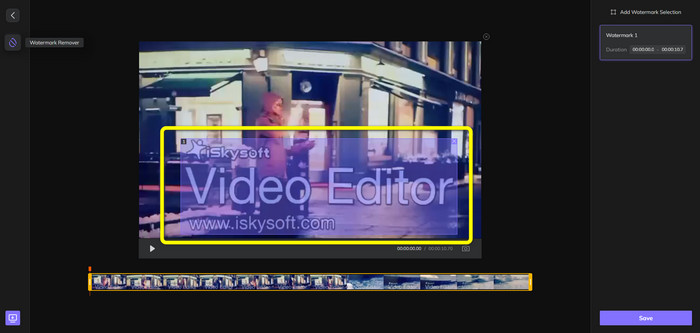
Trinn 2: Når du allerede har lagt til videofilen din, vil en blå boks vises på skjermen. Bruk denne boksen til å dekke iSkysoft-logoen. Du kan endre størrelsen på boksen.
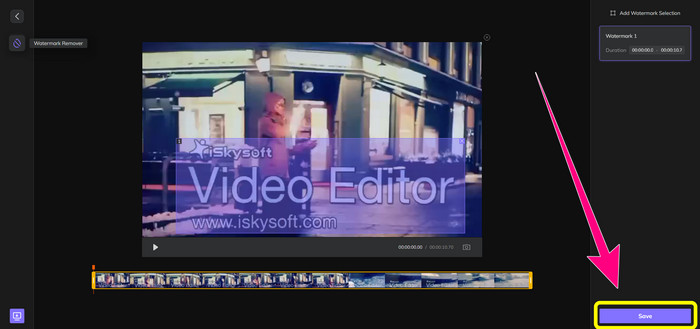
Trinn 3: Når du er ferdig med å dekke iSkysoft-logoen i videoen, klikker du på knappen Save. Vent på fjerningsprosessen og lagre videoen.
Bruke Video Watermark Remover Online
Et annet nettbasert verktøy du kan bruke er Video Watermark Remover Online. Med dette programmet kan du fjerne iSkysoft-logoen fra videoene dine. Det er også enkel programvare å bruke, som passer for ikke-profesjonelle brukere. Du kan også fjerne andre irriterende elementer fra videoene dine uten å miste videokvalitet. Men når du bruker gratisversjonen, er det en begrensning på fjerning av logoer fra videoene dine. Du kan bare fjerne logoer eller vannmerker fra 5 videoer. Du må kjøpe et abonnement hvis du vil legge til flere videoer ved hjelp av Video Watermark Remover Online. Dessuten kan du ikke lagre resultatet i et annet format. Du kan bare lagre det i samme format, noe som ikke er ideelt. Til slutt har det treg filbehandling. Følg de enkle veiledningene nedenfor for å fjerne iSkysoft-logoen fra videoene dine.
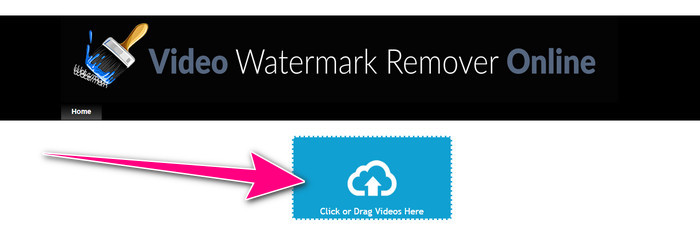
Trinn 1: Gå til nettstedet til Video Watermark Remover Online. Velg knappen Click or Drag Videos Here for å importere videofilen din med iSkysoft-logoen du vil slette.
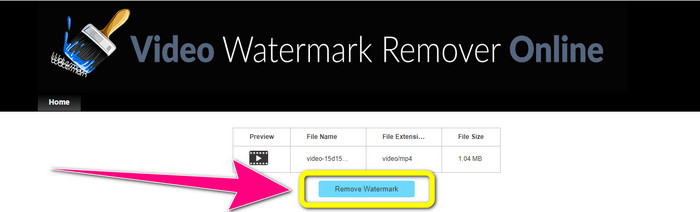
Trinn 2: Klikk deretter på knappen Remove Watermark og vent på fjerningsprosessen.
Relatert til:
Raskeste måte å fjerne logo fra video i Adobe Premiere Pro
Hvordan fjerne logo fra video med Windows Movie Maker
Del 3: Vanlige spørsmål om fjerning av iSkysoft-logoen
Kan du fjerne en logo fra et bilde?
Ja, du kan bruke FVC Free Watermark Remover til enkelt og raskt å fjerne logoen fra bildet ditt.
Er det ulovlig å fjerne vannmerket?
I henhold til US Copyright Act, paragraf 1202, er det ulovlig å fjerne vannmerker uten eierens tillatelse.
Hvordan fjerner jeg logoen gratis?
Du kan bruke den gratis prøveversjonen av Video Converter Ultimate for å fjerne en logo fra videoen din gratis.
Konklusjon
Denne artikkelen presenterte gode metoder for å fjerne iSkysoft-logoen fra videoen din ved hjelp av verktøy for både datamaskin og nett. Men hvis du vil ha en utmerket logofjerner du kan bruke, kan du laste ned Video Converter Ultimate. Dette programmet tilbyr en rask fjerningsprosess. Det er også tilgjengelig for alle brukere.
-
 8 enestående videovannmerkefjernere online og offline
 Hvis du leter etter den beste gratis programvaren for fjerning av videovannmerke du kan bruke på Windows, Mac, iPhone og Android-telefoner, er denne artikkelen for deg
-
 Beste metoder for hvordan du fjerner bitebart vannmerke fra video
 Denne artikkelen vil vise deg en mest pålitelig og fantastisk bitende vannmerkefjerner. Disse fantastiske applikasjonene vil hjelpe deg med å løse denne typen problemer
-
 Enkelt å lære prosedyrer for å fjerne logo fra video
 Leter du etter den beste og enkle fjerning av videologo? Da er denne artikkelen bra for deg. Benytt anledningen til å lære hvordan du fjerner en logo fra en video.
