


 Video Converter Ultimate
 Skjermopptaker
 Videoreparasjon
 Sikker nedlasting
3 Shutterstock vannmerkefjernere å bruke og fjerne vannmerket på videoer
Trenger du høyoppløselige, lisensierte Shutterstock-videoer til prosjektet ditt, men de har Shutterstock-vannmerke? Med hjelp av en Shutterstock-vannmerkefjerner kan du enkelt fjerne vannmerket på den nedlastede videoen. Både profesjonelt og privat liker vi ikke at videoene våre har vannmerke, fordi det ødelegger hele inntrykket av videoen. Så hvis du vil bli kvitt Shutterstock-vannmerket, kan du fortsette å lese informasjonen og den korte veiledningen vi presenterer i denne artikkelen.

Del 1. Slik fjerner du Shutterstock-vannmerket med den ultimate vannmerkefjerneren på markedet [Editor's Choice]
FVC Video Converter Ultimate kan på en presis måte hjelpe og veilede deg i hvordan du fjerner Shutterstock-vannmerket på videoen du har lagret. Det er en alt-i-ett-løsning du kan laste ned på Windows og Mac for å justere videoen din, for eksempel ved å fjerne vannmerker. Selv om programmet er svært allsidig, har utvikleren holdt brukerterskelen lav slik at alle som ønsker å bruke det kan gjøre det uten å ha omfattende kunnskap.
Selv med ferdigheter på lavt nivå, kan du ha en topp-av-line-utgang på slutten når du bruker denne editoren. Fortsatt ikke overbevist med informasjonen vi har lagt til? For å bevise det, vil vi lære deg hvordan du fjerner Shutterstock-vannmerket gratis med denne videoredigereren.
Trinn 1. For å fjerne vannmerket på videoen du har lastet ned, må du først laste ned dette redigeringsprogrammet ved å klikke på riktig nedlastingsknapp for operativsystemet ditt. Det vil være en kort installasjonsprosess du må gjennom; deretter kan du begynne å bruke programvaren.
Gratis nedlastingFor Windows 7 eller nyereSikker nedlasting
Gratis nedlastingFor MacOS 10.7 eller nyereSikker nedlasting
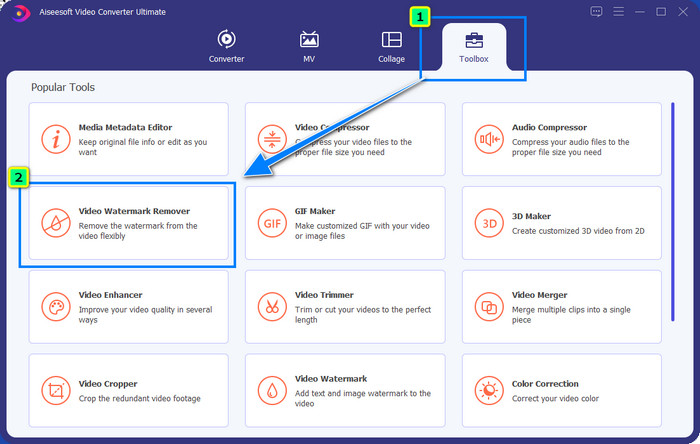
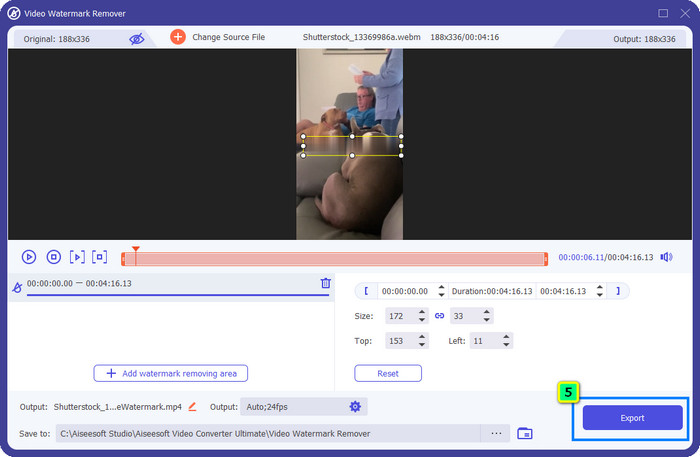
Trinn 2. Deretter bruker du Video Watermark Remover; du finner denne funksjonen under Toolbox. Som du kan se, kan du bruke flere redigeringsfunksjoner til å justere bildet til det uttrykket du ønsker.
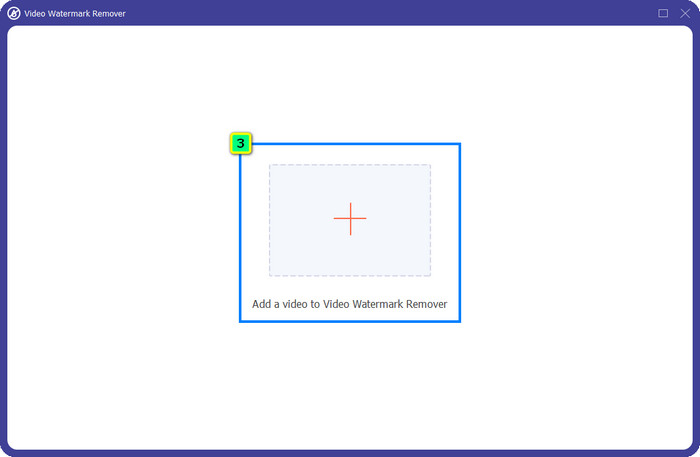
Trinn 3. Klikk på pluss-ikonet, og et filbehandlingsvindu vises på skjermen. Velg videofilen med vannmerke, og klikk deretter Open for å laste den opp.
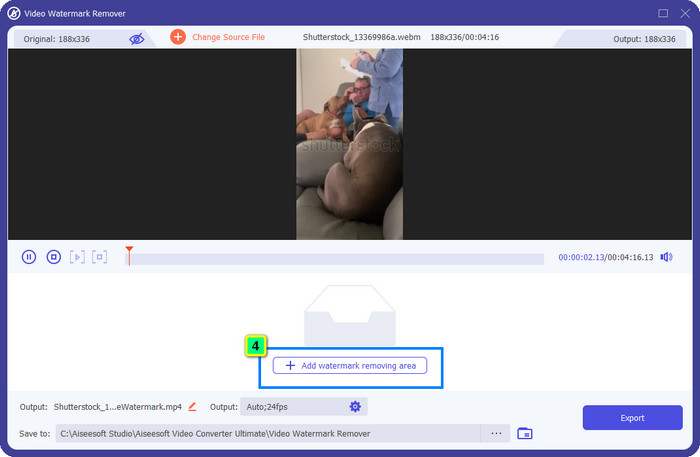
Trinn 4. For å fjerne vannmerket på videoen du har lastet opp, trykker du på Add Watermark Removing Area, og et nytt vindu vises.
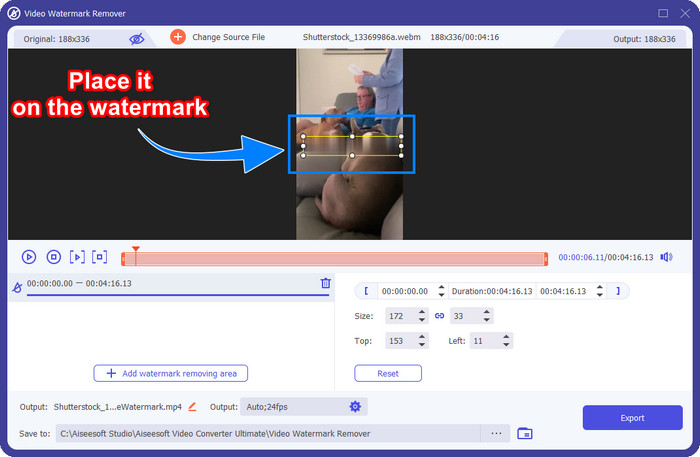
Trinn 5. I denne delen vil det være en kvadratisk boks på videoen; plasser den over vannmerket. Du kan endre størrelse, dra, krympe eller forstørre den slik at den tilpasses vannmerket du vil fjerne.
Trinn 6. Til slutt klikker du på Export-knappen for å laste ned sluttresultatet av Shutterstock-videoen du har lastet ned på enheten din. Nå kan du se den uten å bekymre deg for vannmerket, fordi det er fjernet.
Del 2. Hvordan fjerne Shutterstock Watermark Online gratis
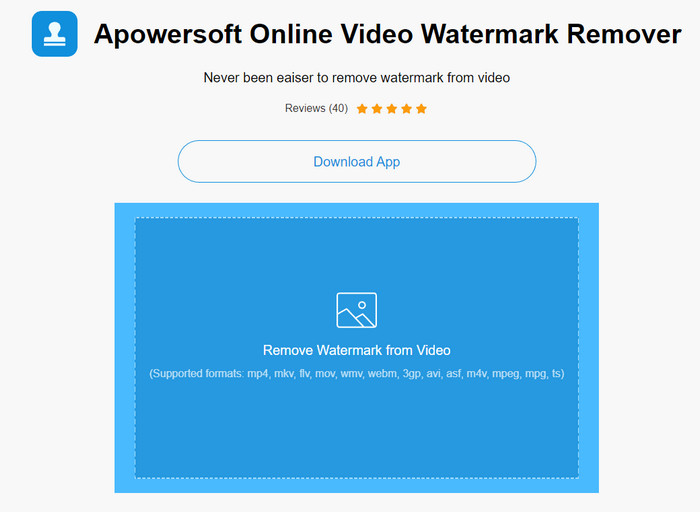
Liker du ikke tanken på å laste ned et program for å fjerne vannmerker på datamaskinen? Da kan du bruke Apowersoft Online Watermark Remover, og her viser vi deg hvordan du fjerner Shutterstock-vannmerket på nett. Dette er et utmerket valg for alle som trenger å fjerne vannmerket på en video eller et bilde. Grunnen til at vi tar det med, er at denne programvaren er lett tilgjengelig og kompatibel med ulike operativsystemer du måtte bruke.
I motsetning til offline-verktøy, trenger du en stabil og robust internettforbindelse for å bruke dem. Som vi lover, nedenfor er veiledningen for bruk av denne vannmerkefjerneren for å fjerne vannmerket som Shutterstock etterlater på den.
Trinn 1. Åpne den offisielle nettsiden til Apowersoft Online Watermark Remover med favorittsøkemotoren din, og klikk deretter på +-knappen på høyre side for å laste opp videofilen.
Trinn 2. Plasser utvalgsboksen over Shutterstock-vannmerket på videoen.
Trinn 3. Deretter klikker du på Erase for å fjerne vannmerket og se resultatet.
Trinn 4. Trykk på Download File for å få Shutterstock-videoen uten vannmerket.
Del 3. Slik fjerner du Shutterstock vannmerke ved hjelp av Photoshop [betalt]
Mange brukere spør hvordan man fjerner Shutterstock-vannmerket med Photoshop, og her skal vi hjelpe deg! Adobe Photoshop støtter en profesjonell funksjon for fjerning av vannmerker som du vil like å bruke. Som programvaren som er introdusert i denne artikkelen, gjør den jobben; men metoden for å fjerne vannmerker er bilde for bilde. Det betyr at du må bruke tid på å fjerne vannmerket for hver enkelt ramme i videoen; jo lengre videoen er, desto flere rammer blir det. Hvis du vil vite hvordan verktøyet fungerer, kan du lese de informative trinnene nedenfor.
Trinn 1. Last ned programmet på datamaskinen, og klikk deretter på File. Under denne menyen trykker du på Open for å laste opp videoen som er lagret på maskinen.
Trinn 2. På venstre side velger du Magic Wand Tool, og klikker deretter på vannmerket du vil fjerne. Denne funksjonen vil automatisk spore vannmerket i rammen.
Trinn 3. Gå til Edit og trykk på Content-Aware Fill etter at du har markert vannmerket.
Trinn 4. Når du har åpnet Content-Aware Fill, vil det automatisk fjerne vannmerket du valgte tidligere, og deretter trykker du på OK.
Mer lesing:
Enkle metoder for å fjerne Shootproof-vannmerket
Hvordan fjerne Bandicam-vannmerket uten problemer [3 effektive metoder]
Del 4. Vanlige spørsmål om hvordan du fjerner Shutterstock-vannmerket
Hvordan fjerne Shutterstock-vannmerket uten Photoshop?
Du kan bruke FVC Video Converter Ultimate til å fjerne Shutterphoto som er bundet til videoen din. Den har et kraftig vannmerkeviskelær som du gjerne vil prøve. Følg trinnene vi legger til i denne artikkelen for å gjøre det like effektivt som Photoshop.
Fungerer beskjæring av Shutterstock-vannmerket på video?
Hvis du vil endre størrelsen på videoen ved å endre dimensjonen, kan du beskjære videoen ved hjelp av flere videoredigerere online og offline. Siden vannmerket til Shutterstock er i midten, er det bedre å ikke bruke beskjæringsfunksjonene. Tallrike vannmerkefjernere er her for å hjelpe; du kan lese og kopiere opplæringen vi legger til, slik at du kan slette den effektivt uten å legge igjen en flekk på den.
Er det lovlig å fjerne Shutterstock-vannmerket?
Å fjerne vannmerket til Shutterstock er ikke lovlig, men hvis du vil bruke det for ikke-kommersiell, kan du gjøre det ved hjelp av en vannmerkefjerner. Det er bedre å kjøpe bildet du ønsker på Shutterstock hvis du skal bruke det til kommersielle formål; selv om det vil koste deg, vil det i det minste gi deg juridiske rettigheter til å bruke det.
Konklusjon
Nå vet du hvordan du kan fjerne Shutterstock-vannmerket med programvarene som er tatt med i denne artikkelen. Så, hvilken programvare foretrekker du – den betalte, den gratis nettbaserte eller den ultimate programvaren? Uansett hva du velger, kan du få et Shutterstock-bilde uten produktlogoen. Men hvis du spør oss hva vi ville brukt, vil vi uten tvil velge FVC Video Converter Ultimate, fordi det gir det mest tilfredsstillende resultatet. Selv om det er en avansert vannmerkefjerner, er det fortsatt enkelt å bruke. Så hvis du vil prøve denne programvaren, kan du klikke på nedlastingsknappen for å få verktøyet på datamaskinen din.
-
 Ultimate verktøy for å fjerne vannmerke fra Renderforest-eksporterte videoer
 For å fjerne vannmerket fra Renderforest trenger du en vannmerkefjerner på enheten din, alle verktøyene du kan bruke er her.
-
 Enkle trinn for hvordan du fjerner WOW Slider Watermark [Løst]
 WOW Slider er en app for å lage en fantastisk lysbildefremvisning. Imidlertid bygger den inn vannmerker på utgangen. Les nedenfor for å lære hvordan du fjerner WOW Slider-vannmerket.
-
 Hvordan bli kvitt Power Director-vannmerket gratis [Fullfør]
 Hvordan bli kvitt Power Director vannmerket gratis? De beste verktøyene for å eliminere vannmerket er her, så lær dem ved å lese dette.
