


 Video Converter Ultimate
 Skjermopptaker
 Videoreparasjon
 Sikker nedlasting
Beste triks for hvordan du fjerner Snapchat-tekst fra skjermbilde
Vil du vite hvordan du kan fjerne Snapchat-tekst fra skjermbildet? Da er du på rett sted. Dette innlegget gir deg de enkleste metodene du kan bruke for å fjerne Snapchat-tekst fra bildene og videoene dine. Disse metodene er enkle å følge, perfekte og godt egnet for uerfarne brukere. Hvis du er interessert i disse enkle metodene, bør du stoppe det du gjør nå og konsentrere deg om å lese denne informative artikkelen.

Del 1: Slik fjerner du Snapchat-tekst og bildetekster fra bilder
Det beste du bør gjøre for å fjerne Snapchat-tekst fra et bilde, er å bruke et verktøy for fjerning av vannmerker. På denne måten kan du fjerne alle elementer fra bildene dine, som tekst, logoer, vannmerker osv. Hvis du ser etter et utmerket og pålitelig verktøy, kan du bruke FVC Free Watermark Remover. Det kan hjelpe deg med å slette Snapchat-tekst fra bilder på nettet umiddelbart. Du kan enkelt forstå dette programmet takket være et brukervennlig grensesnitt, detaljert veiledning og enkle knapper.
Videre støtter FVC Free Watermark Remover ofte brukte inn- og utdatafilformater, som PNG, JPG, JPEG, BMP og mer. I tillegg er dette verktøyet tilgjengelig på Windows 7,8,10,11 og macOS 10.7 ovenfor. Til slutt lover denne applikasjonen å garantere hver brukers personvern, slik at du ikke trenger å bekymre deg for bildene eller informasjonen din. Hvis du vil fjerne en Snapchat-tekst fra bildene dine, følg den enkle guiden nedenfor.
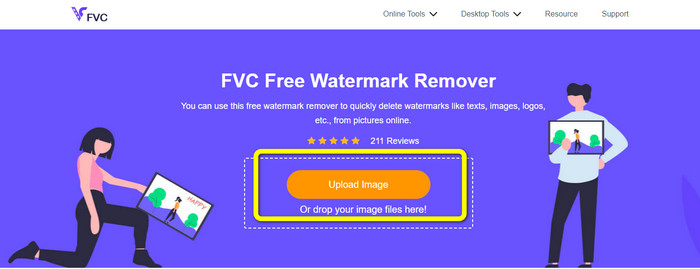
Trinn 1: Gå til FVC sitt Free Watermark Remover-nettsted. Klikk på knappen Upload Image og legg til bildet ditt med Snapchat-teksten du vil fjerne.
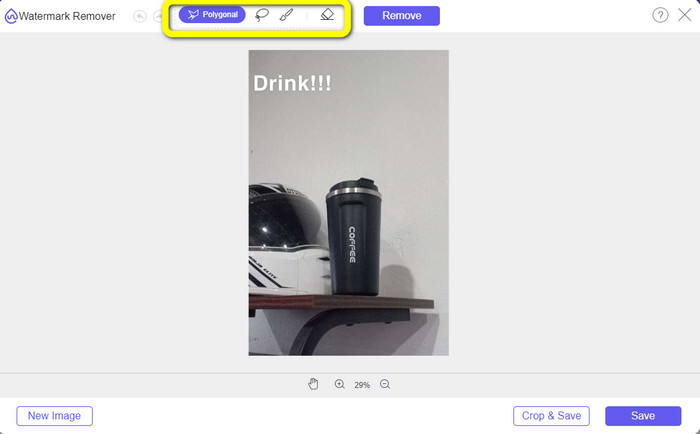
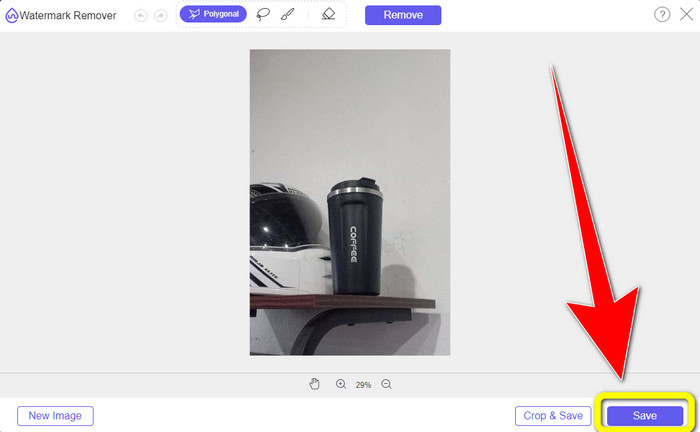
Trinn 2: Etter at du har lagt til bildet ditt, kan du bruke alternativene i verktøyet for fjerning av vannmerker: polygonverktøyet, lasso-verktøyet og penselverktøyet.
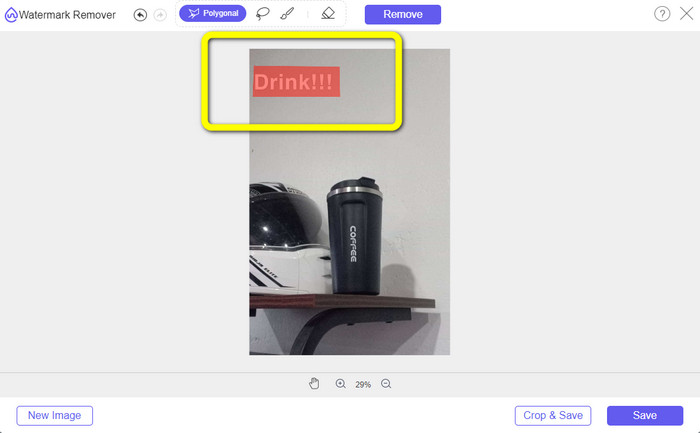
Trinn 3: Ved å bruke disse verktøyene kan du markere teksten du vil fjerne.
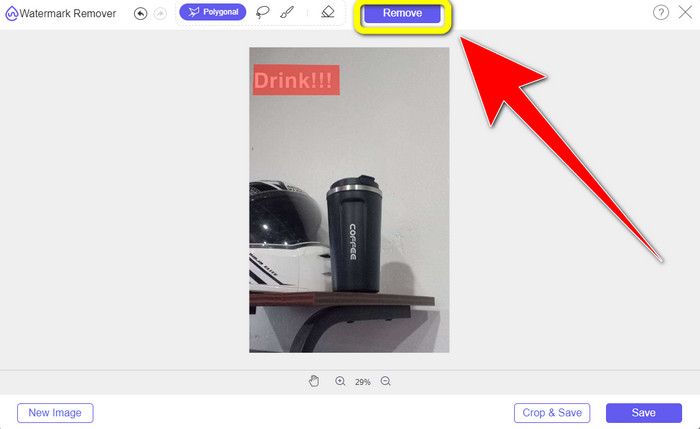
Trinn 4: Når du er ferdig med å markere teksten på bildet, kan du klikke på knappen Remove for å fjerne teksten fra bildet. Deretter venter du på at fjerningsprosessen skal bli ferdig.
Trinn 5: Etter at du har fjernet teksten fra bildet ditt, kan du nå klikke på knappen Save for å laste ned bildet uten tekst.
Del 2: Slik fjerner du Snapchat-tekst fra video
Etter å ha fjernet Snapchat-tekst fra bildet ditt, kan vi også hjelpe deg med å lære hvordan du fjerner Snapchat-tekst fra videoen din. I denne delen er det beste programmet du bør bruke Video Converter Ultimate. Dette programmet kan hjelpe deg med å fjerne unødvendige objekter fra videoene dine, som tekst, vannmerker, logoer osv. Du kan også bruke det til å fjerne teksten på to enkle måter: ved å bruke verktøyet video watermark remover og ved å bruke videobeskjæringsverktøyet. Hvis Snapchat-teksten er i hjørnet eller langs kanten av videoen, kan du bruke videobeskjæringsverktøyet. Og hvis teksten er midt i videoen, kan du bruke verktøyet video watermark remover.
Videre har denne applikasjonen forskjellige redigeringsverktøy du kan glede deg over, som en videoforsterker, videokompressor, videoreverser, legge til og fjerne vannmerket, videotrimmer, beskjæring, rotator, GIF-maker og mer. Den støtter også en rekke videofilformater, som MP4, FLV, MKV, MOV, etc. Du kan også bruke denne applikasjonen på Mac og Windows, noe som er praktisk for brukerne. Hvis du liker å fjerne Snapchat-teksten fra videoene dine ved å bruke de to enkle måtene, må du følge de enkle trinnene nedenfor.
Bruke funksjonen for fjerning av videovannmerke
Trinn 1: Last ned Video Converter Ultimate på Windows- eller Mac-datamaskinen din. Kjør programmet etter at installasjonen er fullført.
Gratis nedlastingFor Windows 7 eller nyereSikker nedlasting
Gratis nedlastingFor MacOS 10.7 eller nyereSikker nedlasting
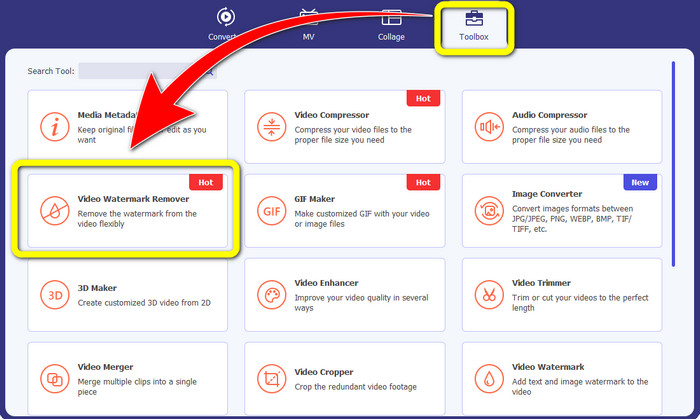
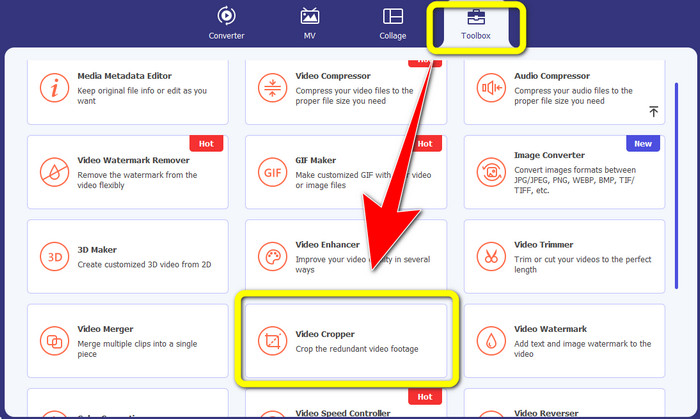
Trinn 2: Deretter vil du se fire alternativer øverst i grensesnittet. Klikk på panelet Toolbox og velg verktøyet Video Watermark Remover.
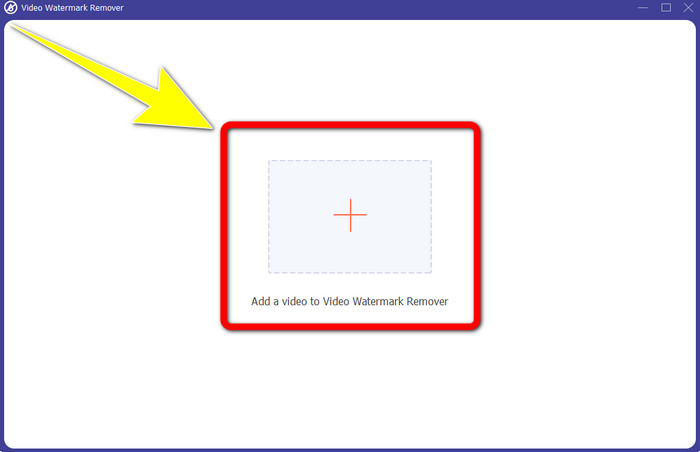
Trinn 3: Deretter vil et nytt vindu dukke opp på skjermen. Klikk på +-ikonet og legg inn videoen din med Snapchat-tekst.
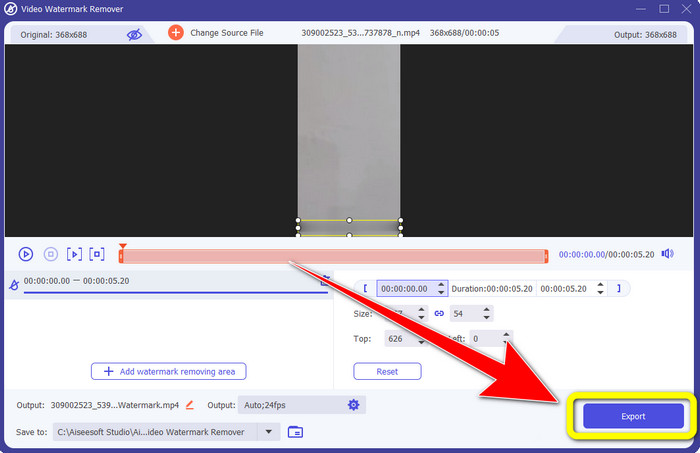
Trinn 4: Når du er ferdig med å legge inn videoen, klikker du på funksjonen Add Watermark Removing Area. En liten boks vises på videoen din, og du drar den for å dekke Snapchat-teksten.
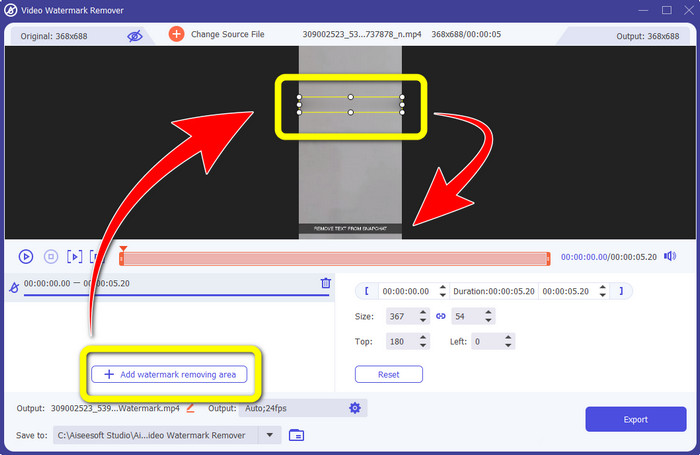
Trinn 5: Etter at du har dratt den lille boksen over Snapchat-teksten, kan du se at teksten allerede er borte. Klikk på knappen Export for å lagre videoen din helt.
Bruke videobeskjæringsfunksjonen
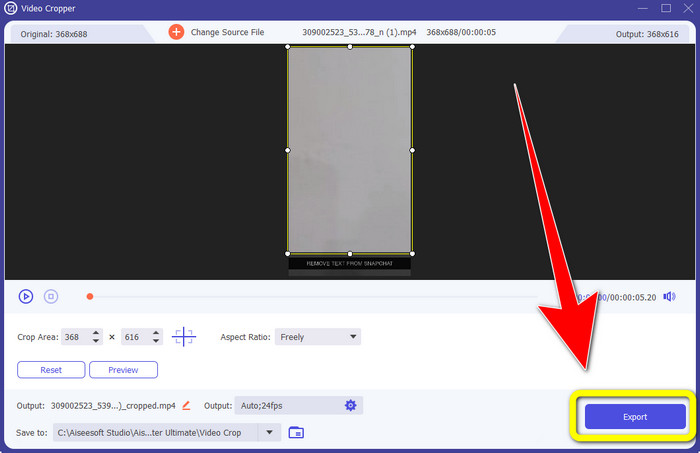
Trinn 1: Start Video Converter Ultimate på datamaskinen din. Velg panelet Toolbox og gå til verktøyet Video Cropper.
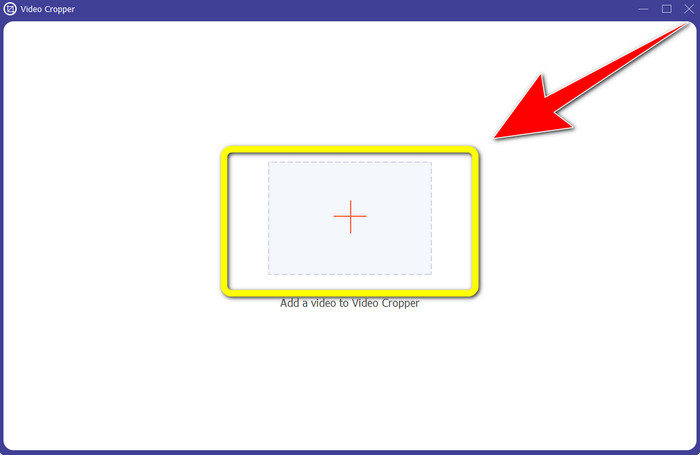
Trinn 2: Etter at du har klikket på verktøyet Video Cropper, vil et nytt grensesnitt vises på skjermen. Klikk på +-knappen for å importere videoen din med Snapchat-teksten du vil fjerne.
Trinn 3: I denne delen kan du beskjære videoen for å fjerne Snapchat-teksten ved å bruke musen til å dra i kantlinjen. Du kan kutte bort kantene på videoen.
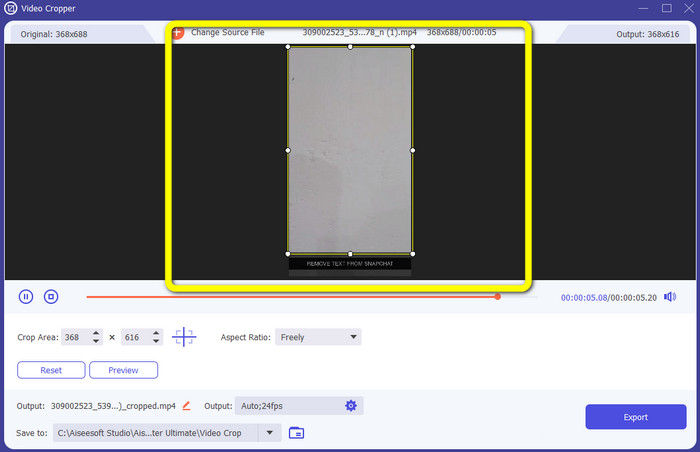
Trinn 4: Nå kan du klikke på knappen Export for å lagre videoen uten Snapchat-tekst som ditt siste og endelige trinn.
Del 3: Vanlige spørsmål om fjerning av Snapchat-tekst fra bilder og videoer
Kan jeg også fjerne Snapchat-tekst fra bilder ved hjelp av telefonen?
Ja det kan du. Du kan bruke mange applikasjoner med vannmerkefjerner, som PicLab, Photo Retouch-Object Removal, Airbrush og mer.
Kan jeg fjerne en Snapchat-tekst fra bildet mitt uten å miste kvaliteten på bildet mitt?
Hvis du ikke vil miste kvaliteten på bildet ditt etter at du har fjernet Snapchat-teksten, bør du bruke FVC Free Watermark Remover. Etter fjerningsprosessen kan du fortsatt beholde den opprinnelige kvaliteten på bildene dine.
Hvordan slår jeg av Snapchat-tekster?
Snapchat-teksting lastes opp manuelt av utgiveren, noe som gir forbedret bildetekstnøyaktighet. Snakkeboblebryteren nederst på skjermen kan brukes til å slå på eller av bildetekstene.
Hva er det beste programmet med en vannmerkefjerner jeg kan bruke for skrivebordet mitt?
Hvis du ser etter et program, kan du bruke Video Converter Ultimate. Dette programmet lar deg fjerne vannmerker fra videoene dine uten anstrengelse. I tillegg har det mange funksjoner du kan dra nytte av.
Hva er vannmerket på bildet eller videoen?
Vannmerkene er signaturene, logoene og tekstene du kan se på bildet eller videoen. Den forteller bare andre hvem som er den faktiske eieren av bildene eller videoene. Vannmerke er en av de beste måtene å sikre bildet og markedsføre et produktnavn.
Konklusjon
Som du ser, er den beste måten å fjerne Snapchat-tekst fra bilder og videoer på, å bruke et godt program med funksjon for fjerning av vannmerker. Denne artikkelen viser deg hvordan du fjerner Snapchat-tekst fra bilder ved å bruke FVC Free Watermark Remover. Den viser også hvordan du fjerner Snapchat-tekst fra videoer ved hjelp av Video Converter Ultimate, som har to bemerkelsesverdige måter: ved å bruke et verktøy for fjerning av videovannmerker og et videobeskjæringsverktøy.
-
 Slik fjerner du logo fra video ved hjelp av Windows Movie Maker
 Hvis du vil lære om hvordan du fjerner logoer fra videoer med Windows Movie Maker og andre alternative måter, kan du lese denne artikkelen. Vi har enkle måter for deg.
-
 Hvordan fjerne VideoScribe-logoen fra videoen uten problemer
 Du trenger ikke å bekymre deg for å fjerne VideoScribe-logoen fra videoene dine lenger. Denne artikkelen vil gi problemfrie metoder. Les dette innlegget for å lære mer
-
 Raskeste måten å fjerne logo fra video i Adobe Premiere Pro
 Prøv disse enkle og raskeste måtene å fjerne logoer fra en video i Adobe Premiere Pro. Denne artikkelen vil gi deg de beste måtene du kan prøve å bruke enheten på.
