


 Video Converter Ultimate
 Skjermopptaker
 Videoreparasjon
 Sikker nedlasting
Slik fjerner du vannmerket fra opprinnelsesgrafen effektivt på grafen
Du må kanskje bruke Origin Graph for å lage en mal for matematiske eller vitenskapelige data som er for kompliserte til å beskrive med ord. Denne programvaren har allerede hjulpet studenter, forskere, professorer, forretningsfolk og andre som trenger å lage sine egne grafer. Med settet av maler du kan velge mellom, kan du lage en visuelt tiltalende graf som fanger seernes oppmerksomhet. Problemet du sannsynligvis vil møte hvis du bruker gratisversjonen, er at den legger til en tekst-vannmerking på sluttresultatet. Har du problemer med å håndtere vannmerket? Ikke bekymre deg mer! For vi har løsningen. Her presenterer vi nyttige tips om hvordan du fjerner vannmerket fra Origin Graph og deretter bruker det i Word- eller PowerPoint-presentasjonen din.

Del 1. Slik fjerner du vannmerke fra Origin Graph med Online Image Watermark Remover
FVC Free Watermark Remover Online er et førsteklasses verktøy for å fjerne tekstvannmerker som du kan bruke til å fjerne Origin Graph-vannmerket. Dette verktøyet er svært effektivt til å fjerne objekter på bildene dine, slik at de ser enda mer profesjonelle ut når du har fjernet vannmerket. Med dette kan vi forsikre deg om at det er et dedikert verktøy for fjerning av vannmerker som du kan bruke og stole på når du har dette problemet. Lurer du på om dette verktøyet er lett å bruke? Ikke bekymre deg mer! For trinnene vi har lagt til nedenfor er de du kan følge for å bli kvitt tekstvannmerket på bildet som Origin Graph legger til.
Trinn 1. Du kan klikke på denne lenken for å åpne det nettbaserte verktøyet for å fjerne bilde-vannmerker; det åpner automatisk en ny fane der du får tilgang til verktøyet.
Trinn 2. Trykk på Upload Image for å legge til bildet med vannmerket her, finn bildefilen i mappen, og klikk Open for å laste den opp.
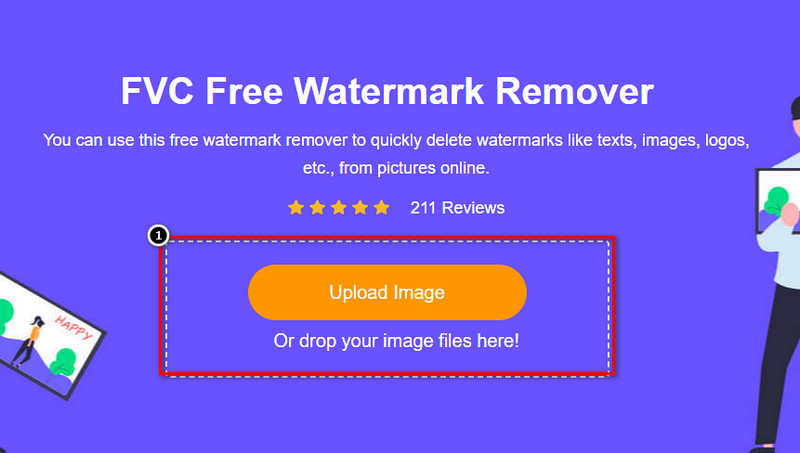
Trinn 3. Du kan bruke tre verktøy til å markere vannmerket; selv om de fungerer forskjellig, er de like effektive. Velg ett verktøy, og marker deretter området på bildet som har vannmerke.
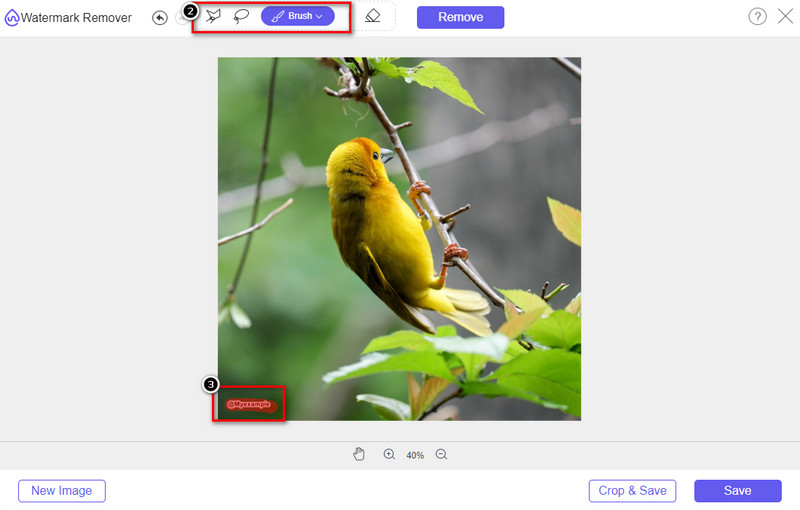
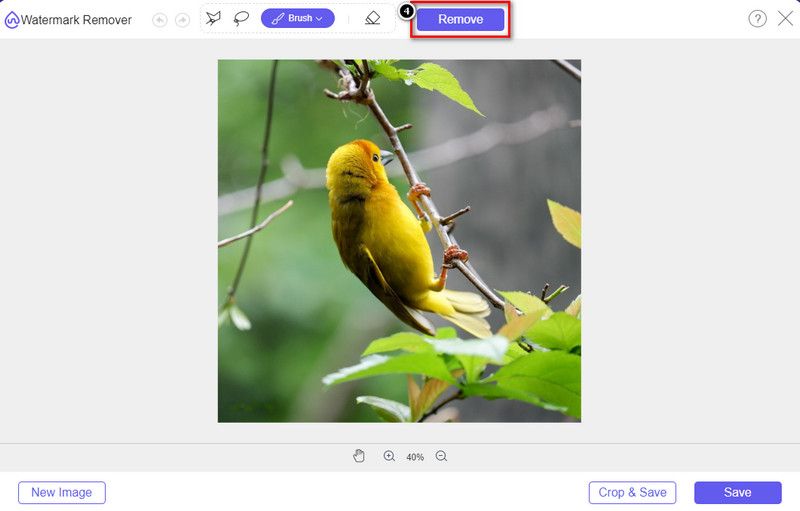
Trinn 4. Husk å klikke på ikonet Remove etter at du har markert vannmerket med verktøyet. Dette trinnet er viktig slik at du har bildet uten vannmerket når du eksporterer det.
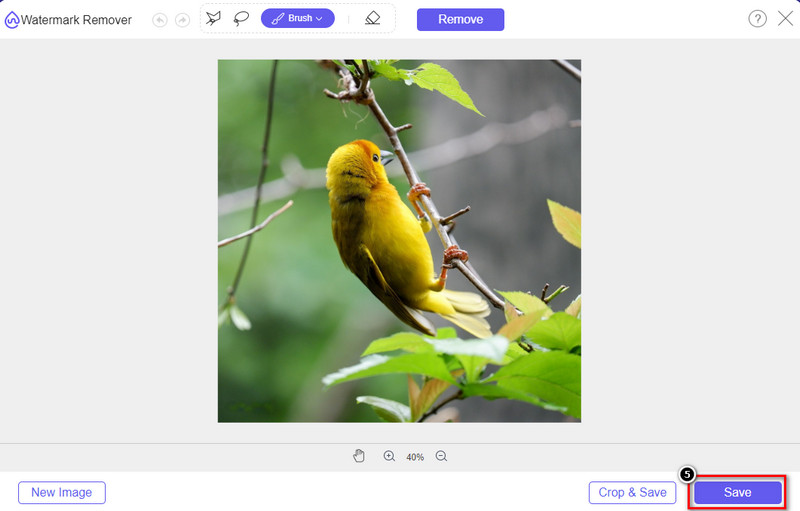
Trinn 5. For å starte eksportprosessen kan du nå klikke på knappen Save. Vent til prosessen er fullført, og du kan deretter se bildet uten at Origin Graph-vannmerket er synlig i området.
Fordeler
- En gratis nettbasert bildevannmerkefjerner du kan få tilgang til.
- Den fungerer effektivt for å fjerne vannmerket med støtte for AI-teknologi.
- Den støtter et bredt utvalg av bildeformater du kan ha på din lokale stasjon.
- Det legges ikke til vannmerke på eksporterte bilder.
Ulemper
- Trenger internett-tilkobling for å fungere.
- Fokuset er på å fjerne vannmerket og ingenting annet.
Del 2. Hvordan kopiere grafer fra Origin til Word eller PowerPoint uten vannmerket
I denne delen av artikkelen vil vi gi deg prosedyren du trenger å vite for å legge til grafen du har laget på Origin Graph uten vannmerket. Følg den deretter for å legge til grafen du lager på Microsoft Word og PowerPoint uten vannmerke.
Du må frigjøre minst 1,9 GB på grunn av den enorme filstørrelsen. I filen på 1,9 GB kan du få hjelpen du trenger, men hvis du ikke vil ha hjelp, kan du laste ned 652 MB-versjonen av den via .zip eller .exe.
Trinn for hvordan du lager en graf på opprinnelsesgraf uten vannmerket:
Trinn 1. Last først ned Origin Graph til operativsystemet ditt ved å gå til den offisielle nettsiden. Åpne programmet for å begynne å lage grafen du ønsker.
Trinn 2. Etter at du har startet programvaren, legger du inn verdiene i tabellen du trenger. Du kan legge til flere variabler og tilsvarende antall grafer her.
Tillegg: Du kan klikke på Plot for å se andre grafer du kan bruke, som Basic 2D, Bar, Statistical og flere.
Trinn 3. Klikk på File, og trykk deretter Save for å eksportere grafen du har opprettet her.
Trinn 4. Du kan følge trinnene vi har lagt til i Del 1 og følge veiledningen for å fjerne vannmerket fra Origin Graph ved hjelp av FVC Free Watermark Remover Online.
Slik bruker du grafen på Word uten vannmerke:
Trinn 1. Åpne Word-appen på datamaskinen, og klikk på Blank Page. Hvis du allerede har opprettet Word-dokumenter, åpner du den aktuelle filen.
Trinn 2. Gå til delen Insert, og klikk deretter på Pictures. Søk etter graffilen på den lokale stasjonen din, klikk på den én gang, og trykk Open for å laste den opp til Word.
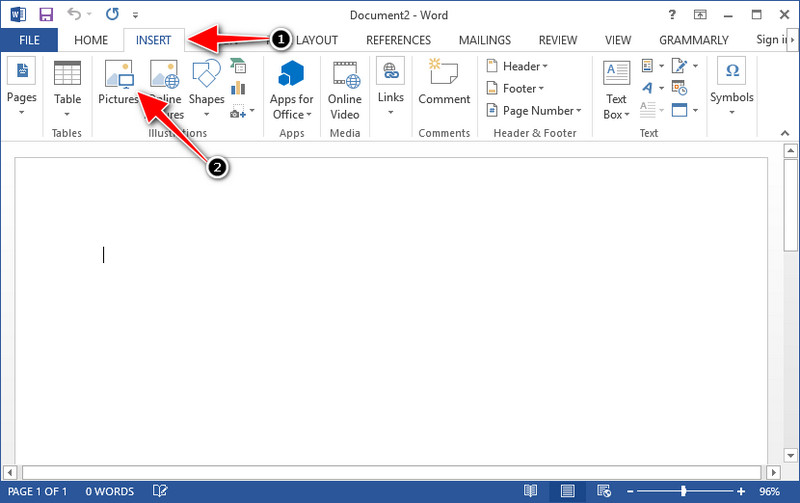
Trinn 3. Den lastes automatisk inn i Word-dokumentet du åpnet eller opprettet; du kan nå plassere grafen ved å holde og dra den i Word.
Slik bruker du grafen på Powerpoint uten vannmerke:
Trinn 1. Start PowerPoint på datamaskinen og klikk Blank Presentation. Du kan også se gjennom de siste presentasjonene du har laget på venstre side. Hvis det finnes en fil der du trenger å legge til grafen, klikker du på den for å åpne den.
Trinn 2. Trykk på Insert og klikk Picture for å sette inn grafbildet du har opprettet i Origin Graph.
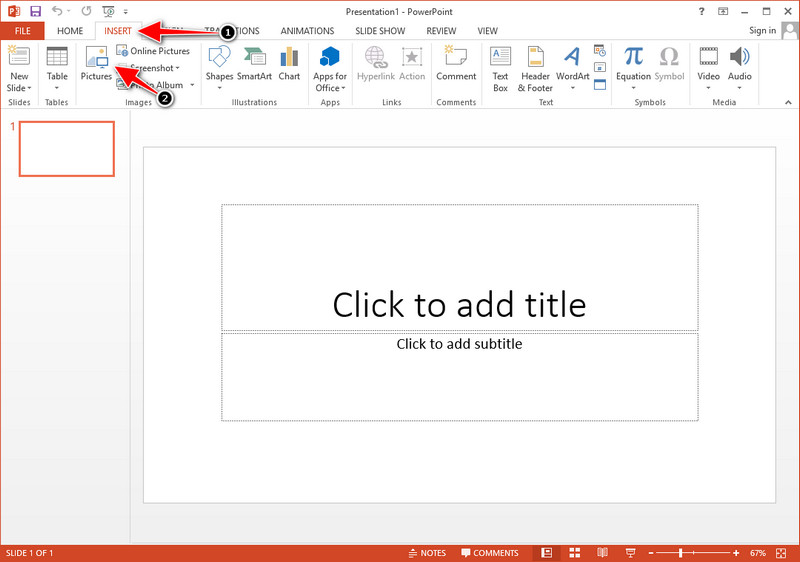
Trinn 3. Juster grafbildet og plasser det på lysbildet.
Mer lesing:
Hvordan fjerne B612-vannmerke fra bildene dine
Hvordan fjerne WOW Slider-vannmerket gratis
Del 3. Vanlige spørsmål om hvordan du fjerner vannmerke fra Origin Graph
Hvor mye koster Origin Pro?
For de enkelte brukerne kan du få premiumversjonen av Origin Graph for $435 fra og med. Du kan besøke den offisielle butikken på Origin Lab.
Hvor kan jeg offisielt laste ned Origin Graph?
Besøk Origin Lab for å laste ned Origin Graph. Før du kan laste ned programvaren på skrivebordet ditt, vil det stille spørsmål. Etter det vil det være to alternativer for å laste ned filen, om du vil laste den ned med hjelp eller ikke, i form av .exe eller zip.
Er Excel og Origin det samme?
Excel og Origin har et regnearklignende GUI for å ordne dataene, beregne og definere etiketter. Imidlertid fokuserer Excel på å inneholde mange kolonner og rader du kan bruke. Men med Origin er det for å arrangere attributter som bruker en kolonneformel i stedet for en celleformel som det Excel støtter.
Konklusjon
Nå som du har lært hvordan du fjerner vannmerket fra Origin Graph, er det din tid til å bruke grafen du har laget og presentere den profesjonelt. Hvis formålet ditt er å bruke det på Word eller Powerpoint, kan du lese del 2 for å lære hvordan du gjør det. Å fjerne vannmerket med dette verktøyet er desidert mest ønsket av alle som vil fjerne vannmerket på bilder. Problemet er løst med dette verktøyet. Hvis denne artikkelen hjalp deg, vennligst legg igjen en 5-stjerne nedenfor.
-
 Slik fjerner du vannmerke med Pixlr i detaljerte trinn [Effektiv]
 Vil du vite hvordan du fjerner et vannmerke med Pixlr? Hvis ja, fortsett å lese nedenfor for å vite hvordan du gjør det og alternativene du kan bruke.
-
 Fjern Animotica Watermark på eksporterte videoer med 3 velprøvde måter
 Har du noen gang lurt på om det er mulig å fjerne Animotica-vannmerket på videoer du eksporterte? Denne artikkelen gir en fremgangsmåte.
-
 Gratis måter å fjerne VideoShop-vannmerket på videoer [Uanstrengt]
 For å fjerne VideoShop-vannmerket, trenger enheten en vannmerkefjerner. For å vite hva disse er, les denne artikkelen.
