


 Video Converter Ultimate
 Scherm opnemer
 Videoreparatie
Top of the Line OGV naar MOV Converter om OGV-bestanden op Mac te converteren
Een van de beste videoformaten met verlies die vaak worden gebruikt om videocontent op webpagina’s op te slaan, is OGV. Dit formaat heeft bijna dezelfde structuur als OGG‑bestanden, maar bevat ook video. Hoewel dit formaat mediabestanden kan opslaan en via internet kan verzenden, wordt het nog steeds niet breed ondersteund door mediaplayers en videobewerkers. Om het formaat compatibel te maken met de standaard videospeler of videobewerker op de Mac, moet je OGV‑bestanden converteren naar een geaccepteerd formaat zoals MOV. Gelukkig bieden wij stappen die je eenvoudig kunt volgen om OGV naar MOV te converteren zonder de kwaliteit te veranderen.

Deel 1. Converteer OGV naar MOV op Mac met de beste OGV naar MOV-converter
Wil je weten wat de ultieme OGV‑naar‑MOV‑converter op de Mac is? Als dat is wat je zoekt, gebruik dan FVC Video Converter Ultimate. Waarom? Dit is een fenomenale converter waarmee je het encoderen en decoderen van OGV zo eenvoudig maakt als 1‑2‑3. Bovendien kun je de conversie binnen een minuut of zelfs enkele seconden afronden, in vergelijking met andere online en offline converters.
En dat is nog niet alles: je kunt je video bewerken, ze samenvoegen, GIF’s maken, video’s versnellen of vertragen en nog veel meer. Dit is zonder twijfel de fenomenale converter die al veel gebruikers heeft geholpen, en jij bent de volgende. Om je probleem op te lossen, gaan we nu verder met de handleiding over hoe je de converter gebruikt.
Stap 1. Om deze tool op je Mac te gebruiken, moet je hem eerst downloaden en daarna installeren. Na dat proces verschijnt er een welkomstvenster; klik op Start Now.
Gratis downloadVoor Windows 7 of nieuwerVeilige download
Gratis downloadVoor MacOS 10.7 of nieuwerVeilige download
Stap 2. Breng je .ogv‑bestand hiernaartoe en lokaliseer het in de map door op Add Files of + te klikken.
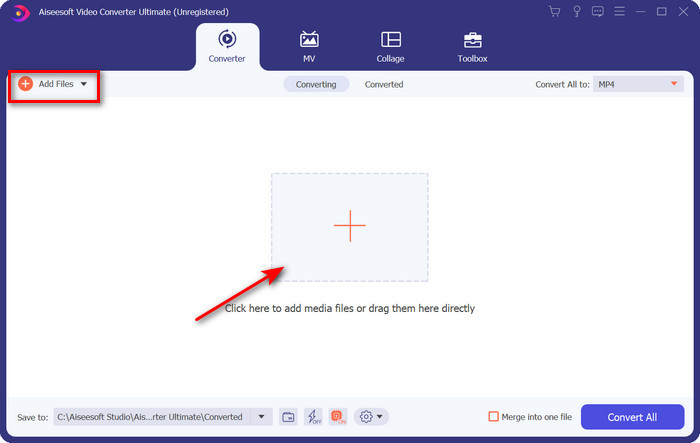
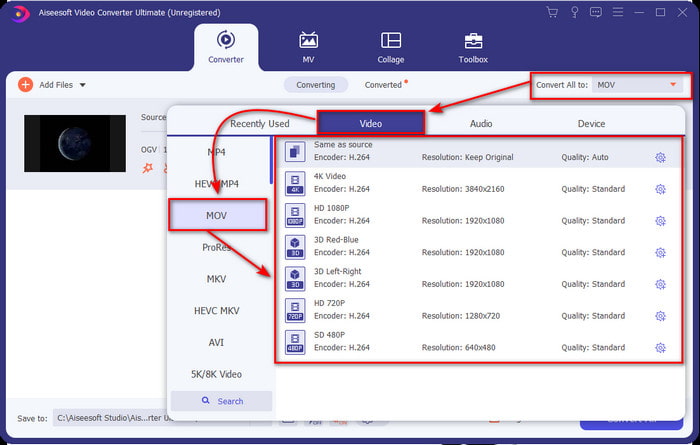
Stap 3. Nadat je het bestand hebt geüpload, moet je het formaat wijzigen in MOV onder Convert All.
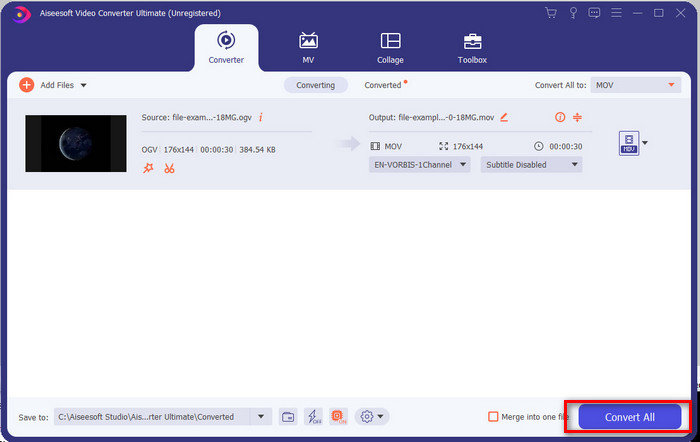
Stap 4. Start het conversieproces door op de knop Convert All te klikken.
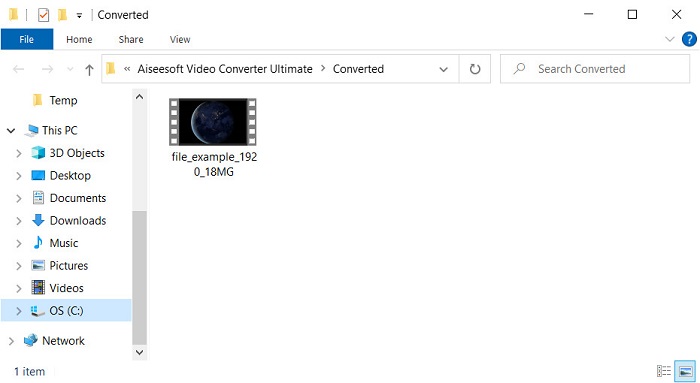
Stap 5. Zodra het converteren van OGV naar MOV is voltooid, verschijnt er een nieuwe map waarin je bestand staat. Je kunt nu vrij op het bestand klikken om de mediabestanden in het nieuwe MOV‑formaat te bekijken of te bewerken.
Voordelen
- Converter van het volgende niveau die u op Mac of zelfs op pc kunt gebruiken.
- Geavanceerde functies zoals bewerken, samenvoegen, knippen, bijsnijden en meer bevinden zich in de Toolbox.
- Gunstige keuze door gebruikers die altijd converteren vanwege het lichte gewicht van deze software.
- Batch converteer hier uw OGV, MOV, AVI, MKV, MP4, meer dan 200 formaat.
Nadelen
- Betalen om software te gebruiken.
Deel 2. Converteer OGV online naar MOV met de gratis en gebruiksvriendelijke converter
Wil je geen gedoe met downloaden, installeren en instellen van een converter? Probeer dan deze OGV‑naar‑MOV‑converter online, beschikbaar via alle zoekmachines. FVC Free Video Converter Online is een innovatieve online videoconverter waarmee je een niet‑ondersteund formaat omzet naar een afspeelbaar formaat. Veel internetgebruikers genieten al van de algehele prestaties van deze webtool. Bovendien heb je voor deze tool geen registratie nodig en zijn er geen vervelende advertenties op de website die je conversie onderbreken. Je kunt hem echter niet gebruiken zonder internetverbinding. Dus als je je gebruikelijke converter wilt vervangen, gebruik dan deze tool en volg de onderstaande stappen.
Stap 1. Klik op deze FVC Free Video Converter Online om naar de website van de webtool te gaan.
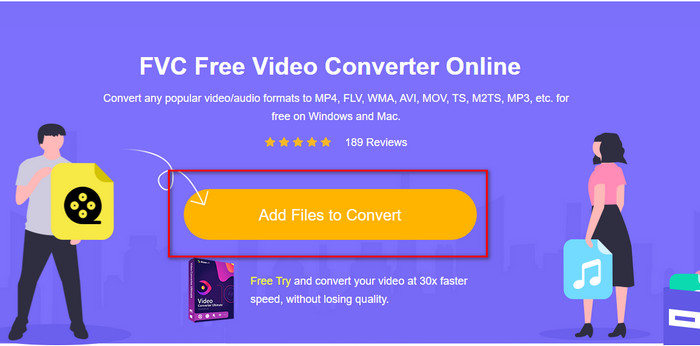
Stap 2. Klik in de webinterface op Add Files to Convert; er verschijnt een map waarin je het OGV‑bestand kunt zoeken, klik vervolgens op Open.
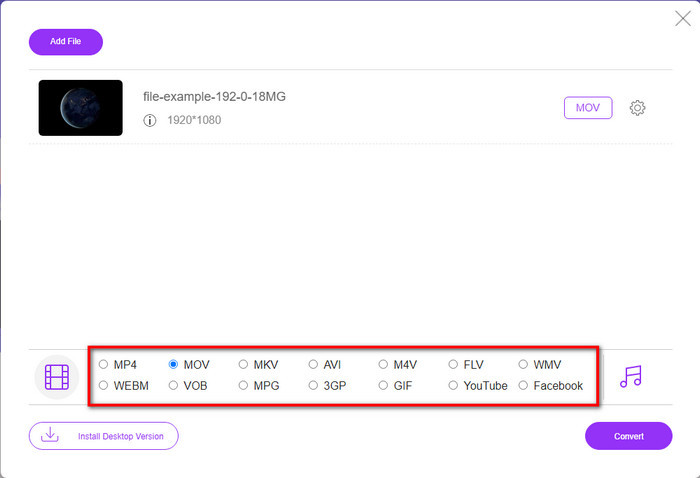
Stap 3. Selecteer het MOV-formaat onderaan, of elk ander formaat dat je als eindresultaat wilt.
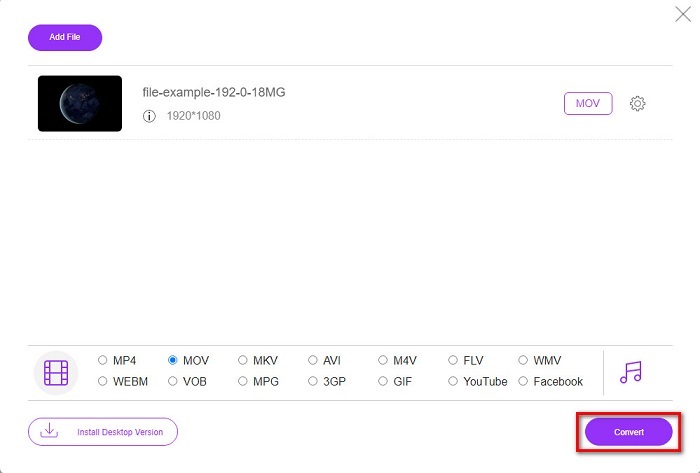
Stap 4. Vink Convert aan om te beginnen met het conversieproces.
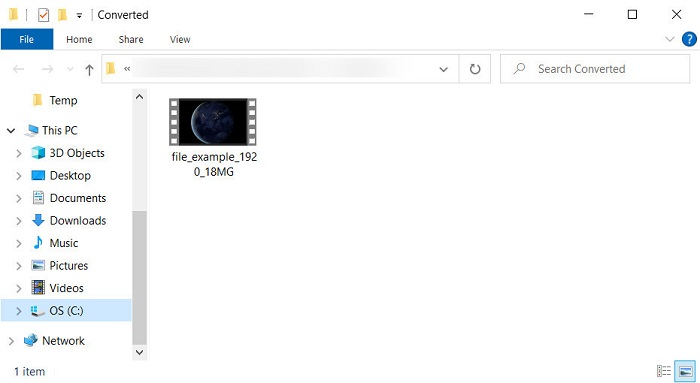
Stap 5. Na het converteren verschijnt Verkenner of Finder; het bestand dat je hebt geconverteerd staat daar. Klik erop om het te bekijken.
Voordelen
- Ondersteunt medium-range formaat en compatibel in alle webbrowsers.
- Gratis te gebruiken en aanmelden is niet nodig.
- Vervelende advertenties worden niet weergegeven in de webtool en tijdens het converteren.
Nadelen
- Internetafhankelijk.
- Ondersteunt geen batchconversie.
Deel 3. OGV versus MOV
OGV is een multimediabestandsindeling die meerdere codecs zoals Theora, Dirac of Daala gebruikt voor HTML 5-videotags. Maar als je het op HTML gebruikt, wordt het .ogg genoemd, ook al bevat het bestand video-inhoud. Omdat het op een website staat, is het een uitdaging om het op een standaard mediaspeler te spelen vanwege de unieke structuur van de formaten en meerdere codecs. Maar als u een uitstekende visuele en audio op uw website wilt toevoegen, is dit een must.
MOV is het formaat dat door Apple is gemaakt om meerdere tracks en mediagegevens op te slaan met behoud van de kwaliteit van de audio, video en ondertitels. U kunt ook mediatracks synchroniseren die zijn gecodeerd in MPEG-4 of met de andere codecs. Ook al is het formaat voor Quicktime, je kunt het nog steeds afspelen op Windows Media Player omdat het wordt ondersteund.
Om het allemaal af te ronden, als je een video en audio op je website wilt invoegen en gegevens sneller wilt overbrengen, ga dan met de OGV. Maar als je de video eerst wilt bewerken en op je Mac wilt afspelen, gebruik dan geen OGV omdat dit niet wordt ondersteund. Gebruik in plaats daarvan MOV omdat het compatibel is met alle Apple-apparaten, of het nu een Mac, iPhone, iPod of iPad is. Het converteren van uw OGV naar MOV is een must om compatibel te zijn met Quicktime player, iMovie of met de andere tools die u op Apple kunt vinden.
Deel 4. Veelgestelde vragen over OGV naar MOV-conversie
Kan ik OGV comprimeren?
Het comprimeren van het bestand is nodig, vooral als je het via e‑mail wilt versturen, omdat daar een beperking geldt voor het verzenden van mediabestanden. Als je de bestandsgrootte kleiner wilt maken, lees dan dit artikel om te weten hoe je OGV‑bestanden kunt comprimeren.
Ondersteunt VLC OGV-bestanden om af te spelen?
Hoewel het doel van dit formaat is om op HTML 5-tag te staan, kunt u nog steeds de VLC-speler gebruiken om de gedownloade OGV-bestanden te bekijken. Maar wist je dat er andere VLC-alternatieven zijn die je kunt gebruiken om dit formaat af te spelen? Als je wilt weten wat de mediaspeler-alternatieven zijn voor VLC, klik dan op deze link.
Verandert de kwaliteit van de OGV na conversie?
Na het converteren van het OGV-bestand moet de kwaliteit ervan hetzelfde blijven als het origineel. Maar je kunt de videosnelheid hoger of lager maken met behulp van de FVC Video Converter Ultimate. In tegenstelling tot andere converters die niet voorzien in het manipuleren van de kwaliteit naar uw wens. Je kunt het ook instellen op 1080 of 4k als je wilt voor een high-definition video.
Gevolgtrekking
Als gevolg van de bevindingen is het converteren van het gedownloade OGV-bestand een must voordat je kunt spelen of bewerken. Deze keer is het aan jou om te kiezen op welke manier je je OGV-bestanden wilt gebruiken en converteren naar MOV. Om een korte samenvatting te hebben, als je bestanden gratis en ongestoord online wilt converteren, ga dan met de FVC Free Video Converter Online. Als u echter nieuwe conversiehoogten wilt ervaren, moet u de FVC Video Converter Ultimate downloaden. Kies de beste converter die uw probleem met het OGV-formaat zal helpen.
-
 4 manieren om DivX gratis naar MOV te converteren [Online & Offline]
 Worstel je met de beperkingen van een DivX, of heb je niet de mediaspelers om toegang te krijgen tot video's in dit formaat? Als je het naar MOV-formaat wilt converteren, lees dan dit artikel verder om de hiaten op te vullen.
-
 Gratis M4V naar MOV Converter - Hoe M4V naar MOV te converteren?
 Als uw mediaspeler & #039; M4V niet ondersteunt, heeft u dan ooit moeite gehad om een film op uw iPhone te kijken? Het belangrijkste onderwerp van dit artikel is om het naar een MOV-videobestand te converteren.
-
 3 efficiënte methoden voor het converteren van MPEG naar MOV [offline en online]
 Ben je het zat om een mediaspeler te vinden om je MPEG-videoformaat af te spelen? Probeer het te converteren naar andere formaten die waarschijnlijk worden afgespeeld, vooral op Mac, bijvoorbeeld een MOV-videoformaat. Lees dit artikel om meer te weten.
