


 Video Converter Ultimate
 Scherm opnemer
 Videoreparatie
Beste MKV-metadata-editor om metadata op MKV toe te voegen/wijzigen/verwijderen
There isn't a wide variety of MKV metadata editors on the market because the MKV isn't much supported. But it doesn't mean that we can't edit the tags on our MKV files, so don't look gloomy. So for you to find out what is the best metadata editor that supports MKV, you can read the full scope of this article as we review different tools. What are you waiting for? Keep the ball on a roll because this won't last more than 7 minutes to have a tag editor.

Deel 1. Beste MKV Tag Editor Aanbevolen voor Windows en Mac: FVC Video Converter Ultimate
FVC Video Converter Ultimate is the most popular MKV metadata editor on Windows and Mac. This tool lives up to its name and expectation, so downloading the software to edit the metadata is the best choice you will make. Its powerful features and functions will easily handle the job as if it is a piece of cake. Furthermore, this tool supports other formats to upload, such as MP4, AVI, MOV, FLV, WMV, and the 1000+ media formats without re-encoding the file for a less hassle experience.
Bovendien? Stel dat u de tool downloadt. Je hebt de snelste tool voor het toevoegen van metadata op MKV en de mooiste GUI van de metadata-editor die de andere tool niet kan bieden. Als u geïnteresseerd bent in het gebruik van de editor, ga dan verder met het lezen van deel 2 terwijl we uitleggen hoe u de gegevens van MKV-bestanden kunt bewerken.
Deel 2. MKV-metadata bewerken met de aanbevolen MKV-metadata-editor
Volg de stappen dienovereenkomstig, te beginnen met het downloaden van de tool enzovoort. Dus laten we beginnen met het gebruik van de beste MKV-metadata-editor die u kunt downloaden op uw Windows of macOS.
Step 1. Tick the download button we present below; select which operating systems you are currently using. Install it immediately after you've downloaded the file, follow the installation process, and we promise that you wouldn't get wrong, then open it to proceed. Before we start, you'll need to get familiarized with the tool to have a smooth sailing process using the MKV tag editor.
Gratis downloadVoor Windows 7 of nieuwerVeilige download
Gratis downloadVoor MacOS 10.7 of nieuwerVeilige download
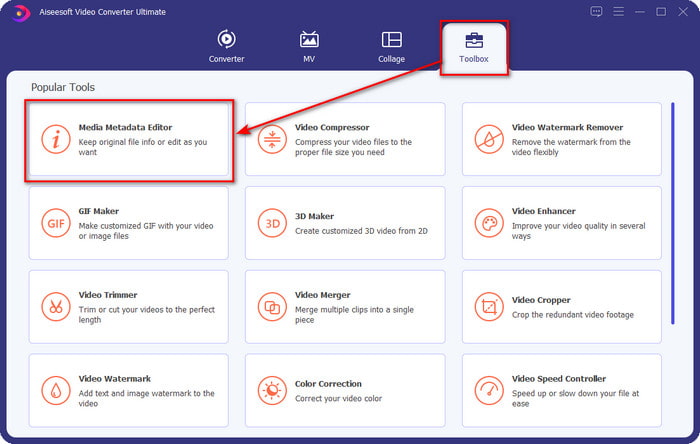
Step 2. Open the Toolbox, look for the Media Metadata Editor, and tap it to open.
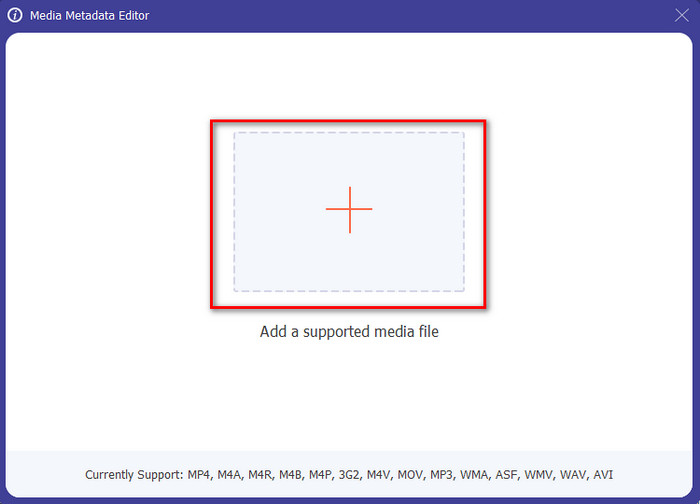
Step 3. Upload your MKV file by clicking the + icon, and a file folder will show, select the MKV file and press Open.
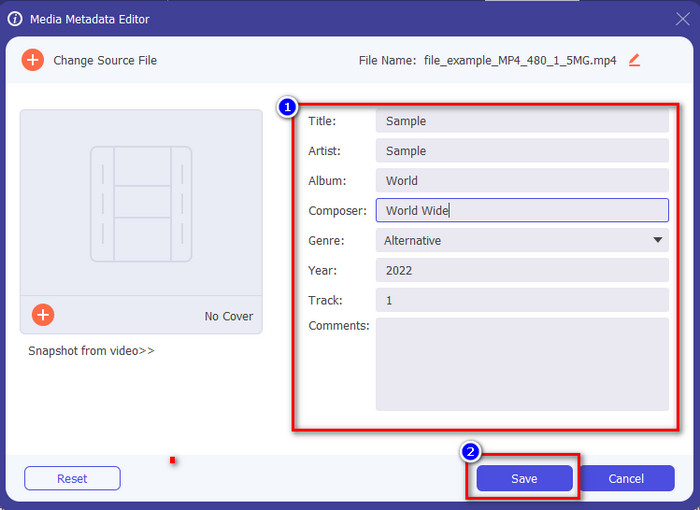
Step 4. Edit the metadata textbox; you can either fill them or remove them, do what you want to do with the metadata. After all of that, click Save to apply the change you've made earlier. With that, you have now edited the MKV tags.
Deel 3. 3 gratis MKV-tag-editors die u moet kennen Beschikbaar op Windows, Mac en online
GROUPDOCS.Metadata [gratis op het web]
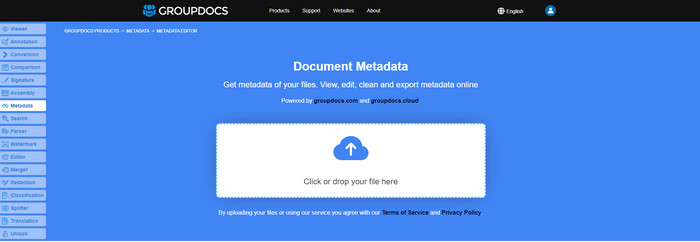
If you want to use an MKV metadata editor for free on the web, we highly suggest you try the GROUPDOCS.Metadata. It is the best choice to view and edit the metadata on your MKV as it works on all platforms, which means it is flexible and adaptable in any case. Moreover, it can easily manipulate the search and update of the tag according to the properties you will need, and if it needs to be removed, it will automatically do it. However, the tool can be challenging to handle on specific tasks, like updating the file's tags. So to get the hang of using the web tool, you will need to use it most of the time to improve your knowledge about the website functions and make it easier to handle.
Eigenschappen op Windows [Ingebouwde Editor op Windows]
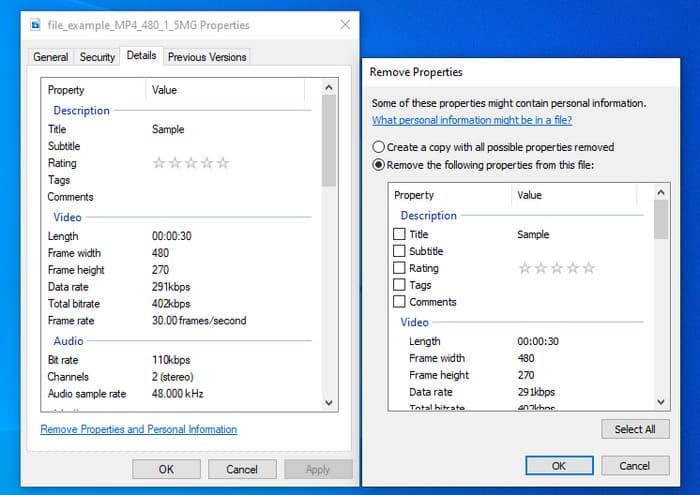
Wil je geen tool downloaden om MKV-metadata te wijzigen en wil je de ingebouwde functie op Windows gebruiken om de metadata te bewerken? Dan kunt u het beste de Eigenschappen op Windows gebruiken. Deze functie is beschikbaar op alle Windows-pc's en u hoeft geen tool of internet te downloaden om deze te gebruiken. Met deze gratis functie kunt u snel de metadata bekijken en bewerken. Er zijn echter enkele meldingen van ontbrekende tags nadat ze deze functie probeerden te gebruiken. Volgens gebruikers kan het automatisch de tags in uw bestand verwijderen. In plaats van deze functie te gebruiken, zijn ze van plan de juiste tool te downloaden om tijd te verspillen aan de tags die ze in hun MKV- of mediabestand opnemen. Maar als u wilt zien waar deze functie zich bevindt, drukt u gewoon met de rechtermuisknop op het bestand, voornamelijk onderaan.
iFlicks [Voor Mac]
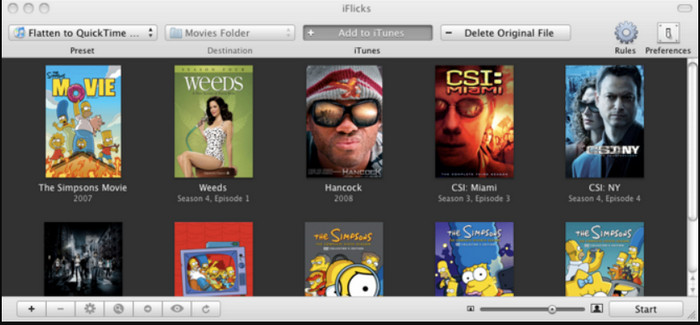
iFlicks kan u helpen de MKV om te zetten in een afspeelbaar formaat of u leren hoe u MKV-metadata op Mac kunt bewerken. Deze tool werkt goed samen met iTunes omdat het gedetailleerde metadata biedt over elk mediabestand. Met deze software kunt u verschillende informatie over uw bestand toevoegen, zoals slogan, genre, datum. beoordelingen, resoluties en andere worden online in de databases opgehaald. Bovendien verzamelt deze software metadata over waar je ze kunt downloaden en past ze automatisch toe op de bestanden. De gratis proefversies kunnen echter slechts zeven dagen duren, dus als u de tool opnieuw wilt gebruiken, moet u de abonnementskosten betalen.
Deel 4. Veelgestelde vragen over MKV Metadata Editor
Is MKV speelbaar op Mac?
MKV is playable on Mac if you use a third-party tool, such as the Blu-ray Player. But if you intentionally play the video on Quicktime, it won't work because it is unsupported. So, if you want to watch your MKV files on Mac, we highly recommend that you use a third-party Blu-ray Player, or you can convert the MKV format into MOV with the help of FVC Video Converter Ultimate.
Moet ik MKV converteren voordat ik de metadata kan bewerken?
Als de tool die u wilt gebruiken het uploaden van het MKV-formaat niet ondersteunt, raden we u aan het formaat eerst te converteren naar een compatibel formaat. Maar met de tol die we hierboven noemden, zou u het bestand niet naar een ondersteund formaat hoeven te converteren. Er zijn echter niet veel opties of hulpmiddelen om MKV-tags te bewerken, omdat het formaat onbekend is. Hoewel het moeilijk te zoeken is, hebben we ons best gedaan om alle editors te doorzoeken die u kunt gebruiken om de metadata die het MKV-formaat ondersteunen bij te werken of te wijzigen.
Waarom zijn MKV-bestanden te groot?
The main reason why MKV files are big is that they can contain multiple contents of a video, audio, and subtitle with different codecs and elements. And you've added metadata on that file, and the file size will become even enormous. So, the best way to save space while having an MKV file on your drive is to compress it without destroying the quality or losing the information on the file. Click this link to learn more about compressing video files.
Gevolgtrekking
Even though there is a limited MKV metadata editor on the market, there are still powerful tools you can depend on available on different platforms. As we reviewed different software you can use, it is always still on your hands; which do you prefer to use on changing the metadata of your MKV file. Indeed, it is a tough decision because all of the tools are awesome to use. If you haven't decided which you prefer, we suggest you use the FVC Video Converter Ultimate because it is the most flexible software and has more advanced features that anyone can use. By pressing the download button, you will attain the best tag editor you can have on Windows and Mac!
-
 5 eenvoudigste manieren om metadata in mediabestanden te verwijderen
 Hoe metagegevens verwijderen? Is het moeilijk om het te doen? Moet ik een gratis tool kopen of gebruiken om tags te verwijderen? Op al deze vragen vindt u in dit artikel een antwoord.
-
 5 bovenste MP4-metadata-editors [bijgewerkt 2022]
 Hoe kan ik mijn MP4-metadata wijzigen? De beste manier om de metadata van je MP4 te wijzigen, is door een tag-editor te gebruiken die het MP4-formaat ondersteunt, zoals het voorbeeld dat we hieronder opsommen.
-
 Top 5 gebruikerskeuze AVI-videotag-editors voor 2022
 Wat is de beste AVI-tag-editor die ik kan gebruiken? De markt van tag-editors voor AVI-bestanden is te breed. Daarom presenteren we vandaag de vijf meest gekozen redacteuren van het jaar 2022.
