


 Video Converter Ultimate
 Scherm opnemer
 Videoreparatie
 Beveiligde download
Top 4 gratis manieren om MTS naar MOV te converteren
Ik heb een aantal video's gemaakt met mijn Sony-camcorder die MTS-bestanden heeft geëxporteerd. Ik merk dat MTS niet kan worden ondersteund door mijn mediaspeler en iMovie. Ik gebruik een Mac en wil deze vastgelegde MTS-video's bewerken. Alle hulp? Is er een eenvoudige, vooral gratis manier om MTS naar MOV te converteren?
MTS is een high-definition videoformaat dat veel wordt gebruikt door camcorders van Sony en Panasonic, als bestandsextensie van AVCHD (Advanced Video Coding High Definition). Nadat je video hebt opgenomen met je digitale camera, krijg je waarschijnlijk een MTS‑bestand. Het ondersteunt 720p/1080i HD en kan een hogere videokwaliteit bieden. MTS is echter geen populair formaat dat door de meeste mediaspelers of editors wordt ondersteund.

Wanneer je MTS in iMovie wilt bewerken of het met een mediaspeler wilt afspelen, moet je MTS naar MOV converteren of naar MP4 voor een betere compatibiliteit. In dit artikel laten we je 4 gratis MTS-converters zien waarmee je MTS eenvoudig naar MOV kunt converteren.
Deel 1. Beste gratis manier om MTS naar MOV te converteren zonder kwaliteitsverlies
Er zijn op internet veel MTS-conversietools beschikbaar die je kunnen helpen MTS met hoge kwaliteit naar MOV te converteren. In dit eerste deel raden we je de beste gratis MTS-naar-MOV-conversiesoftware aan: Free MTS Converter.
Het is speciaal ontworpen om alle soorten conversies aan te kunnen. Het is compatibel met bijna alle video- en audioformaten zoals MP4, MOV, MKV, MTS, AVI, FLV, WMV, MP3, AAC, FLAC en meer. Je kunt het gratis downloaden en de volgende gids gebruiken om MTS gratis naar MOV te converteren.
Gratis downloadenVoor Windows 7 of nieuwerVeilige download
Gratis downloadenVoor macOS 10.7 of nieuwerVeilige download
Stap 1. Eerst moet u deze gratis MTS naar MOV-converter op uw computer installeren en uitvoeren. Het biedt zowel Windows- als Mac-versies die u kunt downloaden.
Stap 2. Klik op Add File(s) om de MTS-bestanden te importeren die je wilt converteren. Je kunt één of meerdere MTS-bestanden tegelijk converteren.
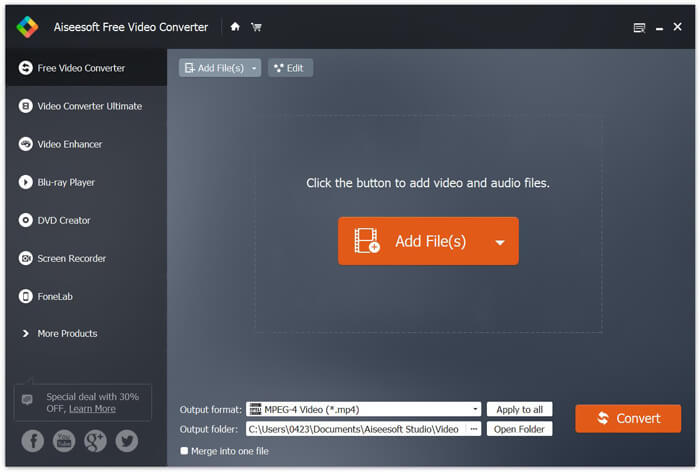
Stap 3. Selecteer MOV als doelformaat in de lijst met Output format. Klik vervolgens op de knop Convert om de conversie van MTS naar MOV te starten.
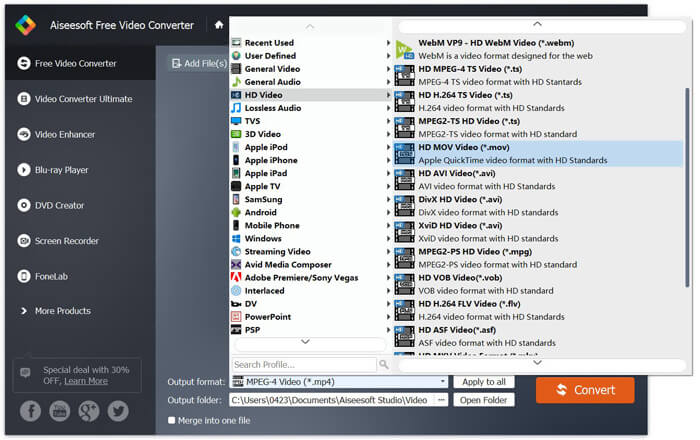
Zoals je hierboven kunt zien, heeft deze gratis MTS naar MOV-converter ook enkele basisbewerkingsfuncties. Voordat u de definitieve conversie uitvoert, kunt u ze gebruiken om uw MTS-bestand aan te passen. In vergelijking met online converters, kan deze gratis video-omzetter u een snellere conversiesnelheid en een hogere videokwaliteit bieden. Daarom maken we het onze eerste aanbeveling.
Deel 2. Gratis online converter helpt je video's gemakkelijk te converteren
Als je in Google zoekt hoe je MTS naar MOV kunt converteren, krijg je veel gratis online converters als resultaat. Hier stellen we je een gebruiksvriendelijke, gratis online MTS-naar-MOV-converter voor: FVC Free Online Video Converter. Zonder software te installeren kun je hiermee gratis alle populaire videoformaten naar MP4, AVI, MOV, enzovoort converteren. En je hoeft je nergens zorgen over te maken, want de conversie is veilig en stabiel. Er gaan geen gegevens verloren tijdens het conversieproces.
Stap 1. Open de link hierboven en klik op de knop Add Files to Convert. Download en installeer vóór de conversie eerst de FVC launcher. Dit duurt slechts enkele seconden.

Stap 2. Nadat je de launcher hebt geïnstalleerd en bijgewerkt, kies je de video die je wilt converteren. Kies vervolgens het gewenste formaat en klik op Convert.

Stap 3. Open de link hierboven en klik op de knop Add Files to Convert. Download en installeer vóór de conversie eerst de FVC launcher. Dit duurt slechts enkele seconden.
Deel 3. Hoe MTS gratis naar MOV te converteren met ZAMZAR
ZAMZAR is een van de meest populaire online video-conversiesoftware waarmee u gratis MTS naar MOV kunt converteren. Het is ontworpen met een beknopte interface en een eenvoudige conversiefunctie. U kunt de volgende gids gebruiken om de MTS-videoconversie uit te voeren.
Stap 1. Open uw browser en ga naar de officiële site van ZAMZAR. Hier kunt u direct naar de pagina https://www.zamzar.com/convert/mts-to-mov/ gaan. Hier mag je MTS direct naar MOV converteren zonder andere instellingen te doen.
Stap 2. Klik op de knop Bestanden toevoegen om het MTS-bestand te laden dat u wilt converteren. U kunt slepen en neerzetten voor het uploaden van het MTS-bestand. Een ding dat u moet weten, is dat u met deze gratis online MTS-converter alleen een MTS-bestand van minder dan 150 MB kunt converteren.
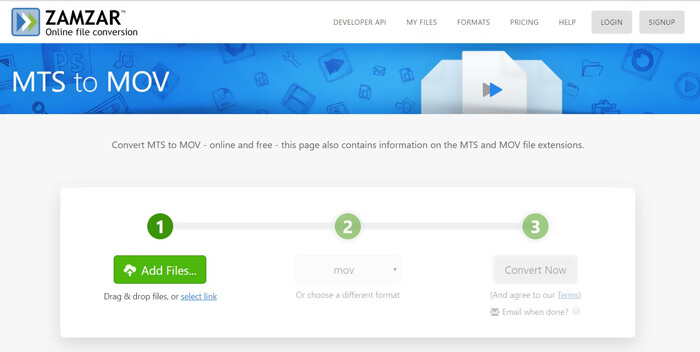
Stap 3. Nadat je hebt geüpload, kun je op de knop Convert Now klikken om gratis online met de conversie van MTS naar MOV te beginnen.
Deel 4. Online manier om MTS naar MOV te converteren met FreeConvert
FreeConvert is een andere populaire online videoconverter die MTS-naar-MOV-videoconversie gratis mogelijk maakt. Deze gratis MTS-naar-MOV-converter ondersteunt MTS en M2TS in hoge mate. Je kunt een MTS-bestand tot 1 GB uploaden. Bovendien kun je tot 20 MTS-bestanden tegelijk uploaden om te converteren. Volg nu de onderstaande stappen om je MTS naar MOV te converteren.
Stap 1. Ga eerst naar FreeConvert.com in je browser. Je kunt ook direct naar https://www.freeconvert.com/mts-to-mov gaan om te converteren.
Stap 2. Klik op de grote blauwe knop Choose MTS Files om het MTS-bestand te uploaden dat je naar MOV wilt converteren. Zoals hierboven vermeld, kun je hier één of meer MTS-bestanden voor de conversie uploaden.
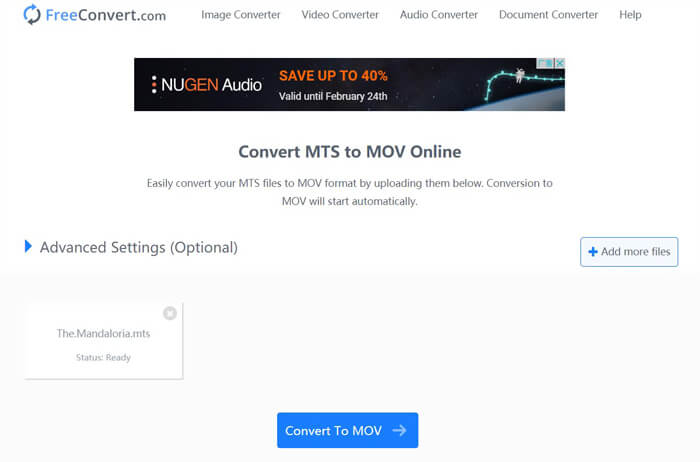
Stap 3. Klik op de knop Convert To MOV om het upload- en conversieproces te starten. Klik daarna op de knop Download om het geconverteerde bestand op je computer op te slaan.
Als je gratis online converters kiest om MTS naar MOV te converteren, heb je relatief meer tijd nodig voor het uploaden en converteren. Daarom kun je beter een MTS-bestand met een kleine bestandsgrootte met online conversiesoftware omzetten. Als je een groot MTS- of M2TS-videobestand wilt converteren, kun je beter vertrouwen op de sterk aanbevolen Free Video Converter.
-
 6 eenvoudige manieren om TS naar AVI / MKV / MOV / WMV op Windows / Mac te converteren
 Wilt u TS-bestanden snel naar AVI / MKV / MOV / WMV converteren? Dit artikel toont online en offline videoconverters met een complete gids. Misschien kun je hier de beste gratis TS-converter krijgen.
-
 MOV VS MP4 - Welke is beter
 MOV VS MP4, welke is beter? Dit bericht vertelt het verschil tussen MP4 en MOV, zodat je de betere keuze kunt krijgen om voor je videobestanden te gebruiken.
-
 Hoe u gratis lid kunt worden van MOV (QuickTime) -bestanden
 Het kan voor beginners moeilijk zijn om verschillende MOV-videoclips samen te voegen. Dus, is er een eenvoudige en snelle manier om MOV-bestanden te combineren? Als dat het geval is, hoe moet u het dan gebruiken? Dit bericht helpt je om deze antwoorden te krijgen.
