


 Video Converter Ultimate
 Scherm opnemer
 Videoreparatie
 Beveiligde download
Hoe M2TS naar iPad-compatibele formaten op Windows / Mac / online te converteren
Kun je M2TS rechtstreeks op een iPad afspelen? Helaas is het antwoord nee. M2TS is niet compatibel met de iPad. Als je M2TS‑bestanden op een iPad wilt afspelen, moet je een M2TS‑speler‑app op de iPad installeren of je kunt het formaat M2TS naar iPad converteren. Dit artikel kiest duidelijk voor de laatste oplossing. Lees gewoon verder en ontdek hoe je het videoformaat van M2TS naar iPad kunt wijzigen.

Deel 1: M2TS converteren naar iPad op Windows en Mac
Welke formaten ondersteunt iPad? Eigenlijk accepteert iPad de gangbare videoformaten H.264, MP4, M4V, MOV, MPEG-4 en M-JPEG. Om M2TS op iPad te zetten, moet u eerst M2TS naar iPad-videoformaat converteren.
Hoe M2TS gratis naar iPad op Windows te converteren
FVC Free M2TS Converter is een geheel gratis M2TS‑naar‑iPad batchconverter. Je kunt M2TS‑bestanden in batch naar iPad converteren met een 50x hogere snelheid dan bij gewone M2TS‑converters. Het maakt dus niet uit als je grote M2TS‑videobestanden in bulk naar iPad moet converteren. De gratis M2TS‑naar‑iPad‑converter kan dit perfect aan.
Bovendien kun je M2TS‑bestanden samenvoegen en thema’s toevoegen vóór de M2TS‑naar‑iPad‑conversie. In het realtime voorbeeldvenster zie je meteen het video‑effect. Kortom, je kunt AVCHD‑M2TS gratis in één keer bewerken en naar iPad converteren op Windows.

Gratis M2TS-converter
113.456+ downloads- Converteer M2TS naar iPad H.264, MP4, MOV, MPEG-4 en andere compatibele formaten.
- 50x hogere snelheid met ondersteuning voor batchconversie.
- Behoud het hoge kwaliteitsniveau tijdens het converteren naar iPad vanaf alle HD-camcorders.
- De M2TS naar iPad converter werkt met Windows 10/8/7 computer.
Gratis downloadenVoor Windows 7 of hogerVeilige download
Gratis downloadenVoor macOS 10.7 of hogerVeilige download
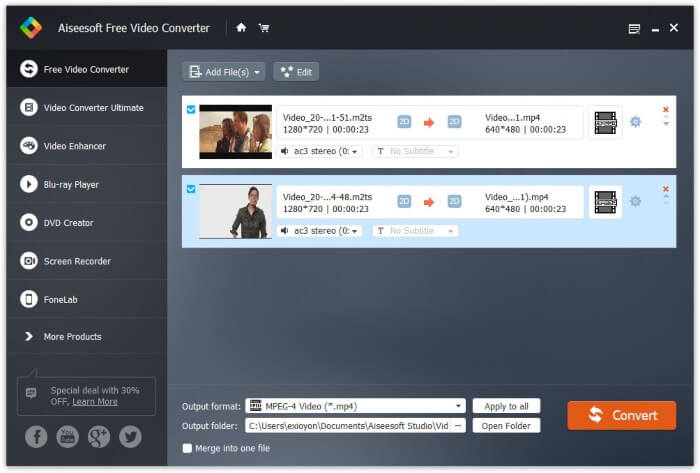
Stap 1: Download FVC Free M2TS Converter gratis, installeer en start het programma. Sleep M2TS‑bestanden naar de hoofdinterface.

Stap 2: Klap de lijst Uitvoerformaat onderaan open. Om M2TS naar iPad op Windows te converteren, kun je het uitvoerformaat direct kiezen uit de categorie Apple iPad.

Stap 3: Klik op het tandwielpictogram Instellingen om video‑encoder, framerate en meer aan te passen. Klik tot slot op Converteren om video van M2TS naar iPad‑formaat te converteren.
Hoe M2TS gratis naar iPad op Mac te converteren
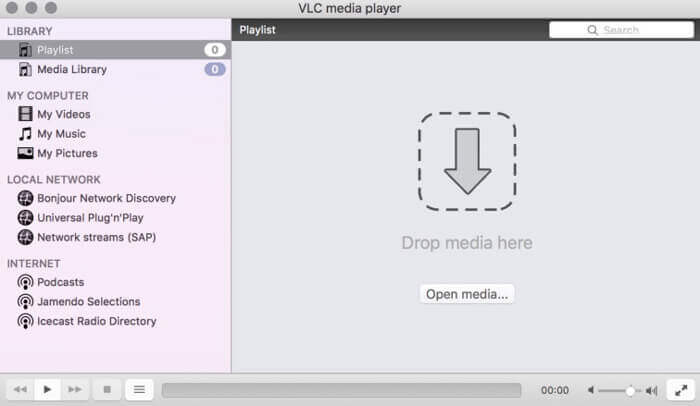
Als u M2TS-video gratis naar iPad op Mac wilt converteren, kan VLC Media Player uw goede keuze zijn. Het is een gratis en open source M2TS-speler en converter voor multiplatform.
Stap 1: Open VLC Media Player op Mac. Kies Converteren/Opslaan in de vervolgkeuzelijst Media.
Stap 2: Klik op Toevoegen om een M2TS‑bestand te importeren. Selecteer vervolgens het bestand en klik onderaan op Openen om door te gaan.
Stap 3: Klik onderaan op Converteren/Opslaan om naar het volgende venster te gaan.
Stap 4: Kies het iPad‑formaat in de vervolgkeuzelijst Profiel. Je kunt op het pictogram Extra ernaast klikken om de video‑instellingen aan te passen.
Stap 5: Klik op Start om het M2TS‑bestand via VLC op Mac naar iPad te converteren.
Deel 2: M2TS online naar iPad converteren
Voor mobiele gebruikers is het gebruik van een online M2TS naar iPad converter ook een goede keuze. U kunt een M2TS-bestand gratis naar iPad converteren zonder dat u het hoeft te downloaden, installeren of registreren.
Stap 1: Open een online M2TS‑naar‑iPad‑converter, zoals FVC Free Online Video Converter.

Stap 2: Download de FVC‑launcher door op Add Files to Convert te klikken en installeer deze.

Stap 3: Zoek het M2TS‑bestand op je computer dat je wilt converteren. En vergeet niet het formaat te kiezen.

Stap 4: Klik op Start Converting om M2TS gratis online naar iPad te converteren.
Deel 3: Veelgestelde vragen over het converteren van M2TS naar iPad
Wat gebeurt er dat er plotseling geen audio meer in M2TS-bestanden in iMovie zit?
M2TS wordt niet standaard ondersteund door Apple-apparaten. U moet M2TS naar Mac-indeling converteren om het probleem op te lossen.
Hoe open ik M2TS-bestanden op iPhone en iPad?
AVCHD M2TS is niet compatibel met iOS-apparaten. Als u erop staat M2TS-video's op iPad af te spelen, kunt u de VLC Media Player-app gebruiken om video af te spelen.
Is er een goede videospeler-app voor iPad?
U kunt op de iPad een groter scherm krijgen dan op de iPhone. Dus de video-kijkervaring zal ook beter zijn. De aanbevolen videospelers zijn PlayerXtreme Media Player, KMPlayer, VLC, AirPlayer en meer. U kunt er een kiezen om de videobediening flexibel te krijgen.
Dat is alles om M2TS naar iPad te converteren met online en offline tools. Deze M2TS‑videoconverters zijn gratis en veilig in gebruik. Ongeacht hoeveel M2TS‑bestanden je naar met iPad compatibele formaten wilt converteren, je kunt hier de hoogste snelheid behalen.
-
 Hoe M2TS naar MP4 te converteren zonder de kwaliteit te verminderen
 Wilt u de video converteren van HD-camcorder naar gewone MP4? Hier zijn 4 eenvoudige en gratis manieren om het M2TS-bestand te wijzigen in MP4 op Windows en Mac.
-
 Hoe M2TS naar MKV te converteren zonder kwaliteitsverlies
 Wilt u M2TS naar MKV converteren met behoud van de originele kwaliteit? Dit bericht toont je gratis en online methoden om M2TS zonder verlies naar MKV te veranderen.
-
 Wat is het verschil tussen MTS en M2TS
 Wat is een MTS- of M2TS-bestand? Wat is het verschil tussen M2TS en MTS? Hoe kan ik het door de camcorder opgenomen MTS- of M2TS-bestand bekijken? Vind alle antwoorden in dit bericht.
