


 Video Converter Ultimate
 Scherm opnemer
 Videoreparatie
 Beveiligde download
Hoe M2TS naar MKV te converteren zonder kwaliteitsverlies
“Ik ben op zoek naar een goede omvormer. Ik heb het nodig om mijn m2ts-bestanden naar MKV te converteren, maar ik wil de ondertitelopties en audio-opties behouden. Deze bestanden zijn ongeveer 40GB en ik wil ze converteren naar kleinere bestanden, maar zonder kwaliteitsverlies. Is er een aanbevolen converter? "
M2TS-bestanden nemen doorgaans veel opslagruimte in, daarom wil je M2TS misschien omzetten naar MKV om ze op bepaalde mediaspelers af te spelen. In dit artikel laten we je de eenvoudigste manieren zien om een M2TS-bestand naar MKV te converteren zonder kwaliteitsverlies op Windows en Mac.

Deel 1. Beste manier om M2TS gratis naar MKV te converteren
Hoewel er veel converters op de markt zijn, zijn er maar weinig gratis M2TS-naar-MKV-converters die echt goed werken. Toch kun je een blik werpen op deze FVC Free M2TS Converter. Het is een alles-in-één M2TS-converter en -editor waarmee je M2TS-bestanden kunt converteren naar MKV, MP4, AVI, MOV, MP3, enzovoort, voor weergave op verschillende populaire mediaspelers.

Gratis M2TS-converter
112.345+ downloads- Converteer M2TS naar MKV, MP4, AVI, TS, VOB, WMV, FLV, SWF, etc.
- Converteer M2TS-bestanden naar door apparaten en media ondersteunde bestandsindelingen.
- Bewerk M2TS-bestanden zoals samenvoegen, comprimeren, thema toevoegen en 3D-effecten inschakelen.
- Volledig compatibel met Windows 10/8/7 / Vista / XP (SP2 of hoger).
Gratis downloadenVoor Windows 7 of hogerVeilige download
Gratis downloadenVoor macOS 10.7 of hogerVeilige download
Stap 1. Voeg M2TS-bestand toe
Na het downloaden van deze gratis M2TS-converter, installeert en start u deze op uw Windows-computer. Klik op de knop "Bestand (en) toevoegen" om de M2TS-bestanden te importeren. Als u meerdere M2TS-bestanden heeft om mee te doen, kunt u onderaan de optie "Samenvoegen tot één bestand" aanvinken.

Stap 2. Bewerk het M2TS-bestand
Klik op de knop "Bewerken" bovenaan de interface, en u kunt een thema toevoegen, titel, auteur, tijd en provider bij het openen en eindigen.

Stap 3. Converteer M2TS naar MKV
Klik op de vervolgkeuzeknop onder "Uitvoerformaat" om MKV als het uitvoerformaat te selecteren. U kunt ook de bestemmingsmap instellen. Klik daarna op de knop "Converteren" om gratis M2TS naar MKV te converteren.

Deel 2. Exporteer MKV van M2TS online gratis
Wil je een gratis online tool vinden om snel M2TS naar MKV te converteren? FVC Free Online Video Converter biedt een gratis platform waarop je eenvoudig een M2TS-bestand naar MKV kunt omzetten. Bovendien kun je meerdere M2TS-bestanden in één keer naar MKV-formaat converteren. Bekijk de gedetailleerde stappen om online gratis een M2TS-bestand naar MKV te converteren.
Stap 1. Ga naar de website door op de link hierboven te klikken. Zoek Add Files to Convert en download en installeer de FVC launcher.

Stap 2. Na installatie en update voeg je de video toe en kies je het formaat om te Converteren.

Stap 3. Voer de map in of open de map waarin je je video wilt opslaan. Wacht even en je MKV-video is gereed.
Deel 3. Transformeer M2TS naar MKV met FreeConvert.com
Of u kunt gewoon FreeConvert.com proberen, een gratis online hulpmiddel voor het converteren van bestanden om uw bestanden (afbeelding, video, document en muziek) van het ene formaat naar het andere te converteren.
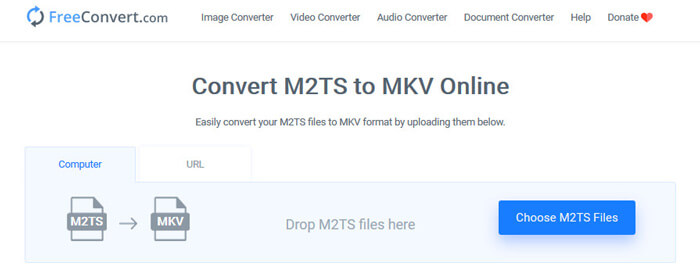
Stap 1. Sleep het M2TS-bestand naar het uploadgebied. Je kunt ook op de knop “Choose M2TS Files” klikken om het M2TS-bestand te importeren.
Stap 2. In Advanced Settings kun je de videocodec, schermgrootte, beeldverhouding, framesnelheid, videorichting, audiocodec en bitrate aanpassen.
Stap 3. Klik op de knop “Convert To MKV” om de M2TS naar MKV te converteren. Dit duurt enkele seconden. Klik vervolgens op de knop “DOWNLOAD MKV” om het MKV-bestand op de computer op te slaan.
Deel 4. Converteer M2TS naar MKV met HandBrake
HandBrake is een gratis en open source M2TS naar MKV-converter die video van bijna alle videoformaten converteert. Het ondersteunt veel besturingssystemen zoals Windows, macOS en Linux OS. Volg onze stapsgewijze handleiding om M2TS-bestanden naar MKV te converteren met HandBrake.
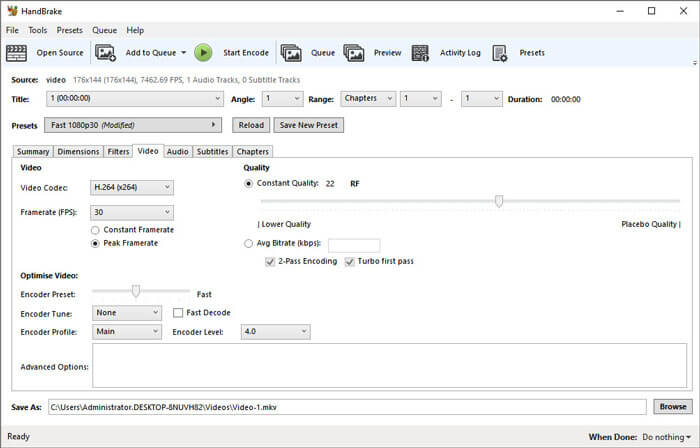
Stap 1. Download HandBrake op je computer. Klik op de knop “Open Source” om het M2TS-bestand in het programma te laden.
Stap 2. Kies in het tabblad Summary “MKV” als uitvoerformaat. Je kunt videofilters, codec, kwaliteit, bitrate, ondertitels en meer aanpassen in andere tabbladen zoals Dimensions, Filters, Video, Audio, Subtitles, Chapters.
Stap 3. Klik op de knop “Start Encode” om te beginnen met het converteren van M2TS-bestanden naar MKV.
Deel 5. Verander M2TS in MKV met MakeMKV
MakeMKV is de oplossing met één klik om M2TS gratis naar MKV te converteren. U kunt MakeMKV gebruiken om M2TS naar MKV te converteren op Windows 10 en Mac.
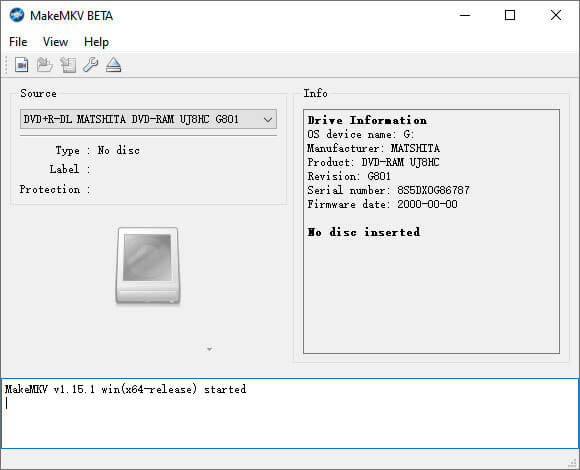
Stap 1. Open MakeMKV op je computer. Kies “Open Files” in de lijst “File” om het M2TS-bestand aan het programma toe te voegen.
Stap 2. Selecteer het M2TS-bestand dat je hebt toegevoegd en klik op het map-pictogram om de uitvoermap te kiezen.
Stap 3. Klik op de knop “Make MKV” om gratis te beginnen met het converteren van het M2TS-bestand naar MKV.
Deel 6. Veelgestelde vragen over het converteren van M2TS naar MKV
Wat is video in M2TS-formaat?
M2TS is een afkorting voor de BDAV (Blu-ray Disc Audio-Video) MPEG-2 Transport Stream. Het is een bestandscontainer-bestandsformaat voor Blu-ray en AVCHD (Advanced Video Coding High Definition), dat video, audio en andere streams bevat.
Kan Plex M2TS-bestanden afspelen?
Nee. Plex Media Server kan geen M2TS-bestanden afspelen omdat het een zeer beperkte externe codec-ondersteuning heeft. Als u M2TS-bestanden met Plex wilt afspelen, kunt u het M2TS-bestand converteren naar een door Plex ondersteund formaat met FVC Free M2TS Converter.
Ondersteunt YouTube M2TS en MTS?
Nee. YouTube ondersteunt geen M2TS- of MTS-bestanden. U moet het M2TS- of MTS-bestand converteren naar het ondersteunde bestandsformaat zoals MP4 en ze vervolgens uploaden naar YouTube.
Gevolgtrekking
Dat zijn alle oplossingen die we hebben om M2TS naar MKV te converteren op Windows en Mac. FVC Free Video Converter garandeert je een verliesvrije uitvoer van MKV-bestanden. Je kunt de M2TS-video’s van alle HD-camcorders eenvoudig naar andere videoformaten converteren zonder kwaliteitsverlies. Het is tijd om het eens te proberen.
-
 Wat is een MTS-bestand en hoe een MTS-bestand te converteren / afspelen?
 Wat is een MTS-bestand en hoe kan ik het afspelen? Dit bericht geeft je een basisinstructie van het MTS-bestand. Bovendien kunt u op 3 eenvoudige manieren een MTS-bestand converteren naar MP4, MOV, AVI, MPEG, MTS, MKV of andere formaten met hoge kwaliteit.
-
 2 eenvoudige manieren om gratis MTS naar MP3 te converteren
 Heeft u de behoefte om MP3-audio uit het MTS-bestand te extraheren, maar weet u niet hoe? Wat is de beste MTS naar MP3-converter? Dit bericht deelt 2 eenvoudige manieren om u te helpen MTS / M2TS naar MP3 te converteren met een hoge audiokwaliteit.
-
 De herziening van Snagit en zijn beste alternatief
 Wat is het beste alternatief voor Snagit? Is er een tool voor het vastleggen van schermen zoals Snagit? Dit bericht behandelt Snagit en deelt het beste alternatief voor Snagit om het scherm vast te leggen.
