


 Video Converter Ultimate
 Scherm opnemer
 Videoreparatie
Hoe MTS snel gratis naar MKV te converteren
Kortom, voor het MPEG Transportsysteem is het MTS‑bestand een standaard bestandsindeling die 720p‑ en 1080i‑video’s ondersteunt. De uitvoerbestandsgrootte van dit formaat kan echter zeer groot zijn. Daarom moet je het converteren naar een bestandsformaat dat breed wordt ondersteund en een kleinere bestandsgrootte heeft, zoals het MKV‑formaat. En in dit artikel laten we de beste manieren zien om MTS gratis naar MKV te converteren.

Deel 1. 2 Beste gratis online tools die MTS naar MKV converteren
FVC gratis video-omzetter online
Mensen gebruiken tegenwoordig liever een online converter in plaats van een softwareconverter te installeren. FVC Free Online Video Converter is een online converter waarmee je bestanden zoals MTS kunt converteren naar MKV, MP4, WMV, AVI, FLV en meer. Ondanks dat het een gratis online converter is, gaat dit niet ten koste van de kwaliteit van je bestand tijdens het converteren. Bovendien heeft het functies waarmee je de resolutie en de video‑ of audiobitrate kunt bewerken.
Hier zijn de stappen voor het converteren van uw bestand MTS naar MKV met behulp van deze gratis online tool:
Stap 1. Om deze converter te gebruiken, klik je op deze link om naar hun webpagina te gaan.
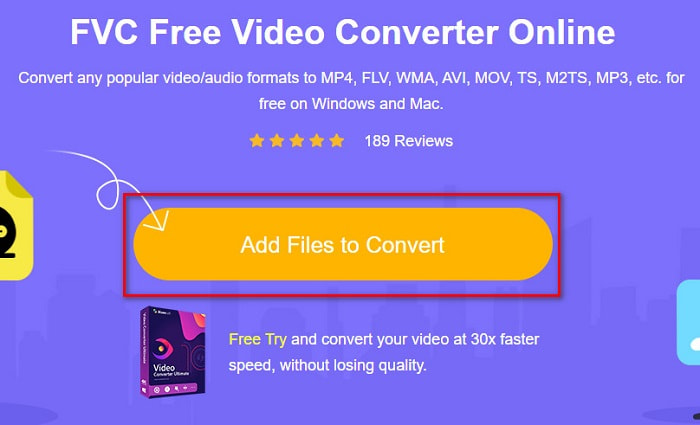
Stap 2. Klik vervolgens op de knop Add Files to Convert om de launcher te downloaden. Nadat de launcher is gedownload, verschijnen je computerbestanden; kies dan je MTS-bestand om te uploaden.
Stap 3. Nadat je je MTS‑bestand hebt gekozen, klik je op het MKV-bestand onder in de interface van de software.
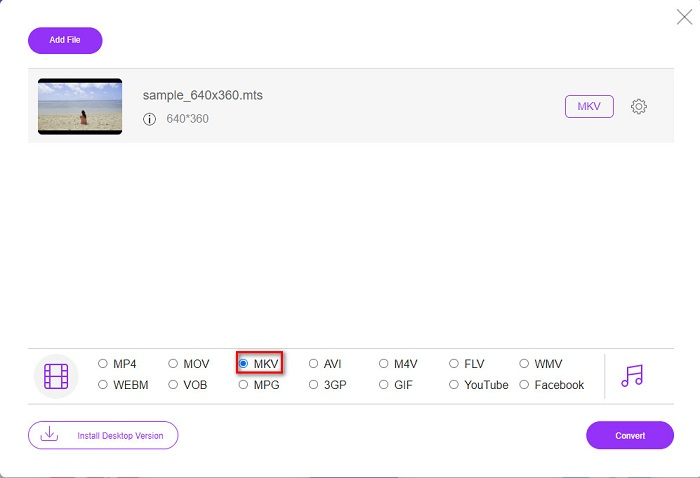
Stap 4. Klik ten slotte op de knop Convert om je MTS‑bestand naar een MKV‑bestand te converteren. Wacht vervolgens tot je bestand is geconverteerd.
Door deze eenvoudige stappen te volgen, kunt u gratis en online MTS naar MKV converteren.
AnyConv
Een andere online converter die je kunt gebruiken om bestanden te converteren zonder kwaliteitsverlies is de AnyConv File Converter. Deze converter zet ook talloze bestandsformaten om, waaronder MTS naar MKV, AVI, MP4, MOV, MPEG, enzovoort. Hij heeft echter slechts beperkte functies. Je kunt de resolutie van je bestand niet bewerken of wijzigen. Het is ook webgebaseerd; daarom kun je te maken krijgen met een trage conversie. Desondanks wordt hij door veel mensen gebruikt vanwege het gebruiksgemak.
Stappen voor het gebruik van AnyConv File Converter:
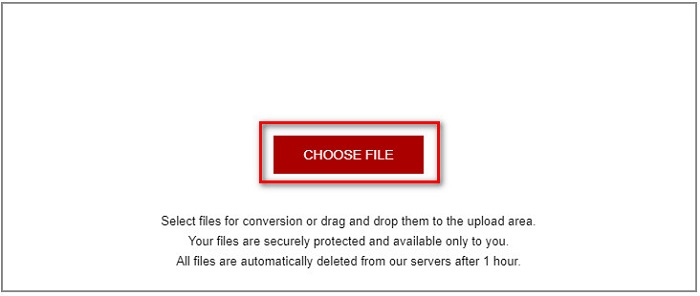
Stap 1. Zoek in je browser naar AnyConv File Converter. Nadat je hun website hebt geopend, klik je op de knop Choose Files om je MTS‑bestand in je computerbestanden te selecteren.
Stap 2. Nadat je je MTS‑bestand hebt geselecteerd, klik je op de drop‑down-knop en kies je het MKV-bestandsformaat.
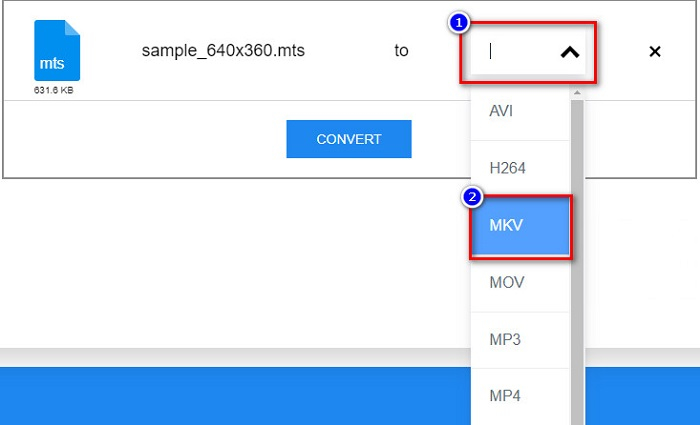
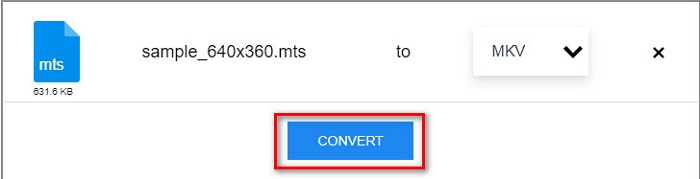
Stap 3. Klik tot slot op de knop Convert om te beginnen met het converteren van je MTS‑bestand naar MKV.
Deel 2. Converteer MTS zonder verlies naar MKV op Windows 10/11
Als u op zoek bent naar een converter voor uw Windows 10/11, dan is FVC Video Converter Ultimate de beste tool voor u. Het ondersteunt verschillende bestandsindelingen en kan MTS converteren naar MKV, MP4, WebM, VOB, MPG, AVI en nog veel meer. Bovendien heeft deze converter een functie waarmee je GIF's kunt maken en zelfs een 3D-video kunt maken. Je kunt MTS ook snel en moeiteloos converteren naar MKV zonder de kwaliteit van je bestand te verliezen.

FVC Video Converter Ultimate
5.689.200+ downloads- U kunt uw bestanden batchgewijs converteren met deze converter.
- Hiermee kunt u verschillende bestandsindelingen converteren, zoals MTS, MKV, MP4, WMV, enz.
- Heeft een functie waarmee u een ultrasnelle conversie kunt uitvoeren.
Gratis downloadVoor Windows 7 of nieuwerVeilige download
Gratis downloadVoor MacOS 10.7 of nieuwerVeilige download
Hier leest u hoe u FVC Video Converter Ultimate met deze eenvoudige stappen kunt gebruiken:
Stap 1. Download eerst de app door op de knop Download hieronder voor Windows te klikken. Voer daarna de softwareapplicatie uit om door te gaan naar de volgende stap.
Gratis downloadVoor Windows 7 of nieuwerVeilige download
Gratis downloadVoor MacOS 10.7 of nieuwerVeilige download
Stap 2. Nadat je de converter hebt geopend, klik je op de knop Add Files, of je kunt je bestand slepen en neerzetten op de knop met het +-teken om je MTS‑bestand te uploaden. Vervolgens wordt je bestand aan de lijst toegevoegd.
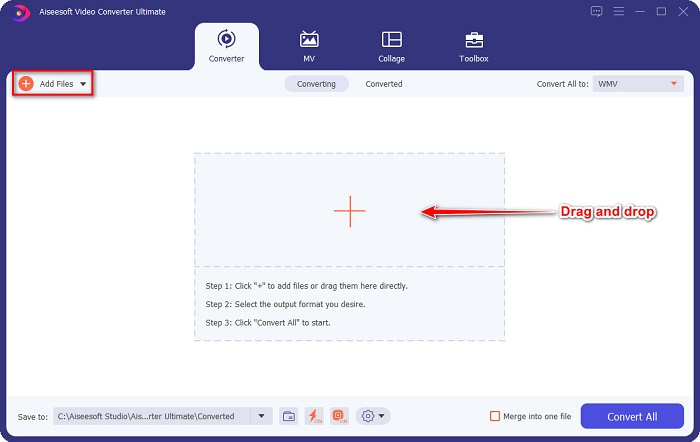
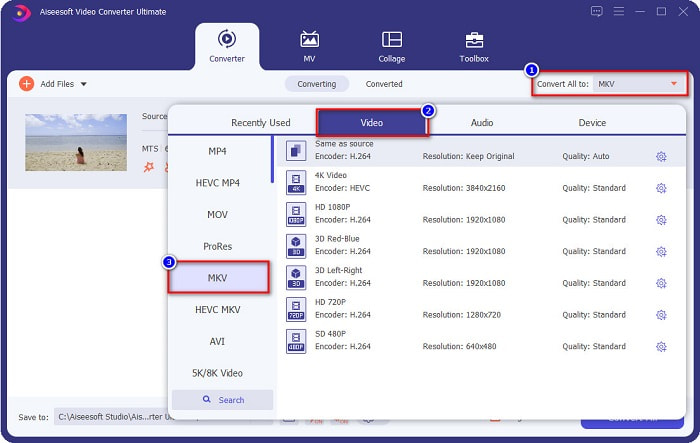
Stap 3. Om het bestandsformaat te kiezen waarnaar je je MTS‑bestand wilt converteren, klik je op de knop Convert All to en selecteer je het MKV-bestand.
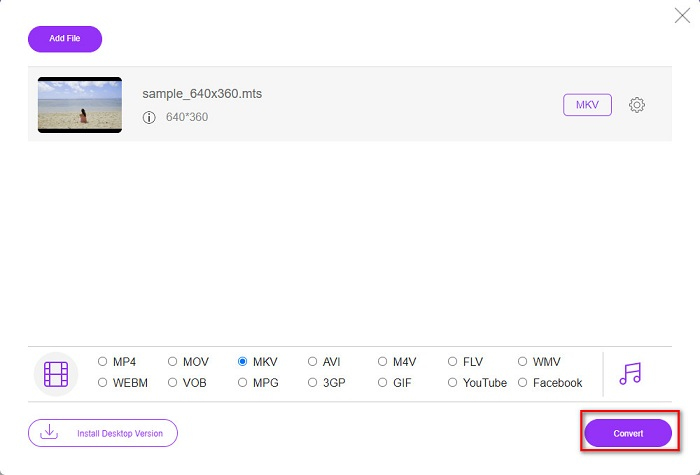
Stap 4. Klik tot besluit op de knop Convert All om te beginnen met het converteren van je MTS‑bestand naar een MKV‑bestand. En voilà! In slechts enkele seconden is je geconverteerde bestand gereed.
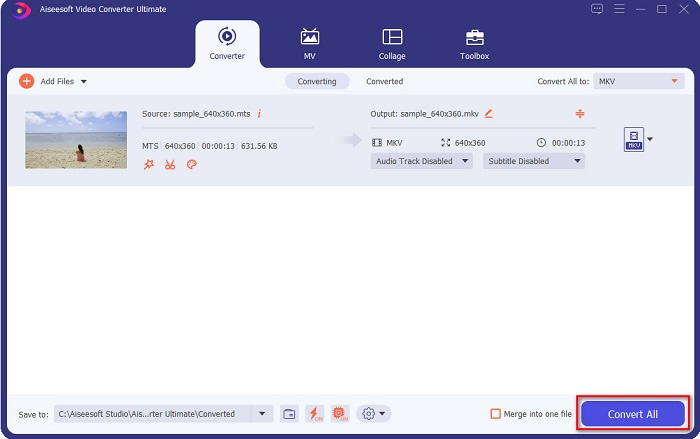
Door deze eenvoudige stappen te volgen, kunt u MTS zo snel als 1-2-3 naar MKV converteren!
Deel 3. Waarom MTS-bestand converteren naar MKV-bestandsindeling?
MTS-bestand, kortweg MPEG Transport System, is een standaardbestandsformaat dat voornamelijk wordt gebruikt door SONY- en Panasonic HD-camcorders. Het is een bestand dat MPEG4/H.264-videocompressie gebruikt. Bovendien ondersteunt het 720p- en 1080i-video's, die andere bestandsindelingen niet ondersteunen. Sinds Panasonic en Sony dit bestand hebben ontwikkeld, wordt er gebruik gemaakt van een Advanced Audio Coding File met betrekking tot het AVCHD-bestandsformaat. Aan de andere kant is MKV-bestand of Matroska een standaard bestandsformaat dat veel audio- en videocodecs ondersteunt. Het wordt meestal gebruikt om korte videoclips en films op te slaan.
Bovendien ondersteunt het ook ondertiteltracks. Dat is de reden waarom veel mensen die fan zijn dit bestandsformaat gebruiken. Dus waarom MTS naar MKV converteren? Simpelweg omdat de bestandsgrootte van MKV kleiner is dan het MTS-bestandsformaat bevat.
Deel 4. Vergelijkingstabel over de online en offline converters
| KENMERKEN | FVC gratis online converter | AnyConv-bestandsconverter | FVC Video Converter Ultimate |
| Conversiesnelheid | Normaal | Normaal | Erg snel |
| Bestandsindelingen om te converteren | MKV, MP4, MTS, MPG, MOV, AVI, WMV, FLV en andere bestandsindelingen | MTS, MKV, AVI, MOV, MP4, MPEG en andere formaten | Ondersteunt meer dan 1000 bestandsformaten |
| Functies bewerken | – | – |  |
| Batchconversie | – | – | |
| Internetverbinding | Nodig zijn | Nodig zijn | Niet nodig |
Deel 5. Veelgestelde vragen over het converteren van MTS naar MKV
Kun je de bestandsgrootte van een MTS-bestand verkleinen?
Ja. Je kunt de bestandsgrootte van een MTS‑bestand comprimeren met behulp van een compressietool die online en offline beschikbaar is, zoals Free Video Compressor.
Waar kun je MKV-bestandsindelingen afspelen?
Je kunt MKV‑bestanden afspelen in Windows Media Player, VLC Media Player, DivX Player, MX Player en meer. Je kunt ook mediacodecs gebruiken om mediabestanden te encoderen en decoderen. Of je kunt je MKV‑bestand converteren naar het MP4‑bestandsformaat, een veelgebruikt formaat.
Kun je MTS naar MKV converteren in Handbrake?
Ja. Met deze converter kunt u ook uw MTS-bestand converteren naar MKV-bestandsindeling. Het ondersteunt echter niet meerdere bestanden en kan ze niet combineren tot één.
Gevolgtrekking
Er zijn tegenwoordig veel online en offline converters op de markt beschikbaar. En de converters die we hierboven hebben genoemd, behoren tot de bestandsconverters die door veel gebruikers worden ingezet en bewezen hebben een fantastische keuze te zijn. Bovendien hebben deze converters verschillende functies en mogelijkheden om MTS gratis online naar MKV te converteren. Maar als je op zoek bent naar een handige en efficiënte converter, raden we aan om FVC Video Converter Ultimate te gebruiken. Deze razendsnelle converter zal je verwachtingen niet teleurstellen. Dus als je klaar bent om bestanden te converteren, download hem dan nu!
-
 [Gratis en online] 6 manieren om MTS in hoge kwaliteit naar MP4 te converteren
 Weet u niet hoe u een MTS-bestand naar MP4 moet converteren? In deze gids vindt u 6 gratis en eenvoudige manieren om het MTS-formaat te wijzigen naar MP4 op Windows of Mac zonder kwaliteitsverlies.
-
 Hoe MTS naar WMV te converteren zonder de kwaliteit te verliezen
 Heb je moeite om naar je favoriete programma te kijken omdat je mediaspeler het MTS-videoformaat niet ondersteunt? Probeer het naar WMV te converteren met deze nieuwe en beste converters in dit artikel.
-
 Hoe MTS naar MP3 te converteren zonder kwaliteitsverlies (AVCHD naar MP3)
 Heeft u de behoefte om MP3-audio uit het MTS-bestand te extraheren, maar weet u niet hoe? Wat is de beste MTS naar MP3-converter? Dit bericht deelt 2 eenvoudige manieren om u te helpen MTS / M2TS naar MP3 te converteren met een hoge audiokwaliteit.
