


 Video Converter Ultimate
 Scherm opnemer
 Videoreparatie
Leer MTS op verschillende manieren naar WMV converteren

Deel 1. Beste tool die MTS online naar WMV converteert
De meesten van ons hebben liever geen gedoe met ongemakken, en daarom willen we geen software‑converter installeren. Zij zijn op zoek naar een online converter die hun bestandstypen kan omzetten. FVC Free Video Converter Online is een volledig gratis online videoconverter. Hoewel dit programma gratis te gebruiken is, hoef je je geen zorgen te maken over de kwaliteit, want FVC Free Video Converter doet tijdens het converteren geen concessies aan de kwaliteit.
Stap 1: Klik om te beginnen op deze link; je wordt dan doorgestuurd naar de website. Klik daar op de knop Add Files to Convert om de launcher te downloaden; daarna moet je de bestanden uploaden die je wilt converteren.
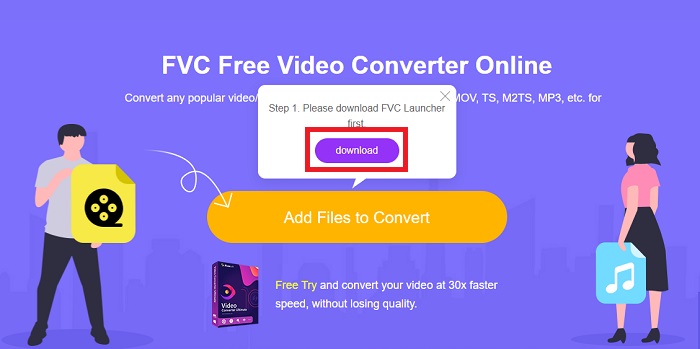
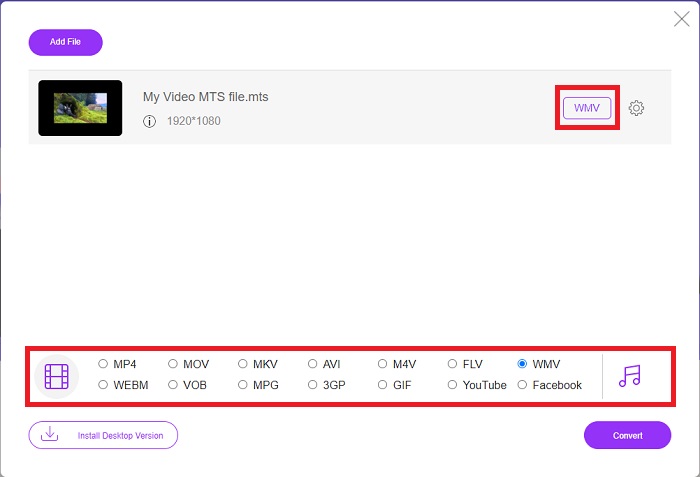
Stap 2: Daarna kun je opnieuw op de knop klikken om het videobestand te uploaden. Onderaan zie je alle aangeboden formaten; kies daaruit WMV.
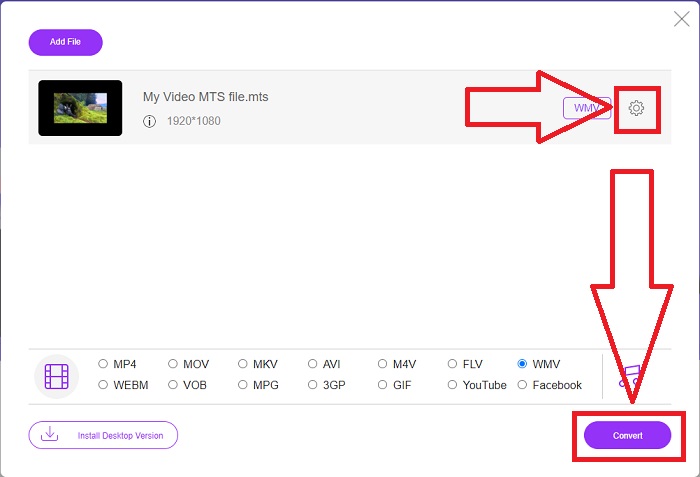
Stap 3: De extra opties zijn nog steeds beschikbaar. Klik op het tandwiel‑icoon; vervolgens zie je alle aanpassingen die je voor je video kunt doen. Klik gewoon op OK zodra je een formaat hebt gekozen om de wijzigingen op te slaan, en klik op Convert om de conversie eindelijk te starten.
Deel 2. Hoe MTS naar WMV te converteren met Best Converter Offline
Bij het kiezen van een converter moeten we letten op eenvoud, omdat we geen dure converter willen die moeilijk te gebruiken is. Daarom stellen we met plezier de Video Converter Ultimate en de gebruikersinterface daarvan aan je voor. Deze converter heeft de meest eenvoudige interface en omdat deze zo overzichtelijk is, is hij ook het makkelijkst te gebruiken. Daarnaast kun je snel je bestanden toevoegen en de ondersteunde bestandstypen bekijken. Er zijn hier nog meer functies waarop je kunt vertrouwen om je bewerkingservaring nog gebruiksvriendelijker te maken. Als je dit alles zelf wilt uitproberen, volg dan deze eenvoudige stappen:
Stap 1: Eerst moet je de software zelf installeren. Download hiervoor het .exe‑bestand door op de knop Free Download hieronder te klikken voor Windows of Mac. Wacht tot het downloaden is voltooid en open het bestand om het installatieproces te starten. Klik op Start Now en start de software vervolgens.
Gratis downloadVoor Windows 7 of nieuwerVeilige download
Gratis downloadVoor MacOS 10.7 of nieuwerVeilige download
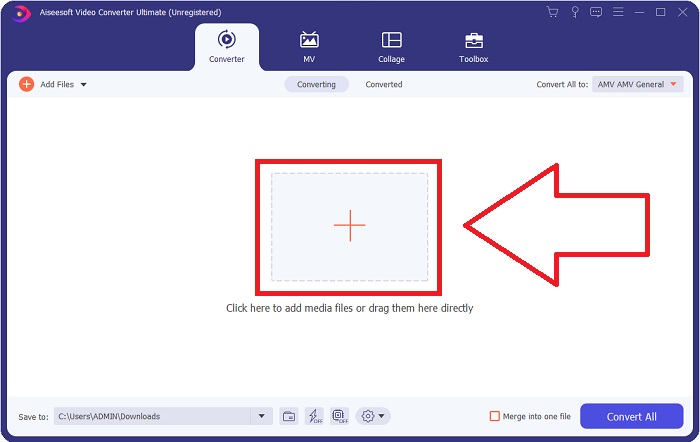
Stap 2: Zodra het programma geopend is, verschijnt er een interface met een +-knop in het midden. Klik daarop om het MTS‑videobestand dat je wilt converteren te uploaden, of sleep het bestand er eenvoudig naartoe voor snel gebruik.
Stap 3: Als het proces is gelukt en het bestand in de interface verschijnt, zie je rechts het huidige formaat van je video. Klik op de pijl‑omlaag en alle beschikbare formaten worden getoond. Scroll naar beneden en selecteer WMV of typ het gewoon in de zoekbalk. Daarnaast kun je in het rechterdeel van het tabblad kiezen welke kwaliteit je wilt.
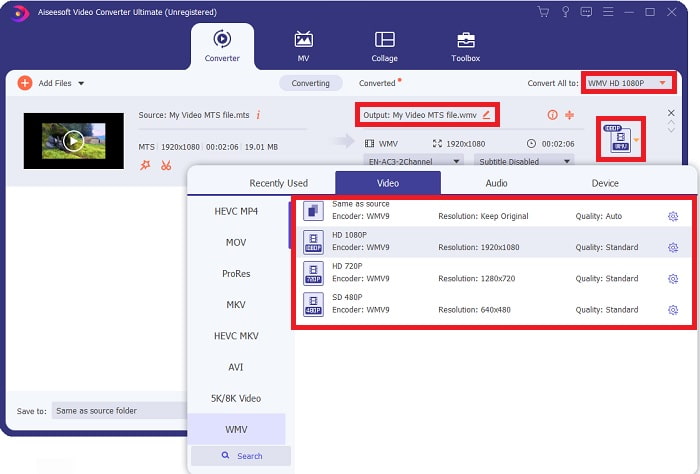
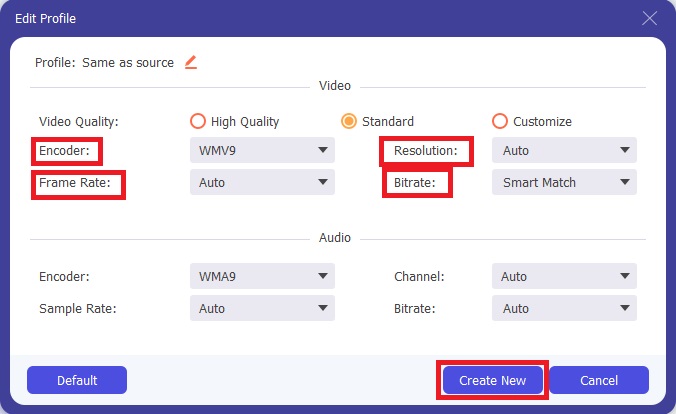
Stap 4: Voor meer opties klik je op het tandwiel‑icoon rechts van de videokwaliteit die je hebt geselecteerd. Daar kun je je video verder bewerken, zoals de resolutie, framerate, bitrate en nog veel meer. Klik gewoon op de knop Create New zodra je klaar bent met het aanpassen.
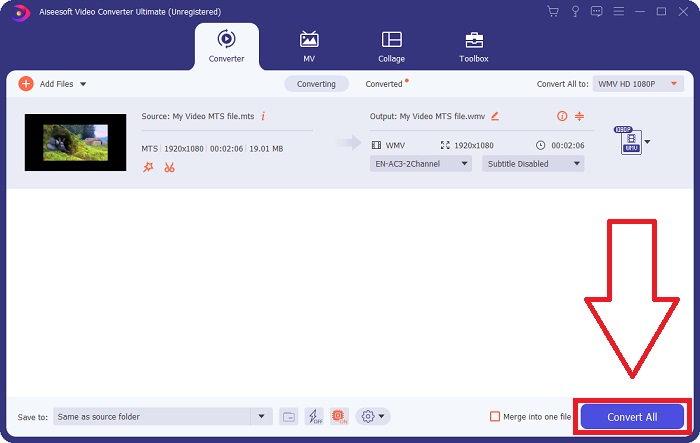
Stap 5: Als alle noodzakelijke aanpassingen zijn gedaan, klik je op de knop Convert All rechtsonder om de conversie daadwerkelijk te starten en wacht je tot deze voltooid is.
Deel 3. Uitgebreide kennis over MTS VS. WMV
| Bestandsextensie | .mts | .wmv |
| Beschrijving | Advanced Video Coding High Definition (AVCHD) is een video-indeling die de MTS-bestandsnaamextensie als bestandsnaam gebruikt. Sommige camcordermerken, zoals JVC, Sony, Canon en Sanyo, gebruiken het HD MPEG-videoformaat en slaan hun bestanden op met de bestandsnaamextensie .mts. | Als onderdeel van het Windows Media-framework van Microsoft bevat WMV (Windows Media Video) verschillende videocodecs en coderingsindelingen. In het begin is het de bedoeling om te concurreren met het RM-formaat op online streaming-apps. Met behulp van WMV-technologie kunnen video's worden opgeslagen, gecomprimeerd en afgeleverd op Blu-ray/DVD's. |
| Bijbehorende programma's | ◆ Roxio Creator NXT Pro 7 ◆ Blender ◆VLC-mediaspeler ◆Apple Final Cut Pro X | ◆VLC-mediaspeler ◆ MP-speler ◆ Mediaspeler Klassiek ◆Windows Media Player |
| Ontwikkeld door | Sony/Panasonic | Microsoft |
| Bestandstype | Video/mp2t | Video/x-ms-asf |
Deel 4. Veelgestelde vragen over het converteren van MTS naar WMV
Welke speler kan het MTS-bestand afspelen?
Als je een MTS-video hebt, kun je die bewerken met de software die wordt meegeleverd bij Sony‑ en Panasonic‑HD‑camcorders, of je kunt een van de onderstaande programma’s gebruiken: In Blender kun je twee of meer onderdelen combineren (cross‑platform). MAGIX Vegas is een softwarepakket waarmee je allerlei verschillende soorten visuele effecten kunt creëren (Windows). CyberLink PowerDirector is een videobewerkingsprogramma (Windows, Mac, Android).
Hebben MTS-bestanden audio?
Verschillende factoren kunnen audioverlies in MTS-bestanden veroorzaken. De meest voorkomende is dat het conformerende proces niet kon worden voltooid, wat resulteerde in geen audio of knippen van audio en het niet kopiëren van de hele mapstructuur (in tegenstelling tot alleen de mediabestanden) van de geheugenkaart.
Wat is het nut van WMV?
Microsoft introduceerde het WMV‑bestandsformaat als een reeks videocodecs in Windows Media Player. WMV is een afkorting van 'Windows Media Video', een gecomprimeerd videocontainerformaat dat is ontwikkeld voor gebruik binnen het Windows Media‑raamwerk. Voor het online verkopen van videocontent of via HD‑dvd’s en Blu‑raydiscs zijn WMV‑videobestanden het meest geschikte formaat. Om WMV‑bestanden af te spelen, klik hier om meer te weten te komen over enkele handige WMV‑spelers.
Gevolgtrekking
Alle bovengenoemde converters zijn betrouwbare en aanbevolen tools om MTS naar WMV te converteren. Video Converter Ultimate en Free Video Converter Ultimate zijn de twee beste converters die niet te vergelijken zijn met andere online tools en software. Het heeft verschillende soorten aanbevolen tools die het biedt en de vele videoformaten die het ondersteunt.
-
 [Gratis en online] 5 methoden om M2TS naar MP4 te converteren
 Wilt u de video converteren van HD-camcorder naar gewone MP4? Hier zijn 5 eenvoudige en gratis manieren om het M2TS-bestand te wijzigen in MP4 op Windows en Mac.
-
 Hoe M2TS gratis en online naar MKV te converteren
 Wilt u M2TS naar MKV converteren met behoud van de originele kwaliteit? Dit bericht toont je gratis en online methoden om M2TS zonder verlies naar MKV te veranderen.
-
 [2021] Top 6 gratis en online manieren om M2TS naar MP3 te converteren
 Kan een M2TS-bestand worden geconverteerd naar MP3? In dit bericht hebben we de zes beste gratis en online manieren vermeld om u te helpen M2TS naar MP3, AAC, AIFF en meer audioformaten te converteren.
