


 Video Converter Ultimate
 Scherm opnemer
 Videoreparatie
 Beveiligde download
Hoe u snel een afbeelding kunt depixelen met 3 beste oplossingen om te gebruiken
Afbeelding ontpixeleren is de oplossing die je nodig hebt om een make-over te geven aan een afbeelding die uiteindelijk gepixeld is, of wanneer je afbeelding bitmapachtig is met kleine vierkantjes erin. Veel gebruikers vinden het lastig om een afbeelding te bewerken, aan te passen, te veranderen en te verbeteren; eerlijk gezegd wás het ook lastig, maar dat is verleden tijd. Met de geavanceerde technologie waar we nu toegang toe hebben, is deze taak eenvoudig op te lossen zodra je het juiste hulpmiddel gebruikt.
Heb je niet de juiste tool om de pixelvorming op je foto te verwijderen? Gelukkig biedt dit artikel je de drie beste software die we hebben gevonden die je kan helpen bij het bewerken van de pixelvorming van de foto en een tutorial over elk om het probleem op te lossen.

Deel 1. Hoe u een afbeelding online kunt unpixelen met de Best Choice Photo Editor [aanbevolen]
FVC Free Image Upscaler is een volledig geautomatiseerde onlinetool die je gratis kunt gebruiken om afbeeldingen online te ontpixeleren. Je kunt deze tool in elke webbrowser openen die je bij de hand hebt – je hoeft geen launcher te downloaden om hem te starten, dus je kunt de tool meteen gebruiken zodra je hem opent. Hoewel deze software via het web beschikbaar is, zijn de kracht en prestaties bij het depixeleren van afbeeldingen vergelijkbaar met die van de meest professionele foto-editors, zowel online als offline. Misschien denk je dat deze tool lastig te gebruiken is, maar dat is niet zo. Nog steeds niet overtuigd? Lees of volg dan de onderstaande handleiding om stap voor stap te zien hoe je deze tool eenvoudig gebruikt.
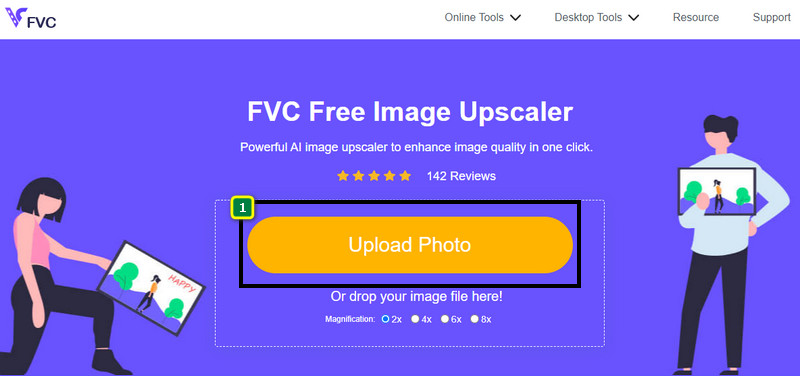
Stap 1. Je kunt deze webtool in elke webbrowser op je apparaat openen door naar de naam te zoeken of door op deze link te klikken om de hoofdwebsite te openen.
Stap 2. Eenmaal op de webtool klik je op Add Image om de gepixelede afbeelding te uploaden. Er verschijnt een bestandsvenster op je scherm; zoek de afbeelding die op je lokale schijf is opgeslagen en klik vervolgens op Open om deze te uploaden.
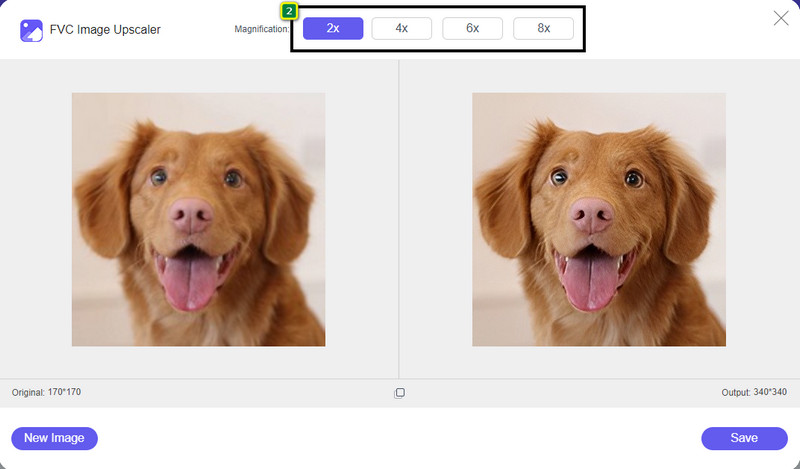
Stap 3. Kies daarna de vergrotingsoptie die je op je afbeelding wilt toepassen om het uiterlijk te verzachten, zodat deze niet langer bitmapachtig oogt met kleine vierkantjes.
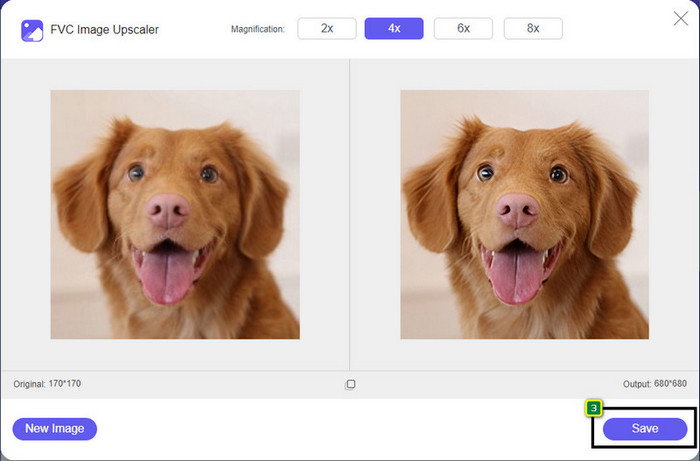
Stap 4. Zo eenvoudig is het: klik op Save om de ontpixelede versie naar je lokale schijf te downloaden.
Deel 2. Hoe u een afbeelding offline kunt verwijderen met 2 manieren op Windows en Mac [Eenvoudig]
Pixbim - Foto's ongedaan maken op Windows
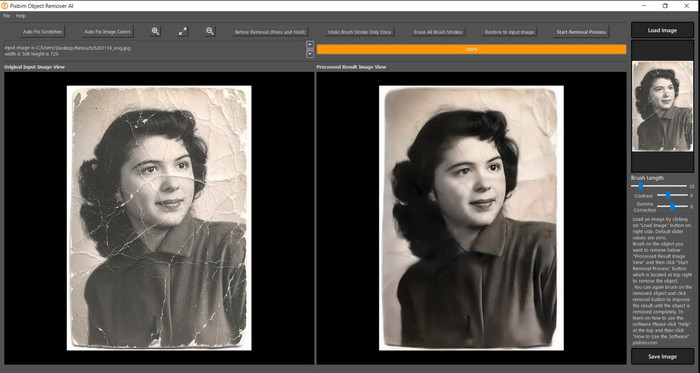
Pixbim is een van de krachtigste, door AI ondersteunde tools om afbeeldingen te ontpixeleren die je op Windows kunt downloaden om dit probleem op te lossen. Deze editor verdient het om in dit artikel genoemd te worden omdat hij gepixelede afbeeldingen snel en efficiënt herstelt. Met behulp van AI worden de parameters automatisch voor je aangepast, zodat je geen ingewikkelde instellingen hoeft te doen. Vanwege de functies en mogelijkheden moet je echter een licentiesleutel kopen om het programma na de proefperiode te blijven gebruiken. Dat kan prijzig zijn voor veel gebruikers die het op hun pc willen hebben.
Stap 1. Zodra je de software hebt gedownload, moet je deze starten zodat we naar de volgende stap kunnen gaan.
Stap 2. Klik op Load Image om de gepixelede afbeelding toe te voegen die je hier wilt verbeteren.
Stap 3. Stel daarna de parameters in door de sliders te verslepen tot de waarden die je wilt bereiken.
Stap 4. Als je klaar bent met het aanpassen van de afbeelding, sla je nu het resultaat op om het te exporteren.
Movavi Foto-editor [Windows en Mac]
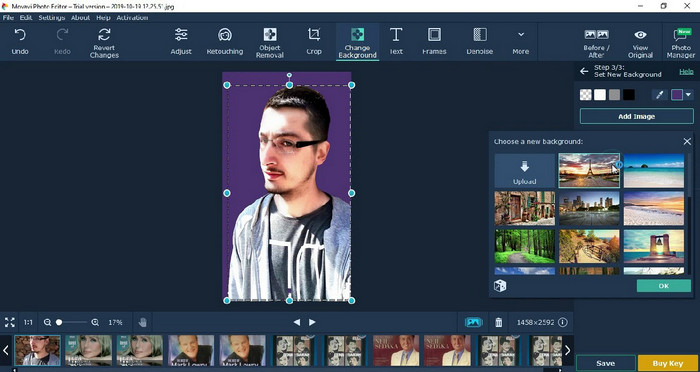
Veel gebruikers hebben de Movavi Photo Editor al geprobeerd vanwege de veelzijdigheid bij het bewerken van afbeeldingen. Net als Pixbim kan deze met behulp van neurale netwerken van de AI de verloren pixels van een afbeelding herstellen. Met deze editor kun je basis- en geavanceerde bewerkingen uitvoeren, zoals bijsnijden, roteren, een filter toevoegen, pixels herstellen en meer. Toch kun je niet van alle functies gebruikmaken als je niet de premiumversie op je desktop aanschaft.
Het heeft een bijna vergelijkbare prijs als de Pixbim, die voor velen vrij duur is. Maar als je een budget hebt om een editor aan te schaffen, is dit misschien degene die je nodig hebt. Leer hoe u afbeeldingen kunt verwijderen met deze app door de stappen te volgen.
Stap 1. Download de applicatie op je Windows- of macOS-systeem.
Stap 2. Start de software en upload vervolgens de foto die je hier wilt ontpixeleren.
Stap 3. Nu je de afbeelding hebt geüpload, klik je op Magic Enhance om de foto automatisch met AI te verbeteren.
Stap 4. Exporteer de afbeelding en geniet van het resultaat.
Deel 3. Veelgestelde vragen over het pixeleren van een afbeelding
Waarom staat er een watermerk op de geëxporteerde niet-gepixelde afbeelding?
Wanneer u een gratis proefversie van de applicatie gebruikt, bestaat de kans dat deze een watermerk achterlaat bij het exporteren. Dus als u een afbeelding wilt exporteren zonder het watermerk, kunt u de licentie van de applicatie aanschaffen of de FVC Free Image Upscaler gebruiken, want deze laat geen watermerk achter op de geëxporteerde afbeelding.
Wat is het verschil tussen wazig en gepixeld?
Veel artikelen hebben bewezen dat wazig en gepixeld niet hetzelfde zijn vanwege een aantal factoren. Wazige beelden zijn de reden waarom u een snelle beweging vastlegt of een foto maakt met een trillende camera. Wanneer u een momentopname vergroot, begint deze te pixelen en ziet u een bitmap met een klein vierkantje.
Wat is de factor die ervoor zorgt dat de afbeelding korrelig wordt?
Sommige redenen veranderen afbeeldingen in pixels; een veelvoorkomende oorzaak is wanneer u een rasterafbeelding vergroot. Rasterindelingen, zoals PNG, JPG, GIF en meer, zijn samengesteld uit kleine vierkantjes die het uiterlijk van het object dat in deze containers is opgeslagen vormen. Wanneer u de afbeelding vergroot, ziet u meestal dat er vierkanten zijn, ook wel pixels genoemd, die kleurgegevens bevatten die visueel worden weergegeven. Het kan voor veel editors een probleem zijn, vooral wanneer pixelvorming optreedt.
Hoe kan ik de beeldruis oplossen?
Dit is een ander veelvoorkomend probleem dat je kunt tegenkomen bij je gemaakte foto’s, en de oplossing die je nodig hebt, vind je mogelijk in dit artikel. Klik op deze link om eenvoudig te lezen, op te lossen en te leren hoe je ruis uit een afbeelding verwijdert.
Gevolgtrekking
Zo eenvoudig is het: je kunt nu gemakkelijk een afbeelding ontpixeleren met de hulp van de beste foto-editors die je kunt downloaden of online kunt gebruiken. Dit probleem is opgelost! Dus als je ooit weer last hebt van pixelatie, kun je op dit artikel terugvallen. De beste tool die je nodig hebt, staat hier klaar om je te helpen, zoals de FVC Free Image Upscaler. Het is het beste om de pixelatie in het uiterlijk te corrigeren, zodat deze niet meer zichtbaar is voor iedereen. Zeg vaarwel tegen pixelatie wanneer je deze online foto-editor gebruikt.
-
 7 Image Upscaler die u kunt gebruiken om elke afbeelding te verbeteren en te verbeteren [2022]
 Heb je de beeld-upscaler nodig? Gelukkig behandelt dit artikel de beste software die u kunt openen en downloaden op uw bureaublad.
-
 5 Verbeteraars voor beeldresolutie die u in 2022 moet gebruiken [Nieuwste keuzes]
 Weet u niet welke beeldresolutieverbeteraar u moet gebruiken? Lees dit artikel terwijl we vijf tools bekijken om de resolutie van afbeeldingen te gebruiken en te verbeteren.
-
 4 apps om de beeldresolutie op uw mobiele apparaten te verhogen [Beste keuze]
 Je hebt apps nodig om je fotoresolutie te verhogen als je 1080p, 4k of iets dergelijks wilt bereiken. Met de onderstaande lijst kunt u het gemakkelijk doen!
