


 Video Converter Ultimate
 Scherm opnemer
 Videoreparatie
 Beveiligde download
Hoe MP3 naar MP4 met afbeelding op Windows 10 en Mac te converteren
MP3 is een standaard audioformaat ontwikkeld door Moving Picture Experts Group. Het maakt gebruik van MPEG-1- en MPEG-2-standaardisaties. MP3 wordt beschouwd als het meest gebruikte audioformaat op websites en multimediaspelers. Welnu, MP4 is het populairste videoformaat onder gebruikers van alle leeftijden.
For many times, you want to add a matched picture to the MP3 file as a background. Here are 3 free and quick solutions to convert MP3 to MP4 on Windows and Mac. After that, you can upload and share the converted video to YouTube or Facebook.
Deel 1. Hoe u gratis MP3 naar MP4 online kunt converteren
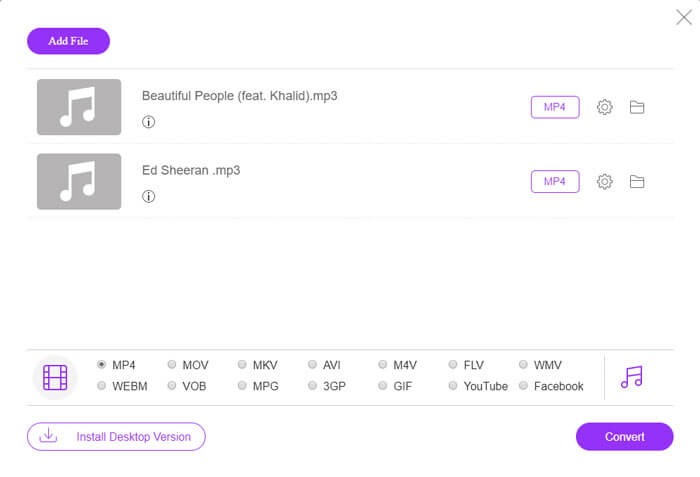
FVC Free Online Video Converter can easily convert any audio or video file to MP4, MOV, MKV, AVI, M4V, FLV, WMV, WEBM, VOB, etc. for free on Windows and Mac. It also allows you to batch convert MP3 to MP4 by uploading multiple MP3 files. This free online tool also supports adjusting video encoder, frame rate, resolution, bitrate, audio encoder and channel. It’d be your best choice if you don’t want to install the third-party software.
Step 1. Click Add Files to Convert button to download the launcher. In the pop up window, select and upload your MP3 files. You can upload more than one MP3 files.
Step 2. Select MP4 at the bottom of this online MP3 converter. You can click the gear icon to set the video and audio settings.
Step 3. After all preferences are set, click Convert button and select the output folder. Then the MP3 to MP4 conversion will start automatically.
Na de succesvolle conversie zal de uitvoermap onmiddellijk verschijnen, zodat u het geconverteerde bestand kunt bekijken of delen zoals u dat wilt. Deze freeware maakt het MP4-bestand met een zwarte achtergrond.
Deel 2. Hoe je MP3 naar MP4 kunt maken met VLC
VLC Media Player is een gratis en open source multimediaspeler die alle multimediabestanden zoals dvd, vcd en verschillende video- en audiobestanden afspeelt. Het is ook een gratis MP3 naar MP4-converter voor Windows-, Mac-, Linux-, Android- en iOS-gebruikers. Hier laten we u zien hoe u MP3 naar MP4 kunt converteren met VLC Media Player.
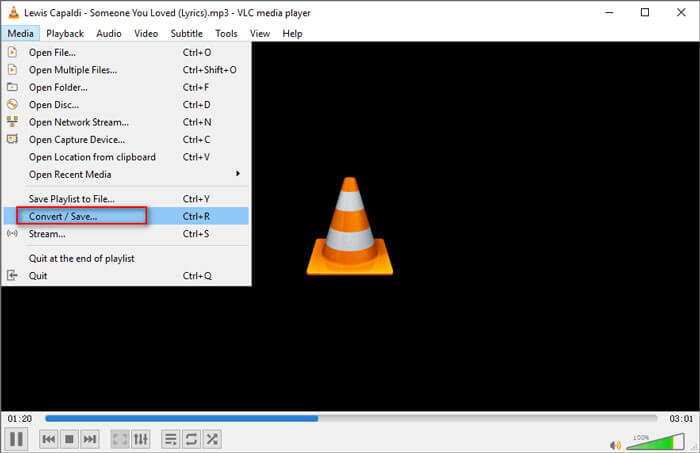
Step 1. Open VLC on your computer. Click Media, then click Open File and import your MP3 file.
Step 2. Click Media, then click Convert/Save. In the pop up window, select Convert under the drop-down button of Convert/Save.
Step 3. Click the drop-down button next to Profile, and select Video - H.264 + MP3 (MP4) as the output format.
Step 4. Click Browse button to select the output folder. Then click Start button to begin converting MP3 to MP4 with black background for free. (How to convert MP4 to MP3?)
Deel 3. Professionele manier om MP3 naar MP4 met afbeelding te converteren
The above methods bring a black background to your MP3 file after conversion. If you want to add a cover to the converted MP4 file, you can use a professional MP3 to MP4 converter. FVC Free MP3 to MP4 Converter provides a more professional way to convert your MP3 music to MP4 with colorful picture.

Gratis MP3 naar MP4 Converter
113.435+ downloads- Converteer MP3-muziekbestanden naar MP4, AVI, MOV, MKV, WMV en meer.
- Zorg voor kleurrijke thema's voor uw MP3-bestand, pas opening en einde aan.
- Bekijk een voorbeeld van de geconverteerde MP4-bestanden voordat u ze converteren met de ingebouwde speler.
- Ondersteuning voor batchconversie van MP3 naar MP4-bestanden met hoge videokwaliteit.
Free DownloadFor Windows 7 or laterSecure Download
Free DownloadFor MacOS 10.7 or laterSecure Download
Stap 1. Voeg een mp3-bestand toe
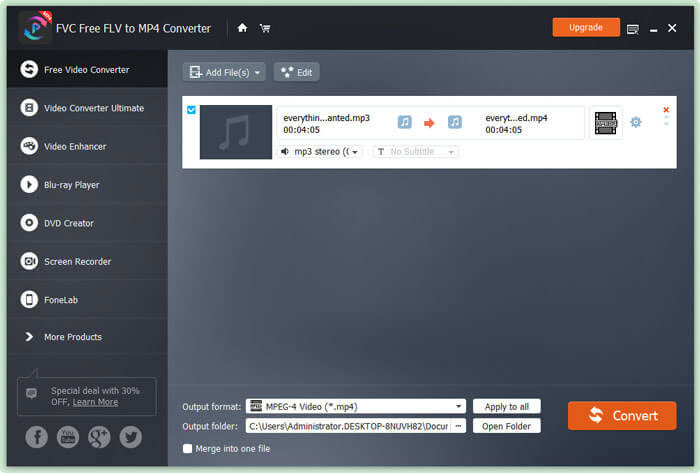
Free download, install and launch this MP3 to MP4 converter on your Windows computer. Click Add File(s) button to import the MP3 file to this converter. This free MP3 to MP4 converter is equipped with a batch conversion feature which allows you to convert one or more MP3 files at a time.
Stap 2. Kies een thema
Select your MP3 file and click Edit button to add the theme. Here are several different types of themes for you to choose from. Then click Next button to edit the opening and ending of the video.

Stap 3. Converteer MP3 naar MP4
Select MP4 as your target format from the drop-down list of Output format. Then click Convert button to start converting MP3 to MP4 with picture for free.

With the adoption of the latest accelerate technology, it enables you to convert MP3 to MP4 in a super-fast converting speed. What’s more, it guarantees that there won’t be any quality loss during the audio conversion. (Find more MP4 players)
Deel 4. Veelgestelde vragen over het converteren van MP3 naar MP4
Kan ik exporteren van iTunes naar MP3?
Ja. Open iTunes en ga naar Bewerken ›Voorkeuren. Zoek en klik op het tabblad Algemeen op Instellingen importeren. Selecteer vervolgens MP3 Encoder in de vervolgkeuzeknop naast Importeren met en klik op OK om de wijzigingen op te slaan. Markeer de muziek die u wilt converteren en ga naar Bestand ›Converteren› MP3-versie maken. Vervolgens wordt de iTunes-muziek geconverteerd naar MP3.
Zijn iTunes-nummers MP3 of MP4?
Geen van beiden. De muziek die u bij iTunes hebt gekocht, heeft de indeling AAC (m4a). U kunt het AAC-formaat naar MP3 converteren om op andere apparaten af te spelen.
Kan ik MP3 naar MP4 converteren met Audacity?
Ja. Audacity zelf ondersteunt het exporteren van MP4 vanuit MP3 niet. U kunt echter de optionele FFmpeg-bibliotheek installeren om meer audioformaten zoals AC3, MP4, M4A, WMA, AMR te exporteren.
Kan HandBrake MP4 exporteren vanuit MP3?
Nee. HandBrake is een open source videotranscoder die van en naar veel audio- en videoformaten converteert. Helaas ondersteunt het geen conversie met alleen audio, zoals conversie van MP3 naar MP4.
Gevolgtrekking
We mainly introduced 3 free ways to convert MP3 to MP4 with image on Windows and Mac. FVC Free Online Video Converter is the most convenient way to change MP3 music file to MP4. If you have any better suggestions, please don’t hesitate to leave us a comment.
-
 MOV VS MP4 - Welke is beter
 MOV VS MP4, welke is beter? Dit bericht vertelt het verschil tussen MP4 en MOV, zodat je de betere keuze kunt krijgen om voor je videobestanden te gebruiken.
-
 Hoe MOV naar MP4 te converteren zonder kwaliteitsverlies
 Wilt u MOV-bestanden (Apple QuickTime Movie) naar MP4 converteren? Dit bericht deelt 4 gratis methoden om uw MOV-videobestanden naar MP4-indeling te converteren op Windows 10/8/7 / XP en Mac OS X.
-
 Top 4 manieren om WMA naar MP3 te converteren
 Is het mogelijk om WMA naar MP3 te converteren met Windows Media Player? Hoe WMA gratis naar MP3 te converteren? Dit bericht deelt 4 eenvoudige methoden om u te helpen bij het maken van de audioconversie van WMA naar MP3 op Mac, Windows-pc en online.
