


 Video Converter Ultimate
 Scherm opnemer
 Videoreparatie
 Beveiligde download
Hoe MKV naar MP4 op Windows / Mac te converteren
Wanneer u een film afspeelt, merkt u dat deze niet kan worden geopend omdat een programma het MKV-formaat niet ondersteunt. Dan vraag je je misschien af waarom dit gebeurt en hoe je het kunt oplossen.
De reden waarom u geen MKV kunt spelen, kan worden veroorzaakt door het ontbreken van bepaalde codecs op uw apparaat. Daarom, hoewel je tegenwoordig overal MKV kunt zien, ondersteunen sommige apparaten of programma's het MKV-formaat nog steeds niet. U moet het dus converteren naar een gebruikelijker formaat, zoals MP4, een veel bruikbaarder formaat dat correct op bijna elk apparaat kan worden geladen.
Vandaag gaan we je 2 gratis converters voorstellen die je helpen om MKV-bestanden naar MP4 te converteren.

Deel 1. Hoe MKV online en gratis in MP4 te veranderen
Als je het niet kunt uitstaan om net als ik veel software op je computer te installeren, raad ik je aan een webgebaseerde online converter te proberen.
Er zijn tal van gratis online videoconverters op de markt, maar om eerlijk te zijn hebben de meeste van deze zogenaamde 'gratis' converters een groot aantal limieten. Je moet ze betalen om een beter plan te krijgen. Alleen op die manier kunt u snel grote bestanden in batches converteren zonder watermerk.
Dus, is er een echt gratis, snelle en krachtige video-omzetter? Het antwoord is ja.
FVC Free Online Video Converter is een efficiënte MKV-naar-MP4‑videoconverter waarmee je onbeperkt video’s kunt converteren. Hij ondersteunt het converteren van bijna alle gangbare videoformaten naar populaire formaten zoals MP4, MOV, WMV, AVI en FLV in enkele seconden. Hij ondersteunt ook batchconversie, wat betekent dat je een hele reeks video’s in één keer kunt converteren en tegelijkertijd hun originele kwaliteit behoudt.
Omdat FVC Free Online Video Converter een webgebaseerde tool is, kun je hem eenvoudig gebruiken op zowel Windows als Mac, zolang je maar beschikt over een stabiele internetverbinding en een browser. Wat het gebruik betreft: je hebt deze MKV-naar-MP4‑converter in slechts een paar stappen onder de knie.
Stap 1. Ga in je browser naar de website van FVC Free Online Video Converter. Klik vervolgens op de knop Add Files to Convert. Als je FVC Launcher nog niet eerder op je computer hebt gedownload, krijg je een melding om de launcher eerst te downloaden. Volg gewoon de aanwijzingen en installeer de launcher.
Download de desktopversie om bestanden in batches te converteren.

Stap 2. Na de installatie verschijnt automatisch het venster Open File. Kies nu het MKV‑bestand dat je wilt converteren. Trouwens, als je in één keer meerdere MKV‑video’s wilt converteren, selecteer je alle MKV‑bestanden die je nodig hebt.
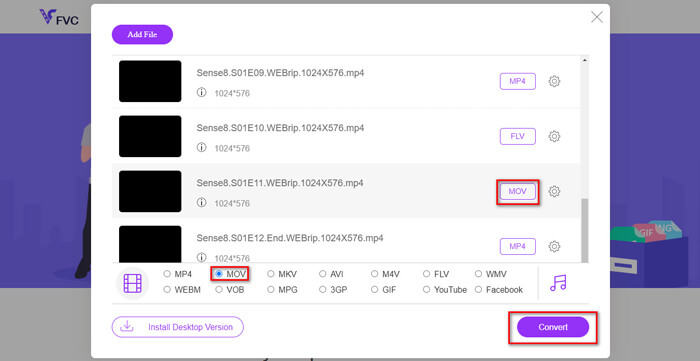
Stap 3. Klik vervolgens op Open en je ziet een lijst met geselecteerde bestanden. Kies de uitvoerindeling MP4 onder die lijst.
Je kunt ook verschillende indelingen voor verschillende bestanden afzonderlijk selecteren door op de indeling naast het Setting-pictogram te klikken en de uitvoerindeling hieronder te wijzigen. Maar je kunt dit ook overslaan en gewoon op de knop Convert klikken. Kies daarna een doelmap om de geconverteerde video’s op te slaan.
Deel 2. Hoe MKV naar MP4 te converteren met VLC Media Player
Je kent VLC misschien als een multimediaplayer die beschikbaar is voor de meeste desktopbesturingssystemen. Maar in feite is het ook een verborgen videoconverter. Je kunt er MKV‑bestanden mee naar MP4 converteren. Als je VLC al op je computer hebt staan, kun je het eens proberen.
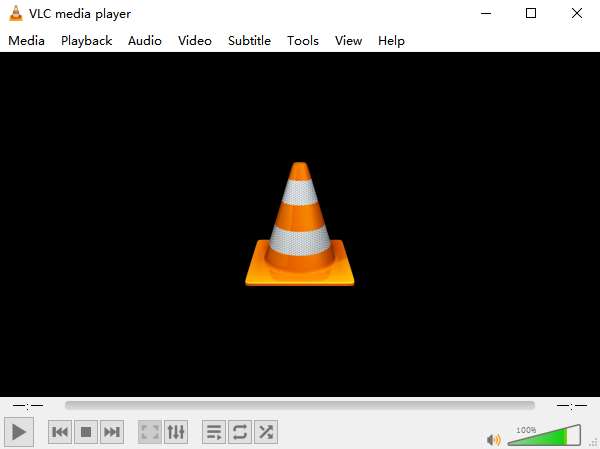
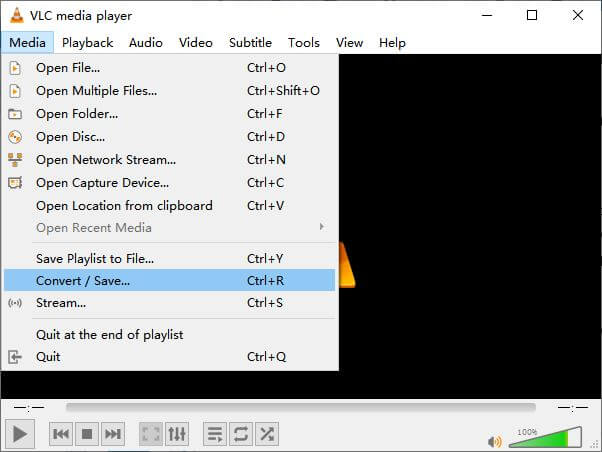
Stap 1. Start eerst VLC Media Player op je computer. Klik op het menu Media. Zoek Convert / Save in de vervolgkeuzelijst.
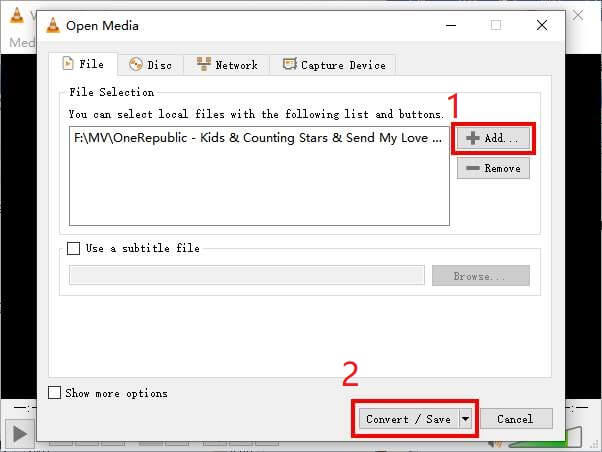
Stap 2. Klik op + Add en zoek de MKV‑video die je wilt converteren. Klik daarna op de knop Convert / Save hieronder.
Stap 3. Kies het formaat MP4 in het venster Convert.
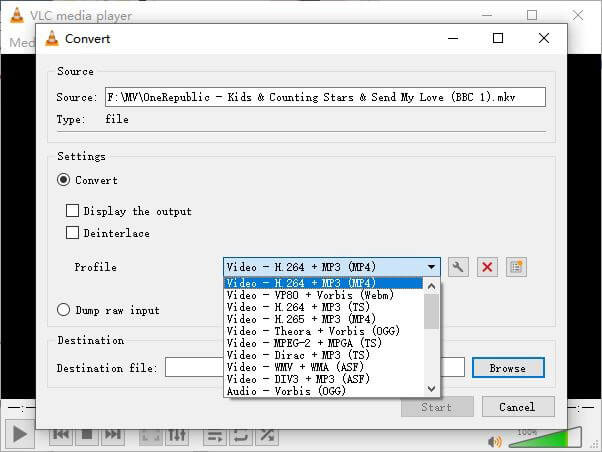
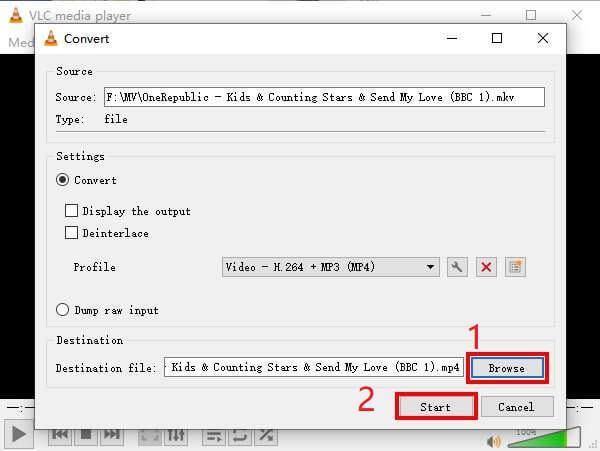
Stap 4. Klik op de knop Browse om de doelmap voor het opslaan te bevestigen. Start ten slotte de conversie en wacht tot je MP4‑video klaar is.
MKV versus MP4
Het Matroska multimedia containerformaat, uitgebracht in 2002, is een open-source formaat dat een aantal video-, audio-, beeld- en ondertiteltracks kan bevatten. U kunt het dus gebruiken om eenvoudig korte videoclips, tv-programma's en films op te slaan. Het is vrij populair voor het ondertitelen van anime-fans.
Het MP4-formaat, uitgebracht door de Moving Picture Experts Group (MPEG) in 2001, kan u helpen video-, audio-, ondertitelings- en afbeeldingsgegevens op te slaan in afzonderlijke tracks. Het is een afkorting voor MPEG-4 Part 14. Bovendien is het een van de meest populaire formaten die worden gebruikt voor het streamen en delen van video's.
Deel 3. Veelgestelde vragen over het converteren van MKV naar MP4
1. Kan ffmpeg MKV naar MP4 converteren?
Ja, je kunt MKV naar MP4 converteren met ffmpeg. Maar het kan wat ingewikkeld zijn om te begrijpen hoe het werkt, ook al is de meest effectieve handeling slechts een reeks tekens: ffmpeg -i my_movie.mkv -vcodec copy -acodec copy my_movie.mp4
2. Kan HandBrake MP4 exporteren vanuit MKV?
Als je na het converteren alleen een MP4‑bestand wilt, kan HandBrake je daar inderdaad bij helpen. Het kan je bestanden echter niet naar andere formaten converteren, zoals WMV, MOV, FLV. HandBrake ondersteunt de meeste gangbare multimediabestanden, maar dat geldt voor de ondersteunde input sources. Voor uitvoerformaten zijn je opties MP4(.M4V) en MKV.
3. Verliest het omzetten van MKV naar MP4 aan kwaliteit?
De meeste videoconverters verliezen kwaliteit wanneer u MKV-bestanden converteert naar MP4, misschien 1% of 5%. Bij het hercoderen van de MKV-bestanden naar MP4, is het moeilijk om gegevensverlies volledig te voorkomen. Maar u kunt de resolutie van afbeeldingen verhogen om de kwaliteit van geëxporteerde MP4-video's dicht bij de originele video te laten komen.
Gevolgtrekking
Er zijn talloze videoconverters waaruit u kunt kiezen. Het is moeilijk om zelf een gratis en efficiënte converter te vinden. Dit bericht heeft je 2-methoden geïntroduceerd om MKV naar MP4 te converteren. De ene is VLC Media Player en de andere is FVC Free Online Video Converter.
Als je alleen een MP4-bestand wilt, is VLC voldoende. VLC ondersteunt echter slechts een eindig aantal formaten. Dus als je een professionelere converter wilt, lijkt FVC Free Online Video Converter een betere keuze.
Ik hoop dat je dit bericht nuttig vindt. En aarzel niet om ons uw mening te geven.
-
 Hoe u uw MP4-videobestanden converteren naar geanimeerde GIF-afbeeldingen zonder kwaliteitsverlies
 Op zoek naar de beste manier om uw MP4-video om te zetten in geanimeerde GIF's? Hier is een gedetailleerde gids om het te doen in Photoshop, Windows Movie Maker, online video-omzetter en meer.
-
 Hoe MOV naar MP4 te converteren zonder kwaliteitsverlies
 Wilt u MOV-bestanden (Apple QuickTime Movie) naar MP4 converteren? Dit bericht deelt 4 gratis methoden om uw MOV-videobestanden naar MP4-indeling te converteren op Windows 10/8/7 / XP en Mac OS X.
-
 4 eenvoudige manieren om WMV naar MP4 op Mac en Windows te converteren
 Hoe WMV-bestanden naar MP4 te converteren? Hier zijn de 4 eenvoudige manieren om met eenvoudige stappen WMV naar MP4 op Mac en Windows te converteren.

