


 Video Converter Ultimate
 Scherm opnemer
 Videoreparatie
 Beveiligde download
Hoe MP4 naar M4A op Windows / Mac te converteren (gratis en online)
MP4 is een wijdverbreid bestandsformaat dat wordt gebruikt met meerdere stations en videospelers. MP4-bestanden kunnen video, audio en andere inhoud opslaan. Nu luisteren veel mensen liever naar de audiotrack van de MP4-video. Om de kwaliteit te behouden, is het omzetten van MP4 naar M4A een geweldig idee. M4A staat voor MPEG 4 Audio. De meeste programma's kunnen M4A-bestanden afspelen, waaronder iTunes, QuickTime, Windows Media Player en meer.

Je vraagt je misschien af hoe je het audiobestand uit een MP4-bestand kunt halen. Er zijn veel manieren om een MP4-bestand om te zetten naar een M4A-bestand. Lees dit artikel om erachter te komen hoe je MP4 naar M4A kunt converteren voor toekomstig luistergebruik op je mobiele apparaten.
Deel 1. Beste gratis online manier om MP4 naar M4A te converteren zonder kwaliteitsverlies
FVC Free Online Video Converter is een gratis MP4-naar-M4A-bestandsconverter die het MP4-formaat niet alleen naar M4A, maar ook naar andere formaten zoals MP3, WAV, M4R, WMA, AIFF, AC3, enzovoort kan omzetten. Je kunt er batchconversies mee uitvoeren, zodat je meerdere MP4-video’s in één keer naar M4A kunt converteren. Daarnaast kun je met deze gratis online tool ook MP4-video naar MOV, AVI, FLV en andere videoformaten converteren.
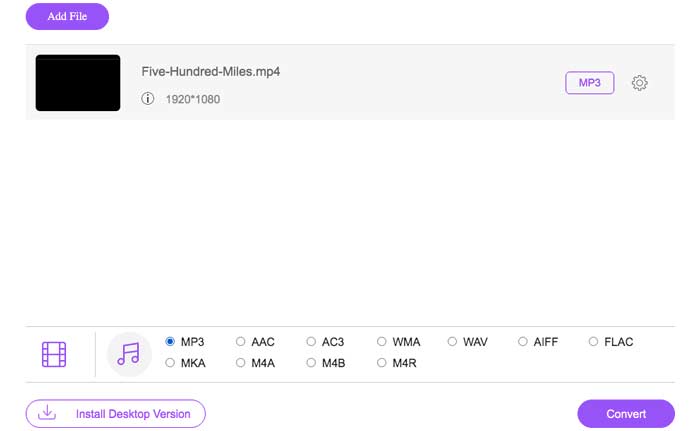
Stap 1. Open https://www.free-videoconverter.net/free-online-video-converter/ in je browser. Klik op de knop Add Files to Convert en download en installeer vervolgens de launcher.

Stap 2. Upload de MP4-video die je wilt converteren en klik daarna op Open om verder te gaan.
Stap 3. Nadat je je videobestanden naar deze toepassing hebt geüpload, klik je op het pictogram Audio en kies je het M4A-formaat als uitvoerformaat.
Stap 4. Klik tot slot rechtsonder op de knop Convert. Wacht even, en je krijgt je M4A-audio uit het MP4-bestand.
Deel 2. Hoe MP4 naar M4A te converteren met gratis audio-omzetter
FVC Free Audio Converter is de freeware waarmee je moeiteloos MP4-bestanden naar M4A kunt converteren. Het kan elk video- of audiobestand wijzigen in M4A, MP3, WAV, enz. U kunt het downloaden en installeren op uw Windows-pc om de conversie te starten.
Gratis downloadVoor Windows 7 of hogerVeilige download
Gratis downloadVoor macOS 10.7 of hogerVeilige download
Stap 1. Start deze audioconverter op je computer. Klik op de knop Add File(s) om de MP4-bestanden naar dit programma te uploaden.

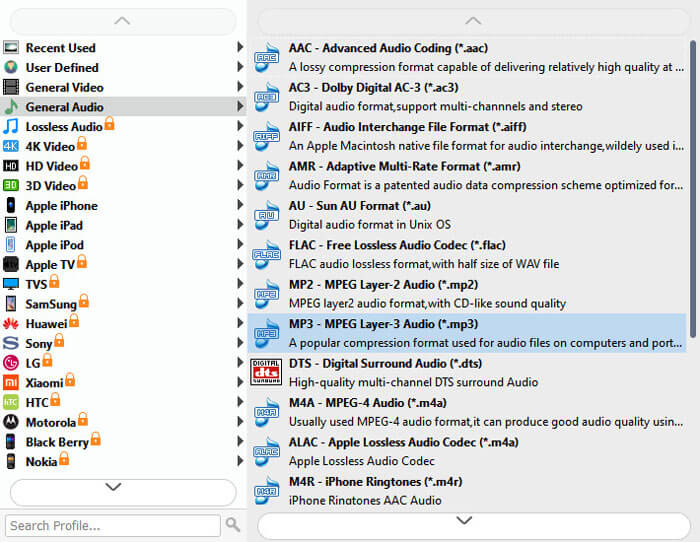
Stap 2. Zoek de optie Output formats en kies M4A als uitvoerformaat in de vervolgkeuzelijst.
Stap 3. Klik op de knop Convert om te beginnen met het omzetten van MP4-bestanden naar M4A.
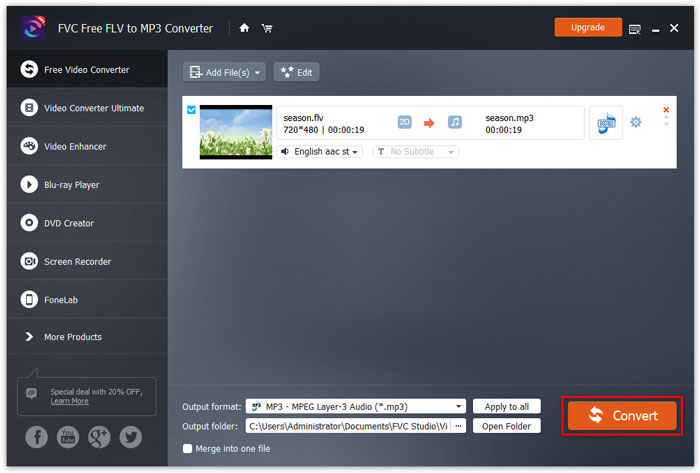
Behalve naar M4A kun je het ook gebruiken om MP4 naar MP3, AAC of andere audioformaten te converteren.
Deel 3. Hoe MP4 naar M4A te converteren met iTunes
Om MP4 naar M4A te converteren met iTunes voor Windows of Mac, moet u de iTunes-importinstellingen wijzigen en vervolgens de menuoptie Converteren gebruiken om een M4A-kopie te maken.
Stap 1. Open iTunes op je Windows-pc of Mac.
Stap 2. Kies Edit en klik vervolgens op Preferences in de menubalk. Ga daarna naar het tabblad General en klik op Import Settings.
Stap 3. Zoek en klik op het menu naast Import Using en kies vervolgens het coderingsformaat waarnaar je de video wilt converteren. Klik daarna op OK.
Stap 4. Selecteer de nummers in je bibliotheek die je wilt converteren. Kies daarna File, klik vervolgens op Create New Version en maak een M4A-versie.
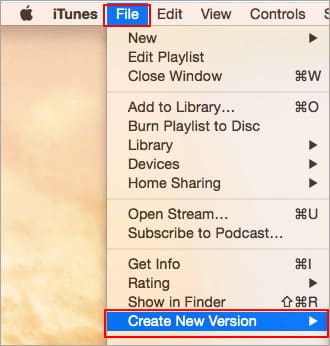
De geconverteerde audiobestanden verschijnen in uw bibliotheek naast de originele bestanden.
Deel 4. Veelgestelde vragen over conversie van MP4 naar M4A
1. Wat is een M4A-bestand?
Een bestand met de M4A-bestandsextensie is een MPEG-4-audiobestand. M4A is vaak te vinden in de iTunes Store van Apple als het formaat van het downloaden van nummers.
2. Hoe M4A-bestanden openen?
Programma's die M4A-bestanden openen, zijn onder meer iTunes, QuickTime, Windows Media Player, enz. Android-tablets en -telefoons, iPhone, iPad en iPod touch ondersteunen ook het afspelen van M4A-bestanden.
3. Hoe MP4-bestanden online samenvoegen?
FVC Free Online Video Merger kan je helpen om verschillende MP4- of andere videoformaten zoals MOV, AVI, FLV en meer online samen te voegen of te combineren.
4. Kan Windows Media Player MP4 naar M4A converteren?
Nee. Windows Media Player ondersteunt alleen het converteren van videobestanden naar MP3 of WAV.
Gevolgtrekking
De bovenstaande drie manieren kunnen u helpen MP4 zonder veel moeite gratis in M4A om te zetten. Als u de conversie liever online uitvoert, zou FVC Free Online Video Converter een goede keuze moeten zijn. Als uw MP4-bestanden groot zijn, is FVC Free Audio Converter of iTunes betrouwbaarder om MP4-bestanden naar M4A te converteren.
-
 Hoe MP4 naar WMV voor Mac / Windows te converteren
 Dit bericht laat zien hoe je MP4-video naar WMV-indeling converteert op Mac of Windows. We bieden u ook verschillende opties, waaronder zowel desktopsoftware als webgebaseerde online converters. Klaar om de beste MP4 naar WMV-conversietools te kennen?
-
 Hoe WMV naar MP3 op desktop en online te converteren
 U kunt alle gratis video-omzetter-software van FVC Studio vinden. Elk video- / audioformaat wordt ondersteund, inclusief MP4, MOV, TS, AVI, WMV, FLAC, MP3, enz.
-
 Hoe AVCHD gratis naar MP4-video's te converteren op Windows / Mac / online
 Er zijn 5 eenvoudige manieren om AVCHD naar MP4-video's op uw computer te converteren. U kunt AVCHD-video's batchgewijs naar MP4 converteren zonder kwaliteit te verliezen met een converter hier.
