


 Video Converter Ultimate
 Scherm opnemer
 Videoreparatie
 Beveiligde download
Hoe MP4 naar WMV voor Mac / Windows te converteren
Before introducing a suggested list of MP4 to WMV converters, let me ask you something about video formats.
To save digital video data on a computer system, we need to use a file format designed for video. So what kind of video formats do you know? MP4? WMV? FLV? AVI? Well, these truly are commonly used video formats while storing digital video data. But have you ever wondered why are there so many video file formats? What’s the difference between MP4 and WMV?
Over het algemeen is MP4 compatibel met bijna elk type apparaat op de markt, wat betekent dat u MP4 overal kunt afspelen, zelfs op de standaard videospeler van uw computer of telefoon. Als u echter Windows-apparaten gebruikt, denk ik dat WMV u beter van dienst kan zijn. Niet alleen omdat het is ontwikkeld door Microsoft, maar omdat het de HQ-video op een kleine schijfruimte kan opslaan.
So today you’re gonna learn how to change a MP4 file to WMV with the best video converters that we recommend.

Deel 1. Hoe u MP4 gratis naar WMV kunt converteren
Naast het installeren van klassieke desktopsoftware, is het gebruik van webgebaseerde converters tegenwoordig ook een optie. Hoewel eenvoudig, zijn veel online converters enigszins traag tijdens de conversie. Sommige beperken zelfs de grootte en hoeveelheid van de bestanden die u uploadt en kunnen de kwaliteit van de uitvoervideo's niet garanderen.
Thus, we here introduce you FVC Free Online Video Converter, a free, fast and efficient video converter which can assist you in converting a bunch of videos or audio losslessly.
As a multifunctional free online MP4 to WMV converter, FVC Video Converter supports almost every type of video formats. You can convert large MP4 files to/from MKV, MOV, WMV, AVI, TS, etc. You can also edit your video according to your need. It is a breeze to adjust video bitrate, sample rate, frame rate, resolution and volume on FVC. And there’s no watermark on your video after converting.
Nu maakt u zich misschien zorgen dat het met al deze functies moeilijk te begrijpen is hoe u deze converter moet bedienen. In feite is de waarheid nogal tegengesteld. Het kost u maar een paar stappen om deze MP4 naar WMV-converter onder de knie te krijgen.
Step 1. Click here to navigate to FVC Free Online Video Converter. Then Click Add Files to Convert to download FVC Launcher first.
Download de desktopversie om bestanden in batches te converteren.
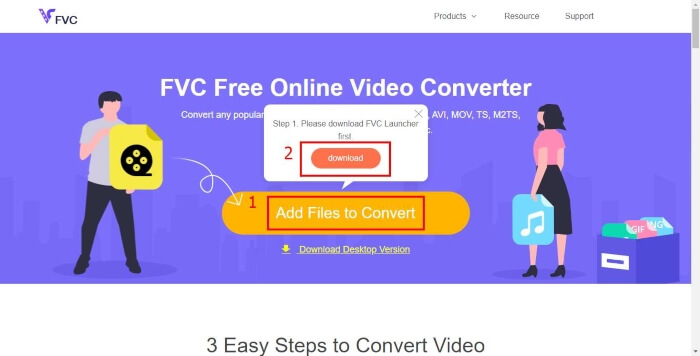
Step 2. After installing the launcher, the Open File window will pop up. Just find the MP4 file you want to change.
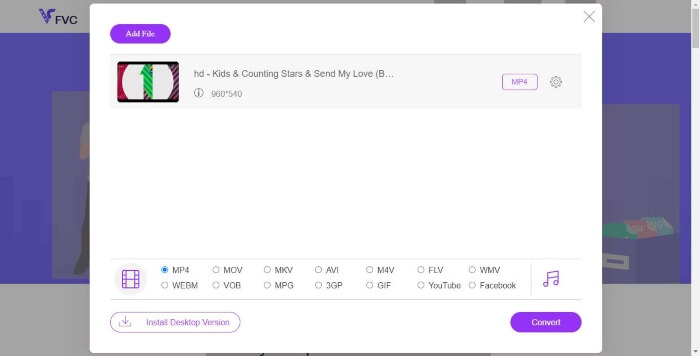
Step 3. Then in the converting page, choose output format WMV. By the way, if you want to change the video parameters, just open the Settings window by clicking the Setting icon. Click the Convert button and pick a destination to store the converted video.
Deel 2. Converteer MP4 naar WMV met Desktop Software
1. RealPlayer
RealPlayer has become one of the most popular media player since 1995. It can not only help you easily manage your videos, music and pictures, but convert videos into multiple formats and transfer them to other mobile devices.
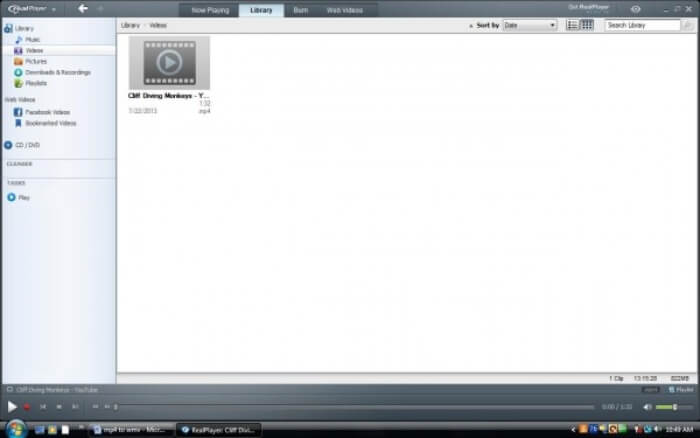
Step 1. If RealPlayer has been installed to your computer, save the MP4 file into the RealPlayer library. Select Library after launching RealPlayer. Find your file in the Video list.
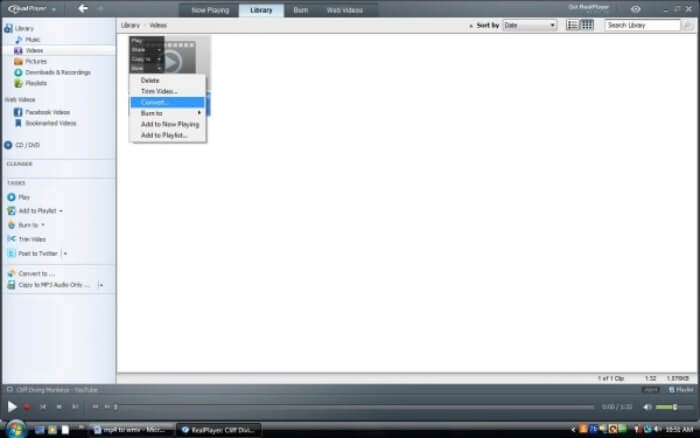
Step 2. Click the file and select the More option from the popup menu. Then select the Convert option.
Step 3. Choose WMV from the Select a Device menu and click OK. Now click the Start button. In a few seconds, your video will be in the RealPlayer library.
2. VLC Media Player
VLC is an open source, cross-platform player that can play videos in different formats. It also supports file conversion to many popular formats. Follow these steps below to export WMV file from MP4.
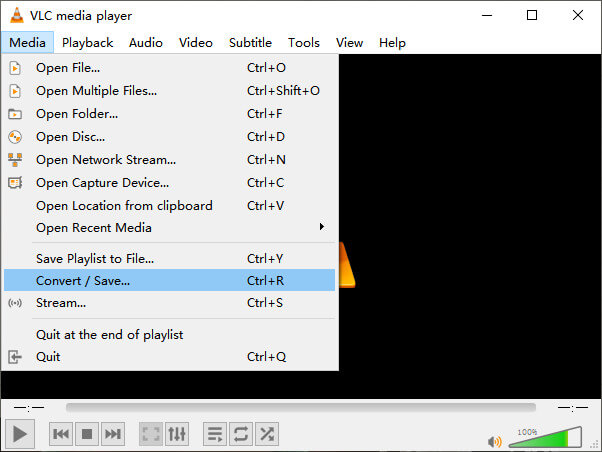
Step 1. Open VLC Media Player and click Convert / Save in the menu of Media.
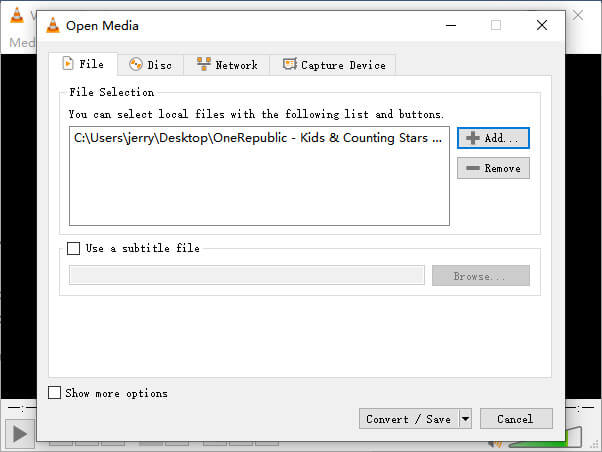
Step 2. Add the file to VLC. Then click the Convert / Save button.
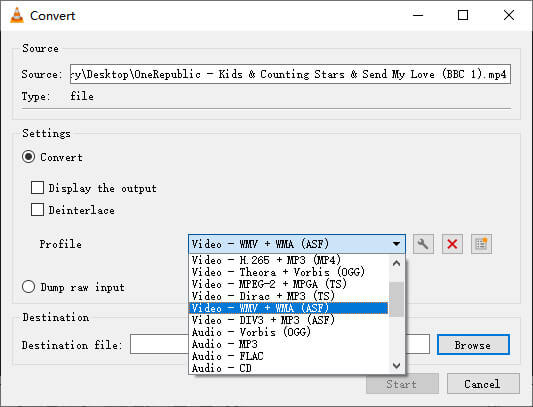
Step 3. Find WMV from Profile and select a folder as the saving destination of the output file. Then click Start.
MP4 versus WMV
Het MP4-formaat, uitgebracht door de Moving Picture Experts Group (MPEG) in 2001, kan u helpen video-, audio-, ondertitelings- en afbeeldingsgegevens op te slaan in afzonderlijke tracks. Het is een afkorting voor MPEG-4 Part 14. Bovendien is het een van de meest populaire formaten die worden gebruikt voor het streamen en delen van video's.
WMV, geproduceerd door Microsoft, was in de jaren 2000 een van de meest voorkomende videoformaten. Het kan via internet worden bekeken en door verschillende mediaspelers op Windows worden afgespeeld. En het is ook het standaard videobestandsformaat van Windows Media Player. Maar het is onlangs overgenomen door andere formaten.
Deel 3. Veelgestelde vragen over het converteren van MP4 naar WMV
1. Kan Handbrake MP4 naar WMV converteren?
After doing a research, unfortunately the latest Handbrake cannot convert MP4 to WMV.It is true that Handbrake supports most common multimedia files. But that’s for input sources. The options for output formats are MP4(.M4V) and MKV.
2. Kan ik een MP4-bestand dat groter is dan 100 MB gratis online converteren naar WMV?
It depends. Different free online video converters have different limitations. Some converters like FVC Free Online Video Converter allow you to change over 100MB. But some other converters may charge you for that.
3. Kan Windows Media Player MP4 naar WMV converteren?
You can’t convert MP4 file to WMV with Windows Media Player. That’s because it is just a player, not a converter. If you want to convert MP4 to WMV, you should use an efficient video converter.
4. Kan ik een WMV-bestand op Mac afspelen?
The built-in video tools on Mac cannot play WMV files. But you have other ways to play WMV videos on MacOS. You can convert WMV to other format that is supported by Mac. Or install Windows Media Player for Mac to play WMV files.
Gevolgtrekking
Even though MP4 and WMV both have their similarities, they also have their own characteristics. So you should make decisions in accordance with specific conditions.Hope that after reading this post, the issues of converting MP4 to WMV will no longer be your problem. Next time when you need a WMV file, just follow the guide above and convert the file with ease.
-
 Hoe u uw MP4-videobestanden converteren naar geanimeerde GIF-afbeeldingen zonder kwaliteitsverlies
 Op zoek naar de beste manier om uw MP4-video om te zetten in geanimeerde GIF's? Hier is een gedetailleerde gids om het te doen in Photoshop, Windows Movie Maker, online video-omzetter en meer.
-
 Hoe u uw FLV-videobestanden naar MP4 kunt converteren zonder een cent te betalen
 Deze gids deelt vier gratis methoden om uw FLV-videobestanden naar MP4-indeling te converteren op Windows 10/8/7 / XP en Mac OS X, zodat u op elk apparaat van de video's kunt genieten.
-
 Hoe MOV naar MP4 te converteren zonder kwaliteitsverlies
 Wilt u MOV-bestanden (Apple QuickTime Movie) naar MP4 converteren? Dit bericht deelt 4 gratis methoden om uw MOV-videobestanden naar MP4-indeling te converteren op Windows 10/8/7 / XP en Mac OS X.

