


 Video Converter Ultimate
 Scherm opnemer
 Videoreparatie
3 online en offline MPG naar MP4-converters die u moet proberen om MPG-bestanden te converteren
MP4 is tegenwoordig een van de meest voorkomende bestandsindelingen die je op internet ziet. Hoewel MPG en MP4 veel overeenkomsten hebben, zijn er ook verschillen. En als je je MPG-bestand wilt converteren naar het MP4-bestandsformaat, hebben wij videoconverters getest die momenteel populair zijn. Bovendien hebben we de beste MPG naar MP4-converters voor je geselecteerd!

Deel 1. Waarom moet je MPG naar MP4 converteren?
Wat is het belang van het converteren van MPG naar MP4? MPG en MP4 zijn formaten die vaak worden gebruikt voor video's op internet. Maar wat is het verschil? MPG of MPEG is het oorspronkelijke formaat dat de MPEG-codec gebruikt. Het is een encoder die video's met een hoge kwaliteit levert.
Aan de andere kant is MP4 een van de meest voorkomende videobestandsindelingen en gebruikt het moderne videocompressie. Dus welke is beter? Dankzij het hoge compressievermogen van de MP4 kunnen bestanden worden gecomprimeerd in kleinere formaten dan elk ander videobestandsformaat zoals MPG.
Deel 2. 3 manieren om MPG naar MP4 te converteren
Hier zijn de uitstekende videoconverters die u online en offline kunt gebruiken en leert u hoe u MPG in MP4 kunt veranderen.
1. Gebruik Video Converter Ultimate
Video Converter Ultimate is een mediabestandsconverter waarmee je je MPG-bestand eenvoudig naar het MP4-bestandsformaat kunt converteren. Deze converter heeft een gebruiksvriendelijke interface, maar levert indrukwekkende resultaten. Hij beschikt over functies waarmee je je MPG-bestand kunt bewerken, verbeteren en comprimeren. Bovendien kun je met deze converter je MPG-bestanden in batch naar MP4 converteren.
Video Converter Ultimate heeft ook een optie waarmee je afbeeldingen en video's kunt collageen. Ook als je een GIF wilt maken, heeft deze converter die functie. Daarnaast kunt u bij gebruik van deze converter grote bestanden converteren zonder hun kwaliteit te verpesten. Hoewel de functies professioneel lijken, kunt u ze snel gebruiken omdat ze alleen maar eenvoudig te gebruiken zijn.
Stap 1. Om deze converter te downloaden, klik je op de onderstaande downloadknop. Volg het installatieproces en open vervolgens de applicatie.
Gratis downloadVoor Windows 7 of nieuwerVeilige download
Gratis downloadVoor MacOS 10.7 of nieuwerVeilige download
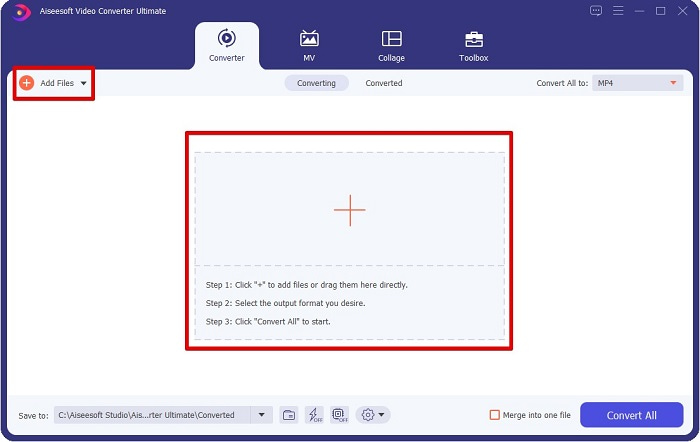
Stap 2. Klik na het starten van de converter op de knop Bestanden toevoegen of de +-knop om je MPG-bestand te uploaden. Je computerbestanden worden weergegeven, waar je in je mappen je bestand opzoekt. Klik vervolgens op Openen om je bestand aan de wachtrij toe te voegen.
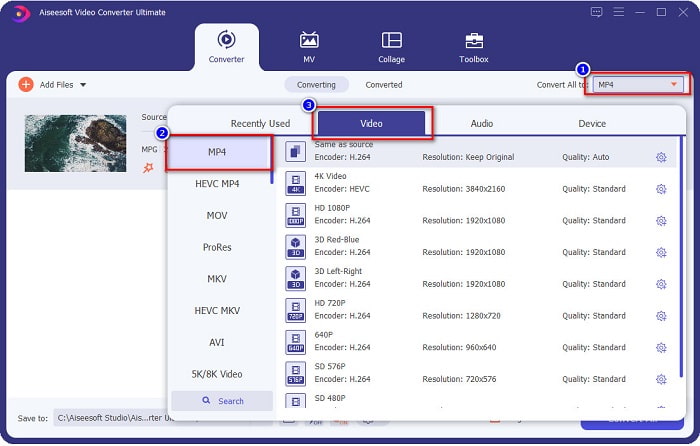
Stap 3. Om het formaat van je MPG-bestand te wijzigen, klik je op Alles converteren naar in de rechterbovenhoek van je scherm. Nadat je een lijst met bestandsformaten ziet, selecteer je het MP4-bestandsformaat.
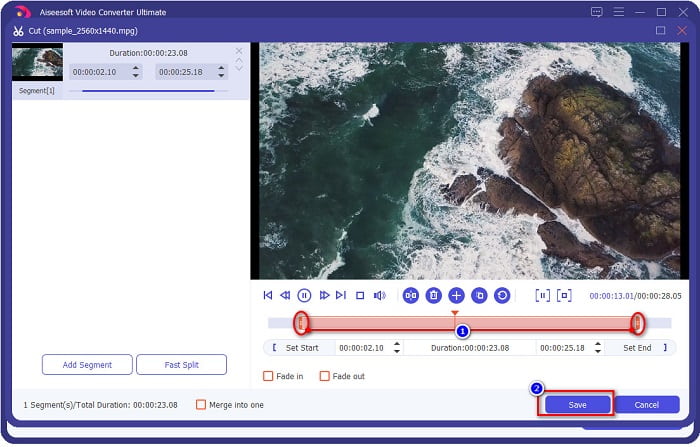
Als je de lengte van je video wilt inkorten, klik je op de schaar-knop om je video te trimmen. Door de knoppen van de afspeelkop te verslepen, kun je de lengte van je video aanpassen. Klik op Opslaan om af te ronden.
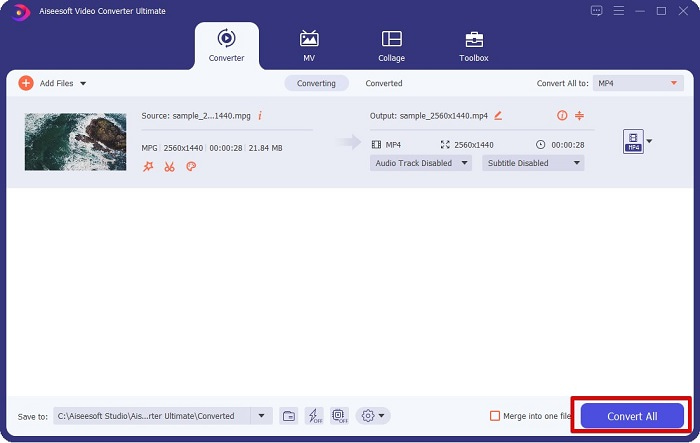
Stap 4. Wanneer je het gewenste bestandsformaat hebt gekozen, klik je op Alles converteren om je MPG-bestand naar een MP4-bestand te converteren. Wacht even, dan wordt je MPG-bestand omgezet naar een MP4-bestand. Met deze eenvoudige stappen heb je je MPG-bestand moeiteloos naar MP4 geconverteerd.
2. Gebruik gratis online converter
FVC Free Online Video Converter stelt je in staat je MPG-bestand gratis en zonder registratie naar het MP4-bestandsformaat te converteren. Het is een gratis online videoconverter waarmee je zonder beperkingen kunt converteren. Bovendien kun je met deze converter grote bestanden online converteren. Je hoeft ook niets te downloaden omdat je hem online kunt gebruiken. Het nadeel is echter dat hij afhankelijk is van internet; de snelheid van je conversie hangt dus af van je internetverbinding. Desondanks is deze converter door veel gebruikers getest en blijkt het een fantastische videoconverter te zijn.
Hier is de lijst met stappen om te converteren in FVC Free Online Video Converter:
Stap 1. Ga in je browser naar FVC Free Online Video Converter.
Stap 2. Wanneer je al op de webpagina bent, klik je op Bestanden toevoegen om te converteren. Er verschijnt een tekstvak waarin je eerst de launcher moet downloaden. Wanneer de launcher is gedownload, word je naar je bestanden geleid; selecteer het MPG-bestand dat je wilt converteren.
Download de desktopversie om bestanden in batches te converteren.
Stap 3. Nadat je je MPG-bestand hebt geselecteerd, zie je de eerste interface met de lijst van videoformaten. Kies MP4 voordat je je MPG-bestand online naar MP4 converteert.
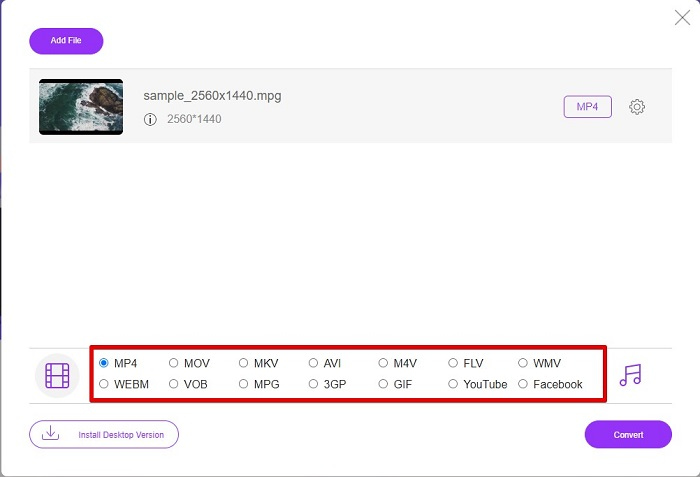
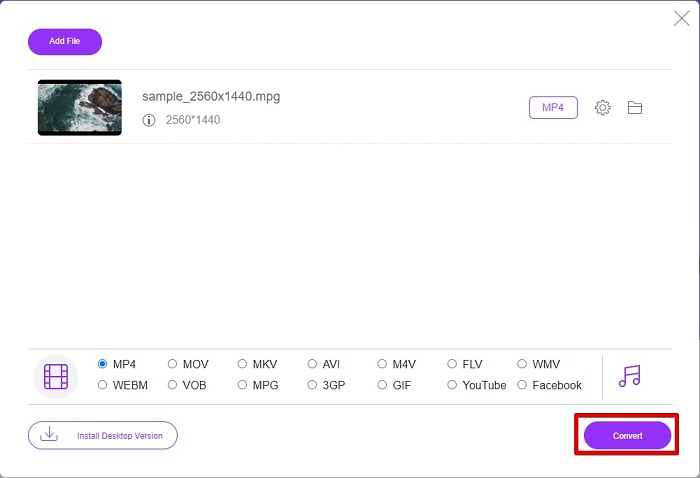
Stap 4. Klik op de knop Converteren om de conversie te starten. Er verschijnt een nieuw tabblad waarin je aangeeft waar je het geconverteerde bestand in je computerbestanden wilt opslaan en klik vervolgens op map selecteren.
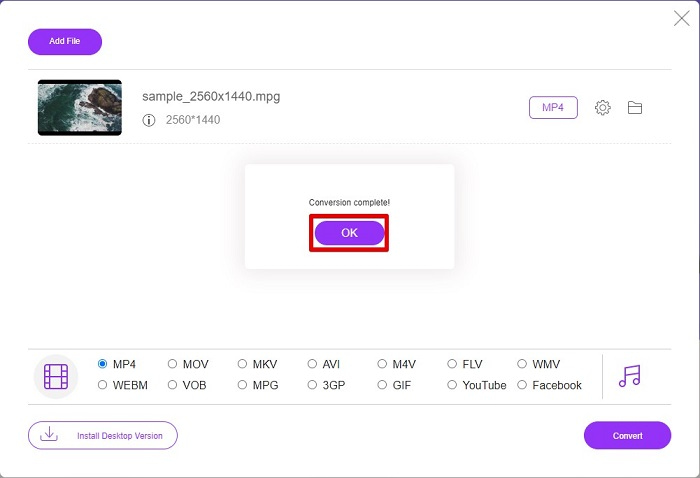
Stap 5. Ten slotte begint je bestand te converteren; wanneer de conversie is voltooid, klik je op OK om af te ronden. En dat is alles! Je bent klaar met converteren, zo eenvoudig als 1-2-3!
3. Gebruik ConvertFiles.com
ConvertFiles.com is een gratis online converter-app om je MPG-bestand naar MP4 te converteren. Hiermee kunt u bestandsindelingen converteren, tot wel 300 soorten bestandsindelingen. En als u online op zoek bent naar een MPG naar MP4-converter waarmee u documenten, tekeningen, video's, presentaties en meer kunt converteren. Bij het gebruik van deze online converter zul je echter veel verontrustende advertenties tegenkomen. Desalniettemin is deze online converter nog steeds het proberen waard en is veelbelovend gebleken.
Hier ziet u hoe u uw MPG-bestand naar het MP4-bestandsformaat converteert:
Stap 1. Zoek in je browser naar ConvertFiles.com om de webpagina direct te bezoeken.
Stap 2. Selecteer je MPG-bestand door op de rechthoekige knop of de knop Bladeren naast Kies een lokaal bestand te klikken. Zoek je MPG-bestand op en selecteer het.
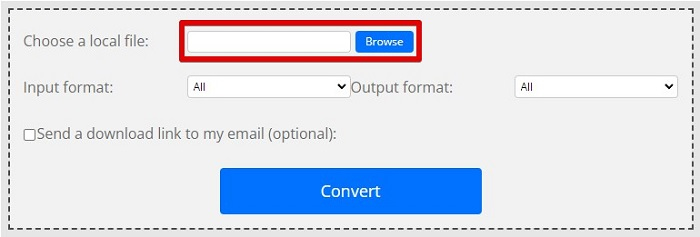
Stap 3. Nadat je het MPG-bestand hebt geselecteerd dat je wilt converteren, kies je bij uitvoerformaat het .mp4-formaat door op de vervolgkeuzelijst-knop te klikken.
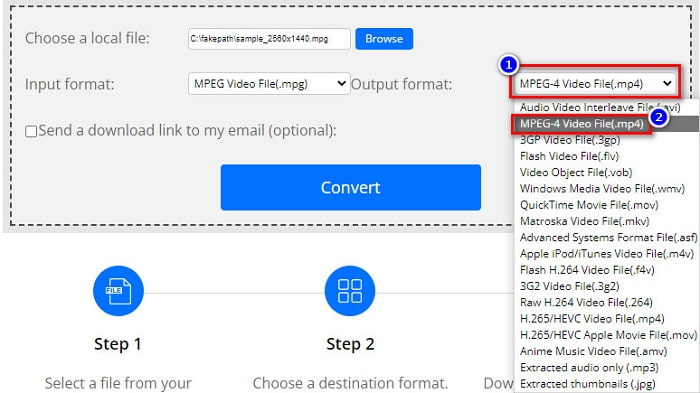
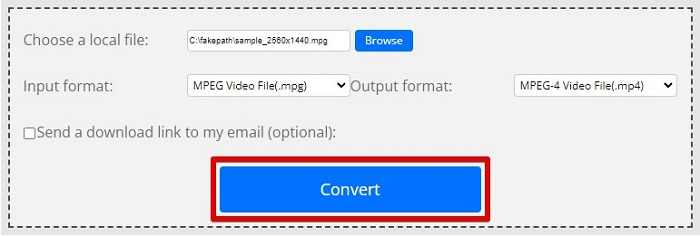
Stap 4. Wanneer je het gewenste bestandsformaat hebt gekozen, kun je je bestand nu converteren door op Converteren te klikken.
MPG versus MP4
MPG, gemaakt door de Moving Picture Experts Group (MPEG), is een veelgebruikt digitaal videoformaat om video-, audio- en metadata-info op te slaan. Het is heel handig bij het maken van films om te delen op internet. Die bestanden in MPG bevatten meestal MPEG-1 of MPEG-2 video/audio compressie.
Het MP4-formaat, uitgebracht door de Moving Picture Experts Group (MPEG) in 2001, kan u helpen video-, audio-, ondertitelings- en afbeeldingsgegevens op te slaan in afzonderlijke tracks. Het is een afkorting voor MPEG-4 Part 14. Bovendien is het een van de meest populaire formaten die worden gebruikt voor het streamen en delen van video's.
Deel 3. Veelgestelde vragen over MPG- en MP4-indeling
Kan ik MPG-bestanden naar MP4 converteren zonder de kwaliteit te verliezen?
Ja. Met Video Converter Ultimate kunt u uw MPG naar MP4-indeling converteren, zonder kwaliteitsverlies, ondanks de bestandsgrootte.
Waar kan ik MPG-bestanden afspelen?
MPG-bestanden worden breed ondersteund. Daardoor kunnen veel mediaspelers dit bestandsformaat openen, waaronder Microsoft Windows Media Player en VideoLAN VLC Media Player. Je kunt dit artikel raadplegen voor meer informatie. Beste 4 MPG/MPEG-spelers voor Windows/Mac/Android/iPhone [2021]
Kan ik MP4 naar MPG converteren?
Ja. U kunt MPG naar MP4-bestandsindeling converteren met behulp van de bestandsconversieprogramma's die we hierboven hebben vermeld.
Gevolgtrekking
De converters die we hierboven hebben genoemd, zijn bewezen betrouwbare converters. Ze zijn gebruiksvriendelijk en gratis! Maar als je een bestandsconverter wilt die je MPG-bestand naar het MP4-bestandsformaat kan converteren en over fantastische functies beschikt om je bestand te verbeteren, dan is Video Converter Ultimate de beste keuze. Wil je bovendien een online converter die vrij is van advertenties en ook grote bestanden moeiteloos kan converteren, probeer dan FVC Free Online Converter.
-
 3 eenvoudige manieren om MPG naar MOV te converteren op uw Mac/Windows/online
 Wilt u uw MPG-bestanden converteren en later naar uw iOS, iPod, iPad of Mac transporteren? Dit artikel zal helpen om erachter te komen hoe MPG met stappen naar MOV kan worden geconverteerd.
-
 Hoe MPG naar FLV te converteren zonder kwaliteitsverlies [Bewezen]
 U moet uw favoriete film bekijken op deze mediaspeler, maar deze ondersteunt geen MPG. Probeer uw MPG-bestand naar FLV te converteren met behulp van deze converters die in dit artikel worden geïntroduceerd.
-
 2 Ultieme MPG-converters om gratis MPG naar WMV te converteren
 Wilt u MPG gratis naar WMV converteren? In dat geval heb je geluk, want we hebben ontdekt dat er twee tools zijn die je kunt gebruiken om je MPG-bestanden te converteren.

