


 Video Converter Ultimate
 Scherm opnemer
 Videoreparatie
 Beveiligde download
Gratis en online manieren om RMVB naar MP4 te converteren
RMVB (RealMedia Variable Bitrate) is een RealMedia‑videobestand dat niet door alle toepassingen wordt ondersteund. Veel mensen willen de bestandsindeling van RMVB naar MP4 veranderen voor eenvoudige weergave op mobiele telefoons. In deze gids laten we je drie gratis en online manieren zien om RMVB-bestanden snel naar MP4 te converteren, zodat je zonder gedoe van je video’s kunt blijven genieten.

Deel 1. Hoe RMVB naar MP4 te converteren met RMVB naar MP4 Converter
Om RMVB naar MP4 te converteren op je Windows 10‑pc of Mac, is een RMVB‑naar‑MP4‑converter behoorlijk snel en betrouwbaar. Free RMVB to MP4 Video Converter is een functionele en gratis videoconverter om snel van RMVB naar MP4 om te zetten. Het ondersteunt ook het converteren van RMVB naar AVI, FLV, MOV of andere formaten. Hieronder staan de stappen om RMVB naar MP4 te wijzigen.
Gratis downloadenVoor Windows 7 of nieuwerVeilige download
Gratis downloadenVoor macOS 10.7 of nieuwerVeilige download
Stap 1. Voordat je begint, moet je deze freeware downloaden en op je computer installeren. Start daarna de Free RMVB to MP4 Converter en importeer de RMVB-bestanden in het programma door op de knop Add File(s) te klikken. Trouwens, het programma ondersteunt batchconversie, zodat je meerdere RMVB-bestanden tegelijk kunt converteren.
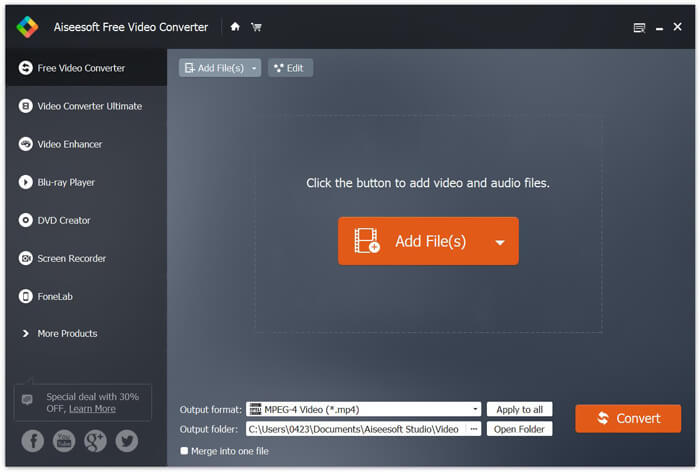
Stap 2. Nadat je je bestanden aan het programma hebt toegevoegd, ga je naar Output format en kies je vervolgens de indeling MP4.

Stap 3. Klik op de knop Convert. Wacht een paar minuten en je krijgt de gewenste MP4-bestanden.
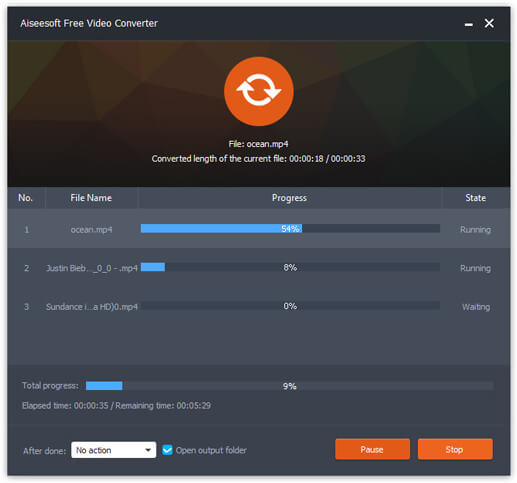
Wanneer je de MP4-bestanden hebt, kun je ze op je computer of mobiele apparaten afspelen. Bovendien kun je deze Free RMVB to MP4 Converter ook gebruiken om RM naar MP4 te converteren of om WMV naar MP4 om te zetten.
Deel 2. Hoe RMVB naar MP4 te converteren met VLC
VLC werkt ook als een praktische tool voor het converteren van video's, en u kunt uw RMVB-bestanden eenvoudig in hoge kwaliteit naar MP4 converteren. Laten we eens kijken hoe we VLC kunnen gebruiken om deze klus te klaren.
Stap 1. Om te beginnen moet je het programma VLC Media Player op je computer downloaden en installeren en het vervolgens uitvoeren.
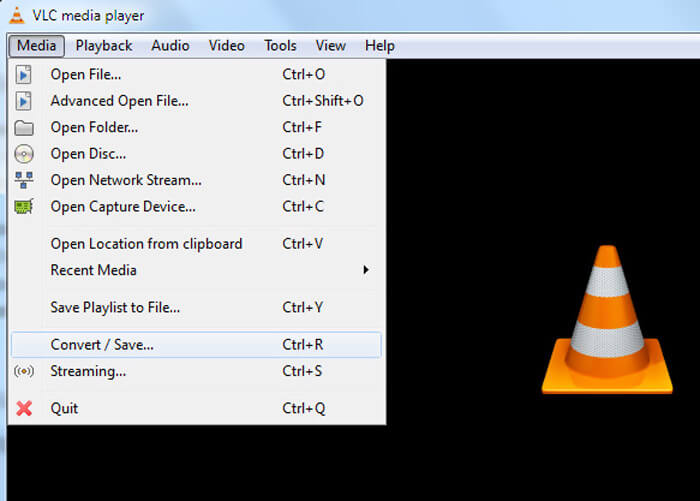
Stap 2. Ga naar het Media-tabblad en kies vervolgens Convert/Save om verder te gaan.
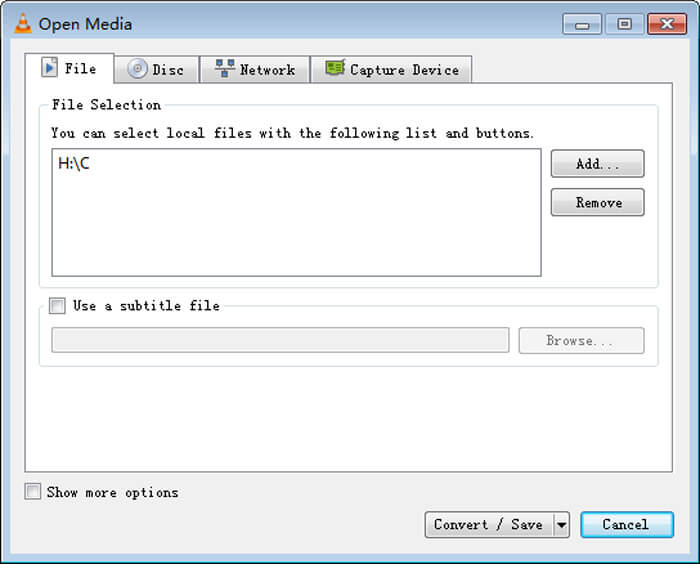
Stap 3. Wanneer je het venster Open Media ziet, moet je je RMVB-bestanden aan VLC toevoegen door op de knop Add… te klikken onder de optie File. Klik daarna onderaan het venster op de knop Convert/Save.
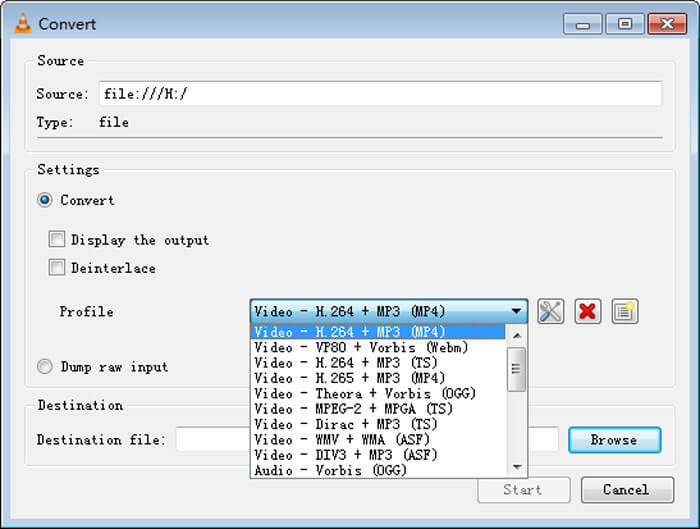
Stap 4. Vervolgens kom je in het venster Convert. Hier moet je Settings opzoeken, naar Profile gaan en vervolgens MP4 als uitvoerformaat kiezen in het vervolgkeuzemenu. Klik ten slotte op Start om je RMVB naar MP4 te converteren voor eenvoudige weergave.
Deel 3. Hoe u RMVB online naar MP4 kunt wijzigen
De online videoconverter ondersteunt ook het snel converteren van RMVB‑video’s naar MP4. Free Online Video Converter is een webgebaseerde videoconverter die elk populair video‑ of audiobestand gratis kan converteren naar MP4, MOV, FLV, AVI, MP3, AAC en nog veel meer. Gebruikers kunnen hiermee via de browser eenvoudig bestanden van RMVB naar MP4 omzetten.
Stap 1. Bezoek https://www.free-videoconverter.net/free-online-video-converter/ en klik op de knop Add Files to Convert om de launcher te activeren.
Download de desktopversie om bestanden in batches te converteren.

Stap 2. Importeer daarna je RMVB-bestanden in deze online tool. Kies vervolgens het formaat MP4 onder het tabblad Video. Wanneer je klaar bent om te converteren, klik je op de knop Convert om de conversie te starten. Zodra de conversie is voltooid, worden de geconverteerde bestanden automatisch op je computer opgeslagen.

RMVB versus MP4
RMVB, een nieuwere variant van het standaard Real Media-formaat (.RM), is een Real Media-videobestandsformaat dat is gecomprimeerd met een variabele bitsnelheid. Het is een populair formaat voor Aziatische films en anime. RMVB-bestanden zijn kleiner van formaat en hebben een lagere bitrate maar een betere kwaliteit.
Het MP4-formaat, uitgebracht door de Moving Picture Experts Group (MPEG) in 2001, kan u helpen video-, audio-, ondertitelings- en afbeeldingsgegevens op te slaan in afzonderlijke tracks. Het is een afkorting voor MPEG-4 Part 14. Bovendien is het een van de meest populaire formaten die worden gebruikt voor het streamen en delen van video's.
Deel 4. Veelgestelde vragen over RMVB naar MP4
Wat is een RMVB-bestand?
RMVB (RealMedia Variable Bitrate) is een Real Media-videobestandsformaat dat gebruikmaakt van de variabele bitrate. Het was ooit populair voor het verspreiden van Aziatische anime, films, afleveringen, torrent, enz. Op het web, aangezien de bestandsgrootte kleiner is en de kwaliteit veel beter.
Hoe een RMVB-bestand openen?
RealPlayer ondersteunt het afspelen van RMVB-bestanden in Windows, Mac OS X en Linux. Of u kunt VLC gebruiken om RMVB-bestanden af te spelen.
Kan HandBrake RMVB naar MP4 converteren?
HandBrake is een geweldige tool voor het converteren van video om te werken op een aantal ondersteunde apparaten. Het is een geweldige keuze voor iedereen om RMVB in MP4 te veranderen.
Dus zo converteert u RMVB-bestanden naar MP4. Heeft u problemen ondervonden bij het volgen van de bovenstaande stappen? Laat ons gerust uw mening weten.
-
 3 eenvoudige stappen om video _TS-bestanden / -map op dvd te branden op Mac / Windows
 Hoe converteer en brand ik TS-bestanden naar een dvd-schijf? Deze stapsgewijze handleiding laat u zien hoe u TS-bestanden en mappen naar dvd kopieert op Windows / Mac, zodat u TS-bestanden op dvd-speler of tv kunt bekijken.
-
 6 eenvoudige manieren om TS naar AVI / MKV / MOV / WMV op Windows / Mac te converteren
 Wilt u TS-bestanden snel naar AVI / MKV / MOV / WMV converteren? Dit artikel toont online en offline videoconverters met een complete gids. Misschien kun je hier de beste gratis TS-converter krijgen.
-
 Hoe MP4 naar M4A op Windows / Mac te converteren (gratis en online)
 Hoe converteer ik MP4 online naar M4A? Kan ik de audio uit MP4-bestanden extraheren? Lees dit bericht en je krijgt alle antwoorden over de conversie van MP4 naar M4A.

