


 Video Converter Ultimate
 Scherm opnemer
 Videoreparatie
2 snelle en gemakkelijke manieren om M2TS naar AVI te converteren met de meegeleverde stappen
Naarmate we verder de toekomst ingaan, krijgen veel formaten niet meer zo veel ondersteuning, zoals M2TS. Dit formaat gebruikt nog steeds de oude Blu-ray Audio Video-container, die een MPEG‑2‑stream gebruikt om de gegevens te transporteren. Je kunt dit formaat niet op sommige apparaten zoals iPhone, iPod en zelfs Android afspelen, omdat zij de structuur van het formaat niet kunnen lezen. Heb je echter nog steeds dit soort bestandsextensie en wil je het bekijken, dan raden we aan het formaat om te zetten naar AVI. Laten we daarom verkennen welke manier het beste is om je te helpen bij je zoektocht om een M2TS te converteren. Bovendien, als je in hetzelfde tempo dit artikel blijft lezen, leer je hoe je M2TS naar AVI kunt converteren, zowel online als offline.

Deel 1. M2TS versus AVI
Zoals we eerder hebben uitgelegd, waren M2TS-bestanden een container op Blu-ray die verschillende video's, audio en een andere stream in één container ondersteunt. Als uw bestandsextensie op uw Blu-ray of AVCHD in dit formaat is, verwacht dan dat de kwaliteit ervan uitstekend is. Hoewel dit bestandsformaat goed presteert, is de ondersteuning die het krijgt op sommige mediaspelers nog steeds mager. Een andere is dat wanneer je dit type bestandsextensie wilt afspelen, je plug-in-play, een codec en enkele componenten nodig hebt om de video in dit formaat te bekijken. Anders dan wanneer uw bestandsextensie .avi is. Dit formaat krijgt fans op het hele web vanwege de goede videokwaliteit die dit formaat kan bevatten. De bestandsgrootte is echter een groot probleem omdat het geen goede codec heeft om uw bestandsgrootte te verkleinen. Maar als we M2TS en AVI vergelijken, zijn ze allebei uitstekend. Toch zijn de ondersteuningen anders en kan de flexibiliteit van het AVI-formaat u brengen.
Deel 2. De eerste manier is om M2TS online naar AVI te converteren met de eenvoudigste webtool
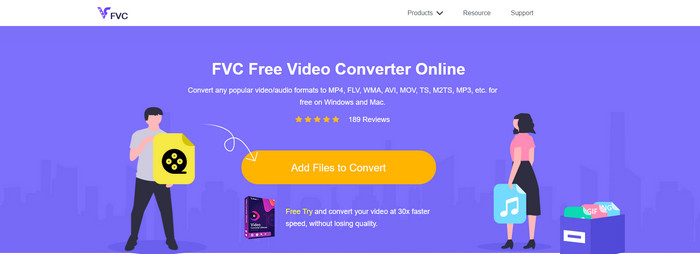
Als je je afvraagt of je M2TS gratis naar AVI kunt converteren, dan is dit voor jou: maak kennis met de FVC Free Video Converter. Deze webtool is een van de beste online converters die je op internet kunt vinden. Bovendien, als je problemen hebt met het converteren van je formaat, is dit ook een oplossing: je kunt de bitrate, resolutie en beeldsnelheid aanpassen. Hoewel de tool een middelgroot aantal verschillende formaten ondersteunt, beschikt hij nog niet over geavanceerde functies om je uiteindelijke uitvoer zo indrukwekkend te maken als de FVC Video Converter Ultimate voor je kan doen. Maar als je niet wilt betalen en je hebt internetverbinding, dan moet dit je keuze zijn om het formaat naar een nieuwe versie te converteren.
Voordelen
- Er is geen software nodig om te downloaden, omdat deze toegankelijk is via internet.
- Het ondersteunt middelgrote varianten van het formaat dat u kunt kiezen.
- Gratis en geen advertenties op de interface van de website.
Nadelen
- Het heeft een internetverbinding nodig om toegang te krijgen.
- Sommige formaten worden hier niet ondersteund en het heeft beperkte formaatondersteuning.
Stappen om de online converter op het web te gebruiken
Stap 1. Klik op deze link om de hoofdpagina van de online converter te openen. Je hoeft je geen zorgen te maken, want deze link is veilig om te bezoeken; we hebben dit zelf getest.
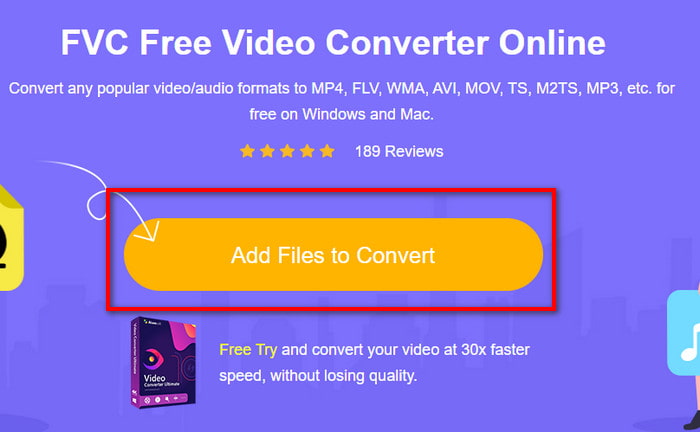
Stap 2. Klik vervolgens op Add Files to Convert; er verschijnt een map op je scherm. Selecteer het bestand met de extensie .m2ts en klik op Open.
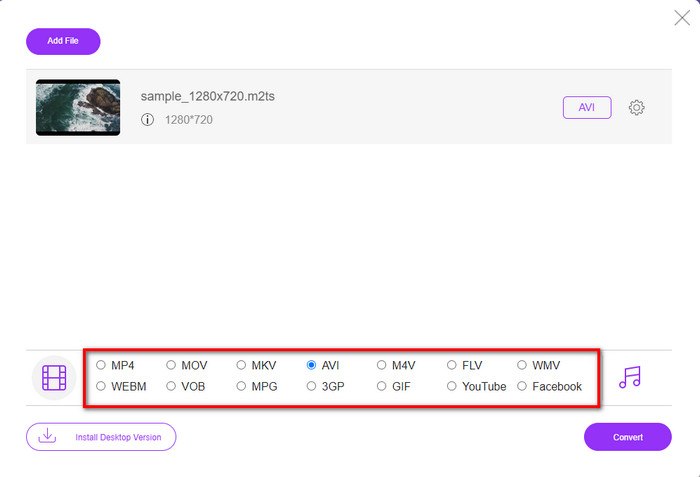
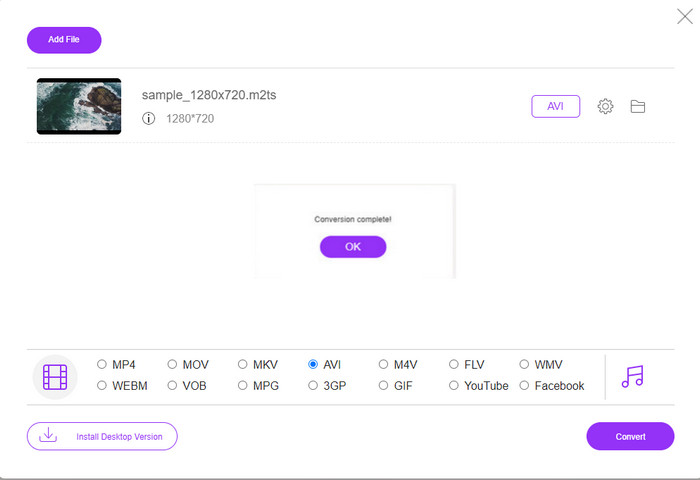
Stap 3. Nadat je het bestand hebt ingevoegd, verschijnt er een interface op je scherm met daaronder de beschikbare formaatopties; kies het AVI‑formaat uit de lijst.
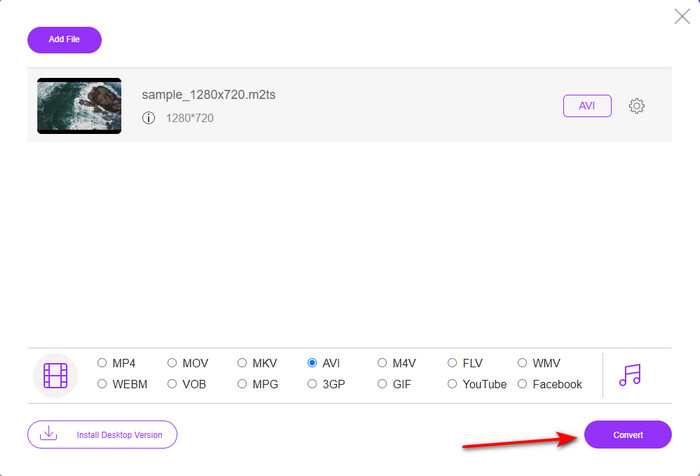
Stap 4. Zodra je het formaat hebt geselecteerd, klik je op Convert om te beginnen met het omzetten van het formaat naar AVI.
Stap 5. Het converteren van het formaat duurt bijna een minuut; daarna verschijnt er een map met daarin het geconverteerde bestand dat je zojuist hebt gemaakt.
Deel 3. Tweede manier is om de ultieme tool te gebruiken om M2TS offline naar AVI te converteren
Als je een tool wilt die aanzienlijk beter presteert dan de online of offline converters die beschikbaar zijn, dan is FVC Video Converter Ultimate de perfecte tool voor jou. Deze tool presteert uitstekend bij verschillende taken, zoals bewerken, een GIF maken, het formaat wijzigen, het volume boosten en nog veel meer. Er zijn al veel geavanceerde maar eenvoudig te gebruiken functies aan deze software toegevoegd om de beste uitvoer voor de klant te leveren. Het klopt dat je klant moet worden voordat je toegang krijgt tot deze ultieme tool. Maar je hoeft niet teleurgesteld te zijn, want hij is niet duur en presteert beter dan andere converters. Ook ondersteunt deze tool alle bekende formaten en dus ongetwijfeld ook de bestandsformaten die je apparaten of desktop hier ondersteunen. Wil je bovendien de beste conversie-ervaring, volg dan de aangegeven stap‑voor‑stap instructies voor het gebruik van deze M2TS‑naar‑AVI‑converter.
Voordelen
- Het ondersteunt veel meer geavanceerde functies die u graag zou willen gebruiken.
- Kan een bestand binnen een paar seconden converteren vanwege de hardwareversnelling en snelle conversie die deze tool biedt.
- Beschikbaar op alle platforms en ondersteunt alle formaten.
Nadelen
- Om toegang te krijgen tot de tool, moet u betalen.
- Het moet eerst op uw computerstation worden gedownload.
Stappen om M2TS‑videoformaat offline naar AVI‑formaat te converteren
Stap 1. Download de software op jouw platform door op de downloadknop hieronder te klikken. Installeer het vervolgens, doorloop de set‑up en open de tool.
Gratis downloadVoor Windows 7 of nieuwerVeilige download
Gratis downloadVoor MacOS 10.7 of nieuwerVeilige download
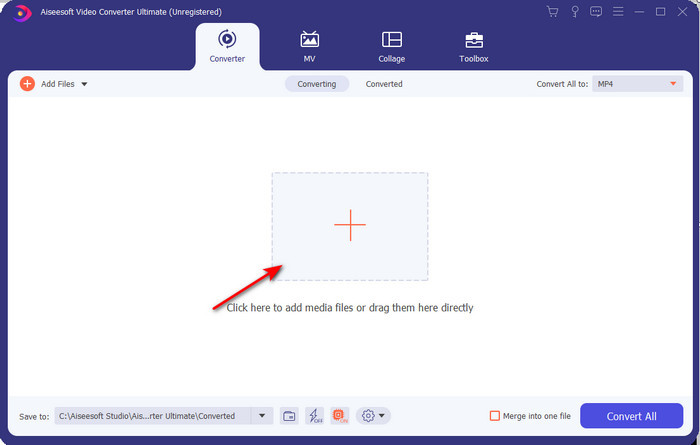
Stap 2. Start de software, klik op de +‑knop om het .m2ts‑bestand in de map te plaatsen en klik op Open.
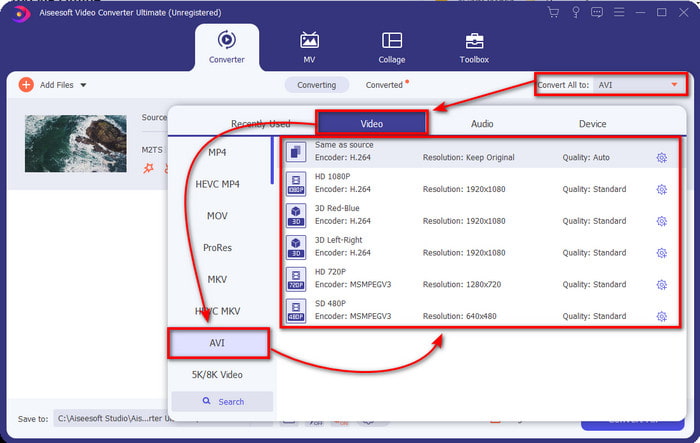
Stap 3. Ga nu naar de rechterbovenkant van de interface; daar zie je het menu Convert All to. Klik daarop. Er verschijnt daarna een submenu; zoek het AVI-formaat in de lijst.
Stap 4. Als je het formaat hebt geselecteerd, kunnen we de conversie starten door op Convert All te klikken.
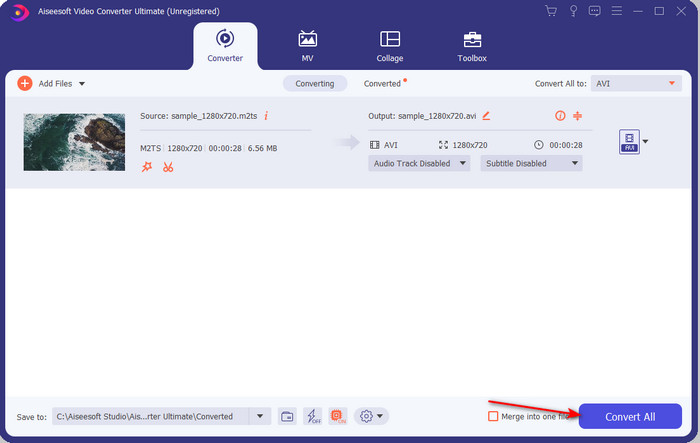
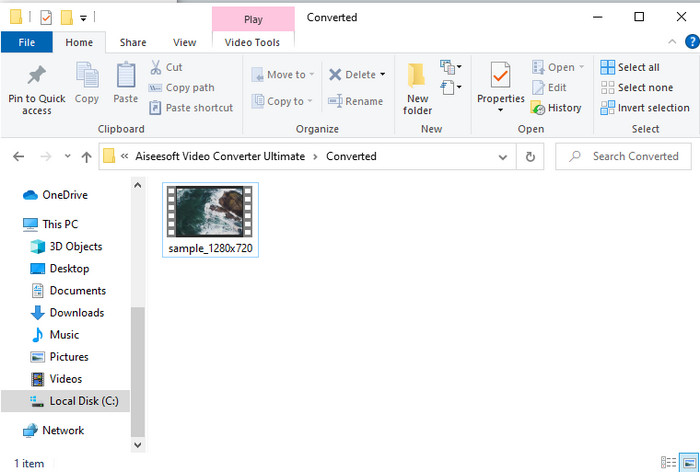
Stap 5. Zodra het converteren is voltooid, verschijnt er een map op je scherm; klik vervolgens op het bestand om de geconverteerde .m2ts‑video te bekijken.
Deel 4. Veelgestelde vragen over M2TS en AVI
Blijft de kwaliteit ervan behouden na het converteren van M2TS naar AVI?
Na het converteren van de M2TS naar AVI moet de kwaliteit van de video behouden blijven. Er is echter een kans dat de kwaliteit verandert als u de uitvoerkwaliteit instelt op gemiddeld of laag. Dit kan worden vermeden als u het instelt op 1080 of 4k, maar de bestandsgrootte ervan zal groter zijn in vergelijking met die van lage kwaliteit.
Waarom kan ik M2TS niet afspelen op mijn Windows Media Player?
Er is eigenlijk één reden waarom je het bestand met de extensie .m2ts niet kunt afspelen: het wordt niet ondersteund. Dus als je je .m2ts‑bestand toch wilt kijken, is het noodzakelijk om het te converteren of een andere externe mediaspeler te zoeken die M2TS‑bestanden kan afspelen.
Is MTS en M2TS anders?
Als we deze twee formaten met elkaar zouden vergelijken, kun je verwachten dat er geen vaststaand verschil is. Ze gebruiken allebei het AVCHD‑videoformaat, dat je videokwaliteit zo hoog mogelijk bewaart. Wil je meer informatie over MTS‑ en M2TS‑bestanden, lees dan verder in What Is Difference Between MTS and M2TS.
Gevolgtrekking
Samen hebben we nu de verschillende technieken gevonden om je M2TS-bestand naar AVI te converteren. Toen we elke tool afzonderlijk hebben onderzocht, kwamen we erachter dat de FVC Video Converter Ultimate goed presteert bij het converteren van bestanden. Dus uiteindelijk raden we je aan de fenomenale converter te downloaden voor eenvoudigere conversie en het snelste conversieproces ooit te ervaren.
-
 Hoe M2TS gratis en online naar MKV te converteren
 Wilt u M2TS naar MKV converteren met behoud van de originele kwaliteit? Dit bericht toont je gratis en online methoden om M2TS zonder verlies naar MKV te veranderen.
-
 [2021] Top 6 gratis en online manieren om M2TS naar MP3 te converteren
 Kan een M2TS-bestand worden geconverteerd naar MP3? In dit bericht hebben we de zes beste gratis en online manieren vermeld om u te helpen M2TS naar MP3, AAC, AIFF en meer audioformaten te converteren.
-
 Hoe M2TS gratis naar MOV te converteren [Online & Offline]
 Moet u M2TS naar MOV converteren om videobestanden op een aantal spelers en platforms af te spelen? Dit artikel helpt je bij het vinden van de beste online / offline methode om M2TS naar MOV op Windows / Mac te converteren.
