


 Video Converter Ultimate
 Scherm opnemer
 Videoreparatie
Hoe de resolutie van een video te verlagen op Windows, Mac en mobiele telefoons
Videos on 1080 and 720 HD have the best resolution you would love to use, especially watching. Although these resolutions are best, sooner or later, you will need to convert the video resolution into less to save some space on your drive. But the question is how to convert the video resolution to lower it? This article will identify the leading video resolution converter to lower the video resolution on Windows, Mac, Online, Android, & iPhone.

Deel 1. Waarom moet u de videoresolutie verlagen?
Laten we, als voorbereiding voordat we de videoresolutie verlagen, eerst de oorzaak bepalen waarom we moeten veranderen om de resolutie van een video te verlagen. De onderstaande informatie is de meest voorkomende instantie die u nodig heeft om de resolutie te verlagen.
Reden 1. Niet ondersteund op mobiele apparaten
Sommige mobiele apparaten ondersteunen geen hogere videoresolutie omdat uw mobiel deze niet herkent. Soms dachten we dat de video niet kon worden geopend vanwege de compatibiliteit van het formaat, maar dit is een andere reden. Als je de video wilt afspelen, moet je rekening houden met de resolutie van de video die je op je telefoon hebt opgeslagen.
Reden 2. Neem de tijd om het bestand op een mediaspeler te laden
Elke mediaspeler kan je video in de hoogst mogelijke resolutie afspelen, maar niet iedereen kan de video meteen met hoge kwaliteit laden. Hoewel het kijken naar een video met een hoge resolutie leuker is dan het kijken naar een lagere resolutie. Leren hoe u de resolutie van een video kunt verlagen, is een must als u de video direct wilt bekijken met weinig of minder belasting van de mediaspeler.
Reden 3. Video met hoge kwaliteit neemt veel ruimte in beslag
Deze reden is niet nieuw voor ons; video met hoge kwaliteit heeft meer kans op een enorme bestandsgrootte. Vanwege de hoogwaardige uitvoer moet u verwachten dat de bestandsgrootte groot is. 720 en 1080 zijn bijvoorbeeld enkele van de beste kwaliteit, maar de bestandsgrootte van 720 video's is veel kleiner dan 1080 video's. Aan de andere kant is de resolutie van 1080 veel hoger dan die van 720.
Nu we een idee hebben waarom we de videoresolutie moeten verlagen, leert de onderstaande informatie u de verschillende toolsets die u kunt gebruiken om de resolutie van uw video te verlagen. Houd de bal aan het rollen om er een alomvattend idee over te hebben.
Deel 2. Gemakkelijkste manier om videoresolutie op desktop te verminderen
If you need a user-friendly video converter that can help you quickly change the video resolution, then Video Converter Ultimate will offer this to you. This tool supports 200+ formats with different presets you can choose from. Want to know what impressed us about this converter? With this tool, you can create presets that can go up to 4k or as low as 360 resolution. Moreover, you don't need to be a professional video editor to learn how to convert video to a lower resolution; by following the steps below, you can convert resolution successfully.
Step 1. Kindly click the appropriate button to get the version you are currently using, whether Windows or Mac. Open the download file to install the software follow the installation process to install it properly. After installation, open the Video Converter Ultimate and proceed to the next step.
Gratis downloadVoor Windows 7 of nieuwerVeilige download
Gratis downloadVoor MacOS 10.7 of nieuwerVeilige download
Step 2. Upload the video with the highest resolution by dragging and dropping it on the tool's interface. But you can click the + button to open the folder, locate the file and click Open to upload the video.
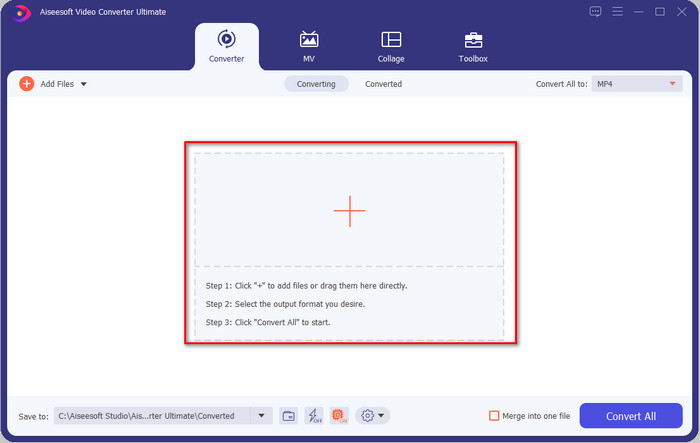
Step 3. Click Convert All to, and a setlist of the premade format will show. You can select different formats such as MP4, MOV, AVI, MKV, and 200+ more with different resolutions, click the format you want, and proceed.
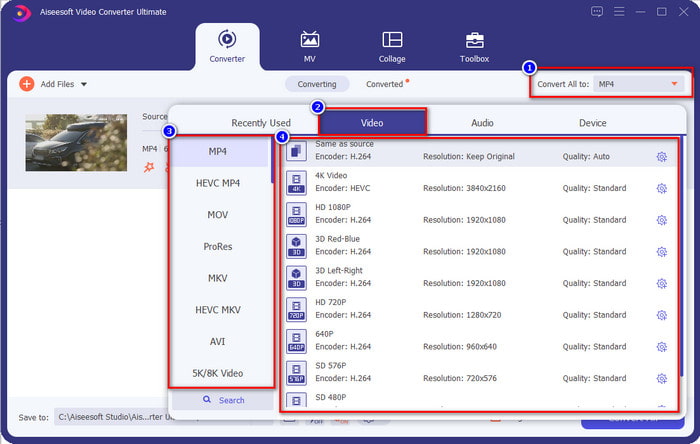
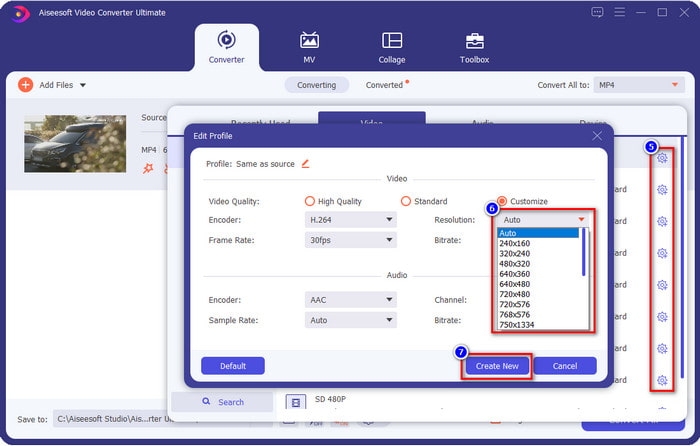
What if the resolution you want to achieve is not on the pre-made list? No need to worry; you can create your resolution. After clicking the Convert All to, choose the format you want and click the gear with a plus icon. Click the drop-down button, select the resolution you want, click Create New, and click the preset you've made.
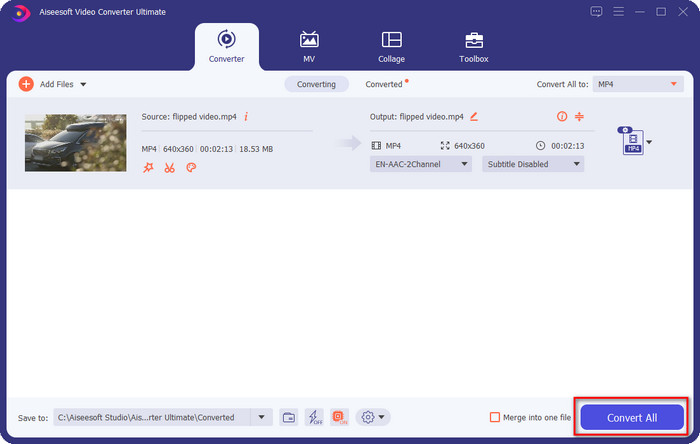
Step 4. To start lowering your video resolution, hit the Convert All button. With the ultra-fast conversion, the download will take less than a minute. And voila, the resolution of your video is now lowered, all thanks to the ultimate tool.
Deel 3. Gratis manier om videoresolutie naar lagere resolutie op internet te converteren
If you are looking for a way to convert HD video to lower resolution online, then you can use the FVC Free Video Converter Online as a solution. This web tool supports numerous formats you can upload and export into. Unlike the ultimate tool, you won't need to download this tool to convert the high-resolution video into a lower one. However, the tool doesn't have an ultra-fast converting process, and the supported format is not as many as the ultimate tool. So, if you want to try and use this web tool, you can follow the steps below.
Step 1. To go to the main webpage of FVC Free Video Converter Online, click this link.
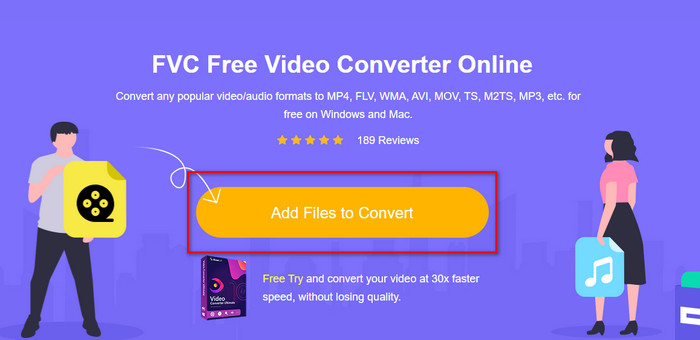
Step 2. Press Add Files to Convert to upload the video you want to lower the resolution. Additionally, if this is your first time using the tool, you must download the launcher. After that, click the Add Files to Convert again to upload the file.
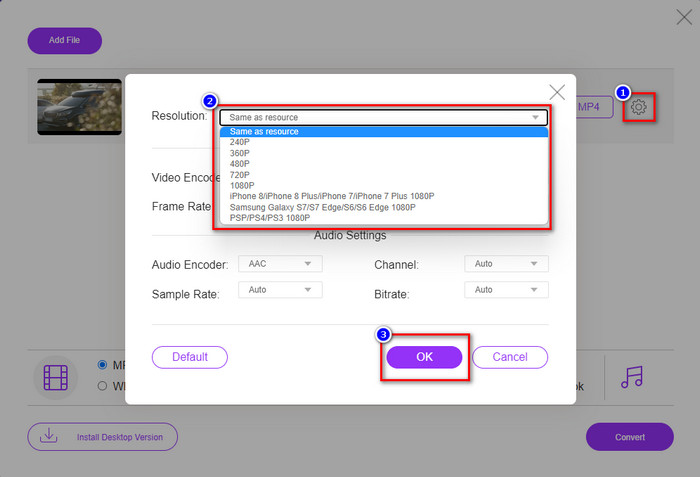
Step 3. Click the gear icon on the right side of the window that will show. Choose the resolution you want by clicking the drop-down button and pressing OK to save.
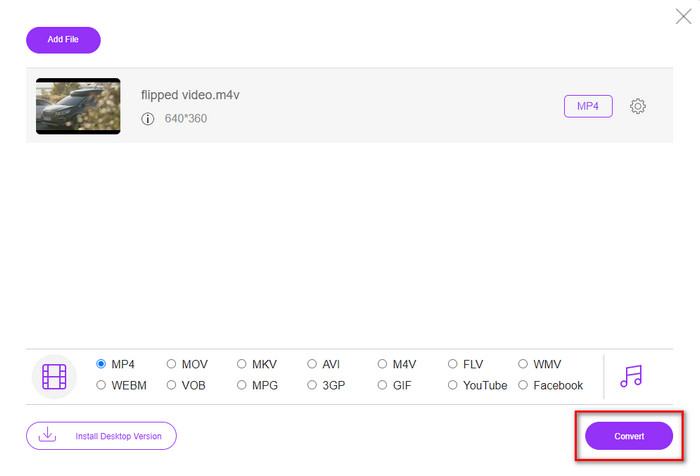
Step 4. To export the lower-quality video, click Convert and wait to download it on your drive.
Deel 4. 2 Beste apps om de videoresolutie op iPhone en Android te verminderen
Video Format Factory (alleen voor Android-gebruikers)
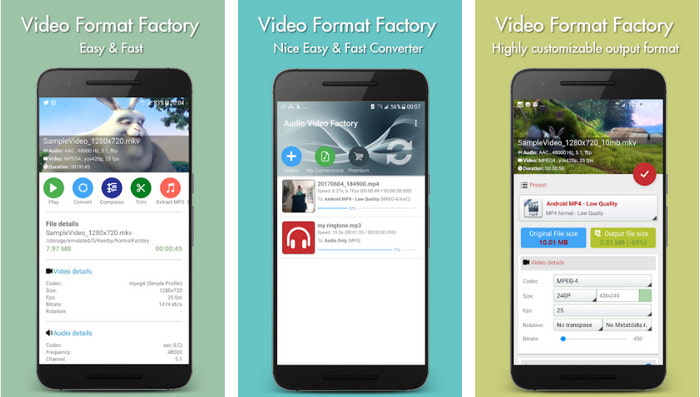
Als u moet leren hoe u de videoresolutie op Android kunt verlagen, kan Audio Video Factory u helpen. Met deze app kun je eenvoudig en gratis de videoresolutie van je video converteren. Sommige advertenties verschijnen echter terwijl u converteert en u kunt het volledige potentieel van de tool niet gebruiken als u deze niet koopt. Dus, om u te leren hoe u het moet gebruiken, volgt u de stappen.
Step 1. Download the app on Playstore, then open it.
Step 2. Click Add to upload the video, choose where your video is, and click the video. After that, click Convert; click the Size and choose the resolution you want.
Step 3. Scroll up and click Convert Now to begin the process.
Lagere camera met zeer lage resolutie (alleen voor iOS-gebruikers)
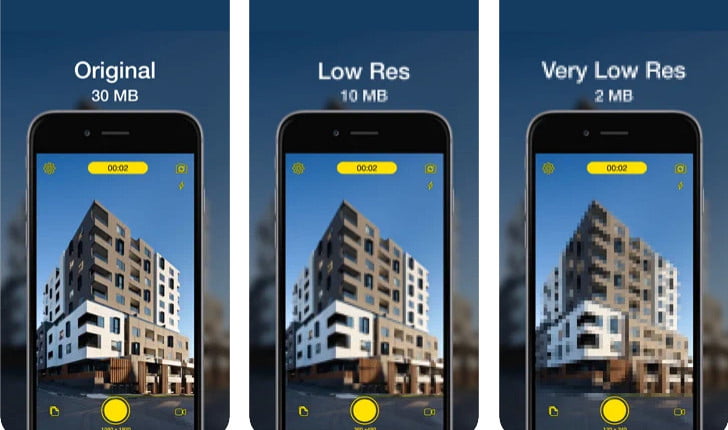
If you are an iOS user, you can still learn how to reduce the resolution of the video on the iPhone by using the Lower- Very Low Res Camera. Unlike the tools in this list, you can shoot a video with a lower resolution if you download this app on the App Store. However, the tools have some limitations, and it has pop-up ads while using the app.
Step 1. Download the app on the App Store, then click it to open.
Step 2. Click the file's icon and select the video you want to convert; after clicking the video, press Resize.
Step 3. Select the Recording Quality, and the process of converting it will begin.
Deel 5. Veelgestelde vragen over het verlagen van de videoresolutie
Ondersteunt VLC 4K-resolutie?
Yes, VLC 3.0 supports playing videos that are on 4k resolution. But did you know there are many things VLC can do? If you want to explore VLC more, click this link and learn about VLC and its other perfect alternatives to use.
Wat zijn de andere hulpmiddelen die ik kan gebruiken om de videoresolutie te converteren?
This review will learn the 8 of the best video resolution converters you can use on different platforms. By clicking this link, you will have more detailed information and different varieties of converter choices.
Wat is de hoogste videoresolutie die ik kan hebben?
8k-videoresolutie is de hoogste videoresolutie die u op tv kunt gebruiken. Deze resolutie is 4x scherper dan de 4k en 16 keer beter dan 1080.
Gevolgtrekking
Finally, we now have a clearer idea on how to lower the video resolution in your platform; whether you are using a Windows, Mac, Online, Android, or iPhone, you can use the converters in this list. But if you want a tool that can change your resolution without reducing the quality, we recommend using the FVC Video Converter Ultimate. As we present above, there are many reasons you should use this tool, and if you still do not believe us, you can download the tool and try if it works, as we explain in this post.
-
 Ultieme gids Hoe u de videoresolutie kunt wijzigen die beschikbaar is op meerdere platforms
 Wilt u de videoresolutie van de video wijzigen? Zo ja, leer dan de verschillende manieren waarop u eenvoudig de videoresolutie kunt wijzigen van de video die u aan het bekijken bent.
-
 Top 8 videoresolutie-converters voor gebruik in multiplatforms [Bijgewerkt 2022]
 Heb je geen idee van de beste videoresolutie-omzetter op je apparaat? Als dit het geval is, kunt u dit artikel volledig lezen om meer te weten te komen over de beschikbare videoconverters.
-
 Beste 1080p HD-videospeler voor Windows/Mac/iOS/Android in 2021
 Als je op zoek bent naar een videospeler om 1080p high-definition video's op je computer te bekijken, bekijk dan onze selectie van de beste 1080p HD-videospelers voor Mac, Windows PC, iOS en Android.
