


 Video Converter Ultimate
 Scherm opnemer
 Videoreparatie
Voeg je eigen magie toe aan de video met behulp van de Mac Video Editors
Tegenwoordig heeft videodelen meer aandacht en populariteit gekregen dan ooit tevoren. Mediadeelplatforms hebben de wereld inmiddels stormenderhand veroverd en het lijkt alsof niets ze kan stoppen. Zodra de verveling toeslaat, vermaken we ons door video’s te kijken of zelf video’s te maken. Daardoor is ook de vraag naar video-editors gestegen om je video te verbeteren en aantrekkelijker te maken. Maar als je op zoek gaat naar de beste Mac‑video-editor op de markt, is er ontzettend veel keuze. In plaats van je geluk te beproeven met allerlei verschillende tools, hebben wij nu verschillende opties voor je verzameld waaruit je kunt kiezen. Blijf dus vooral in de flow, terwijl wij het zoeken naar editors voor jou eenvoudiger dan ooit maken. Zonder verder oponthoud, laten we doorgaan naar de beste tools die geweldige resultaten en bewerkingsfuncties bieden waarop je kunt vertrouwen.

Deel 1. Fenomenale Premium Video Editor voor Mac (betaalde versie)
De fenomenale converter staat nu klaar om je te helpen en je eerste stap in videobewerking te zetten. FVC Video Converter Ultimate is de beste als het gaat om converteren en bewerken. Deze pc- en Mac‑video-editor helpt gebruikers die moeite hebben met het verbeteren van hun video en audio. Bovendien is dit een alles-in-één editor, wat betekent dat hij geavanceerde functies biedt zoals geen ander. Die je kunt gebruiken met duidelijke, gerichte instructies. Dus als je een uitzonderlijke bewerkingservaring wilt, ook al ben je een beginner, probeer dan deze tool. Volg daarvoor de onderstaande stappen die zijn voorzien voor gebruikers die hun video graag willen laten opvallen tussen de rest.
Stap 1. Klik op de downloadknop voor Mac en installeer het programma. Installeer het, doorloop de snelle installatie en start het daarna.
Gratis downloadVoor Windows 7 of nieuwerVeilige download
Gratis downloadVoor MacOS 10.7 of nieuwerVeilige download
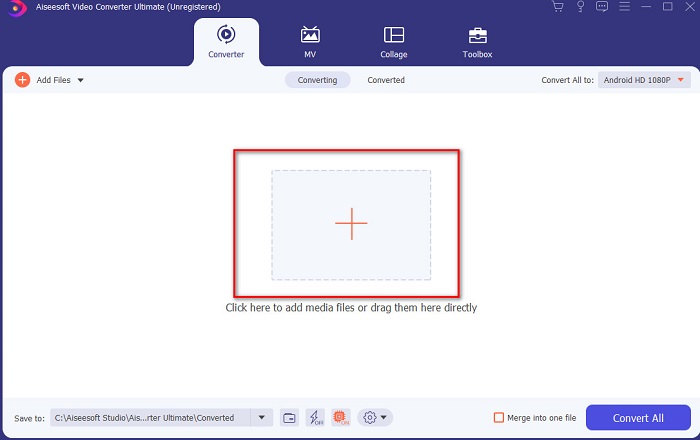
Stap 2. Als de Ultimate Converter eenmaal op je systeem draait, klik je op de knop Add Files of op het +-icoon in het midden om het videobestand toe te voegen dat je wilt bewerken.
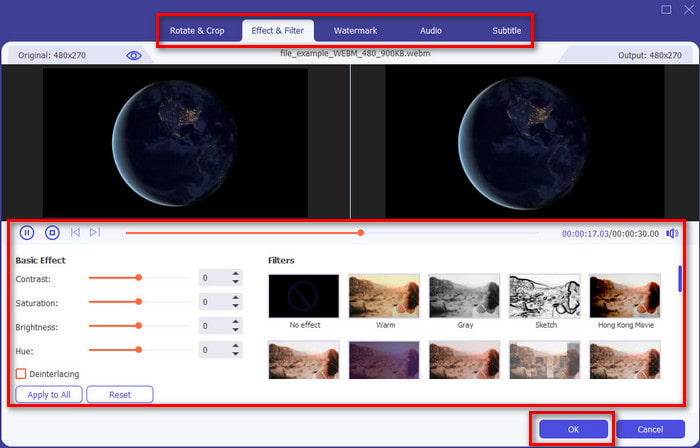
Stap 3. Klik vervolgens op de toverstaf-knop om de video te bewerken en je magie erop los te laten. Er zijn meerdere opties die je aan je video’s kunt toevoegen, zoals filters, effecten, bijsnijden enzovoort. Om de aangebrachte wijzigingen op te slaan, klik je op OK.
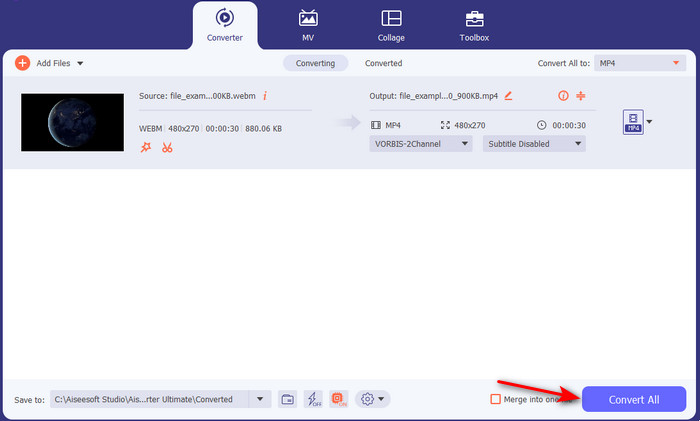
Stap 4. Om de video die je zojuist hebt bewerkt te exporteren, klik je op Convert All. en wacht je een minuut tot het proces is voltooid.
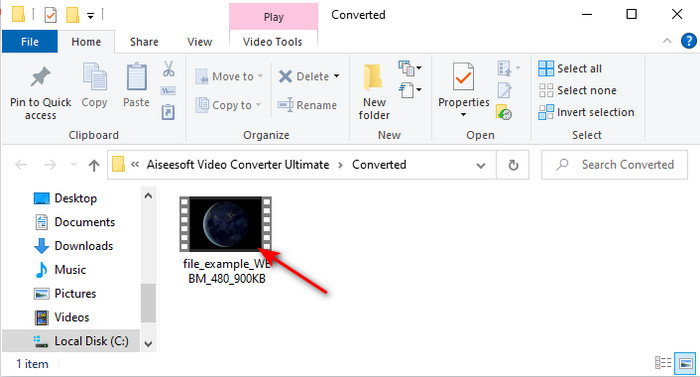
Stap 5. Er verschijnt een map met je bewerkte video op je scherm. Klik erop om de video te bekijken en als je hem wilt samenvoegen met een andere video, kun je ook de geweldige video‑merger in de toolbox uitproberen.
Deel 2. Andere handige video-editors voor Mac (gratis versie en vooraf geïnstalleerde tool)
1. iMovie
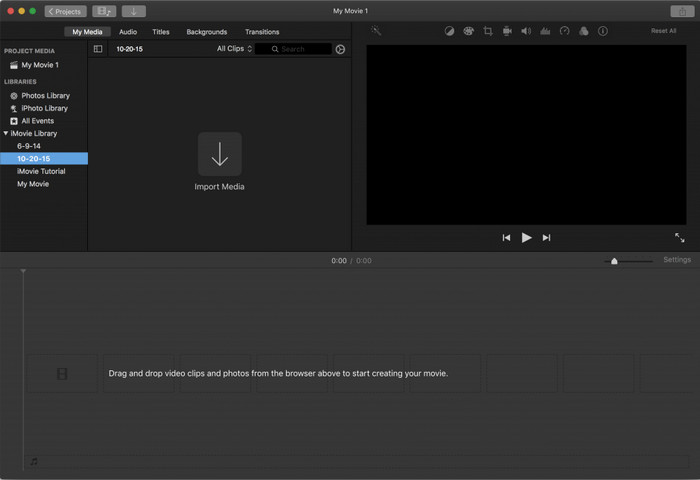
iMovie is een vooraf geïnstalleerde gratis video-editor voor Mac, dus als je een krap budget hebt, kun je deze gebruiken. Hoewel deze tool een gemiddeld scala aan bewerkingsfuncties biedt, ontbreken er nog steeds geavanceerde functies zoals motion tracking. Toch is het een goede editor, al is het niet de beste; je kunt hem in ieder geval gratis op de Mac gebruiken. Als je echter een professioneel resultaat wilt, zou dit je laatste redmiddel moeten zijn. Het biedt namelijk alleen basisbewerkingen die je kunt gebruiken om eenvoudige video’s te monteren. Daarnaast is het gratis en vooraf geïnstalleerd, dus je hoeft geen app van derden te downloaden om te kunnen bewerken.
Voordelen
- Makkelijk te begrijpen hulpmiddel.
- Native editor voor Mac-gebruikers.
Nadelen
- Het mist de meeste geavanceerde functies die een professional nodig heeft.
- Niet de beste tool als je een kwaliteitsvideo wilt delen.
2. Avidemux
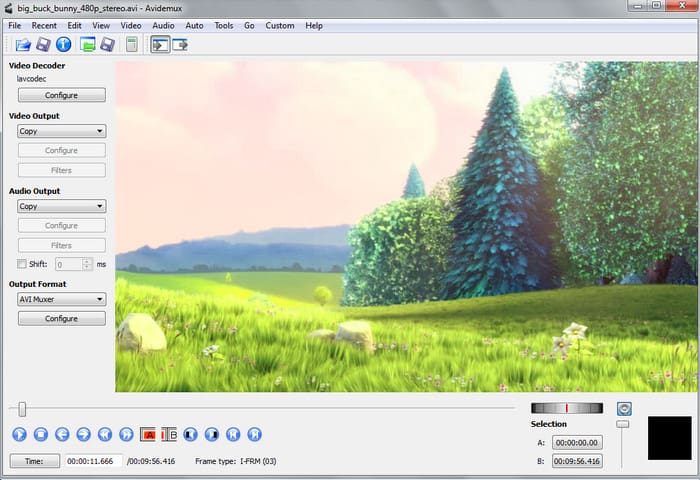
Avidemux is een slow‑motion‑video-editor voor Mac en biedt ook een zekere mate van efficiëntie. Het levert eenvoudige bewerkingsfuncties, maar iMovie heeft aanzienlijk meer te bieden dan deze editor. Bovendien is het, wanneer je de hoofdpagina van deze tool bezoekt, niet aan te raden om persoonlijke informatie in te vullen, omdat deze niet goed beveiligd is. Geef je toch persoonlijke gegevens, zoals een bankrekening, dan is de kans groot dat je wordt gehackt. Desondanks biedt het nog altijd redelijke videobewerking voor wat je nodig hebt, maar als je een professional bent, is het hooguit van een middelmatig niveau.
Voordelen
- Bewerkingsfuncties zijn prima.
- Het ondersteunt veel bestandstypen om te bewerken.
Nadelen
- Niet de beste keuze als je een professional bent in bewerken omdat het geavanceerde functies mist.
- Interface van de tool is ook zo saai.
3. Kdenlive
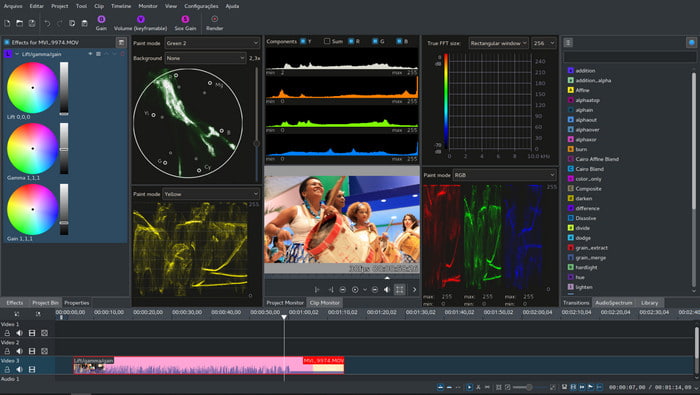
Een andere Mac‑video-editor die je eenvoudig op je desktop kunt downloaden is Kdenlive. Deze tool beschikt over de mogelijkheden die een editor zou moeten hebben. Toch komen er nog steeds kleine en grote fouten of bugs voor wanneer je hem probeert te gebruiken. Deze tool werkt beter op pc dan op Mac, omdat hij daar meer gebruikers en ondersteuning heeft. Op Mac is vooral de oude versie van de tool beschikbaar, maar die werkt wel. Hoewel het misschien lijkt alsof hij je niet goed zal helpen vanwege de bugs of het gebrek aan functies, is het toch best de moeite waard om te leren hoe je deze tool gebruikt.
Voordelen
- Het ondersteunt alle bekende platforms.
- U hoeft niet te betalen omdat het gratis is.
Nadelen
- Video's die je hier gaat bewerken, hebben een kleine kans om op te vallen.
- Heeft veel technische problemen die nog niet zijn verholpen.
Deel 3. Veelgestelde vragen over Mac Video Editor
Hoe combineer je verschillende video's op iMovie?
Als je twee of meer video’s die je afzonderlijk met je iPhone hebt opgenomen wilt combineren, probeer dan iMovie om ze samen te voegen. Wil je meer weten over het samenvoegen met iMovie, ga dan naar deze link.
Waarom bewerken we onze video's?
Het bewerken van video staat bekend als postproductie, waarbij je je video verbetert en onnodige clips verwijdert. Deze stap is erg cruciaal, omdat je video hierdoor indrukwekkender en opvallender zal zijn dan andere. Zelfs als je geweldige inhoud hebt, als je bewerkte video niet zo goed is, zal deze minder aandacht krijgen voor de anderen.
Hoe GIF's op Mac te bewerken?
Hoewel iMovie video’s kan bewerken, geldt dat niet voor GIF’s. Daarom hebben we nu verschillende tools verzameld die je kunt gebruiken om GIF’s op Mac te bewerken. Hier vind je de top 9 bewerkingsprogramma’s voor het bewerken van GIF’s.
Gevolgtrekking
Nu we aan het einde zijn gekomen, kun je met behulp van de in dit artikel genoemde tools zelf aan de slag met videobewerking. Hoewel niet alle tools de fenomenale bewerkingsfuncties bieden waar je misschien op hoopt, kun je Video Converter Ultimate hier niet mee vergelijken, want deze tool heeft enorm veel in huis. Als je indruk wilt maken op je kijkers, gebruik dan de ultieme tool om een ongelooflijk resultaat te produceren.
-
 Concrete tutorial - Hoe twee audiotracks samen te voegen in Audacity
 Audacity staat bekend om het bewerken van audio. Je hebt Audacity gedownload, maar weet niet hoe je audiotracks moet samenvoegen in Audacity? Dit bericht zal je vertellen hoe je tracks kunt samenvoegen in Audacity.
-
 2 Efficiënte methoden om MPEG-bestanden samen te voegen om oude tv-series te combineren
 Als je oude tv-series in MPEG hebt, kun je meer te weten komen over de 2 efficiënte methoden om MPEG-bestanden samen te voegen tot één film volgens jouw vereisten.
-
 [Bijgewerkt in 2025] 9 beste GIF-editors voor pc, Mac, iOS en Android
 Wilt u een persoonlijk tintje aan uw GIF toevoegen, zodat deze expressiever kan worden? Lees dit artikel verder om te weten hoe u kunt bewerken en wat de beste tool voor de klus is.
