


 Video Converter Ultimate
 Scherm opnemer
 Videoreparatie
4 effectieve tools voor het bekijken van metagegevens om metagegevens uit bestanden te bekijken
As part of a video element, the metadata contains the data you'll need to know about the file. But the question is, how can you view the file's metadata? So, if you want to see the meta information inside your video, this is the perfect post for you. Keep on reading this article because we will review for you the best metadata viewer you can use to see the metadata, and if possible, you can edit it as well.

Deel 1. 2 van de beste metadataviewers voor Windows en Mac van 2022
Video Converter Ultimate [Beste Video en Audio Metadata Viewer & Editor]
Video Converter Ultimate offers you the best video metadata viewer on Mac and Windows. With this tool, you can easily add and view the metadata in all video and audio formats with just a few clicks. Even though you didn't have experience dealing with this particular task, you can depend on the best viewer to help you. Unlike the other tools that offer to view metadata, this software provides a great function to help you do more in different tasks, such as editing the metadata. Want to know what these are? If so, read the key features you can have once you attain this software.

FVC Video Converter Ultimate
5.689.200+ downloads- Het is de beste tool om de metadata van elke video of video te bekijken en te bewerken.
- Ondersteunt verschillende mediaformaten, waaronder MP4, AVI, MOV, MKV, FLV en meer.
- U kunt hier grote video- en audiobestanden invoegen om hun metadata te controleren.
- Om te beginnen is dit de beste metadata-viewer met een gebruiksvriendelijke interface.
- Beschikbaar in alle verschillende soorten desktopplatforms zoals Windows en Mac.
Gratis downloadVoor Windows 7 of nieuwerVeilige download
Gratis downloadVoor MacOS 10.7 of nieuwerVeilige download
Dus als u nu wilt leren hoe u metadata kunt bekijken, moet u de tool eerst downloaden door op de juiste downloadknop hieronder te klikken, deze vervolgens installeren en vervolgens openen.
Gratis downloadVoor Windows 7 of nieuwerVeilige download
Gratis downloadVoor MacOS 10.7 of nieuwerVeilige download
Metadata bekijken op Video Converter Ultimate
Step 1. By clicking the + button, a file folder will show on your screen where you can locate the video or audio file you want to check the metadata. Once you've chosen the file, click Open and proceed to the next step.
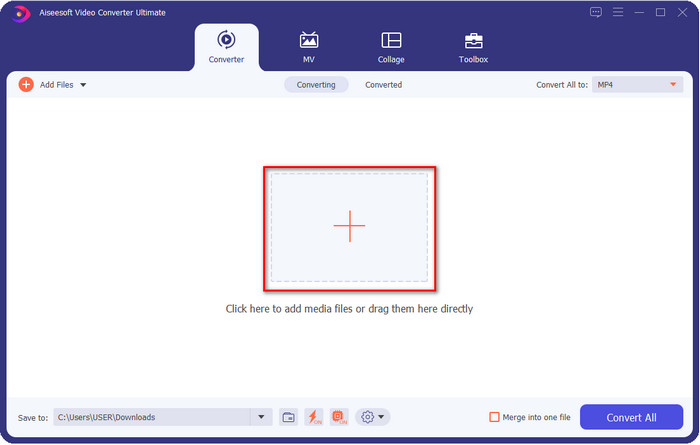
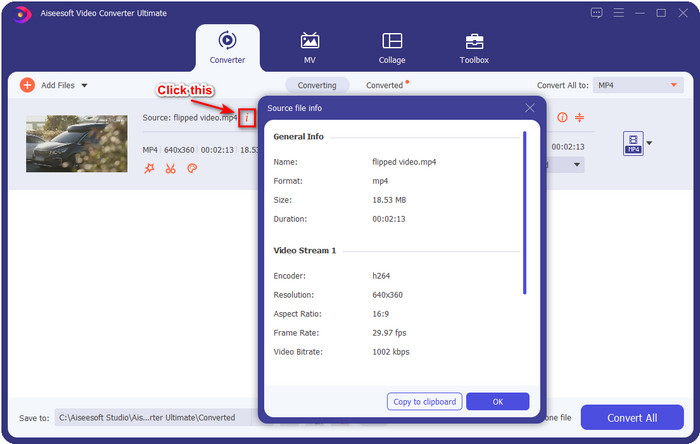
Step 2. While the file is on queue, click the i icon; voila, you have now viewed the metadata of your video file saved on your computer.
Metadata van het video- of audiobestand toevoegen of bewerken met de beste metadata-editor
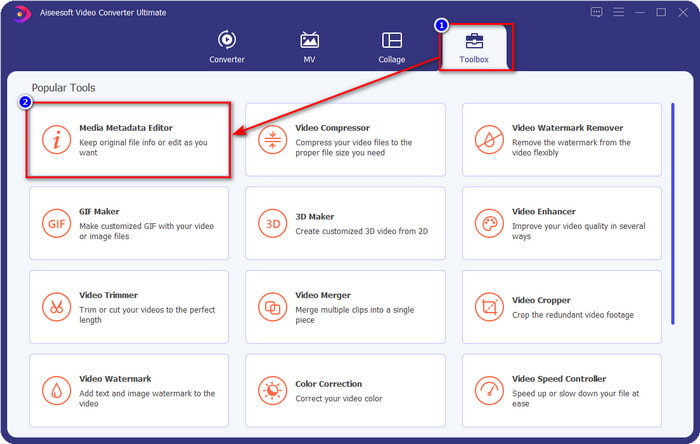
Step 1. After you've opened the software, you must go to the Toolbox section, and in that section, you will see a feature Media Metadata Editor, then click it.
Step 2. New windows will show, click the + button, find the video or audio file on the computers folder, and click Open.
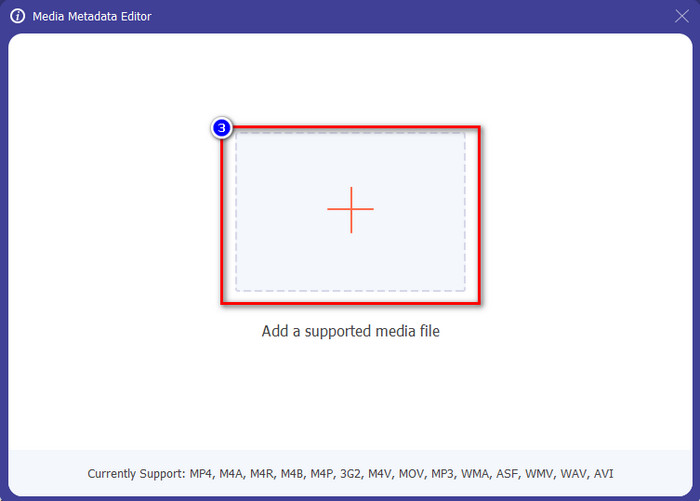
Step 3. Add or edit the data about the file according to your needs; after that, click Save to apply the changes you add.

Photoshop [Beste metadataviewer voor professionals]
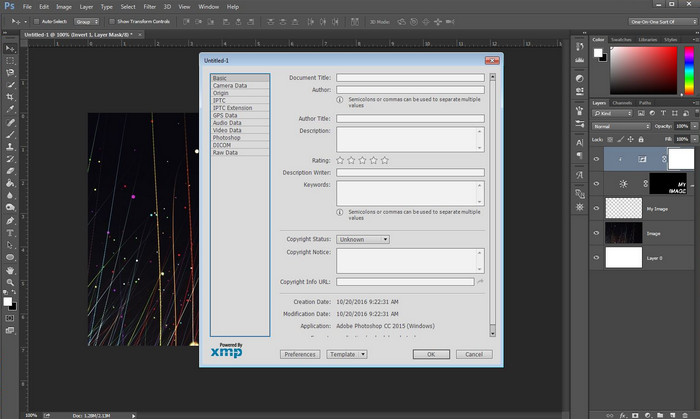
Photoshop became known as the top photo editor you can use as a professional. This tool offers users the high-end editing you will need to make your photo look better than before. Although the tool offers advanced editing, viewing the file's metadata, this tool is too expensive for some users. Maybe you are asking why we add this editor to the list, well it is popular, and many users already use this, so why not? Although it can add metadata on every PSD file, the metadata it supports is minimal, which means it is mostly about basics. So, if you want to view metadata in Photoshop, you must purchase the tool.
Voordelen
- Het is de beste editor die je op internet kunt vinden.
- Het ondersteunt een breed scala aan afbeeldingsbestandsindelingen die u kunt invoegen en later de metadata kunt controleren.
- De keuze van de redacteur omdat het een eersteklas editorsoftware op de desktop is.
Nadelen
- Als u de tool koopt, verwacht dan dat deze duur is.
- Het heeft een high-end desktop nodig om het beter te kunnen gebruiken.
- Niet de beste keuze voor beginners om mee te beginnen.
Gerelateerd:
How to Add Watermark in Photoshop
Deel 2. 2 gratis metadataviewers beschikbaar op het web
Jeffrey's Metadata-editor voor afbeeldingen
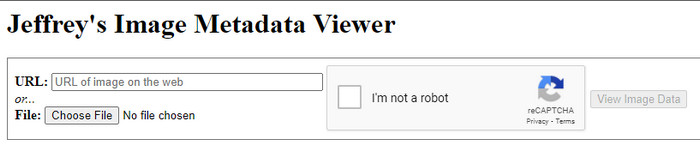
If you want a simple free metadata viewer on the web, try to use Jeffrey's Image Metadata Editor. This web tool is an effective tool to view the metadata of every media file you have for free. However, the users' interface of the web tool isn't as impressive as the others; it still serves its purpose as a metadata editor and viewer. Moreover, if you want to try and access this tool, you must beware because the website isn't protected on different web browsers, which means signing in to the website can lead to hacking or losing some files. Remember that you'll need to beware if you try to access the tool to view your metadata or edit it. So far, there aren't any reports of some who have been hacked while using the website.
Voordelen
- Gratis toegang in alle webbrowsers.
- Het ondersteunt verschillende formaten; u kunt de metadata uploaden en bekijken.
- U kunt de URL invoegen in plaats van het bestand om ruimte te besparen.
Nadelen
- De captcha is een beetje vervelend als je de metadata wilt bekijken.
- De website is niet beveiligd.
Metadata2go
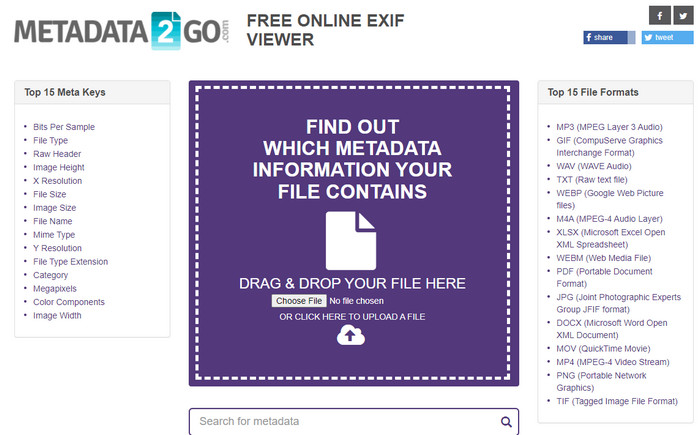
Metadat2go offers a wide range of image formats to insert and later view the metadata. Even though the GUI is much heavier than the first web tool we introduced, it is still easy to use for anyone who would like to access the tool. Although the tool is safer to use than the first one, there are some limitations on the functions, and most of the time the drag and drop function of it doesn't do well. But if you want to learn how to open and read metadata from video, this tool will suffice your needs.
Voordelen
- Het is gratis en veilig toegankelijk via verschillende zoekmachines.
- Het voert de taak soepel uit.
- Het ondersteunt tal van afbeeldingsformaten.
Nadelen
- In sommige gevallen werken opties niet goed, zoals slepen en neerzetten.
- Het ondersteunt andere formaten, maar er zijn er maar weinig geselecteerd.
Deel 3. Vergelijkingstabel over de 4 Metadata Viewer [Online & Offline]
| Kenmerken | FVC Video Converter Ultimate | Photoshop | Jeffrey's Metadata-editor voor afbeeldingen | Metadata2go |
| Eenvoudig metagegevens bekijken en bewerken |  | | | |
| Veilig in gebruik | | |  | |
| Budgetvriendelijk | | | | |
| Gebruikersvriendelijk | | | | |
| Geavanceerde functies beschikbaar | | | | |
| Programma-gebaseerd | Desktop-gebaseerd programma | Desktop-gebaseerd programma | Webgebaseerd programma | Webgebaseerd programma |
Deel 4. Veelgestelde vragen over Metadata Viewer
Wat zit er in metadata?
Binnen de metadata ziet u een andere set informatie over het bestand, bijvoorbeeld de naam van de auteur, het genre (als het muziek is), de bestandstitel, de bestandsgrootte en nog veel meer.
Waarom moet ik de metadata zien?
Welnu, metadata helpen je om korte informatie over het bestand te krijgen die je niet in het bestand kunt zien. Door de metadata te bekijken, krijgt u een idee over de gegevens in een bepaald bestand, of het nu een afbeelding, video, audio, PDF of meer is.
Kan ik metadata gebruiken om het bestand te beschermen?
Ja, u kunt metadata toevoegen om uw bestand te beschermen tegen de mensen die dit van u willen proberen te stelen. Op deze manier kunt u de door u gemaakte inloggegevens hebben die werken als iemand deze van u probeert te stelen. Er zijn echter enkele technieken om de metadata van het bestand te verwijderen; hoewel iemand de gegevens kan verwijderen, is het het beste om metagegevens aan het bestand toe te voegen voor extra en eenvoudige bescherming.
Gevolgtrekking
Now that we have the metadata viewer presented, it is time to choose one and use it to see your file's inside. Moreover, the first two tools we presented are undoubtedly the best on viewing metadata; but we can see that Photoshop is too expensive to use compared to the ultimate tool. So, therefore, if you want a cheap and safe way to view your metadata or edit it, you must use the FVC Video Converter Ultimate because it is the perfect tool for this task. Still, are you not convinced with the review we did on the tool? Well, you can download the tool on your software and try it for yourself!
-
 3 beste oplossingen voor het gemakkelijk verwijderen van watermerken uit video's
 Wil je het vervelende watermerk op de video verwijderen? Met deze blog leer je de verschillende ideeën over het verwijderen van het watermerk op een video.
-
 4 beste manieren om snel een watermerk aan video's toe te voegen
 Laten we leren hoe u een watermerk kunt toevoegen aan video's op Windows, Mac, Online, iOS en Android met gedetailleerde stappen als u dit artikel leest.
-
 4 effectieve manieren om Tiktok-watermerken van Tiktok-video's te verwijderen
 Moet je het Tiktok-watermerk van je geëxporteerde Tiktok-video's verwijderen? Je kunt het hier doen met behulp van de tools die we presenteren; je kunt het gemakkelijk doen.
