


 Video Converter Ultimate
 Scherm opnemer
 Videoreparatie
TikTok-video's op Tiktok versnellen of de andere alternatieve software gebruiken
Een van de snelstgroeiende apps voor video-entertainment die je op je mobiele telefoon kunt gebruiken, is TikTok. Hoewel TikTok in 2016 werd uitgebracht, werd het binnen enkele maanden na de releasedatum al razend populair. Een veelgebruikte bewerking in de app is het versnellen van video’s om een visueel effect te creëren. Als jij een van die gebruikers bent en wilt weten hoe je dat doet, dan ben je hier op de juiste plek. We bespreken verschillende tools die je helpen om te leren hoe je een video kunt versnellen op TikTok.

Deel 1. Een video versnellen op TikTok
Zoals eerder gezegd is TikTok een van de bekendste platforms voor korte video’s geworden, dus een video bewerken is hier vrij eenvoudig. Let op: je kunt je video al tijdens het opnemen versnellen, en niet pas als de video klaar is. Als je een video op TikTok versnelt, moet je wel vooraf inschatten hoe snel je hem wilt hebben, zonder precies te weten of dat het tempo is dat je uiteindelijk wilt. Maar als je geen externe tool wilt downloaden om een video te versnellen, dan volstaat TikTok zelf. Volg nu de onderstaande stappen om een video op TikTok te versnellen.
Stappen om een versnelde video op TikTok op te nemen:
Stap 1. Download eerst TikTok op je mobiele telefoon en start de app zodra het downloaden is voltooid.
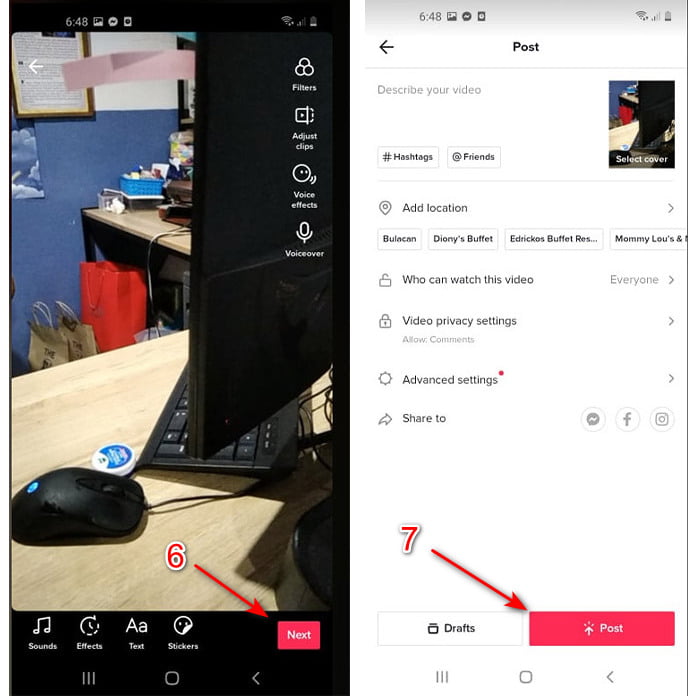
Stap 2. Tik op het +-teken om met filmen te beginnen. Klik daarna op ‘geluid toevoegen’ om achtergrondmuziek en eventueel een filter toe te voegen. Om de video te versnellen, tik je op Speed en kies je een van de opties eronder. Tik op de ronde knop om de opname te starten en tik er nogmaals op om te stoppen.
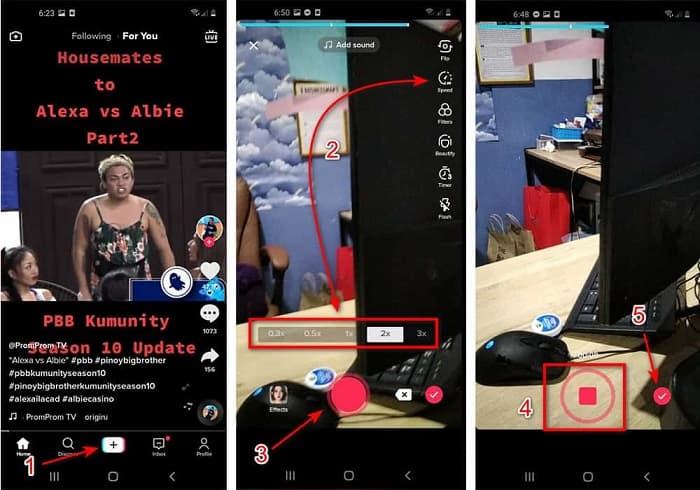
Stap 3. Om de video te controleren, druk je op de check-knop en klik je op Next. Klik daarna op Post om de video op TikTok te uploaden.
Deel 2. Hoe u TikTok-video's op Video Converter Ultimate kunt versnellen
In tegenstelling tot de ingebouwde bewerkingsfunctie die TikTok je biedt, laat Video Converter Ultimate je de snelheid handmatig aanpassen, maar dan op een eenvoudigere manier. Bovendien krijg je tijdens het versnellen een voorbeeld te zien, zodat je kunt bepalen of de snelheid van de video naar je wens is. Daarnaast biedt deze geweldige software gebruikers al de ervaring van geavanceerde, professionele bewerkingsfuncties, maar dan in een vereenvoudigde stap-voor-stapvorm. Door de geavanceerde functies van deze tool moet je er wel een paar dollar voor betalen. Maak je echter geen zorgen: het kost je geen honderden of duizenden euro’s. Wil je weten welke voordelen of belangrijkste functies je krijgt als je deze tool gebruikt, bekijk dan de volgende lijst.
Belangrijkste functies die je in Video Converter Ultimate vindt:
◆ Dit is platformonafhankelijke software, wat betekent dat u deze kunt downloaden op uw pc, Mac of Linux.
◆ Alle geavanceerde bewerkingen, converters, GIF-makers en meer zijn beschikbaar in deze tool.
◆ De bruikbaarheid van de tool is voor iedereen erg handig, zelfs voor professionals of voor beginners.
◆ Het stelt de gebruikers in staat om hun creatieve kant te uiten via verschillende bewerkingsfuncties die hier beschikbaar zijn.
◆ Hoewel het hulpmiddel wordt betaald, is het minder duur en zeer betaalbaar voor iedereen die het wil proberen.
Als je nu wilt weten hoe je TikTok-video’s kunt versnellen met deze geweldige alternatieve editor, lees en volg dan de onderstaande instructies om gegarandeerd succes te behalen.
Stappen om TikTok-video’s te versnellen met Video Converter Ultimate:
Stap 1. Om de software te gebruiken, moet je die eerst downloaden op je pc of Mac. Installeer het programma, doorloop de eenvoudige installatie en klik op ‘Voltooien’ om verder te gaan.
Gratis downloadVoor Windows 7 of nieuwerVeilige download
Gratis downloadVoor MacOS 10.7 of nieuwerVeilige download
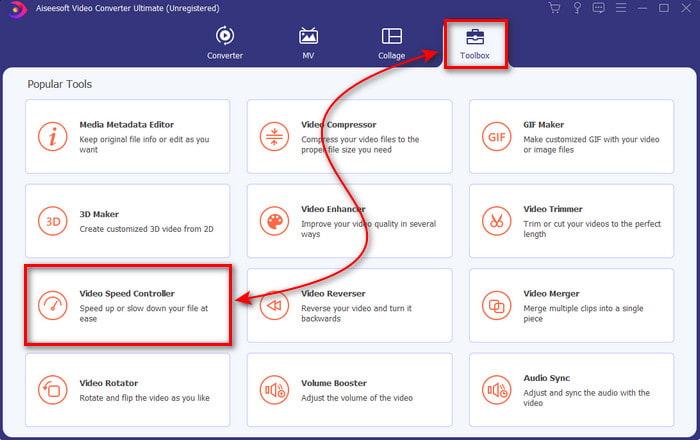
Stap 2. Klik op Toolbox en selecteer vervolgens Video Speed Controller.
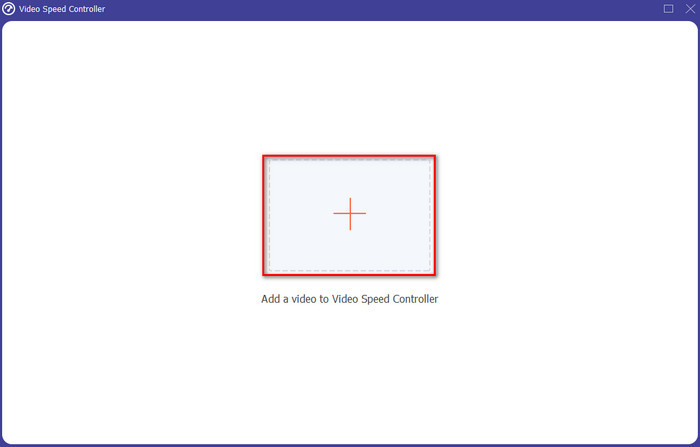
Stap 3. Klik op de +-knop om het bestand toe te voegen dat je wilt versnellen. Kies vervolgens het bestand in de map die verschijnt en klik op Open om verder te gaan.
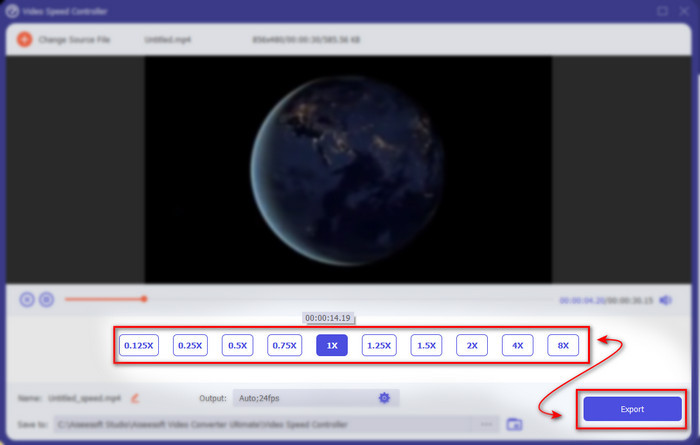
Stap 4. Kies de gewenste snelheid-optie onderaan om de snelheid van de video aan te passen. Klik daarna op Export om het exporteren te starten.
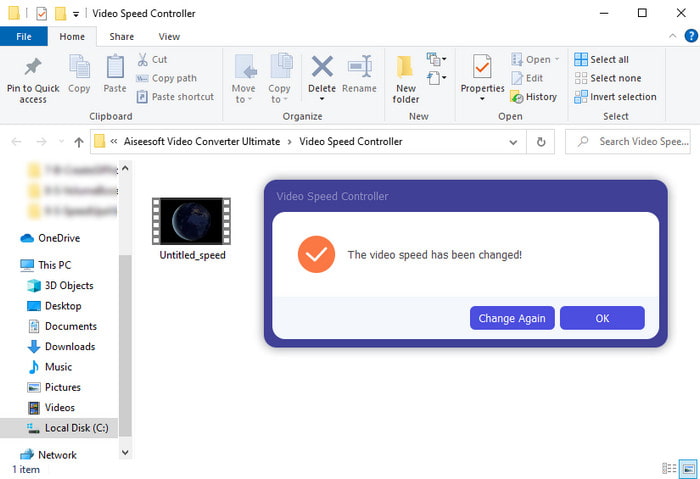
Stap 5. Je hoeft geen minuut te wachten, want het bestand is na een paar seconden al klaar. Als er een map in beeld verschijnt, betekent dit dat het bestand al geëxporteerd is. Klik op het bestand om de versnelde video te bekijken.
Gerelateerd:
Deel 3. Veelgestelde vragen over het versnellen van een video op Tiktok
Hoe versnel je een TikTok-video die niet van jou is?
Als je een video wilt versnellen die niet van jou is, moet je de TikTok-video eerst downloaden. Klik op de +-knop en op Uploaden, en kies vervolgens de video in je galerij. Selecteer de snelheidsoptie en klik op Next om hem te uploaden. Of gebruik Video Converter Ultimate om hem te versnellen door de bovengenoemde stappen te volgen.
Kan ik een video van 3 minuten opnemen op Tiktok?
Absoluut Ja, dat kan als ze apart zijn opgenomen, maar je kunt geen rechtstreekse video van 3 minuten opnemen. Omdat de opnameduur met deze app-ondersteuning 15 tot 60 volledige seconden is. Dus als de videolengte die u wilt opnemen meer dan een minuut is, is het beter om deze apart op te nemen. Als je echter een van de gebruikers bent die door Tiktok is geselecteerd om de opname van 3 minuten uit te proberen, dan heb je geluk omdat dit slechts voor een kleine groep mensen is getest.
Kan ik MP3 toevoegen aan mijn video's op Tiktok?
Toen TikTok voor het eerst werd uitgebracht, mochten gebruikers muziek aan hun video toevoegen, maar nu hebben ze deze functie verwijderd. Vanwege de copyrightkwestie die bij TikTok is ingediend. Dus om het probleem te voorkomen, verwijderen ze het en voegen ze een voorbeeldmuziek toe die beschikbaar is of je kunt een andere app gebruiken om het voor je te doen.
Heeft Tiktok een leeftijdsbeperking?
Volgens de algemene voorwaarden van TikTok moet 13 jaar of ouder de leeftijd zijn van de gebruiker die deze app gaat gebruiken. Tiktok heeft ook geen leeftijdsverificatie wanneer je je aanmeldt, dus verwacht dat er ongeveer 16+ inhoud op je feed verschijnt.
Gevolgtrekking
Nu je weet hoe je een video op TikTok kunt versnellen, is het tijd om ermee aan de slag te gaan. Kies bovendien de oplossing die het beste bij jou past. Als je vindt dat de ingebouwde snelheidsfunctie van TikTok goed genoeg is, gebruik die dan. Maar als je een betere snelheidsaanpassing met voorbeeldweergave wilt, gebruik dan Video Converter Ultimate. Welke optie je ook kiest, je mag een uitstekend resultaat verwachten dankzij hun functies en algehele prestaties.
-
 7 eenvoudige stappen voor het oplossen van problemen met OBS-audiovertraging [opgelost]
 Heb je moeite om je videoclip te bekijken na het opnemen vanwege de audiovertraging bij het gebruik van OBS Studio? Lees het onderstaande artikel om te leren hoe u niet-gesynchroniseerde audio effectief kunt herstellen.
-
 Uitstekende manieren mogelijk | VLC-audiovertraging repareren [2021]
 Vind je het moeilijk om je favoriete film op je VLC-mediaspeler te bekijken vanwege de audio-onzekerheid? Ga door met het lezen van dit artikel om alle mogelijke manieren te kennen om VLC-audiovertraging op te lossen.
-
 De beste manieren om het MP4-volume online en offline te verhogen
 Heb je moeite om de geluiden van je videoclip te horen? Lees het onderstaande artikel om te weten hoe u het mp4-volume op verschillende manieren kunt verhogen.
