


 Video Converter Ultimate
 Scherm opnemer
 Videoreparatie
 Beveiligde download
Wat is een kleurcorrectie en hoe wordt deze uitgevoerd?
Bent u ooit ontevreden geweest over saaie of afwijkende beelden die uw creativiteit geen recht doen? Zeg vaarwel tegen uw zorgen! Een door AI aangestuurde kleurcorrectie is nauwkeurig ontwikkeld om uw videobeelden of films tot leven te brengen, zodat elke kleur, tint en toon eruit springt zoals u dat wilt. Deze innovatieve technologie is een geavanceerde technologie die de kracht van kunstmatige intelligentie uitrust om uw video's te verbeteren en kleurperfecties te geven.
Of je nu kleuronvolkomenheden wilt corrigeren, een specifieke sfeer wilt creëren of simpelweg de algehele visuele aantrekkingskracht wilt verfijnen, een AI‑videokleurcorrectie stroomlijnt het proces en levert uitzonderlijke resultaten op. Laten we je videocontent tot leven brengen met levendige, natuurgetrouwe kleuren die je publiek boeien en een blijvende indruk achterlaten. Maak je klaar om je wereld met schittering te schilderen terwijl we in dit artikel de diepte ingaan.
Deel 1. Wat is een kleurcorrectie op video?
Het is vrij eenvoudig om te begrijpen wat de kleurcorrectiedefinitie in video is. Het verwijst naar het verbeteren en aanpassen van de kleuren en tonen van een video om het gewenste uiterlijk te bereiken of om nauwkeurigheid en consistentie te garanderen. Het is net als het verfijnen van de kleuren in een foto, maar dan voor bewegende beelden. Stel je voor dat je een foto maakt en dat de kleuren er een beetje afwijkend, dof of overdreven levendig uitzien. Dit kan ook gebeuren in een video, maar er zijn vaak duizenden frames. Kleurcorrectie helpt deze inconsistenties op te lossen, zodat de kleuren in de hele video goed bij elkaar passen. Als een scène bijvoorbeeld op een bewolkte dag is opgenomen, kunnen de kleuren er kalm en blauwachtig uitzien. Kleurcorrectie kan de tinten opwarmen, zodat ze er natuurlijker uitzien of de blauwtinten laten opvallen voor een artistiek effect. Het kan ook het contrast, de verzadiging, de helderheid en andere aspecten aanpassen om een specifieke sfeer of stijl in een video te creëren.
Deel 2. Verschillende situaties met kleurcorrectie
Kleurcorrectie is cruciaal in verschillende situaties binnen videoproductie. Dit is om de gewenste visuele impact te bereiken en de consistentie te behouden. Hieronder staan enkele situaties waarbij kleurcorrectie in een video betrokken is.
Gemengde lichtomgevingen – kleurcorrectie is nuttig bij het filmen op locaties met verschillende lichtbronnen, zoals natuurlijk licht, fluorescerend licht en gloeilampen. De kleurcorrectie helpt de kleuren in balans te brengen en te verenigen, zodat alles er natuurlijk en consistent uitziet in alle shots.
Problemen met witbalans – het corrigeren van de witbalans zorgt ervoor dat wit ook echt wit wordt weergegeven en niet wordt getint met ongewenste kleuren, wat vaak voorkomt door onjuiste camera‑instellingen of wisselende lichtomstandigheden.
Belichtingsproblemen – videokleurcorrectie kan overbelichte beelden, als het te helder is, of onderbelichte beelden, wanneer het te donker is, aanpakken, waardoor details naar voren komen en een juiste balans tussen donkere en lichte tonen behouden blijft.
Kleurgrading voor esthetiek – kleurcorrectie omvat ook kleurgrading, waarbij de kleuren van de video worden aangepast om een bepaalde stemming of stijl te creëren. Dit omvat het versterken van contrast en verzadiging of het creëren van een vintage‑uitstraling in een video.
Het tijdstip van de dag nabootsen – het aanpassen van videokleuren is nuttig om een bepaald tijdstip te simuleren, zoals een dagscène laten lijken alsof het regent, tijdens zonsondergang is opgenomen, of de kleuren aanpassen om ochtend‑ of avondlicht over te brengen.
Deel 3. Hoe kleurcorrectie op video uitvoeren?
Kleurcorrectie bij videobewerking is een essentieel proces, omdat het de algehele visuele kwaliteit van je video verbetert. Een van de beste tools waarop je kunt vertrouwen is Video Converter Ultimate. Deze krachtige tool met kleurcorrectiepallet stelt je in staat om snel kleuren in je video’s te corrigeren, waardoor hun visuele aantrekkingskracht en kwaliteit toenemen. Met deze tool kun je experimenteren met verschillende kleurcorrectie‑opties om de gewenste look voor je video te bereiken. Dankzij de bewerkingsmogelijkheden kunnen gebruikers hun video’s trimmen, bewerken, bijsnijden en effecten toevoegen.
Bovendien maakt het een naadloze conversie tussen verschillende videoformaten mogelijk, waardoor het aanpassen van uw video-inhoud voor verschillende apparaten eenvoudig wordt. Een ander lovenswaardig kenmerk van deze tool is dat deze gebruiksvriendelijk is. Met Video Converter Ultimate kunt u eenvoudig kleuren aanpassen en corrigeren om uw video aantrekkelijker te maken. Hier vindt u een stapsgewijze handleiding om te weten hoe u deze tool kunt gebruiken:
Stap 1: Download en installeer Video Converter Ultimate
Als je de tool nog niet hebt, kun je Video Converter Ultimate downloaden en installeren op je computer. Klik daarvoor op een van de knoppen Gratis downloaden hieronder, afhankelijk van het besturingssysteem van je computer, en volg de installatie‑instructies.
Gratis DownloadVoor Windows 7 of hogerBeveiligde download
Gratis DownloadVoor MacOS 10.7 of hogerBeveiligde download
Stap 2: Start Video Converter Ultimate
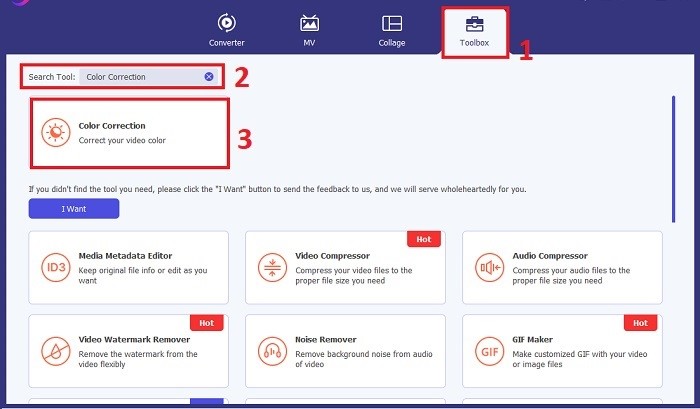
Zodra het programma is geïnstalleerd, start je de videokorrectietool op je computer om toegang te krijgen tot de hoofdinterface. Ga in het globale menu naar de Toolbox. Van hieruit kun je de functie Kleurcorrectie van de tool vinden of opzoeken en erop klikken.
Stap 3: Importeer de video voor kleurcorrectie
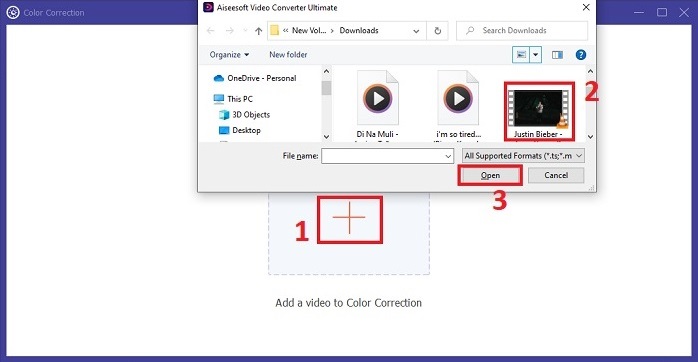
Klik op de knop Plus om de video te importeren die je wilt kleurcorrigeren. Zoek het videobestand op je computer en klik op Open om het in de software te importeren.
Stap 4: Pas video‑kleurparameters aan
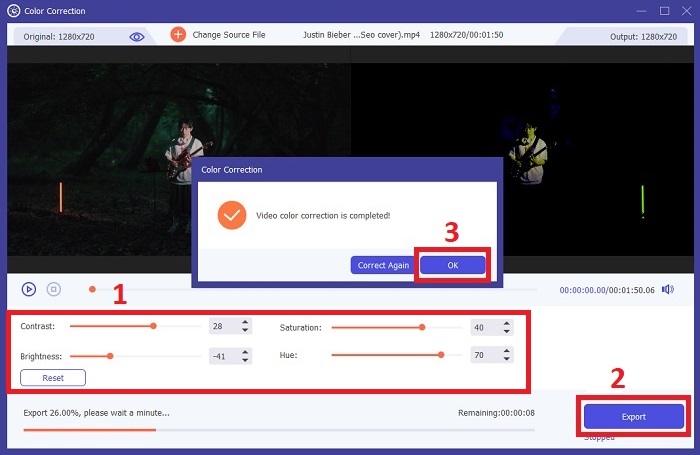
Zodra de video is geïmporteerd, pas je parameters zoals helderheid, contrast, verzadiging en tint aan om de gewenste kleurcorrectie te bereiken. Tijdens het bewerken van de video in de tool kun je de wijzigingen in real‑time bekijken in het deelvenster aan de rechterkant. Zodra je tevreden bent met de kleurcorrecties, klik je op Exporteren. Laat de tool de video verwerken en het resultaat opslaan op de door jou gewenste locatie.
Verder lezen:
Videofilter: verbeter je video met filters en effecten op de desktop
Wat is 3D? Alles wat je moet weten over 3D en hoe je het kunt maken
Deel 4. Veelgestelde vragen over videokleurcorrectie
Hoe weet ik of ik een kleurcorrectie nodig heb?
Weet u niet zeker of uw video kleurcorrectie nodig heeft? Kleurcorrectie is nodig als kleuren er ongelijkmatig of vreemd uitzien of niet overeenkomen met de gewenste sfeer of het gewenste onderwerp van uw videobeelden.
Is kleurcorrectie echt nodig?
Absoluut! Een AI-videokleurcorrectie is essentieel bij videoproductie om te garanderen dat de kleuren nauwkeurig en visueel aantrekkelijk zijn. Het verbetert de visuele uniformiteit en kan een fatsoenlijke video tot een buitengewone video verheffen.
Wat is een kleurcorrector in film?
Een kleurcorrector in film is een hulpmiddel, hardware of software, dat in de postproductie wordt gebruikt om kleuren aan te passen en in balans te brengen. Het helpt filmmakers bij het bereiken van een bepaalde uitstraling, stemming of sfeer, waardoor beelden aantrekkelijker en uniformer worden in het verhaal.
Gevolgtrekking
Samenvattend is videokleurcorrectie de sleutel tot een boeiende visuele ervaring. Het draait allemaal om het fijn afstellen van kleuren en tonen om aan je creatieve visie te voldoen, zodat elk frame de beoogde schittering uitstraalt. Door AI‑gestuurde kleurcorrectie worden je video’s getransformeerd met levendige, natuurgetrouwe kleuren die een blijvende indruk maken. Van het corrigeren van gemengde belichting tot het creëren van specifieke stemmingen, deze innovatie tilt je verhalenvertelling naar een hoger niveau. Video Converter Ultimate komt naar voren als een krachtige bondgenoot, die het kleurcorrectieproces vereenvoudigt en je artistieke potentieel ontketent.
-
 Wat is FPS? Alles wat je erover moet weten
 Wat is FPS? Leer alle informatie die je nodig hebt over Frame Per Seconds (FPS) en wat het kan doen in verschillende situaties. Lees dit artikel voor alle details.
-
 Top Photo Color Enhancer-app op je Android en iOS gratis
 Wil je een app voor het verbeteren van fotokleuren op je telefoon? Welnu, kies welke versterkers volgens u het beste bij uw behoefte passen.
-
 Ultieme gids voor het wijzigen van de videoresolutie die beschikbaar is op meerdere platforms
 Wilt u de videoresolutie van de video wijzigen? Zo ja, leer dan de verschillende manieren waarop u eenvoudig de videoresolutie kunt wijzigen van de video die u aan het bekijken bent.
