


 Video Converter Ultimate
 Nagrywarka ekranu
 Naprawa wideo
7 prostych sposobów na szybką konwersję HEIC do PNG w kilka sekund
Chcesz, aby Twój plik HEIC był szeroko kompatybilny z innymi urządzeniami? Mamy coś, czego szukasz! Ten artykuł pokazuje najlepsze sposoby konwersji pliku HEIC do PNG bez zbędnych trudności. Zapnij pasy, bo zaraz poznasz najlepsze metody, aby bez wysiłku konwertować HEIC na PNG.

Część 1. Po co konwertować HEIC na format PNG?
Format pliku HEIC to format obrazu stworzony przez Apple. Jest to format obrazu powszechnie używany przez urządzenia Apple. Chociaż ma wysoką rozdzielczość, nie zajmuje zbyt dużo miejsca na twoim urządzeniu. Jednak pliki HEIC nie są kompatybilne z urządzeniami innymi niż Apple. Natomiast PNG, co oznacza Portable Graphics Format, to format pliku obrazu stworzony w celu zastąpienia formatów GIF.
Jest to najczęściej używany format obrazu, który jest nieskompresowany, co oznacza, że ma ogromny rozmiar pliku. Niemniej jednak prawie wszystkie urządzenia obsługują ten format pliku obrazu. Jeśli więc chcesz otworzyć obraz HEIC na innych urządzeniach poza Apple, lepiej przekonwertuj go na format pliku PNG.
Część 2. 5 łatwych sposobów konwersji pliku HEIC do pliku PNG online
Szukanie najlepszych sposobów konwersji HEIC na PNG jest dość trudne. Jednak szukaliśmy najlepszych i najprostszych metod zmiany HEIC na format pliku PNG.
Użyj darmowego konwertera HEIC na PNG FVC
Najlepszym sposobem na konwersję HEIC do PNG jest skorzystanie z narzędzia konwertującego. A najlepszym narzędziem, jakie znaleźliśmy w internecie, jest FVC Free HEIC to PNG Converter. Ten konwerter to narzędzie online, które w wygodny sposób przekształca plik HEIC w format PNG. Dodatkowo, jeśli chcesz masowo konwertować pliki HEIC do PNG, to narzędzie również oferuje taką funkcję.
Jest również dostępny w prawie wszystkich popularnych przeglądarkach, co czyni go narzędziem bez ograniczeń przeglądarki. Co więcej, ma prosty interfejs oprogramowania i nie ma limitu rozmiaru pliku, dzięki czemu możesz konwertować pliki HEIC bez zastanawiania się nad rozmiarem pliku. Dlatego postępuj zgodnie z poniższym prostym przewodnikiem, jeśli jesteś zainteresowany użyciem tego internetowego konwertera HEIC na PNG.
Krok 1. W przeglądarce wyszukaj FVC Free HEIC to PNG Converter. Możesz też kliknąć ten link, aby przejść bezpośrednio na ich stronę. Tak wygląda pierwszy ekran interfejsu:

Krok 2. Następnie kliknij przycisk Add HEIC/HEIF File(s). Pojawią się foldery na komputerze, z których wybierzesz swój plik HEIC.
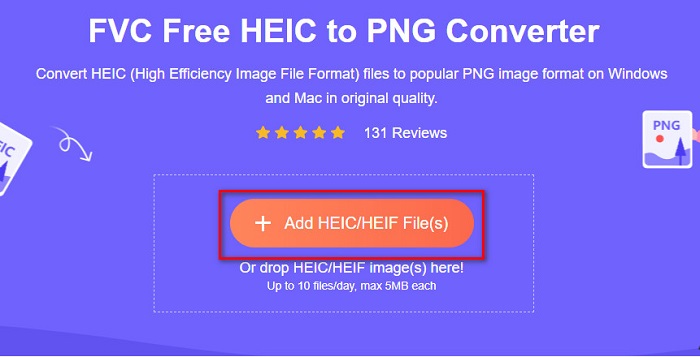
Krok 3. Potem ponownie pojawią się foldery na twoim komputerze, z których wybierzesz plik HEIC. Kliknij Open. Rozpocznie się konwersja z HEIC na PNG.

Krok 4. Na koniec w interfejsie programu kliknij przycisk Download, aby pobrać plik PNG.

Proste, prawda? Możesz przekonwertować plik HEIC na plik PNG, wykonując te proste kroki.
Użyj Xconvert.com
Xconvert to darmowy internetowy konwerter HEIC na PNG, który z łatwością przekształca pliki HEIC w pliki PNG. Ten konwerter online ma prosty w obsłudze interfejs, co jest korzystne dla początkujących użytkowników. Co więcej, korzystając z tego narzędzia online, możesz zmienić rozdzielczość obrazu. Jednak ponieważ jest to narzędzie zależne od internetu, przy wolnym łączu proces konwersji może być spowolniony. Zawiera też reklamy, które mogą być dla ciebie uciążliwe.
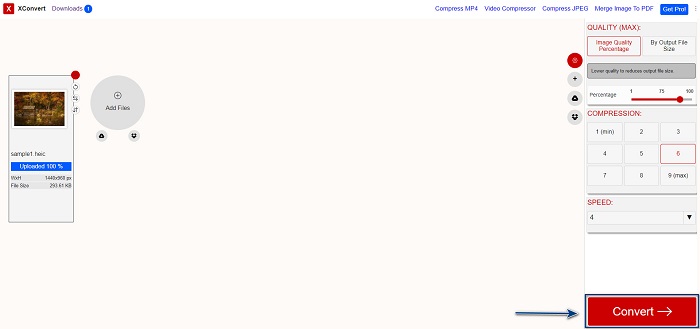
Krok 1. Wyszukaj w przeglądarce Xconvert.com. Na ich stronie kliknij przycisk Add Files, następnie pojawią się pliki z twojego komputera – wybierz plik HEIC.

Krok 2. Twój obraz zostanie przesłany do interfejsu programu. Po przesłaniu kliknij przycisk Convert znajdujący się w prawym dolnym rogu interfejsu. Następnie poczekaj, aż plik będzie gotowy do pobrania i przejdź do następnego kroku.
Krok 3. Gdy plik będzie gotowy, kliknij przycisk Download, aby pobrać plik PNG; nad przyciskiem pobierania zobaczysz również rozmiar wyjściowy i czas, jaki zajęła konwersja.

Użyj Zamzar
Innym sposobem na konwersję HEIC do PNG online jest użycie internetowego konwertera Zamzar. Prawdopodobnie natknąłeś się na ten konwerter, szukając narzędzia HEIC do PNG. To narzędzie jest dostępne w niemal wszystkich popularnych przeglądarkach. Dodatkowo ma prosty interfejs, dzięki czemu jest przyjazne dla użytkownika. Jednak przy przerwaniu połączenia internetowego w trakcie procesu konwersji plik może zostać uszkodzony. Mimo to wielu użytkowników korzysta z tego konwertera, aby zmieniać pliki HEIC na PNG.
Krok 1. W używanej przeglądarce wyszukaj Zamzar. Na ich stronie kliknij przycisk Add Files. Pojawią się pliki z twojego komputera, a następnie prześlij obraz HEIC.

Krok 2. Po przesłaniu pliku HEIC kliknij przycisk drop-down, a następnie wybierz PNG jako format wyjściowy pliku.

Krok 3. Na koniec kliknij przycisk Convert Now, aby przekonwertować plik HEIC na format PNG. Następnie pobierz plik PNG. Wystarczy poczekać kilka sekund i gotowe!

Użyj konwersji Tools.io
Conversion Tool to internetowy konwerter HEIC na PNG z prostym interfejsem. Może bardzo szybko konwertować pliki HEIC do PNG. Co więcej, nie zawiera tylu reklam, co inne konwertery online. Wadą jest jednak to, że możesz konwertować tylko dziesięć plików dziennie i obowiązuje limit rozmiaru pliku. Jeśli jednak konwertujesz małe pliki, to narzędzie może być dla ciebie odpowiednie.
Krok 1. W przeglądarce wyszukaj Conversion Tools.io. Następnie kliknij przycisk Browse w głównym interfejsie programu lub przeciągnij i upuść plik HEIC na przycisk Browse.

Krok 2. Następnie kliknij przycisk Run Conversion, aby rozpocząć konwersję pliku HEIC do pliku PNG. Poczekaj, aż obraz się załaduje, a potem przejdź do kolejnego kroku.

Krok 3. Na zakończenie kliknij przycisk Download, aby pobrać plik PNG.

Użyj CDKM
Ostatnim narzędziem, które ci przedstawimy, jest CDKM. To narzędzie pozwala konwertować pliki HEIC do PNG za pomocą zaledwie kilku kliknięć. Jednak korzystanie z tego konwertera online może zająć kilka sekund, w zależności od prędkości twojego łącza. Zawiera też reklamy, które mogą cię irytować. Mimo to nie ma ograniczenia rozmiaru pliku, więc warto je wypróbować.
Krok 1. W przeglądarce wyszukaj CDKM online converter. W głównym interfejsie programu kliknij przycisk Choose Files. Pojawią się foldery na komputerze, następnie wybierz plik HEIC do przesłania.

Krok 2. Następnie kliknij przycisk Start Conversion, aby rozpocząć proces konwersji.

Krok 3. Na koniec przewiń stronę nieco w dół, aż zobaczysz przycisk Download. Kliknij przycisk Download, aby pobrać plik PNG.

Część 3. Konwertuj HEIC na PNG na Macu
Urządzenia Apple obsługują formaty plików HEIC, a za pomocą komputera Mac można natywnie otworzyć plik HEIC. Ale jeśli chcesz przekonwertować plik HEIC na PNG, możesz go zmienić za pomocą aplikacji Photo na komputerze Mac. W związku z tym, jeśli jesteś użytkownikiem Maca, lepiej przeczytaj tę część.
Krok 1. Najpierw przeciągnij i upuść plik HEIC do aplikacji Photo App. Następnie wyświetl podgląd zdjęcia HEIC i kliknij File > Export > Export 1 Photo.

Krok 2. Następnie w polu Photo Kind wybierz format wyjściowy, którego potrzebujesz. Wybierz format pliku PNG.

Krok 3. Potem kliknij przycisk Export, a następnie wybierz lokalizację docelową pliku wyjściowego. Zobaczysz, że twój plik HEIC został zmieniony na format PNG.

Część 4. Konwertuj plik HEIC na PNG na iPhonie
Jeśli używasz iPhone'a, możesz otworzyć plik HEIC na swoim urządzeniu. Ale jeśli chcesz przekonwertować plik HEIC na PNG za pomocą urządzenia iPhone, mamy dla Ciebie sposób. Wykonując poniższe proste i łatwe kroki, możesz bez wysiłku przekonwertować HEIC na PNG.
Krok 1. W aplikacji Photo App na iPhonie stuknij przycisk Select u góry ekranu. Następnie wybierz plik HEIC i kliknij ikonę Share.
Krok 2. Przesuń ekran w górę; zobaczysz opcję Copy Photo, następnie ją kliknij.
Krok 3. Na koniec przejdź do aplikacji Files, stuknij przycisk browse i wybierz żądaną lokalizację wyjściową (kliknij iCloud Drive lub On my iPhone). Następnie wklej tam swój plik HEIC.

Po wklejeniu pliku zobaczysz, że zostanie on automatycznie przekonwertowany na plik PNG.
Część 5. Rozszerzona wiedza na temat pliku HEIC i pliku PNG
Jeśli nadal masz wątpliwości, czy chcesz przekonwertować plik HEIC do PNG, udostępniamy tabelę porównawczą, która pomoże Ci odróżnić różnice między tymi dwoma plikami. Co więcej, daje jasny przegląd cech HEIC i PNG. Przeczytaj uważnie, aby poznać różnicę między plikami HEIC a plikami PNG.
| HEIC | PNG | |
| Zgodność | Tylko urządzenie Apple obsługuje ten format pliku. | Prawie wszystkie urządzenia obsługują ten plik, w tym urządzenia Apple. |
| Rozmiar pliku | Mały rozmiar pliku. | Może osiągnąć ogromny rozmiar pliku. |
| Jakość obrazu | Wysoka jakość obrazu. | Ma dobrą jakość, ale nie lepszą niż plik HEIC. |
| Skompresowany/Nieskompresowany | Sprężony | Nieskompresowany |
| Redagowanie | Zachowuje jakość obrazu podczas edycji. | Jakość może ulec pogorszeniu podczas edycji. |
Część 6. Często zadawane pytania dotyczące konwersji HEIC na PNG
Czy konwersja HEIC do PNG wpłynie na rozmiar pliku?
TAk. Podczas konwersji HEIC na PNG zwiększy się rozmiar pliku, chociaż nie będzie wysoki.
Czy możesz otwierać pliki PNG w Adobe Photoshop?
Z pewnością. Pliki PNG można otwierać w programie Adobe Photoshop, ponieważ Adobe Photoshop obsługuje format plików PNG.
Czy możesz natywnie otworzyć format pliku PNG na urządzeniach Apple?
TAk. Gdy robisz zrzuty ekranu z iPhone'a, są one automatycznie zapisywane w Rolce z aparatu jako plik PNG.
Wniosek
Nareszcie! Dotarliśmy do końca naszej 'podróży'. Ten artykuł przedstawia najlepsze rozwiązania do konwersji plików HEIC na format PNG. Wszystkie internetowe konwertery HEIC na PNG opisane powyżej potrafią skutecznie i bez wysiłku przekonwertować twoje pliki. Co więcej, dostępne są także inne opcje, z których możesz skorzystać jako użytkownik Maca lub iPhone’a. Jeśli jednak szukasz najlepszego konwertera HEIC do PNG z wyjątkowymi funkcjami, to konwerter FVC Free HEIC to PNG będzie dla ciebie najlepszym wyborem.
-
 Jak otworzyć plik HEIC w systemie Windows, Mac i Online?
 Szukasz sposobu na otwieranie plików HEIC? W tym artykule znajdziesz najlepsze rozwiązania do otwierania plików HEIC w systemach Windows, Mac i Online.
-
 JPG VS GIF: 3 łatwe sposoby konwersji JPG na GIF
 Czy chcesz poznać różnicę między JPG a GIF? A może chcesz zmienić animowany format JPG na GIF? Następnie przeczytaj ten artykuł, aby mieć pomysł.
-
 5 najlepszych sposobów na zmianę obrazu na animowany GIF [Aktualizacja 2022]
 Potrzebujesz konwertera obrazu na GIF? W tym artykule przedstawimy pięć najlepszych konwerterów, jakie możemy znaleźć na rynku. Więc dowiedzmy się o tych narzędziach, czytając ten artykuł.
