


 Video Converter Ultimate
 Nagrywarka ekranu
 Naprawa wideo
Jak łatwo i skutecznie usunąć znak wodny Viva Video z filmów?
Viva Video to aplikacja do edycji i tworzenia wideo, którą możesz pobrać na urządzenia mobilne, aby stworzyć wyjątkowy film, którego nie możesz osiągnąć za pomocą innego edytora wideo. Dzięki temu możesz skorzystać z bezpłatnej wersji lub edycji wideo premium na swoją korzyść. W związku z tym użytkownicy napotykają problemy podczas korzystania z bezpłatnej wersji, ponieważ pozostawia znak wodny, a inne funkcje edycji nie są takie same jak w wersji pro. Znak wodny osadzony w filmie może utrudnić efekt wizualny, a usunięcie go jest lepsze.
Możesz jednak skorzystać z kilku narzędzi do usuwania znaku wodnego, które znajdziesz w Play Store i App Store, ale które z nich jest najlepsze? Czytaj dalej ten artykuł, ponieważ przedstawiamy narzędzie, którego możesz użyć do usunięcia znaku wodnego wraz z instrukcją jak usunąć znak wodny Viva Video z Twojego filmu.

Część 1. Jak usunąć znak wodny Viva Video za pomocą najlepszych aplikacji do usuwania znaków wodnych
Gumka wideo - Usuń znak wodny/logo z wideo [Android]
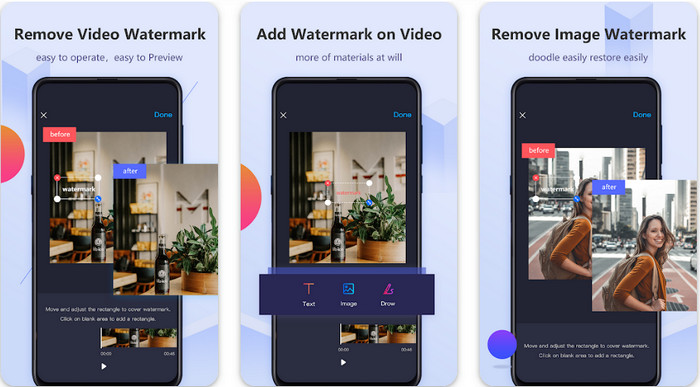
Video Eraser - Remove Watermark/Logo from Video to potężne narzędzie do usuwania znaków wodnych, które możesz pobrać na swoje urządzenie z Androidem, aby usunąć znak wodny osadzony w Twoim wideo. Aplikacja ta może pomóc usunąć każdy rodzaj znaku wodnego w Twoim filmie, taki jak logo, tekst, stemple itp. Możesz również skorzystać z niej, jeśli chcesz dodać własny, spersonalizowany znak wodny, przyciąć, kadrować, odwrócić, skompresować wideo lub zmienić jego prędkość. Mimo że ma tak wiele funkcji, możesz pobrać to narzędzie za darmo. Aby więc usunąć znak wodny Viva Video na Androidzie, wykonaj poniższe kroki.
Krok 1. Najpierw pobierz aplikację na swój telefon z Androidem, wchodząc do Play Store, a następnie kliknij Pobierz.
Krok 2. Otwórz narzędzie do usuwania znaku wodnego, kliknij Remove Watermark from Video, pozwól aplikacji uzyskać dostęp do Twoich filmów, a następnie wczytaj wideo ze znakiem wodnym.
Krok 3. Umieść prostokąt na znaku wodnym, aby go zakryć.
Krok 4. Naciśnij Gotowe, aby zapisać wideo już bez znaku wodnego.
Powiązane:
Gumka wideo – usuwanie retuszu [iOS]
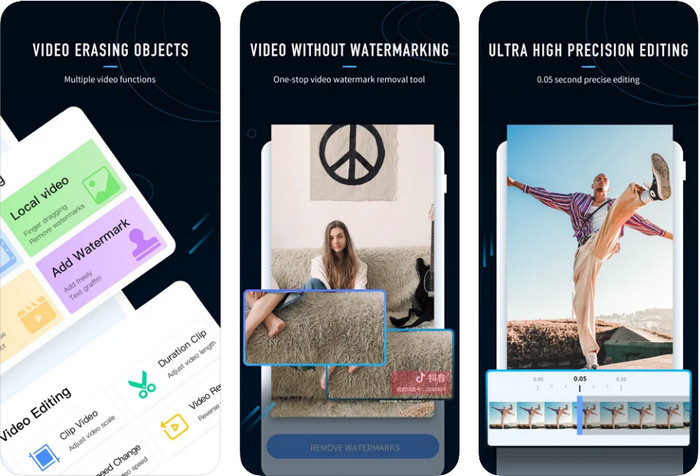
Na iOS możesz pobrać z App Store aplikację Video Eraser- Retouch Removal. Jest to jedno z narzędzi do usuwania znaku wodnego Viva Video, które możesz pobrać za darmo, a które pozwala skutecznie pozbyć się znaku z Twojego filmu. Podobnie jak przedstawione tu narzędzie na Androida, obsługuje ono inne funkcje edycji, z których możesz skorzystać, takie jak poprawa jakości wideo (upscale), dodawanie znaku wodnego, wycinanie, przycinanie, kompresja czy obracanie/odwracanie filmu. To wszystko znajdziesz w tej aplikacji. Choć ma podobne funkcje jak aplikacja na Androida, różni się sposobem działania i zanim będziesz mógł za jej pomocą usunąć znak wodny, musisz ją zakupić. Możesz skorzystać z poniższych kroków, aby dowiedzieć się, jak usunąć znak wodny z wideo wyeksportowanego z Viva Video; postępuj zgodnie z poniższymi instrukcjami.
Krok 1. Pobierz aplikację z App Store, a następnie otwórz ją po zakończeniu pobierania.
Krok 2. Po uruchomieniu programu kliknij Local Video/GIF, aby wczytać wideo ze znakiem wodnym. Upewnij się, że pozwoliłeś aplikacji na dostęp do Zdjęć.
Krok 3. Stuknij część wideo ze znakiem wodnym, a na ekranie pojawi się prostokątny kształt.
Krok 4. Stuknij Eliminate Watermark, aby wyeksportować wideo i zapisać je już bez przeszkadzającego znaku wodnego.
Część 2. Jak usunąć znak wodny Viva Video w systemach Windows i Mac [Oprogramowanie Ultimate]
Jako użytkownik Windowsa i macOS będziesz potrzebować skutecznego programu, który usunie znak wodny z Twojego filmu wydajnie i bez pozostawiania smug. FVC Video Converter Ultimate może pokazać Ci, jak za darmo usunąć znak wodny Viva Video, zapewniając przy tym profesjonalny efekt końcowy. Podobnie jak aplikacje do usuwania znaków wodnych, które możesz pobrać na Androida i iOS, to narzędzie obsługuje jeszcze więcej funkcji, z których możesz skorzystać. Oferuje ono znacznie więcej niż dwa wspomniane wcześniej programy do usuwania znaków wodnych.
Co sprawia, że to narzędzie robi wrażenie? Funkcje usuwania obsługiwane przez to narzędzie są lepsze niż inne narzędzia do usuwania znaków wodnych, których możesz użyć w swoim filmie. Jeśli więc tego użyjesz, możesz oglądać wideo bez znaku wodnego po usunięciu go tutaj. Potrzebujesz samouczka, jak z tego korzystać? Kolejne szczegóły pozwolą Ci wiedzieć, jak korzystać z tego narzędzia tak łatwo, jak 1-2-3.
Krok 1. Aby pobrać ten zaawansowany program, kliknij przycisk pobierania poniżej, a następnie zainstaluj oprogramowanie na swoim urządzeniu. Postępuj zgodnie z instrukcją instalatora WinRAR, a na końcu kliknij Start Now.
Bezpłatne pobieranieDla Windows 7 lub nowszegoBezpieczne pobieranie
Bezpłatne pobieranieDla MacOS 10.7 lub nowszegoBezpieczne pobieranie
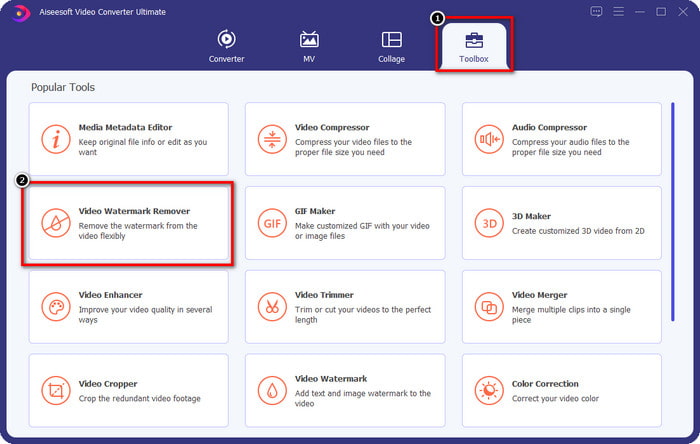
Krok 2. Przejdź do zakładki Toolbox, a następnie kliknij Video Watermark Remover, aby zacząć korzystać z funkcji skutecznego usuwania znaków wodnych w tym narzędziu.
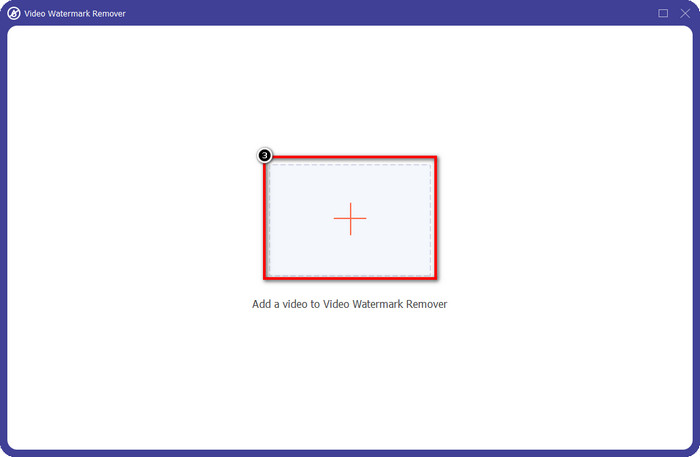
Krok 3. Możesz wczytać wideo z Viva Video ze znakiem wodnym zapisane na pulpicie, klikając ikonę +. Znajdź plik wideo w folderze, który pojawi się na ekranie, a następnie kliknij Open, aby pomyślnie go zaimportować.
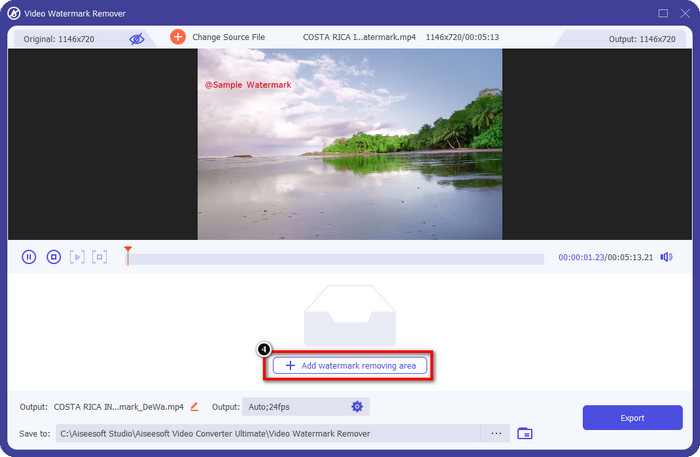
Krok 4. Kliknij Add Watermark Removing Area, aby rozpocząć korzystanie z funkcji usuwania znaku wodnego.
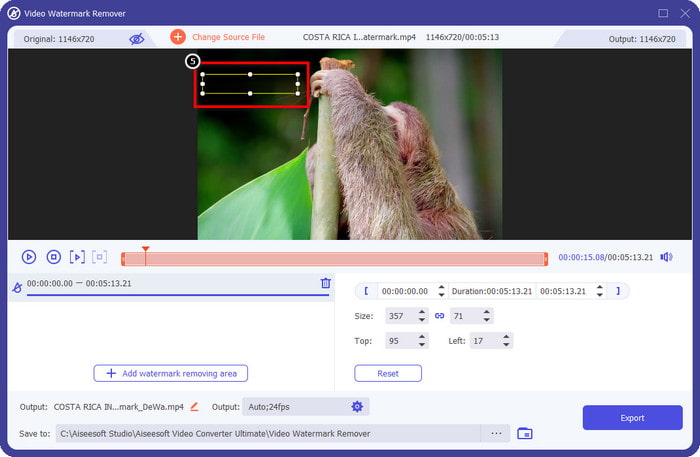
Krok 5. Przeciągnij i umieść prostokątny kształt na znaku wodnym w Twoim filmie i całkowicie go zakryj. Ważne jest, aby zakryć go w całości, ponieważ jeśli tego nie zrobisz, pozostanie ślad po znaku wodnym; możesz także zmienić rozmiar prostokąta w zależności od potrzeb.
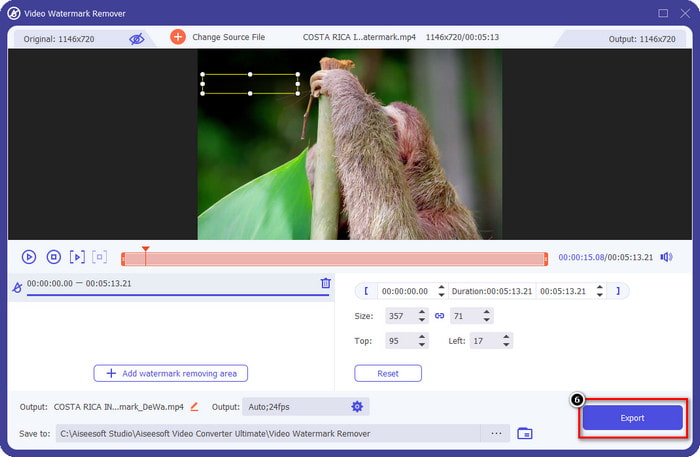
Krok 6. Następnie kliknij Export, aby zapisać wideo bez znaku wodnego. Proste? Właśnie do tego stworzono to narzędzie – ma być łatwe w obsłudze, a jednocześnie skuteczne we wszystkim.
Część 3. Często zadawane pytania dotyczące usuwania znaku wodnego Viva Video
Czy mogę pobrać Viva Video bez znaku wodnego?
Tak, możesz kupić wersję pro tego narzędzia, dzięki czemu po wyeksportowaniu wideo, które tutaj edytujesz, nie pozostawisz na nim znaku wodnego. Ponadto po zakupie wersji pro tego narzędzia będziesz korzystać z innej funkcji premium tego narzędzia, która nie jest dostępna za darmo.
Czy Viva Video ma wersję na komputery stacjonarne?
Wersję Viva Video można pobrać tylko na Androida i iOS. Tak więc, jeśli chcesz pobrać wersję na komputer, nie znajdziesz żadnej, ale możesz wyszukać najlepsze alternatywy do edycji wideo, takie jak to, co oferuje Viva Video.
Czy Viva Video ma oprogramowanie szpiegujące?
W 2017 r. raporty na temat tej aplikacji potwierdziły, że zawiera ona złośliwe oprogramowanie. Tak więc osoby, które pobrały to oprogramowanie, siłą usunęły tę aplikację na swoich urządzeniach, aby uniknąć dalszych konsekwencji.
Wniosek
Dzięki narzędziu do usuwania znaków wodnych Viva Video z tego artykułu możesz wyeliminować znak wodny, który Viva Video osadza w wyeksportowanym filmie. Możesz spróbować użyć wyżej wymienionych aplikacji i postępować zgodnie z instrukcjami, które zamieściliśmy, jak usunąć znak wodny. Ale w przypadku użytkowników systemów Windows i Mac ze znakiem wodnym Viva Video lepiej jest użyć najlepszego oprogramowania, aby szybko i skutecznie usunąć znak wodny i uzyskać profesjonalny wynik. Na co czekasz? Kliknij przycisk pobierania, aby usunąć ostateczny znak wodny z urządzenia i użyj go, wykonując powyższe kroki.
-
 Jak usunąć znak wodny Lomotif za pomocą tych niesamowitych narzędzi
 Czy chcesz dowiedzieć się, jak usunąć znak wodny Lomotif ze swojego filmu? Przeczytaj ten artykuł, aby poznać najwybitniejsze metody usuwania go online i offline.
-
 Jak usunąć turystów ze zdjęć za pomocą narzędzi do usuwania znaków wodnych?
 Jak usunąć turystów ze zdjęć? Jeśli chcesz dowiedzieć się, jak usunąć niechciane rzeczy ze swojego zdjęcia, te narzędzia Ci pomogą. Przeczytaj ten artykuł, aby dowiedzieć się więcej.
-
 Narzędzia do usuwania znaków wodnych 123rf — dokładny przegląd najlepszych narzędzi
 Jeśli chcesz wiedzieć, jakie są najwybitniejsze produkty do usuwania znaków wodnych 123rf, przeczytaj dokładnie ten artykuł. Ten artykuł zawiera szczegółowy przegląd narzędzi.
