


 Video Converter Ultimate
 Nagrywarka ekranu
 Naprawa wideo
100% Darmowe sposoby kompresji pliku M4V z GB do MB
Format pliku M4V, podobny do MP4, to świetny kontener wideo wyprodukowany przez Apple. Możesz odtwarzać pliki M4V na prawie wszystkich popularnych odtwarzaczach, takich jak iTunes, QuickTime, VLC Media Player, RealPlayer i nie tylko. Ale czasami może się okazać, że Twoje wideo M4V jest zbyt duże, aby je przechowywać lub udostępniać. W takiej sytuacji musisz zmniejszyć rozmiar pliku.
Jeśli nie wiesz, jak skompresować plik M4V, możesz wypróbować poniższe opcje.

Część 1. Jak skompresować M4V online za darmo
Jak wspomnieliśmy, edycja i udostępnianie dużego pliku wideo na YouTube, Facebooku, Instagramie lub innych witrynach do przesyłania strumieniowego może być trochę trudne. Ponieważ te witryny mają zwykle ścisłe ograniczenie rozmiaru przesyłanego filmu. Poza tym duże pliki mogą zajmować dużo miejsca na komputerze, dysku, telefonie, pendrive, karcie pamięci itp.
Dlatego, gdy masz duży plik M4V, najlepiej zmniejszyć jego rozmiar za pomocą profesjonalnego kompresora wideo. Jeśli szukasz darmowego programu, dlaczego nie spróbować FVC Free Video Compressor? Jest całkowicie bezpłatny. Co więcej, jest to internetowe narzędzie do kompresji, co oznacza, że możesz skompresować dowolne wideo do żądanego rozmiaru bez instalowania na komputerze dużego oprogramowania.
Możesz go używać w dowolnej popularnej przeglądarce, takiej jak Google Chrome, Mozilla Firefox i Microsoft Edge. Do skompresowanego wideo nie zostanie dodany żaden znak wodny. Możesz nawet cieszyć się wideo o wysokiej jakości obrazu.
Oto kroki, jak kompresować duże pliki M4V online.
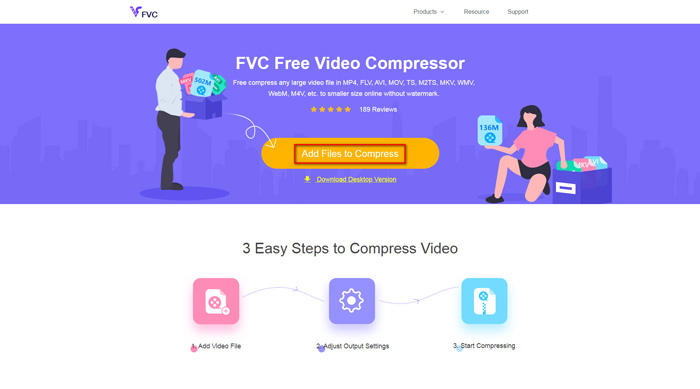
Krok 1. Wejdź w przeglądarce na stronę FVC Free Video Compressor. Zobaczysz przycisk Add Files to Compress w banerze. Kliknij go i postępuj zgodnie z instrukcją, aby pobrać i zainstalować program uruchamiający FVC na komputerze.
Krok 2. Następnie musisz wybrać plik M4V, który chcesz skompresować. Potem możesz przesunąć suwak za polem Size, aby łatwo dopasować i znaleźć dokładny rozmiar pliku, jakiego potrzebujesz. Możesz także osobno zmienić rozdzielczość i bitrate, zgodnie ze swoimi potrzebami.
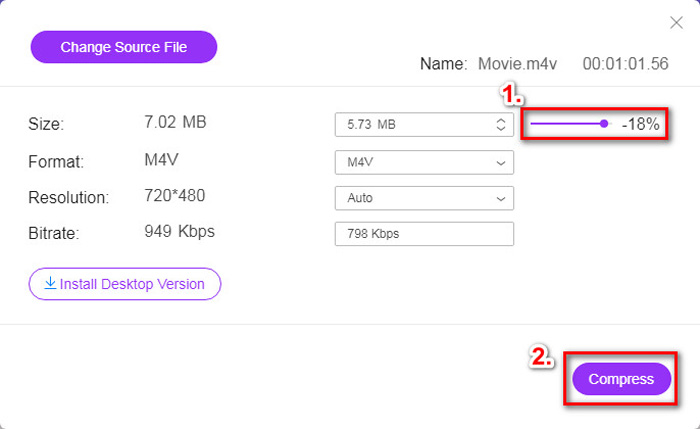
Krok 3. Jeśli chcesz skompresować M4V do MP4, powinieneś wybrać MP4 jako format wyjściowy. Jeśli nie, możesz od razu kliknąć Compress w prawym rogu. Wybierz folder do zapisania skompresowanego wideo i odczekaj kilka sekund, aby otrzymać oczekiwany plik.
Część 2. Jak zmniejszyć rozmiar pliku M4V w systemie Mac / Windows
Ponieważ M4V jest formatem opracowanym przez Apple, możesz również użyć domyślnego odtwarzacza Apple, QuickTime Player, aby kompresować pliki M4V na Macu. QuickTime Player oferuje też wersję dla systemu Windows. Należy jednak pamiętać, że najnowsza wersja dla Windows to QuickTime 7.7.9, wydana w 2016 roku. Jeśli więc zależy ci na nowocześniejszym programie, możesz wypróbować FVC Free Video Compressor, który obsługuje nawet wideo 4K.
W każdym razie wykonaj poniższe czynności, aby zmniejszyć rozmiar pliku M4V w programie QuickTime.
Krok 1. Otwórz w QuickTime plik M4V, który ma zostać skompresowany.
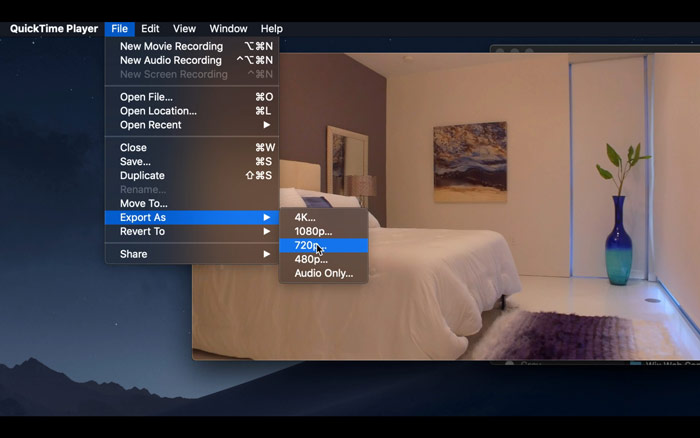
Krok 2. Znajdź menu File w lewym górnym rogu. Kliknij je i wybierz z listy opcję Export As. Następnie wybierz rozdzielczość niższą niż w oryginalnym wideo, aby skomprymować wideo. W końcu nie chcemy tutaj zwiększać rozmiaru pliku.
Krok 3. Jeśli nie chcesz zmieniać ścieżki zapisu, możesz po prostu kliknąć Save. Poczekaj cierpliwie na wyeksportowanie wideo.
Część 3. Często zadawane pytania dotyczące kompresji M4V
1. Czy mogę zmienić nazwę M4V na MP4?
Nie, jeśli masz na myśli konwersję M4V do MP4 poprzez zmianę rozszerzenia na .mp4. Ich kodowanie nie jest bowiem takie samo. Powinieneś skorzystać z bardziej profesjonalnego narzędzia, aby przekonwertować M4V na MP4.
2. Czy YouTube akceptuje format M4V?
Niestety YouTube obsługuje tylko ograniczoną liczbę formatów plików, które nie obejmują M4V. Tak więc, jeśli chcesz przesłać swój film M4V do YouTube, powinieneś przekonwertować go na format obsługiwany przez YouTube, taki jak MP4.
3. Jak połączyć kilka filmów M4V w jeden?
Jeśli masz kilka plików wideo M4V, które trzeba połączyć w jeden, możesz skorzystać z FVC Free Online Video Merger, aby scalić różne pliki wideo.
Wniosek
Teraz znasz 2 proste i darmowe sposoby, aby skompresować plik M4V. Jeśli używasz Maca, możesz zmniejszyć rozmiar wideo w QuickTime Player. Jeśli jednak nie satysfakcjonują cię stałe rozdzielczości oferowane przez QuickTime lub korzystasz z komputera z systemem Windows, możesz wypróbować FVC Free Video Compressor.
-
 Konwerter M4V na MP3 - 4 najlepsze metody wyodrębniania plików MP3 z plików M4V
 Jeśli chcesz z łatwością wyodrębnić dźwięk MP3 z filmów M4V, możesz dowiedzieć się więcej o 4 najlepszych konwerterach M4V na MP3, aby uzyskać żądane pliki audio z artykułu.
-
 4 sposoby konwertowania filmów QuickTime na MP4 za darmo na telefonie / komputerze
 Przeczytaj i uzyskaj 4 sposoby konwersji QuickTime na filmy MP4 za darmo na telefonie lub komputerze. Możesz z łatwością zmienić format pliku z MOV na MP4 na Windows / Mac / iPhone / Android / online.
-
 4 Najlepsze konwertery MP4 na M4V do łatwego przekształcania filmów MP4 w M4V
 Kiedy musisz zmienić pliki MP4 na M4V, powinieneś dowiedzieć się więcej o różnicach między tymi dwoma formatami, a także o najlepszych konwerterach MP4 na M4V z artykułu.
