


 Video Converter Ultimate
 Nagrywarka ekranu
 Naprawa wideo
5 Greatest MP4 Cutter: Dowiedz się, jak wycinać filmy na komputerach PC, Mac i urządzeniach mobilnych
Jeśli jesteś vlogerem lub początkującym, robienie sobie filmu jest tak powszechne. Wymagałoby to dużo wysiłku i pewności siebie, podobnie jak robienie zdjęć przed kamerą. Ponadto najczęstszą rzeczą, którą wszyscy profesjonaliści i nowi we vlogowaniu są błędy, które popełniasz. Zamiast ponownie nakręcić film, zwykle go przycinają i łączą z oryginalnymi filmami. Aby stworzyć jeden zupełnie nowy film, który składa się z różnych kątów, widoków, montaży i nie tylko, wycinają go z różnych filmów i dodają do jednego. Ale jako nowicjusz w tego rodzaju pracy, a nawet profesjonalista, wybór odpowiedniego trymera jest trudny. Ponieważ nie wszystkie funkcje, jak powiedzieli w reklamie narzędzia, nie znajdują się w narzędziach. Zamiast przechodzić do drugiego artykułu i czytać rekomendację, dlaczego nie nauczysz się z tego w pierwszej kolejności. Ponieważ zebraliśmy tylko realne dowody dla własnego zysku. Tak więc na liście znajdują się frezy MP4, których możesz użyć do rozpoczęcia vlogowania. Skoncentruj się, aby dowiedzieć się, jakie są najlepsze trymery, których możesz użyć, które zapewniają prosty, ale profesjonalny wygląd Twoich filmów.

Część 1. Pobierz najlepsze oprogramowanie do cięcia wideo MP4 na komputery PC i Mac
Jeśli mamy mówić o tym, co najlepsze, musisz najpierw przeczytać właśnie to. Jak już wcześniej wspomniano, tworzenie vlogów jest znacznie trudniejsze, niż się spodziewaliśmy – nie chodzi tylko o pewność siebie przed kamerą i samo opublikowanie materiału. Musisz także wziąć pod uwagę posiadanie wielofunkcyjnego narzędzia, które zapewni bardziej atrakcyjny wizualnie materiał dla każdego widza. FVC Video Converter Ultimate oferuje znakomite funkcje edycji i konwersji, z których może korzystać każdy, kto chce. Jako początkujący lub profesjonalista musimy brać pod uwagę to, co jest absolutnie najlepsze na rynku. Chociaż jest to wersja płatna, nadal zapewnia wszystko, co najlepsze. Jeśli wybierzesz ją jako swoje osobiste narzędzie, czeka cię świetlana przyszłość. Chcesz zacząć vlogowanie już dziś? W takim razie postępuj zgodnie z poniższymi krokami, aby dowiedzieć się, jak używać tego korka do wideo MP4.
Krok 1. Kliknij przycisk pobierania poniżej i zainstaluj program na swoim PC lub Macu. Postępuj zgodnie z kreatorem instalacji narzędzia i kliknij „Zakończ”, aby uruchomić oprogramowanie.
Bezpłatne pobieranieDla Windows 7 lub nowszegoBezpieczne pobieranie
Bezpłatne pobieranieDla MacOS 10.7 lub nowszegoBezpieczne pobieranie
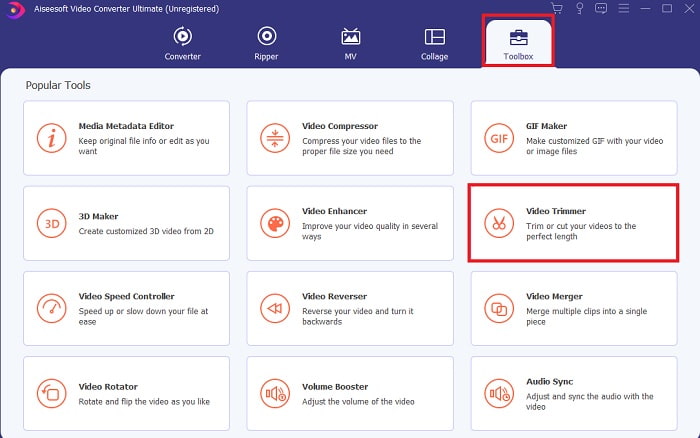
Krok 2. Jeśli takie okno pojawiło się na ekranie, kliknij Toolbar, a następnie znajdź poniżej Video Trimmer.
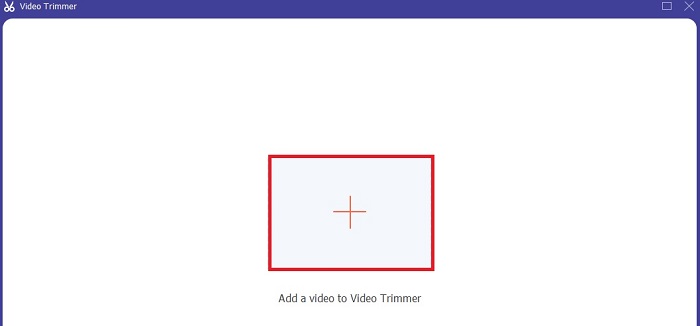
Krok 3. Kliknij przycisk plus, aby dodać plik. Wybierz na dysku plik, który chcesz przyciąć, i kliknij open, aby wstawić wideo.
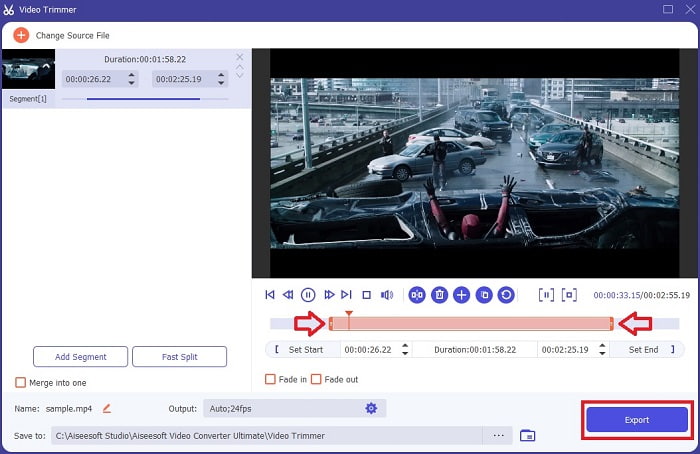
Krok 4. Aby dostosować punkt początkowy i końcowy wideo, manipuluj ustawieniami playback in and out, aby ustawić żądany czas trwania. Jeśli chcesz, dodaj efekt fade in i fade out. Możesz także zmienić format wyjściowy, klikając przycisk cog. Gdy skończysz, kliknij przycisk Export, aby rozpocząć proces przycinania.
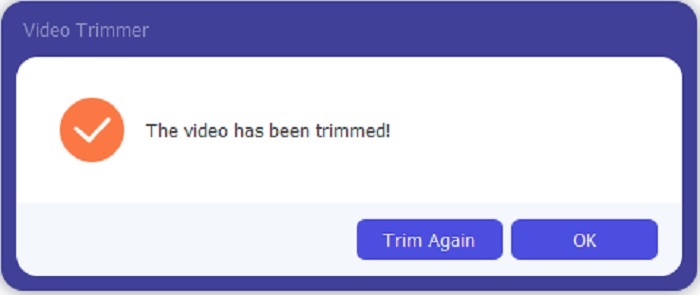
Krok 5. Odczekaj dosłownie chwilę, a twoje wideo zostanie przycięte. Następnie kliknij OK lub Trim Again, jeśli musisz przyciąć kolejny materiał. Jeśli chcesz ulepszyć właśnie przygotowane wideo, ponownie kliknij pasek narzędzi i znajdź funkcję video enhancer.
Zaleta posiadania narzędzia scalającego dostarczanego przez FVC Video Converter Ultimate z Steps
W przeciwieństwie do innych aplikacji, scalanie filmów w FVC Video Converter Ultimate jest bardzo łatwe. Jest to dodatkowa funkcja, jeśli kupisz to narzędzie. Jak już wspomniano, to narzędzie jest wielofunkcyjne, więc bez zbędnych ceregieli zacznijmy łączyć różne filmy w jeden.
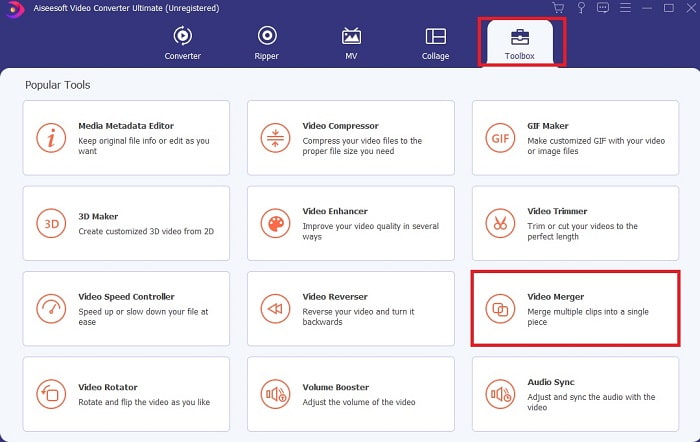
Krok 1. Otwórz oprogramowanie, przejdź do Toolbar, a następnie znajdź i kliknij Video Merger.
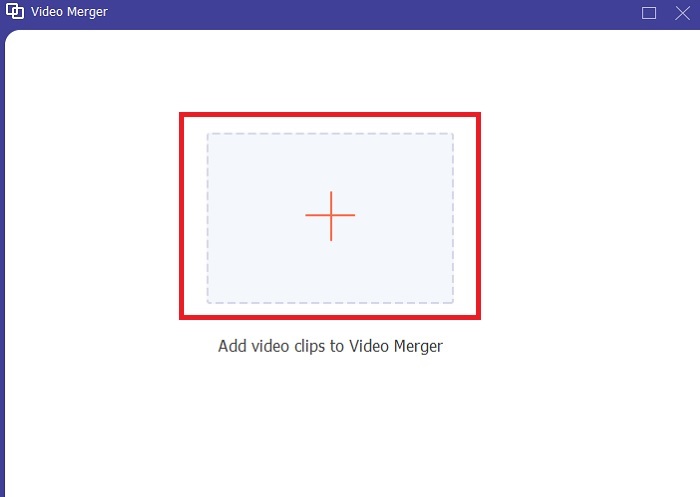
Krok 2. Kliknij przycisk add i wybierz wideo, które chcesz połączyć, po czym kliknij open, aby kontynuować. Po wybraniu pierwszego pliku kliknij znak plus, aby dodać kolejny materiał, który chcesz scalić.
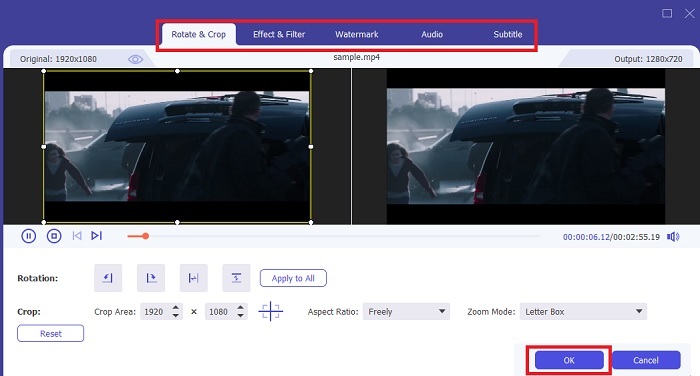
Krok 3. W interfejsie kliknij przycisk wand, aby dodać efekty, poprawić dźwięk, obrócić lub przyciąć obraz oraz dodać napisy. Aby zapisać wprowadzone zmiany, kliknij OK. Jeśli chcesz, wykonaj tę samą procedurę również dla pozostałych klipów.
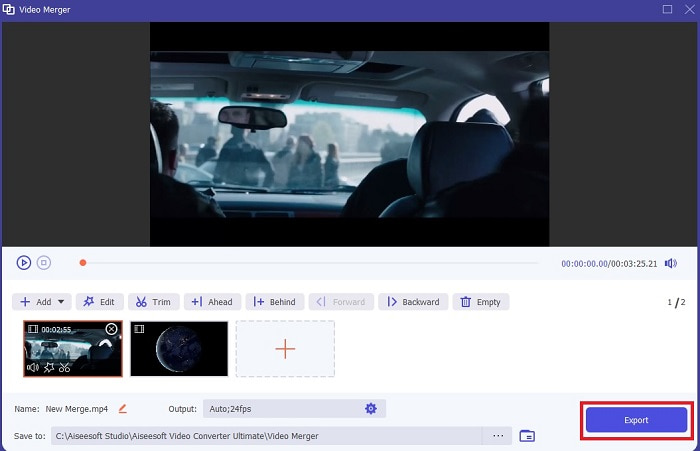
Krok 4. Gdy jesteś gotowy, aby rozpocząć proces, kliknij Export. Po zakończeniu eksportu na ekranie pojawi się okno menedżera plików. Aby obejrzeć wyeksportowane wideo, po prostu je kliknij i ciesz się materiałem.
Część 2. Najlepsze przecinaki MP4 online
To może być dobry program do przycinania, ale nie tak dobry jak FVC Video Converter Ultimate. Mimo to warto wypróbować te internetowe trymery MP4.
1. Wycinarka wideo online 123Apps
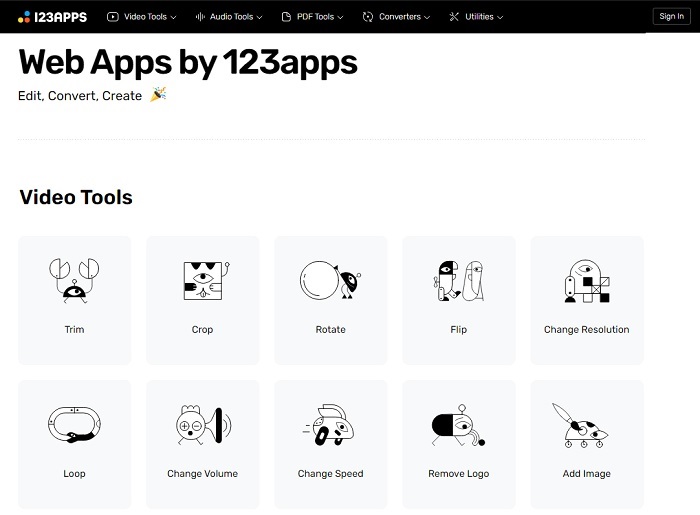
To pierwsze narzędzie online ma na celu ulepszanie Twoich filmów. Może dostosować czas trwania wideo, przyciąć, dodać tekst i nie tylko. Jednak wyeksportowanie tego narzędzia zajmuje dużo czasu. Po wyeksportowaniu musisz go pobrać, a proces ten będzie zależał od szybkości Internetu. Nie możesz też dostosować jakości swoich filmów. Tak więc, jeśli Twój film jest nieco rozmazany i wymaga dostosowania jego klatek na sekundę, nie możesz tego zrobić tutaj. Ale mimo wszystko warto spróbować.
2. Klideo
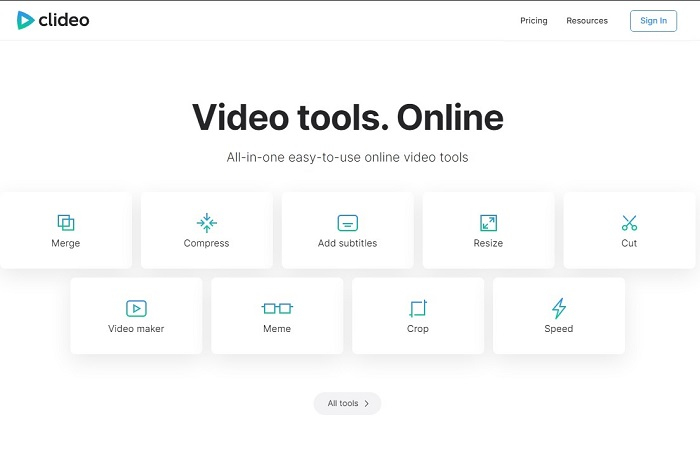
Jeśli mówimy o przycinaniu, to również może być dobry wybór. Clideo to jedno z najlepszych internetowych narzędzi typu MP4 trimmer, jakie możesz znaleźć. Podobnie jak pierwsze opisane narzędzie online, to również oferuje podstawowe funkcje edycji. Chociaż obsługuje tylko podstawową edycję, to wciąż może być niewystarczające, jeśli tworzysz naprawdę przyciągające wzrok wideo. Jednak możesz wypróbować je online bez obaw – jest darmowe i bezpieczne.
Część 3. 3 Najlepsze aplikacje do cięcia MP4 na Androida i iOS
Co zrobić, jeśli nie masz komputera stacjonarnego do korzystania z powyższych narzędzi i chcesz zostać vlogerem, czy nadal jest to możliwe? Jeśli masz telefon, taki jak Android lub iOS, możesz użyć tych aplikacji do edycji na swoich telefonach. Ale jest kilka funkcji, które są dostępne powyżej, których tutaj nie ma. Kontynuuj czytanie poniżej, aby dowiedzieć się, jakie są te narzędzia i wybrać z nich.
1. iMovie na iOS
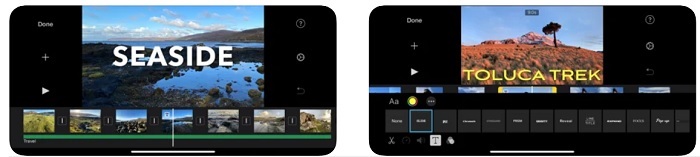
Jeśli chcesz dodać do swojego wideo klimat rodem z Hollywood, iMovie będzie właściwym oprogramowaniem. Ta aplikacja do przycinania MP4 została stworzona wyłącznie dla użytkowników iOS. Mimo że oferuje zaawansowane funkcje edycyjne, część błędów wciąż nie została naprawiona. Zdarza się, że aplikacja regularnie się zawiesza podczas edycji i ekran robi się czarny. Czasami wideo i dźwięk się rozjeżdżają z powodu błędów. To tylko kilka przykładów – błędy może i są drobne, ale bywają bardzo irytujące. Jeśli jednak chcesz wypróbować iMovie, nadal możesz pobrać je z App Store.
2. Edytor i kreator wideo – Viva Video na Androida
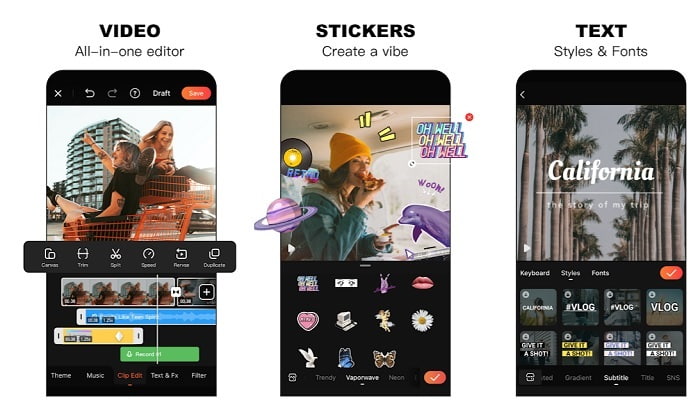
Jednym z najlepszych darmowych programów do przycinania MP4 na Androida jest Video Editor & Maker – Viva Video. Podobnie jak wspomniane wyżej narzędzie, oba zapewniają świetne funkcje edycji na telefonach: przejścia między ujęciami, efekty glitch i wiele więcej, ale jest to narzędzie płatne. Zdarza się, że nie jest idealne, ponieważ nie ma przycisku rezygnacji z subskrypcji. Możesz więc uznać, że najlepszym sposobem jest usunięcie aplikacji, by zakończyć subskrypcję, ale ona i tak nie wygaśnie. Jeśli wybrałeś płatność kartą kredytową, opłaty będą nadal pobierane. Poza tym jednak narzędzie jest klasy A – ani mniej, ani więcej.
Część 4. Często zadawane pytania dotyczące frezu MP4
Co to jest MP4?
MP4 jest również znany jako uniwersalny format multimedialny. Zamiast przechowywać kod, przechowuje dane filmów, zdjęć, napisów lub tekstów. Ponadto jest to najczęściej używany format wideo na całym świecie.
Czy MP4 jest stratny czy bezstratny?
Będąc formatem uniwersalnym, MP4 jest kompresją stratną.
Jaki jest najlepszy format inny niż MP4?
Istnieją formaty, które zapewniają lepszą jakość wyjściową niż MP4, ale nie są tak elastyczne jak ten format. Na przykład WMV – ma on mniejszy rozmiar pliku niż MP4, ale nie jest kompatybilny z urządzeniami Apple, ponieważ został opracowany jako natywny format dla Windows Media Player. Możesz przekonwertować swoje pliki MP4 na WMV, aby uzyskać lepsze odtwarzanie.
Wniosek
Podsumowując, teraz łatwiej jest zrozumieć różnice między poszczególnymi narzędziami, z których możesz korzystać. Jednak jak już wcześniej wspomniano, nie wszystkie z nich oferują tak zaawansowane funkcje przycinania jak FVC Video Converter Ultimate. Szczególnie jeśli chcesz tworzyć bardziej atrakcyjne wideo, aby zdobyć więcej wyświetleń, a przy tym zarabiać. Zamiast zadowalać się czymś tymczasowym, dlaczego nie wybrać FVC Video Converter Ultimate, aby pewnie patrzeć w przyszłość i zapewnić sobie najlepszą możliwą wersję narzędzia?.
-
 Przewodnik po tym, jak przekonwertować RMVB na MP4 na Windows / Mac (3 bezpłatne sposoby)
 Chcesz przekonwertować RMVB na MP4 w celu łatwego odtwarzania na komputerze lub telefonie komórkowym? W tym przewodniku znajdziesz proste sposoby konwersji plików RMVB na MP4.
-
 4 Najlepsze konwertery MP4 na M4V do łatwego przekształcania filmów MP4 w M4V
 Kiedy musisz zmienić pliki MP4 na M4V, powinieneś dowiedzieć się więcej o różnicach między tymi dwoma formatami, a także o najlepszych konwerterach MP4 na M4V z artykułu.
-
 Konwerter AMV - 3 najlepsze metody konwersji MP4 na AMV na Win / Mac
 Jakie są najlepsze konwertery MP4 na AMV, aby zamienić filmy w Amine Music Video, możesz dowiedzieć się więcej o najbardziej wydajnych metodach 3, aby z łatwością uzyskać pożądane filmy z artykułu.
