


 Video Converter Ultimate
 Nagrywarka ekranu
 Naprawa wideo
Pełny przegląd konwertera WaltR HEIC i jego najlepszych alternatyw [2022]
There is no doubt that HEIC images are one of the popular image formats you will see on the internet because of their small file size and high-quality resolution. With the emergence of iOS 11, many people have struggled with this image format because you cannot view them on other applications and the Windows system. As a result, many people convert it to other image formats like JPG. One of the most popular HEIC to JPEG converters is WaltR HEIC Converter. And in this article, you will know the features and how you can convert HEIC to JPG using WaltR HEIC Converter.

Część 1. WaltR HEIC Converter-najlepsze narzędzie do konwersji HEIC na JPEG
WaltR HEIC Converter is one of the best converters when converting HEIC to JPEG format. This online tool allows you to convert HEIC to JPG offline conveniently. It is a user-friendly tool because it has a simple and easy-to-operate software interface. Also, you can convert multiple HEIC files in just one click. In addition to that, it is free to use and can convert your HEIC file ultimately fast. And if you want to convert your HEIC image to a PNG image format, this tool can also do that for you.
Plusy i minusy konwertera WaltR HEIC
Plusy
- Posiada prosty interfejs użytkownika.
- Może grupowo konwertować obrazy HEIC na obrazy JPEG i PNG.
- Jest 100% darmowy.
- Dostępne na wszystkich platformach multimedialnych, w tym Windows i Mac.
Cons
- Obsługuje tylko formaty plików JPEG i PNG.
Jak korzystać z konwertera WaltR HEIC
Daj nam znać, jak przekonwertować format pliku HEIC na JPEG za pomocą konwertera WaltR HEIC.
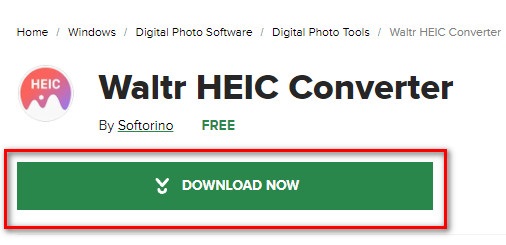
Step 1. For you to download WaltR HEIC Converter application, search WaltR HEIC Converter. Then follow the installation process, and run the application.
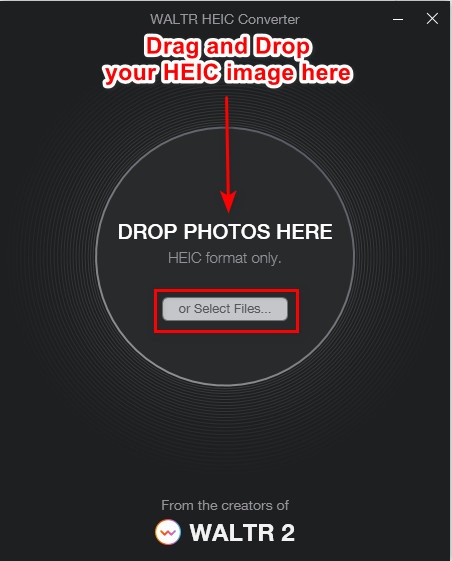
Step 2. Drag and drop your HEIC image on the main software interface or click the Select Files button to upload your HEIC image on the queue. And then wait for your HEIC image to upload, then proceed to the next step.
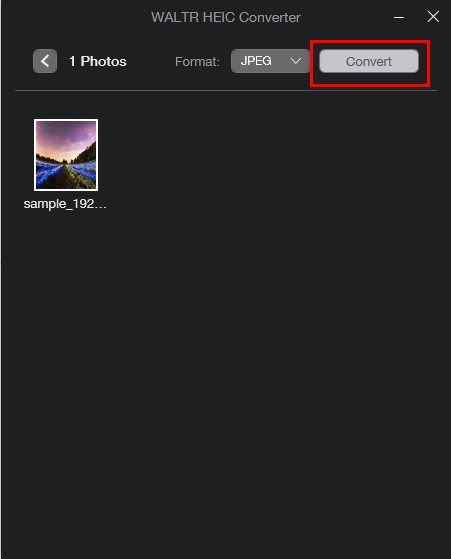
Step 3. Next, click the drop-down button beside Format to select the output format you want. Click JPEG.

Step 4. Lastly, click the Convert button to convert your HEIC image to JPEG image format. And then, select the destination of your image, and that’s it!
Łatwe, prawda? Możesz przekonwertować obraz HEIC na obraz JPEG, wykonując powyższe kroki.
Część 2. 4 Najlepsze alternatywy dla konwertera WaltR HEIC
Jeśli jednak szukasz wygodniejszego sposobu konwersji HEIC na JPEG, którego nie musisz pobierać, rozwiązaniem dla Ciebie jest użycie internetowego konwertera HEIC na JPEG. Szukaliśmy najlepszych internetowych konwerterów HEIC na JPEG w Internecie i stwierdziliśmy, że te narzędzia są najlepsze w użyciu. Dlatego kontynuuj czytanie tego artykułu, aby poznać dwie najlepsze alternatywy dla konwertera WaltR HEIC.
Alternatywa 1. FVC Free HEIC to JPEG Converter
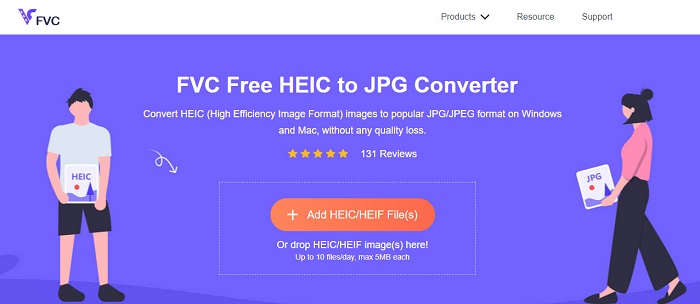
FVC Free HEIC to JPEG Converter is the best tool for converting HEIC to JPEG online. This converter can convert your HEIC image to JPEG without losing the quality of your image. It also allows you to batch convert your HEIC images to JPEG/JPG in just one click. Furthermore, when converting your images, it keeps the EXIF data like the size, dimensions, capture date/time, and exposure settings. It is also 100% free and safe to use. And unlike any other online tool, FVC Free HEIC to JPEG Converter does not contain pesky ads.
Plusy
- Posiada łatwy w obsłudze interfejs oprogramowania.
- Może grupowo konwertować obrazy HEIC do formatu obrazu JPEG.
- Jest bezpieczny w użyciu i wolny od 100%.
- Dostępne we wszystkich przeglądarkach internetowych, w tym Google, Firefox i Safari.
Cons
- W przypadku wolnego połączenia internetowego może wystąpić powolny proces konwersji.
Alternatywa 2. OnlineConvert.com

OnlineConvert.com is also a popular tool for converting HEIC to JPEG images. This online HEIC to JPEG converter allows you to change the size and quality of your image output. Also, this converter is a user-friendly tool because it has a simple GUI. However, it contains pesky ads that might be disturbing for you. Nevertheless, many people still use this converter to convert their HEIC image to JPEG.
Plusy
- Posiada intuicyjny interfejs oprogramowania.
- Umożliwia zmianę rozmiaru i dostosowanie jakości obrazu.
Cons
- Zawiera reklamy.
- Twój plik może zostać uszkodzony, gdy połączenie internetowe zostanie przerwane.
Alternatywa 3. CloudConvert
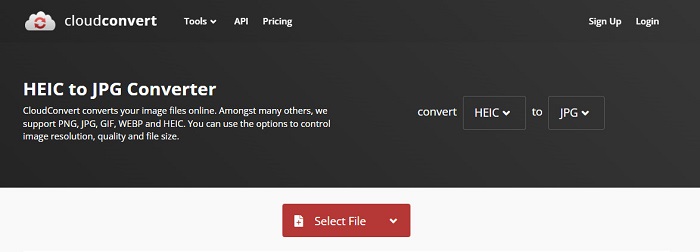
CloudConvert is an online converter that can also convert HEIC to JPEG images. This converter has a simple interface, making it a user-friendly tool. Using this converter, you can change the width and height of your image output and its quality. Moreover, this tool supports various file formats like HEIC, JPEG, PNG, GIF, and WebP.
Mimo to podczas korzystania z tego konwertera połączenie internetowe musi być szybkie, abyś nie musiał zbyt długo czekać z konwersją obrazu HEIC. Niemniej jednak nadal jest to jedno z najskuteczniejszych narzędzi, jakie można znaleźć w Internecie.
Plusy
- Jest bezpieczny w użyciu i bezpłatny.
- Pozwala zmienić jakość wyjściowego obrazu.
- Posiada łatwy w obsłudze interfejs.
Cons
- Twój proces konwersji będzie powolny, w zależności od szybkości Internetu.
Alternatywa 4. FreeToolOnline.com
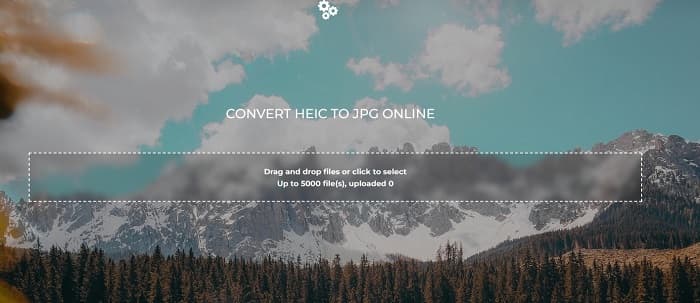
Another online HEIC to JPEG converter that you must try is FreeOnlineTool.com. This tool can convert HEIC images to JPEG and PDF format. Also, this online converter is safe to use and free. And if you want to convert your multiple HEIC image to JPEG in one go, this converter has that feature. Furthermore, it has an easy-to-use and intuitive interface. However, just like the other converter, it contains ads that may be disturbing for you while using this tool.
Plusy
- Obsługuje konwersję HEIC do formatu JPEG i PFD.
- Posiada prosty graficzny interfejs użytkownika.
- Umożliwia grupową konwersję obrazów HEIC na obrazy JPEG.
Cons
- Zawiera reklamy.
Część 3. Często zadawane pytania dotyczące konwertera WaltR HEIC
Czy konwerter WaltR HEIC jest dostępny na urządzeniach mobilnych?
Niestety WaltR HEIC Converter nie jest dostępny do pobrania na żadne urządzenie mobilne.
Czy możesz przekonwertować HEIC na GIF za pomocą WaltR HEIC Converter?
No. WaltR HEIC Converter does not support GIF image files. But if you want to convert your HEIC image to a GIF format, you can use this tool Aiseesoft Free Image Converter Online, to convert HEIC image to GIF.
Czy WaltR HEIC Converter ma wersję online?
WaltR HEIC Converter nie ma wersji online. Dlatego jeśli chcesz przekonwertować HEIC na JPEG online, skorzystaj z powyższych alternatyw.
Wniosek
Waltr HEIC Converter is indeed an amazing tool for HEIC to JPEG conversion. With the best features it offers, there is no wonder why many people use it. But if you do not want to download an app to convert HEIC to JPEG, then using an online tool is the best choice. And we recommend using the best tool on the market, FVC Free HEIC to JPEG Converter.
-
 Konwertuj HEIC na PDF przy użyciu najlepszych ulepszonych sposobów 4 w 2022
 Aby dowiedzieć się więcej o najlepszym konwerterze HEIC na PDF, możesz pobrać ten 2022. Możesz przeczytać ten artykuł, gdy przedstawiliśmy ich recenzję.
-
 5 najlepszych konwerterów HEIC na JPG wybiera to 2022
 Dzięki konwerterowi HEIC na JPC możesz łatwo zmienić format obrazu na przenośny JPG. Chcesz wiedzieć, jakie są te 5 narzędzi? Przeczytaj ten artykuł.
-
 5 najlepszych sposobów na zmianę obrazu na animowany GIF [Aktualizacja 2022]
 Potrzebujesz konwertera obrazu na GIF? W tym artykule przedstawimy pięć najlepszych konwerterów, jakie możemy znaleźć na rynku. Więc dowiedzmy się o tych narzędziach, czytając ten artykuł.
