


 Video Converter Ultimate
 Nagrywarka ekranu
 Naprawa wideo
Jak usunąć znak wodny WeVideo z edytowanego wideo jak profesjonalista?
Nie chcesz pobierać ani korzystać z żadnego comiesięcznego edytora wideo na swoim komputerze, ponieważ nie masz na to wystarczającego budżetu? WeVideo to narzędzie, które musisz wypróbować, jeśli potrzebujesz darmowego edytora wideo, który nie zdziera żadnych pieniędzy. To narzędzie internetowe umożliwia tworzenie niesamowitych materiałów wideo w zasięgu ręki i w piękniejszy sposób, wykonując kilka prostych czynności. Ze względu na swoją popularność narzędzie stało się jednym z najczęściej odwiedzanych edytorów wideo, do których można uzyskać dostęp w Internecie.
Od tego dnia szanse, że użytkownicy będą odwiedzać stronę ze względu na jej edytor wideo, znacznie wzrosną. Użytkownicy mają jednak pewne pytania dotyczące tego edytora online i bardzo często pada pytanie: czy WeVideo ma znak wodny nanoszony na edytowany film? Aby na nie odpowiedzieć, musisz przeczytać cały artykuł i dowiedzieć się, czy na filmie edytowanym tutaj faktycznie pozostaje znak wodny.

Część 1. Czy WeVideo ma znak wodny?
Tak, dodaje znak wodny WeVideo po wyeksportowaniu wideo, które tutaj edytujesz. Istnieją różne metody usuwania znaku wodnego WeVideo, ale nie wszystkie narzędzia do usuwania znaków wodnych, które można zobaczyć na rynku, są tak skuteczne, jak inne narzędzia do usuwania znaków wodnych. Zamiast wypróbowywać wszystkie narzędzia, aby zobaczyć, które Ci odpowiadają, rozważane są tutaj najlepsze rzeczy, ponieważ dajemy Ci wybrany przez nas program do usuwania znaków wodnych, który zapewnia najlepszą wydajność usuwania znaku wodnego. Nawet jeśli jesteś profesjonalistą, czy nie, możesz użyć tego narzędzia do usuwania znaków wodnych, aby łatwo wyeliminować znak wodny z filmu.
Część 2. Jak pozbyć się znaku wodnego WeVideo
FVC Video Converter Ultimate
FVC Video Converter Ultimate zapewnia najlepszą jakość wyjściową wideo zarówno dla początkujących, jak i profesjonalistów. Dzięki możliwości usuwania znaków wodnych z filmów narzędzie stało się bardzo popularne wśród użytkowników i jest ich pierwszym wyborem do pozbywania się znaków wodnych z nagrań. Program jest kompatybilny z Windows i macOS, więc działa na wielu platformach – od najstarszych po najnowsze wersje. Choć narzędzie nie jest darmowe, po jego użyciu uzyskasz świetny efekt końcowy. Dla użytkowników, którzy chcą z niego skorzystać lub już go wypróbowali, ale chcą się dowiedzieć, jak usunąć znak wodny WeVideo, poniższe instrukcje krok po kroku poprowadzą cię do skutecznego usunięcia znaku wodnego z twojego filmu.
Krok 1. Pobierz program, klikając przycisk pobierania poniżej, wybierz system operacyjny, z którego aktualnie korzystasz, i upewnij się, że klikasz właściwy przycisk. Następnie szybko zainstaluj oprogramowanie, postępuj zgodnie z instrukcją konfiguracji i uruchom je.
Bezpłatne pobieranieDla Windows 7 lub nowszegoBezpieczne pobieranie
Bezpłatne pobieranieDla MacOS 10.7 lub nowszegoBezpieczne pobieranie
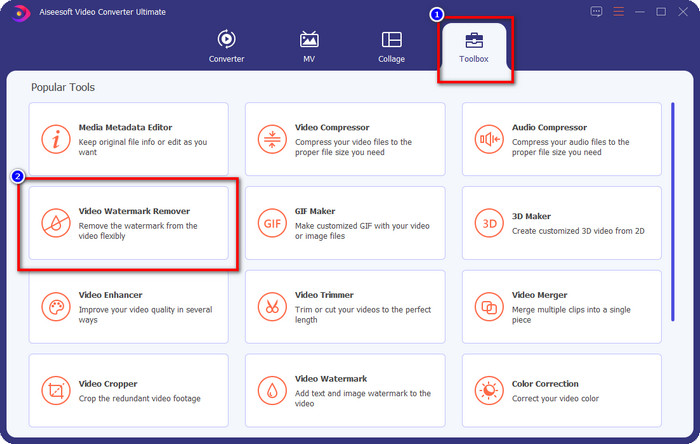
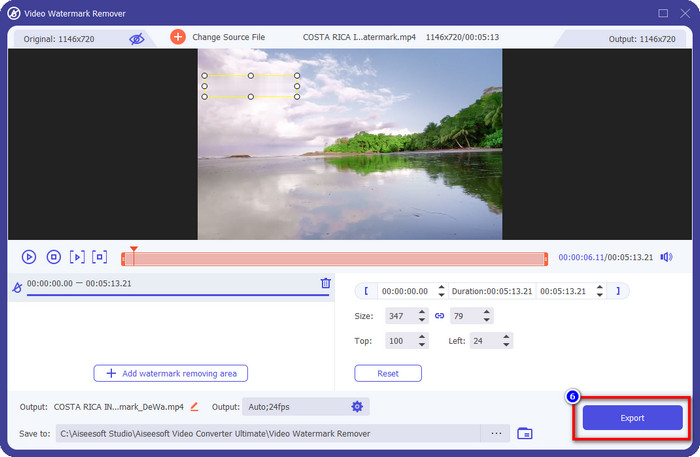
Krok 2. W zakładce Toolbox znajdź narzędzie Video Watermark Remover i kliknij je, aby przejść dalej.
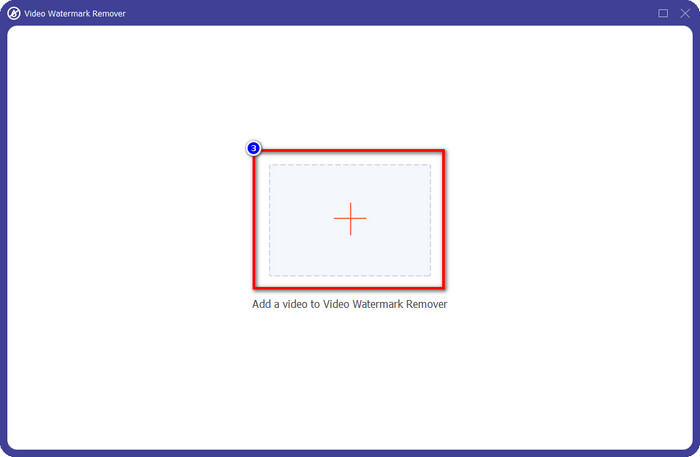
Krok 3. Klikając ikonę +, prześlij film zawierający znak wodny. Wyszukaj go w folderze, który pojawi się na ekranie, kliknij plik raz, a następnie naciśnij Open, aby go załadować.
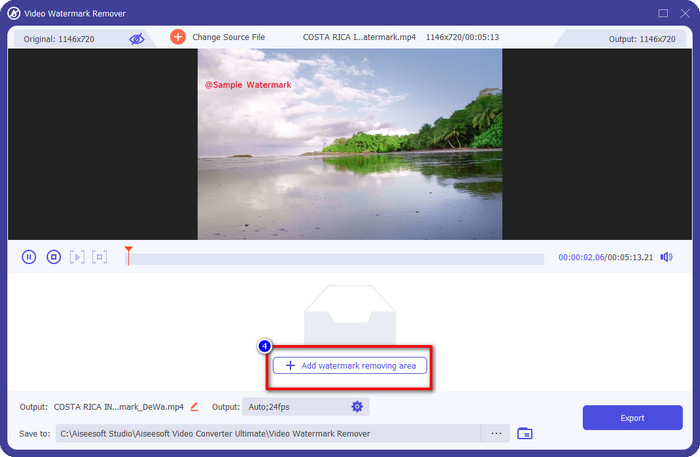
Krok 4. Po przesłaniu filmu ze znakiem wodnym naciśnij Add Watermark Removing Area i poczekaj na krótki proces ładowania.
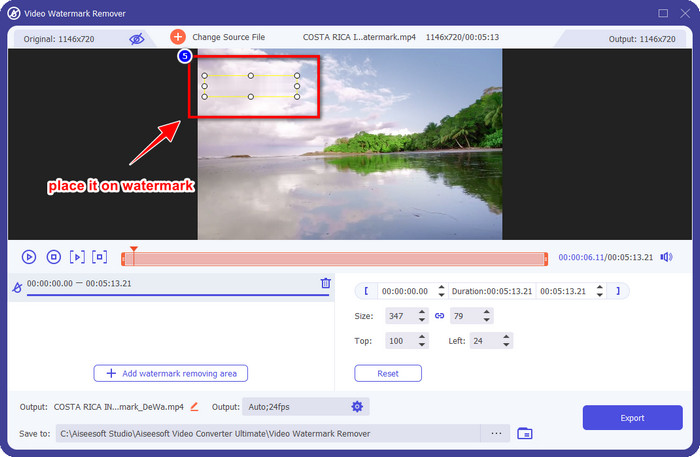
Krok 5. Umieść prostokąt zaznaczenia na znaku wodnym WeVideo i zakryj go w całości, aby po wyeksportowaniu filmu nie było żadnych śladów znaku wodnego na końcowym nagraniu.
Krok 6. Teraz możesz zapisać film, z którego usunąłeś znak wodny, klikając przycisk Export. Proces zapisywania nie zajmie dużo czasu, ponieważ program obsługuje bardzo szybkie przetwarzanie i akcelerację sprzętową.
iMyFone Mark Go
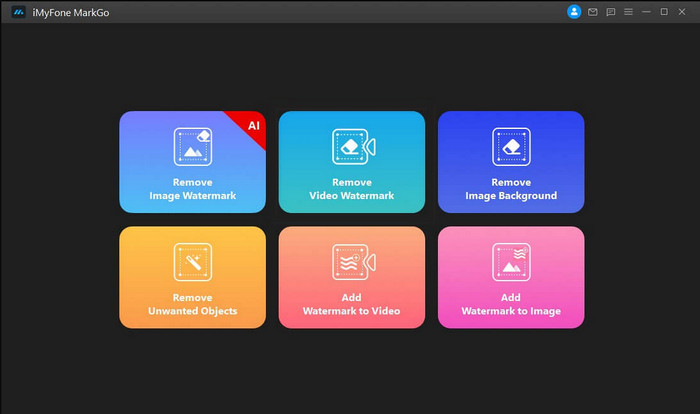
iMyFone Mark Go to kolejny program do usuwania znaków wodnych, który możesz pobrać na Windows i Mac, aby pomóc ci usunąć znak wodny WeVideo. Narzędzie to skutecznie usuwa znaki wodne z filmów, podobnie jak opisany wcześniej program „ultimate”. Jak w przypadku innego oprogramowania instalowanego na komputerze, aby w pełni usuwać znaki wodne i korzystać z wersji premium, musisz wykupić dostęp. Choć wiąże się to z kosztem, nie jest on tak wysoki jak w przypadku wielu innych programów do usuwania znaków wodnych. Jeśli więc chcesz łatwo i skutecznie usunąć znak wodny ze swojego nagrania, możesz postępować zgodnie z poniższymi krokami, gdzie pokazujemy cały proces krok po kroku.
Krok 1. Pobierz program na komputer, przechodząc na jego oficjalną stronę internetową.
Krok 2. Po uruchomieniu programu kliknij opcję Remove Video Watermark.
Krok 3. Dodaj plik wideo, klikając Add the Video. Wybierz plik, który zawiera znak wodny.
Krok 4. Przesuń prostokątny kształt, który się pojawi, i ustaw go na znaku wodnym, aby go zakryć. Choć dostępne są jeszcze trzy inne opcje usuwania znaku wodnego, nie możesz z nich skorzystać, ponieważ są przeznaczone dla użytkowników premium.
Krok 5. Kliknij przycisk Export, aby zapisać film, z którego usunąłeś znak wodny.
Przycinacz wideo online – usuń logo z wideo
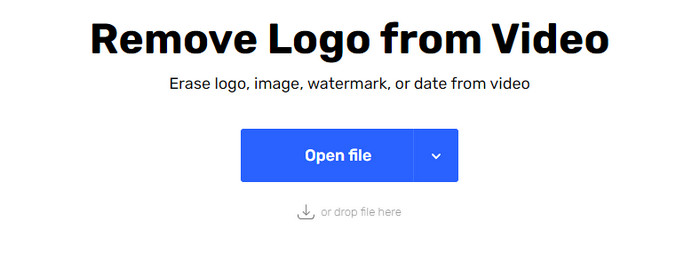
Jak usunąć znak wodny WeVideo za darmo? Użyj Online Video Cutter – Remove Logo From Video. To darmowe narzędzie internetowe, którego możesz użyć do usunięcia znaku wodnego z filmu w przeglądarce, bez pobierania czegokolwiek i bez opłat. Jeśli porównamy je z innymi programami do usuwania znaków wodnych na rynku, to jest ono skuteczne, choć nie tak dobre jak opisane wcześniej „ultimate” oprogramowanie. Potrafi zakryć znak wodny na filmie i poprawić jego odbiór wizualny. Jeśli jednak nie masz dostępu do Internetu, narzędzie to nie będzie najlepszym wyborem do usuwania znaków wodnych z nagrań. Jeśli natomiast masz połączenie, możesz skorzystać z poniższych kroków, aby zacząć usuwać znak wodny ze swojego filmu.
Krok 1. Otwórz nową kartę w przeglądarce i wyszukaj nazwę narzędzia, aby rozpocząć usuwanie znaku wodnego z filmu.
Krok 2. Kliknij Open File, aby przesłać tutaj film z WeVideo i wygenerować jego podgląd.
Krok 3. Kliknij na znak wodny, aby zastosować obszar usuwania, jaki oferuje to narzędzie. Po kliknięciu dowolnej części filmu pojawi się prostokąt zaznaczenia.
Krok 4. Naciśnij Save, aby otrzymać film bez znaku wodnego.
Powiązane:
Część 3. Często zadawane pytania dotyczące usuwania znaku wodnego WeVideo
Które narzędzie jest najlepsze do usunięcia znaku wodnego WeVideo?
Bez wątpienia jest to FVC Video Converter Ultimate; to narzędzie zapewnia najlepszą wydajność w usuwaniu znaku wodnego z filmu. Wśród wybranych środków do usuwania znaków wodnych nie możemy zaprzeczyć, że najlepsze narzędzie przewyższa inne narzędzie do usuwania znaków wodnych.
Czy mogę wyciąć znak wodny WeVideo?
Tak, możesz wyciąć znak wodny, który WeVideo pozostawia na Twoim filmie. Ale wymiar wideo zostanie zmniejszony i istnieje szansa, że jego jakość może się zmniejszyć, ponieważ wycinasz proporcje.
Co sprawia, że WeVideo jest najlepszym edytorem wideo w sieci?
Dzięki kompletnym podstawowym funkcjom edycji wideo, do których możesz się przyzwyczaić, i łatwości korzystania z tego narzędzia. Oto najczęstsza wiedza na temat tego, co sprawia, że WeVideo jest jednym z najlepszych edytorów wideo, z których możesz korzystać w Internecie. Ale nie jest tak dobry, jak inny edytor wideo Adobe Premiere Pro, Final Cut Pro itp.
Wniosek
W końcu dzięki metodom, które zapewniamy powyżej, masz teraz pomysł, jak pozbyć się znaku wodnego WeVideo. Ale co sądzisz o narzędziu, które wybieramy? Jeśli nadal nie masz pomysłu, czego użyć, musisz naszym zdaniem przetestować FVC Video Converter Ultimate. Zapewnia najlepsze z najlepszych w usuwaniu znaku wodnego, a także jest łatwy w użyciu. Więc na co czekasz? Kliknij przycisk pobierania, aby usunąć znak wodny i natychmiast go użyć.
-
 Narzędzia do usuwania znaków wodnych 123rf — dokładny przegląd najlepszych narzędzi
 Jeśli chcesz wiedzieć, jakie są najwybitniejsze produkty do usuwania znaków wodnych 123rf, przeczytaj dokładnie ten artykuł. Ten artykuł zawiera szczegółowy przegląd narzędzi.
-
 Jak usunąć znak wodny DeviantArt w systemie Windows i Mac?
 Chcesz dowiedzieć się, jak usunąć znak wodny DeviantArt ze swoich obrazów? Używając najwybitniejszych środków do usuwania znaków wodnych DeviantArt, możesz łatwo usunąć te nieznośne znaki wodne.
-
 Najlepsze oprogramowanie do usuwania znaku wodnego Video Helper z eksportowanych filmów [2022]
 Czy chcesz wiedzieć, jak usunąć znak wodny z filmu pobranego w Video Helper? Jeśli tak, przeczytaj ten artykuł, aby wiedzieć.
