


 Video Converter Ultimate
 Nagrywarka ekranu
 Naprawa wideo
Dowiedz się więcej o 5 najlepszym edytorze wideo na PC i porównaj
W dzisiejszych czasach wiele osób lubi nagrywać filmy, aby zachować wyjątkowe chwile, a większość z nich wykorzystuje je także do zarabiania pieniędzy. Vlogerzy i influencerzy nieustannie nagrywają siebie i to, co robią, dla swoich fanów, a także po to, by zyskać większą popularność niż inni twórcy. Jeśli więc jesteś początkującym vlogerem lub influencerem, który lubi nagrywać siebie, koniecznie powinieneś mieć najlepszy edytor wideo na Windows 10, aby ulepszać i tworzyć imponujące filmy, zdobywać więcej polubień, wyświetleń, subskrybentów, a w dłuższej perspektywie także zyski. Zanim zaczniemy, chcielibyśmy ci pogratulować, ponieważ zrobiłeś już pierwszy krok do zostania odnoszącym sukcesy vlogerem lub influencerem. Wybór odpowiedniego narzędzia, którego będziesz używać, to jednak jeden z kluczowych etapów, z jakimi się zmierzysz. Dlatego zebraliśmy różne edytory wideo, wciąż bardzo skuteczne, spośród których możesz wybrać poniżej.

Część 1. Top 5 edytorów wideo Windows online i offline
Top 1. Konwerter wideo Ultimate
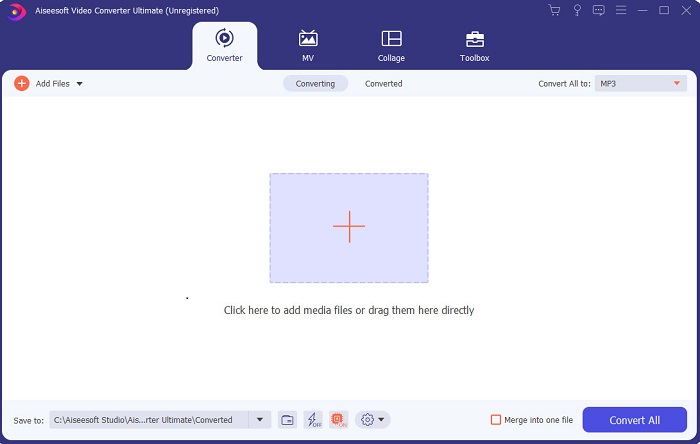
Jeśli chcesz mieć przewagę i tworzyć filmy tak dobre jak twoi idole, użyj FVC Video Converter Ultimate. Ten konwerter i edytor wideo na Windows pomógł już wielu użytkownikom zdobyć popularność na całym świecie – być może ty będziesz następny. Większość znanych influencerów, vlogerów i montażystów korzysta z niego jako edytora, narzędzia do ulepszania, wzmacniania materiału i nie tylko. Jeśli więc chcesz uzyskiwać profesjonalne efekty jak twoi idole i naprawdę na tym zarabiać, musisz jak najszybciej pobrać to oprogramowanie, by stać się nową sensacją internetu i najlepszą wersją siebie. Przygotowaliśmy też listę zalet i wad, abyś lepiej zrozumiał to narzędzie.
Bezpłatne pobieranieDla Windows 7 lub nowszegoBezpieczne pobieranie
Bezpłatne pobieranieDla MacOS 10.7 lub nowszegoBezpieczne pobieranie
Plusy
- Dla początkujących to narzędzie jest dla nich właściwym wyborem. Ponieważ zawiera proste instrukcje do naśladowania i łatwiejsze do zrozumienia. Zasadniczo jest na miejscu.
- Dla profesjonalistów, jak nikt inny edytor wideo na PC to narzędzie ma wiele futurystycznych funkcji. Na przykład, jeśli chcesz poprawić jakość dźwięku i ulepszyć wideo, możesz użyć tego narzędzia. Ponadto, jeśli dźwięk nie jest zsynchronizowany z wideo, ma funkcję synchronizacji dźwięku, aby to naprawić.
- Ogólnie rzecz biorąc, jest to fenomenalny konwerter i edytor, na którym można polegać. Zwłaszcza jeśli chcesz w zaskakujący sposób wejść w świat vlogerów i influencerów.
- Oprogramowanie do edycji można pobrać i nie ma narzędzi do edycji, które mają takie same funkcje, jak to.
Cons
- To narzędzie nie jest darmowe, ale ma niską cenę. Innymi słowy, jest tani i zapewnia wysoką jakość wydruku.
Top 2. Windows Movie Maker
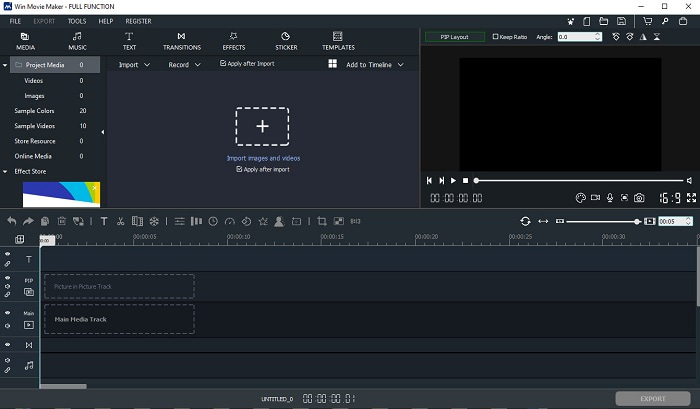
Ten edytor wideo dla Windows 7, 8, 10 i XP jest jednym z najlepszych do tworzenia i montażu filmów. Windows Movie Maker został już pobrany przez wielu użytkowników, by montować własne nagrania, ponieważ oferuje zaawansowane funkcje edycji. Jednak to narzędzie może być przytłaczające dla osób, które dopiero zaczynają montować. Jeśli jednak jesteś profesjonalistą lub masz doświadczenie w edycji, zdecydowanie powinieneś go wypróbować. Program ma wersję premium, bardzo podobną do darmowej, ale w eksporcie nie ma znaku wodnego.
Plusy
- Dla początkujących to narzędzie nie jest idealne, ale świetnie nadaje się do skomplikowanej edycji.
- Dla profesjonalistów przedstawione tutaj funkcje są możliwe do wykonania, jeśli masz doświadczenie.
- Zapewnia przejścia, efekty i naklejki itp.
Cons
- Narzędzie jest nieco niepokojące ze względu na funkcje narzędzia, które możesz tutaj wykonać. Ponadto jest przytłaczający i nie ma instrukcji, jak go obsługiwać.
- Jeśli korzystasz z bezpłatnej wersji tego narzędzia, spodziewaj się, że po wyeksportowaniu samego filmu będzie widoczny znak wodny.
Top 3. OpenShot
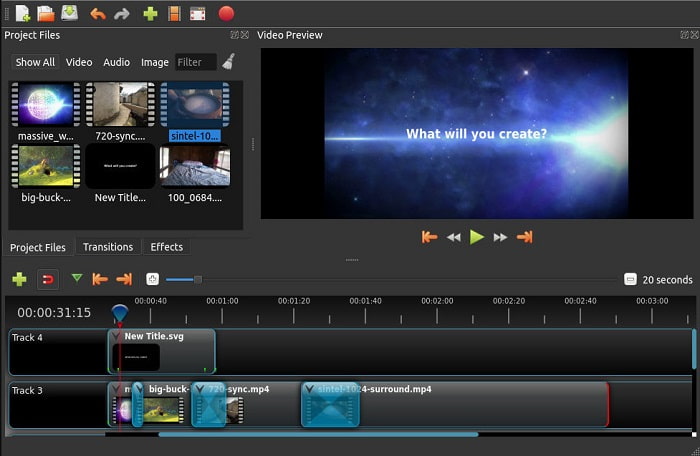
Kolejnym darmowym programem do edycji wideo bez znaku wodnego jest Openshot. Oferuje on prostsze i bardziej zrozumiałe funkcje niż Windows Movie Maker. Co więcej, po instalacji programu otrzymasz krótką prezentację jego funkcji. Choć są one objaśnione, dotyczy to tylko podstawowych opcji. Ten program zapewnia jednak wyłącznie podstawowe funkcje edycji, co oznacza, że trudno się w nim wykazać większą kreatywnością. Dodatkowo interfejs w odcieniach monochromatycznych sprawia, że narzędzie może wydawać się nieco nudne wizualnie.
Plusy
- Dla początkujących jest to prostsza wersja programu Windows Movie Maker. Możesz dodawać efekty, przejścia i nie tylko.
- Dla profesjonalistów jest w porządku, ale nie jest najlepszy.
- Oprogramowanie jest w porządku, jeśli zawiera prostą edycję.
Cons
- Nie można zmienić nudnego interfejsu i jest mniej interaktywny.
- Niektóre większe i mniejsze błędy są nadal obecne nawet po aktualizacji.
Top 4. Lightworks
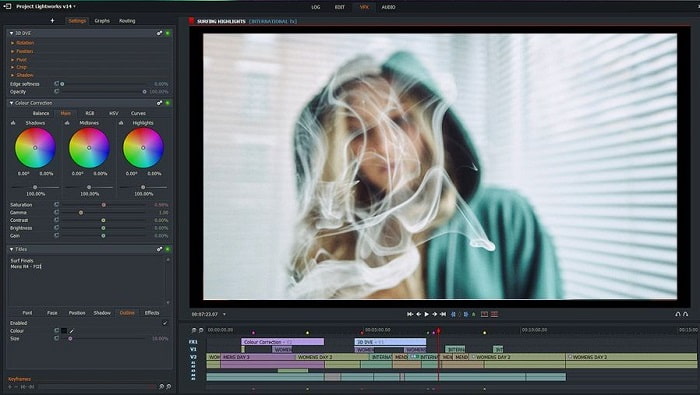
Lightworks to darmowy edytor wideo dla Windows, który ma także wersję premium. Jednak gdy próbowaliśmy pobrać ten program, pojawił się komunikat, że plik .exe może zaszkodzić naszemu komputerowi, dlatego zrezygnowaliśmy z instalacji i przeprowadziliśmy dogłębne badanie na jego temat. Jeśli zainstalujesz go na dysku, przed użyciem musisz się zarejestrować. Funkcje edycji, jakie oferuje, są bardzo rozbudowane – dla początkujących mogą być trudne do ogarnięcia, a nawet dla zaawansowanych użytkowników wymagają przyzwyczajenia. Nie ma jednak powodu do obaw: można się go nauczyć, po prostu z niego korzystając.
Plusy
- Dla początkujących narzędzie jest zbyt skomplikowane i może być zbyt trudne w obsłudze. Zwłaszcza jeśli chcesz spróbować i po prostu wykonać prostą edycję.
- Profesjonaliści mogą skorzystać z funkcji edycji w czasie rzeczywistym, które zapewnia to narzędzie. Chociaż niektóre funkcje są nowe, a większość z nich jest płatna.
- Ogólna wydajność narzędzia jest klasyfikowana jako klasa A w edycji i tworzeniu filmów.
Cons
- Jeśli chcesz mieć wyjście 1080px, musisz kupić narzędzie. I jeszcze zanim będziesz mógł z niego korzystać, będziesz musiał się zarejestrować.
- Oprogramowanie zawiera szkodliwy plik .exe, więc pobierz go na własne ryzyko.
Top 5. ClipChamp
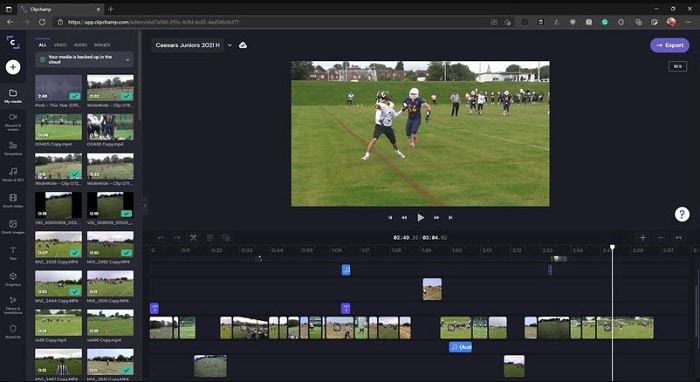
To narzędzie online po uaktualnieniu planu oferuje dodatkowe funkcje. Jest jednym z najłatwiej dostępnych narzędzi do edycji wideo bez konieczności pobierania konkretnego oprogramowania. Clipchamp to świetne rozwiązanie, ale przed skorzystaniem musisz się zarejestrować. Ten internetowy edytor wideo na Windows 10 ma podobne funkcje do Lightworks, tyle że działa w przeglądarce. Trzeba jednak liczyć się z tym, że importowanie plików wideo do edycji może być dość powolne. Zaletą jest natomiast to, że nie musisz instalować programu na komputerze.
Plusy
- Dla początkujących to narzędzie jest koniecznością, ale proces edycji i wstawiania wideo jest tutaj nieco wolniejszy.
- Dla profesjonalistów używanie i edytowanie prostych filmów przy ograniczonych zasobach jest w porządku.
- Ogólnie rzecz biorąc, narzędzie jest łatwiejsze do zrozumienia niż Windows Movie Maker.
Cons
- Zależny od Internetu, co oznacza, że jeśli masz wolny Internet, spodziewaj się niestabilnego procesu.
- Potrzebujesz formularza rejestracyjnego, zanim będziesz mógł korzystać z narzędzia internetowego.
Część 2. Tabela porównawcza dla 5 edytorów wideo dla systemu Windows
| Cechy | Video Converter Ultimate | Windows Movie Maker | OpenShot | Lightworks | ClipChamp |
| Edycja wideo, taka jak przycinanie, wycinanie, łączenie i tak dalej. |  | | | | |
| Wzmacniacz wideo | |  | | | |
| znak wodny | | | | | |
| Obsługiwany program | Narzędzie oparte na komputerach stacjonarnych | Narzędzie oparte na komputerach stacjonarnych | Narzędzie oparte na komputerach stacjonarnych | Narzędzie internetowe | Narzędzie internetowe |
| Przedział cenowy | Za 1 miesiąc: $25,00 Przez rok: $31.20 | $39.95 Płatność jednorazowa | Za darmo, ale możesz przekazać darowiznę | QScan Pro QScan Pro — miesięczne aktywacje subskrypcji $59.99 | Twórca – $9/miesięcznie Biznes- $19/ miesięcznie |
| Dożywotnia licencja: $55.20 | QScan Max QScan Max – miesięczne aktywacje subskrypcji $119.99 | Platyna Biznesu – $39/ miesięcznie |
Część 3. Często zadawane pytania dotyczące Edytora wideo systemu Windows
Jaki jest najlepszy edytor wideo dla komputerów Mac, którego mogę użyć?
Choć wszystkie przedstawione tu narzędzia to edytory dla Windows (z wyjątkiem Video Converter Ultimate), jeśli chcesz poznać inne edytory wideo na Maca, kliknij ten link i wybierz coś z listy.
Dlaczego moje filmy nie mogą być odtwarzane na Androidzie?
Istnieje wiele powodów, dla których filmy nie odtwarzają się na twoim urządzeniu z Androidem. Aby poznać możliwe przyczyny i szybko naprawić problem, przeczytaj poradnik Jak naprawić filmy, które nie odtwarzają się na telefonach z Androidem.
Jak skompresować moje długie filmy i udostępnić je na YouTube?
Obecnie możesz przesyłać pliki o maksymalnym rozmiarze 256, więc najlepszym sposobem na obejście tego ograniczenia jest ich kompresja. Jeśli chcesz udostępniać swoje filmy w serwisie YouTube, sprawdź, jak zmniejszyć rozmiar pliku i opublikować go na YouTube.
Wniosek
Zanim staniesz się jednym z tych vlogerów czy influencerów, na których dziś patrzysz z podziwem, musisz opanować umiejętność samodzielnego montażu. Teraz masz okazję skorzystać z fenomenalnego edytora, który oferuje funkcje i jakość rodem z Hollywood. Dzięki temu zachwycisz swoich widzów, obserwujących, a nawet samego siebie. Zabłyśnij więc jak diament i pozwól, by promień światła otworzył ci drogę do sukcesu z pomocą FVC Video Converter Ultimate.
-
 Najlepszy edytor MP4 dla systemów Windows i Mac w 2025 r.
 Niezależnie od tego, czy używasz komputera do edycji wideo MP4, czy po prostu pracujesz na telefonie, znajdziesz tutaj kilka świetnych opcji, w tym najlepszy edytor MP4 dla systemów Windows i Mac.
-
 Jak bezpłatnie dodać dźwięk i muzykę do wideo na komputerze / telefonie
 W tym artykule przedstawiono 4 proste sposoby bezpłatnego dodawania dźwięku do wideo. Bez względu na to, którą ścieżkę dźwiękową chcesz dodać do swojego filmu, tutaj możesz uzyskać satysfakcjonujące wyniki.
-
 Jak wycinać i łączyć utwory online – 4 najlepsze sposoby, które powinieneś wiedzieć
 Jeśli chcesz wyciąć i połączyć utwory online, aby stworzyć utwór muzyczny, możesz dowiedzieć się więcej o 4 najlepszych narzędziach online do przycinania utworów i łączenia plików z artykułu.
