


 Video Converter Ultimate
 Gravador de ecrã
 Reparo de vídeo
5 melhores ferramentas que você pode usar para acelerar vídeos sem problemas em todas as plataformas
Speeding up videos is very useful especially if you want to watch a video into a faster motion rather than normal. Also, if you want to speed up video, it will lessen the duration of the file and even make it a smaller file size than the usual raw video file. However, speeding up a video has its disadvantages like if the speed is too much the video can't be played. So, to avoid this problem we present different tools for you to choose from. All of the statements you will read below are only facts and have already been tried before we write this article. So now, let us explore the different tools presented below to know what are the best software on Windows, Mac and Linux.

Parte 1. 3 Melhor software para acelerar um vídeo no Windows
1.Conversor de Vídeo Final
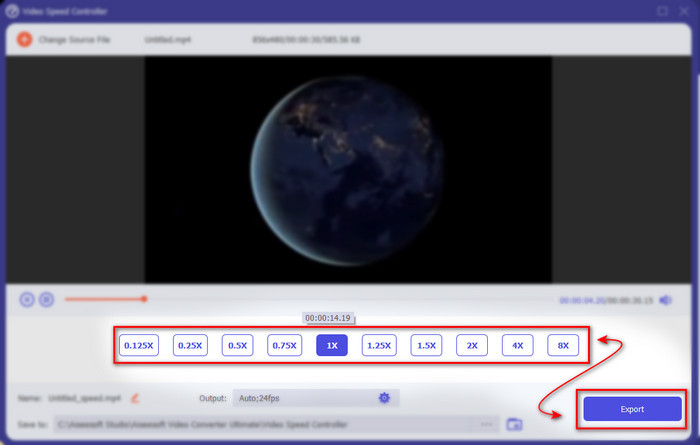
If speeding it up or slowing it down is your problem then there is a one solution: the Video Converter Ultimate. This software is ready to make your video even faster than before or slow it down if you like. Also, the quality of the output if you want to export will not be lessened or reduced to a much lower quality. So, if you insert a 1080 or 4k UHD video in here expect that the quality will not be changed although you change the speed of it. And now, if you want to know how to speed up a video via Video Converter Ultimate then follow the steps provided below. In addition, you can't preview the 4x and 8x speed in here but you can still achieve that speed after exporting without destroying the quality.
Steps on How to Make the Video Faster with the Help of the Video Converter Ultimate:
Step 1. First and foremost, you will need to click the download button below to choose whether it is a PC or Mac. Then install it next and change the set-up if you want then click finish to save the changes.
Free DownloadFor Windows 7 or laterSecure Download
Free DownloadFor MacOS 10.7 or laterSecure Download
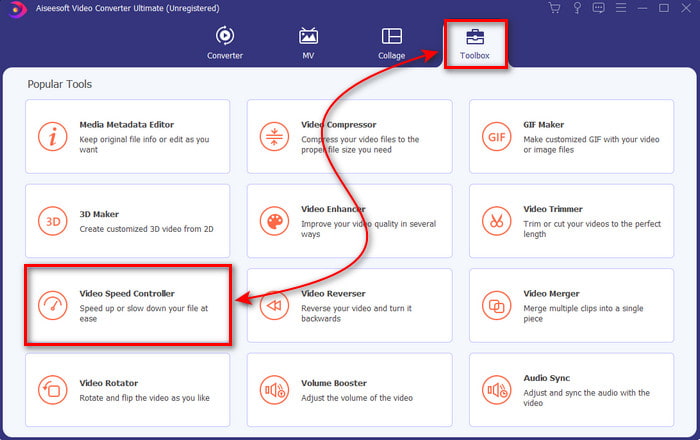
Step 2. Go to the Toolbox and locate the Video Speed Controller then click it.
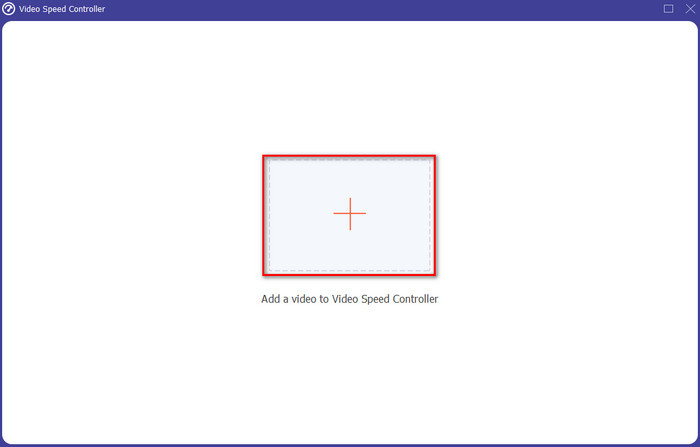
Step 3. Click the + sign to insert the video file you want to speed up and click Open to proceed.
Step 4. On the interface select the speed option you want it to be to slow or speed up video. Previews are only available to 2x and below. Then to save the video you speed up, click the Export button.
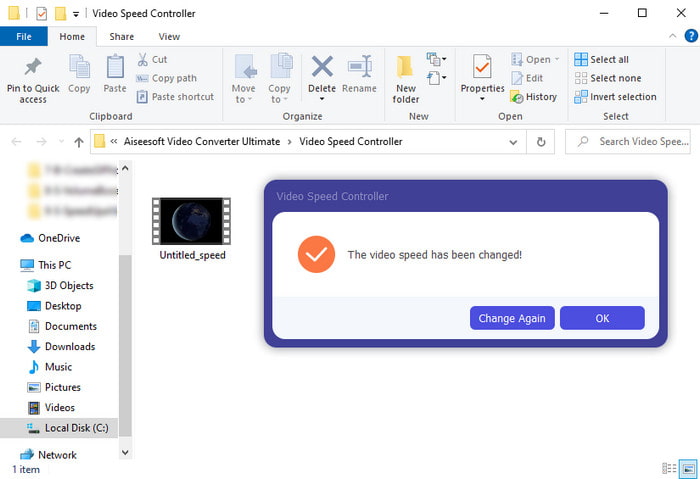
Step 5. Wait for a couple of minutes to be exported then if the video file is done a folder with the speed up video will show. Click the video to watch the speed up version of your video.
Prós
- Recursos de edição avançados e futuristas já são apresentados no Video Converter Ultimate.
- A ferramenta é simples de usar, mas a saída é impressionante.
- A interface da ferramenta já é mais impressionante do que as outras ferramentas apresentadas aqui.
Contras
- É pago, mas não é tão caro.
- Antes de poder usar esta ferramenta, você precisará baixá-la primeiro.
2. Adobe Premiere Pro
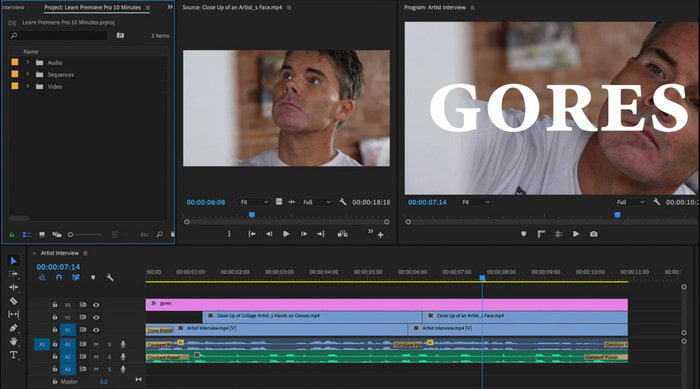
Adobe Premiere Pro is one of the best video editors you can use. This Adobe tool is one of the most picked because you can do whatever you want in editing and making a professional video. However, the tool is so expensive than the Video Converter Ultimate and also it is not user friendly. Instead of doing the editing once you launch the tool you will need to search on how to speed up video in Premiere. Also, the learning curve of this tool is a bit more complicated than expected because you will need to watch on YouTube how to use this and read some manuals about this tool.
Prós
- Uma das melhores ferramentas que tem sido usada pelo profissional.
- A ferramenta pode fazer edição de vídeo pesada.
- A interface parece mais elegante e organizada do que outra ferramenta.
Contras
- O Adobe Premier Pro é literalmente superfaturado.
- A curva de aprendizado desta ferramenta levará algum tempo antes que você possa usá-la completamente.
3.FFmpeg
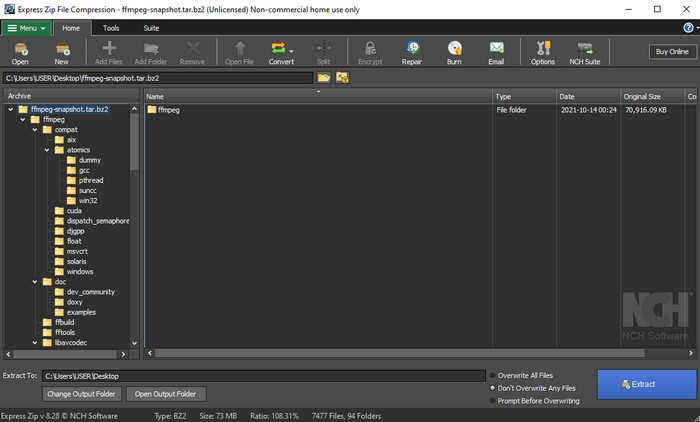
FFmpeg is one of the tools that is known as the leading multimedia framework. This tool is basically a Swiss-knife for handling videos, audio, streams and other multimedia files you need. Although the tool is a multipurpose, there are some upgrades this software needs. For example, the interface of the FFmpeg needs to become simplified. Like Adobe Premiere this tool is hard to be managed by beginners because of its overwhelming interface. Overall, the FFmpeg speed up video can be done if you study how to use the tool. If you will give a lot of time to learning this tool it should probably be paid off but it will be a long run.
Prós
- É um projeto de software de código aberto.
- Ele suporta uma ampla variedade de codecs.
- Ótima escolha para todos os profissionais que desejam um recurso de edição eficaz.
Contras
- Não é a melhor escolha para iniciantes executarem sozinhos.
- Ele suporta uma pequena variedade de plataformas cruzadas.
- A interface dele é enorme para ser manuseada por não-profissionais.
Parte 2. 2 do melhor software Mac para acelerar um vídeo
1.Jogador QuickTime
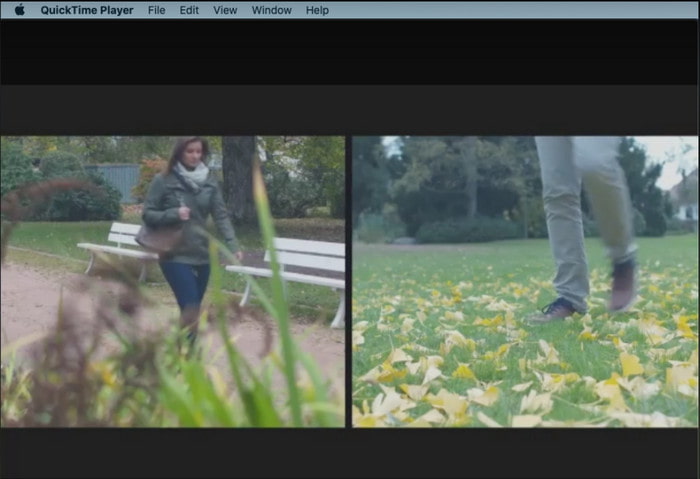
Learning how to speed up video in QuickTime is easy as one two three. Because you will not need to download the tool because it is already pre-installed on every Mac desktop. We know QuickTime Player is made by Apple Inc. to be used as a native media player for all Mac users. Although the tool has a built-in speed up and down you will need to do it manually which is a bit of a work for you. However, the overall interface of it is neatly great compared to VLC but QuickTime is only available on Apple products and there are no QuickTime Players on Windows.
Prós
- Não há necessidade de baixar a ferramenta porque ela já vem pré-instalada.
- A conexão com a Internet não é necessária se você quiser usar a ferramenta.
- Assista e encaminhe facilmente com a ajuda desta ferramenta.
Contras
- Não há versões disponíveis para Windows desta ferramenta.
- Acelere e desça manualmente.
- Ele não suporta um formato de mídia de grande escala.
2. Tiro Aberto
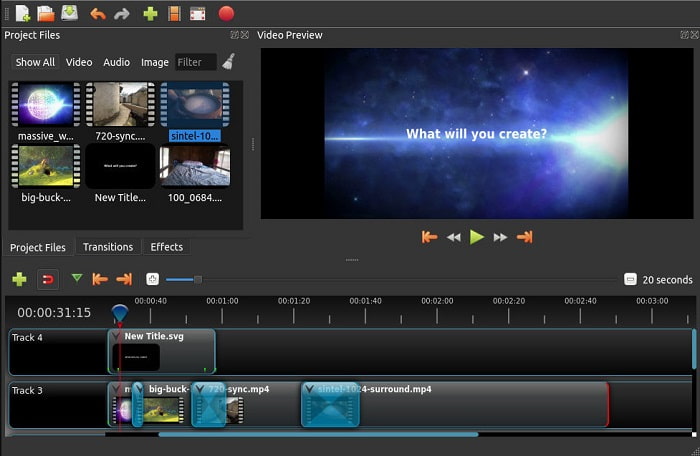
Open Shot is one of the best video editor software you can use especially for Mac. Although the tool has support in Windows, the Mac version is the best. Also, Open Shot speed up video can be done effectively with the help of this software. Moreover, the tool is free to be used by those who don't have enough confidence in using complicated tools with advanced features. Basically, this tool is presenting some basic editing features you would like to use. However, some of the features need to be added or updated.
Prós
- Ele tem a capacidade de salvar sua saída de vídeo final em outros formatos que você gosta.
- Os vídeos podem ser editados simplesmente com a ajuda de seus recursos de ferramentas disponíveis.
- Ele vem com instruções muito intuitivas para iniciantes seguirem. Então, se você quer aprender a acelerar vídeo Windows 10, Mac ou Linux esta é uma ótima escolha.
Contras
- Não é a melhor escolha para os usuários que desejam ter uma saída incrível, pois faltam alguns dos recursos avançados.
- Às vezes, a ferramenta trava por causa da carga de edição que você faz ou, às vezes, por motivos desconhecidos.
- Não é a melhor escolha para um profissional que quer ter o melhor.
Parte 3. Perguntas frequentes sobre como acelerar um vídeo Windows e Mac
Posso acelerar uma seção em meus vídeos?
Absolutely yes. You can cut a video clip and speed that up then merge it with the other video to make a whole nother video speed up. For example, if you have an AVI you want to speed up you can follow the steps above and if you are done you can merge it with the best AVI merger in this link.
Qual velocidade mais combina com você; 2x, 4x ou 8x?
If watching a movie, speeding your video to 4x above will be hard to follow because the video becomes a lot faster so that the human eyes can't follow on. So, it is ideal to play a movie to 2x if you want to watch it faster and yet you can easily manage to follow. By clicking this link, you will go to a new article and learn how to speed the video up to 2x faster.
Como diminuir a velocidade do tutorial em vídeo de avanço rápido?
If the video you download or convert is too fast then you can watch it in slow motion with the 5 Best Slow-Motion Video Player. So, go right now to this article to know how to slow down the videos.
Conclusão
Para concluir, agora ficou mais fácil entendermos que você pode acelerar os vídeos facilmente com a ajuda da ferramenta apresentada acima. Todas as ferramentas são capazes de aumentar ou diminuir a velocidade dos vídeos. Além disso, existe uma ferramenta que prova que é capaz de não ter um vídeo atrasado mesmo se você aumentar a velocidade dos vídeos. E essa ferramenta é o editor fenomenal o Video Converter Ultimate, este software é fácil de usar, a melhor escolha para profissionais e iniciantes, possui muitos recursos avançados que você pode escolher e muito mais. Portanto, não se contente com uma ferramenta boa se você puder ter a melhor, como o Video Converter Ultimate.
-
 O Windows Media Player não reproduz MP4? 5 maneiras eficientes de consertar
 Falha ao reproduzir MP4 no Windows Media Player? Saiba mais sobre os motivos e as soluções definitivas para reproduzir MP4 no Windows Media Player no Windows 10 Computer.
-
 [Guia detalhado] Como corrigir o vídeo do Google Drive que não está sendo reproduzido no computador
 Os vídeos no Google Drive não são reproduzidos com o erro "Ocorreu um problema ao reproduzir este vídeo". Pode ser causado pelo próprio Google Drive ou pelos problemas de cromo. Este artigo apresentará 6 soluções em detalhes.
-
 Como consertar o Windows Media Player que não funciona com vídeos ou áudio
 O Windows Media Player de repente não está funcionando com ou sem nenhum prompt de erro? Isso pode ser causado por vários motivos, e existem 4 métodos para resolver esse problema neste artigo.
