


 Video Converter Ultimate
 Gravador de ecrã
 Reparo de vídeo
Como converter MTV para AVI com alta qualidade: melhores abordagens que você deve conhecer
AVI (Audio Video Interleave) is a video container that holds and encodes both audio and video data. Despite having less compression power than some of its competitors, most DVD players can play files in this container. The AVI codec is required for multimedia players to decode AVI data. This video file is available in every video player and video editor. However, MTV's video format is not that famous for using and being converted into other formats. If you're wondering how it will happen that you will convert MTV to AVI, continue reading the article to know more about these two formats.

Parte 1. Como converter MTV para AVI no Windows e Mac
There are many different methods to convert MTV to AVI, and it varies on its purpose. It can be downloaded as an application, used in an online web tool, or installed in a program. But have you ever thought about software that can convert multiple video formats in the fastest manner? Video Converter Ultimate is software this article recommends you to use, not just because it is the fastest converter that is free to download. It has a lot of featured tools to offer that can be helpful in editing videos. One of its main features that you can't find from other applications or web tools is that it supports various formats, including converting MTV to AVI. If you're not interested yet, read these given details to learn more about the software:
Step 1. To begin, click on the Free Download button below to start the download process. You have the option of downloading the software from Windows or Mac if you prefer once the download is complete. Before you simply run the program, you need to get it installed on your computer's desktop and click Start Now to get started.
Free DownloadFor Windows 7 or laterSecure Download
Free DownloadFor MacOS 10.7 or laterSecure Download
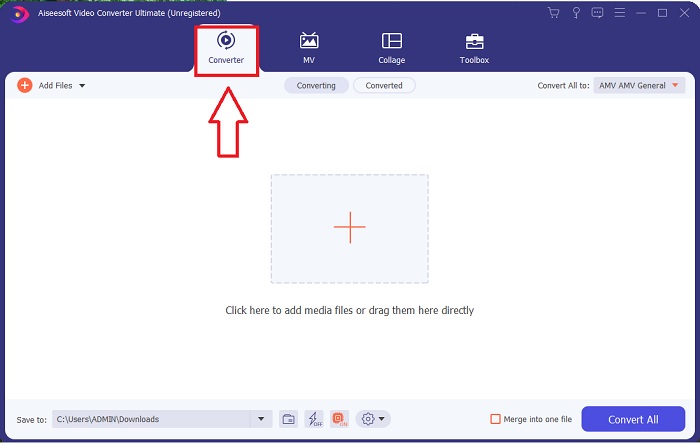
Step 2. Launch the downloaded application. When you first start the program, a window will appear with the Converter interface. This is where you'll enter your video file and begin converting.
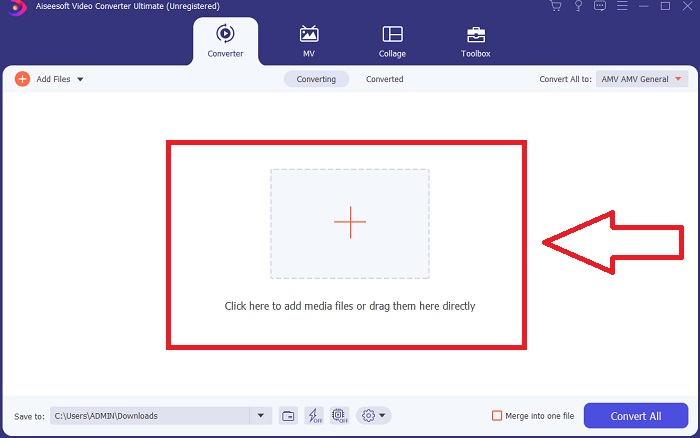
Step 3. Import your files into the converter to begin the conversion process. Drag and drop the video file you want to convert onto the + icon.
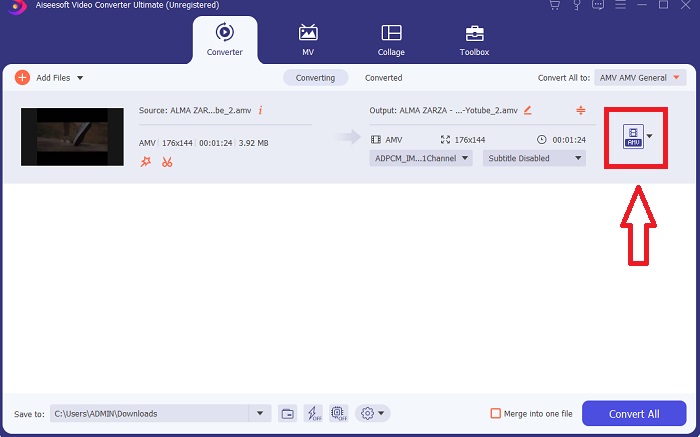
Step 4. Select a video format from the list in the upper-right corner of the screen. Locate and select the drop-down menu of Convert All to, then choose the AVI format from the video category list. However, if your preferred video output isn't listed, you can change the quality settings to suit your needs. You can alter the display's resolution, frame rate, and even audio quality by clicking the gear icon. To keep your changes, click the Create New button.
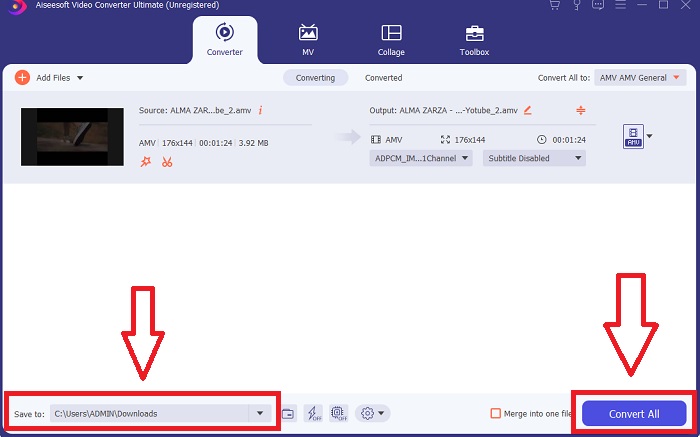
Step 5. Once you've finished editing the video and it's ready to be converted, click Convert All to start the process of transferring it to your computer.
Parte 2. Como Converter MTV para AVI Online
Método 1: Online-Convert.com
Usando este conversor de arquivos online gratuito, você pode transformar sua mídia de forma fácil e rápida de um formato para outro. Muitos formatos podem ser convertidos usando esta ferramenta da web, bem como uma ampla variedade de destinos. Para mais explicações, aqui estão as etapas fornecidas para você:
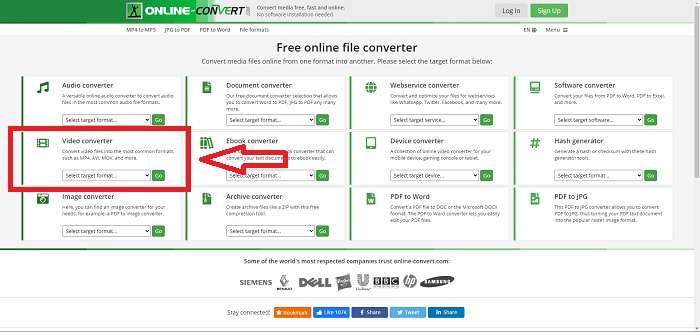
Step 1. Search for online-convert on any search engine and click the webtool. After you click the webtool, its interface will appear. The different processes of converting files will be your choices. Choose Video Converter if you wish to convert MTV to AVI; after deciding, select Convert to AVI and proceed by clicking Go.
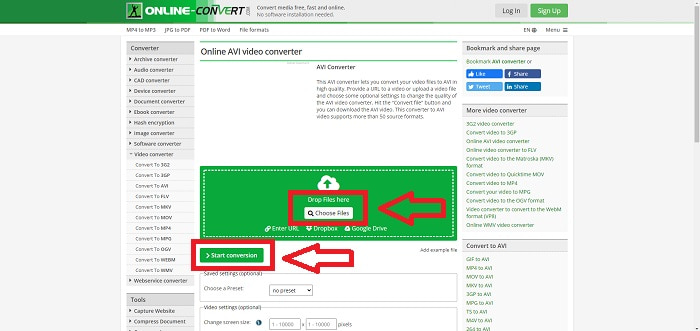
Step 2. After proceeding, another interface will going to appear. Click Choose Files to upload the file you want to convert. Wait a minute long - depending on the file size - to process your video file. Then, click Start Conversion to convert your file to AVI.
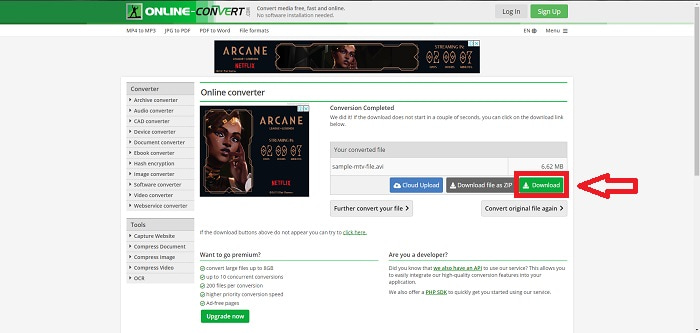
Step 3. To begin downloading the converted file, click Download.
Método 2: Video-Converter.com
Use este conversor de vídeo online gratuito para modificar as configurações de vídeo, como formato, resolução e tamanho do vídeo, no seu navegador da web. Para saber mais sobre esta ferramenta web online, aqui estão os procedimentos que você precisa saber:
Step 1. Open the video converter in any search engine. Click the primary web tool, and another window will pop up. On the main interface, you will see the whole process of conversion already. To start, click the Open File to import any video file you wish to convert.
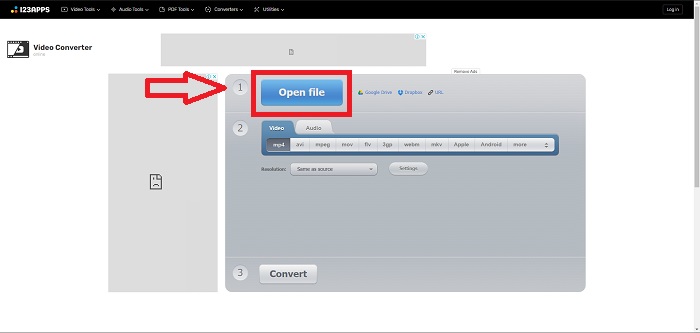
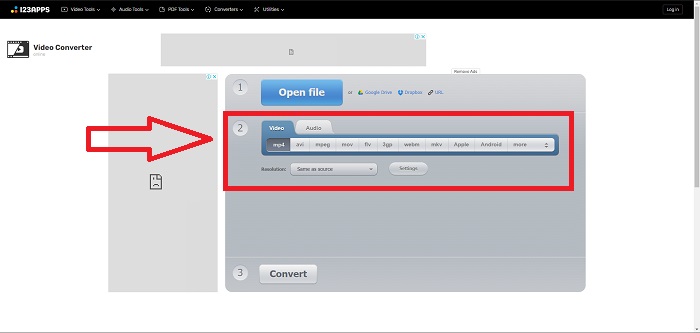
Step 2. Choose the format you want to convert your video from all the video formats given. Since you will convert MTV to AVI, choose the AVI. You can edit the resolution and the video output by clicking the Same as Source or Settings.
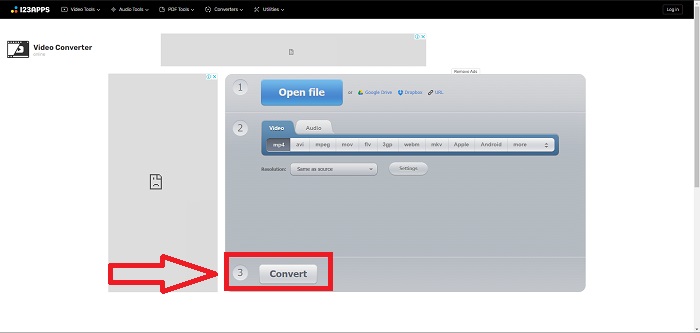
Step 3. Convert the file by clicking Convert. After you convert the file, you can now download the file by clicking the Download button after you convert.
Parte 3. Fatos interessantes sobre MTV e AVI
O que é AVI?
This file format, also known as Audio Video Interleaved (AVI), combines audio and video data into one file to play it back simultaneously. It primarily serves as a storage space for electronic media such as televisions, movies, and other video recordings. After the release of Windows 3.1, AVI came into widespread use. Video and audio are combined using a powerful compression algorithm currently the conventional standard for Windows PC movie storage. Images and audio can be preserved in high fidelity even though AVI video is not lossless. On the contrary, AVI consumes a lot of memory, sometimes as much as a DVD does for storage. That's most likely why MPEG-1 came after it, all the way up to MPEG-4 today.
O que é MTV?
A grande maioria dos arquivos da MTV são de propriedade da MTV. O formato de arquivo MTV foi criado para permitir a reprodução de vídeo em MP4 players portáteis de baixo custo fabricados na China sem aumentar o preço desses dispositivos com royalties de licença e mais poder de processador. O MP4 Watch é um produto que faz uso desse formato de arquivo.
Parte 4. Perguntas frequentes sobre MTV e AVI
O AVI é de alta qualidade?
AVI é um formato de vídeo de alta definição desenvolvido pela Microsoft. É suportado pelo YouTube e faz um excelente trabalho ao permitir que você assista TV no seu computador. O vídeo de alta definição requer um formato de codificação de vídeo específico chamado Advanced Video Coding HD.
Onde o AVI é comumente usado?
Desde a criação da Microsoft em novembro de 1992, o formato de arquivo AVI tornou-se amplamente utilizado para transmitir e armazenar dados de vídeo e áudio. Os arquivos AVI podem ser reproduzidos em uma ampla variedade de sistemas operacionais, incluindo Windows, Mac OS X, Linux e Unix, graças ao seu alto grau de compatibilidade.
Como converter um vídeo para o formato MTV?
Usando o AVS Video Converter, você pode ir na barra de ferramentas principal, ir para a guia Formatos e clicar no botão Para MTV. Você pode procurar um arquivo de entrada clicando no botão Procurar na barra de ferramentas na parte superior. Clique no botão Procurar inferior e digite o nome do arquivo de saída que deseja criar. Decida sobre a aparência da MTV criando uma conta na MTV.
Conclusão
Para concluir, sempre há uma diferença entre o software online e o software que você precisa baixar antes de usá-lo. Existem prós e contras nos diferentes lados, mas recomendamos o uso do Video Converter Ultimate para a conveniência e a linha de base de saída de qualidade. Com isso, você pode experimentar o conversor e o editor profissional ao mesmo tempo em um software.
-
 Como converter TS para AVI / MKV / MOV / WMV online e gratuitamente no Win / Mac
 Quer converter arquivos TS para AVI / MKV / MOV / WMV rapidamente? Este artigo mostra conversores de vídeo online e offline com guia completo. Talvez você possa obter o melhor conversor TS grátis aqui.
-
 4 maneiras eficientes de converter MOV em AVI no PC e Mac [2021]
 Você quer saber qual é o melhor conversor de MOV para AVI da web? E por que o FVC Ultimate Video Converter pode ser a pessoa certa para você.
-
 Excelente opção para converter MKV para um formato AVI
 Domine como converter vídeos MKV com etapas fáceis fornecidas exclusivamente para você. Você quer saber como? Então clique neste link para saber mais.
