


 Video Converter Ultimate
 Gravador de ecrã
 Reparo de vídeo
[2021] Quais são os 5 melhores geradores para trás disponíveis no PC e Mac
Some of the most famous music videos you've already heard and watched have hidden messages if you play them backwards. Most of them are intentionally included in the music video and some are not. So, if you want to find out the hidden message on the song then try to know what backwards generator playback is available. In this list we save you a lot of time searching for what you should use and sum-up the top 5 best playback reversers on the web.

Parte 1. Os 5 principais geradores de retrocesso disponíveis [off-line e on-line]
Topo 1. Video Converter Ultimate
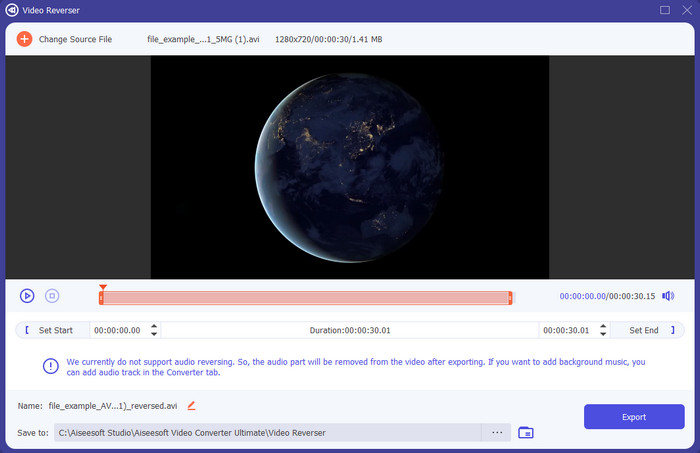
First in this list of the best backwards generators is the phenomenal Video Converter Ultimate. This software lives up to its reputation as the ultimate tool that performs great whether uploading or downloading. A lot of its customers have been satisfied because of the performance, capability, strength points and more. If you want to have the best output then it is a must to use this tool because it is easy and reliable as well. And because of the advanced feature this software provides you will need to spend a couple of your money to be able to access it. However, the satisfaction the tool provides is much greater if we were about to compare it to the other tool. So, whether you are a Windows user or Mac you can still use this and no need to worry because all of the features on Mac are presented on Windows and vice versa.
Free DownloadFor Windows 7 or laterSecure Download
Free DownloadFor MacOS 10.7 or laterSecure Download
Prós
- Possui uma aceleração de hardware integrada para ter uma compactação rápida.
- O desempenho geral da ferramenta é fenomenal em comparação com as outras ferramentas.
- A interface da ferramenta é sensacional de se ver.
Contras
- Precisa gastar dinheiro antes de poder fazer o download, embora não seja tão caro.
Parte superior 2. iMovie
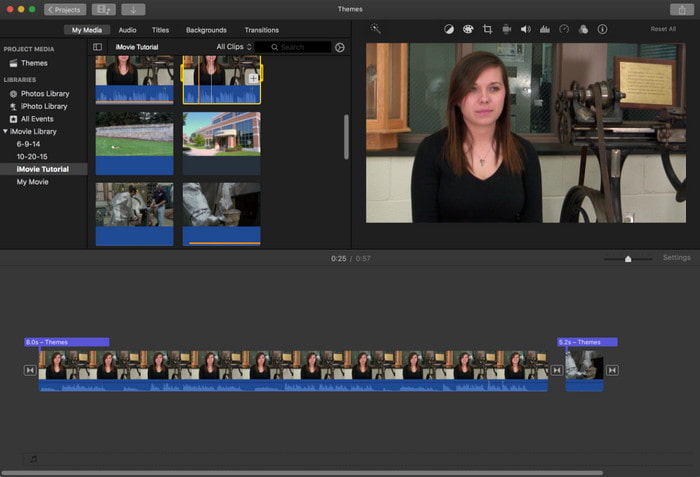
The best Mac pre-installed editor you can use to make your video as astonishing as possible. iMovie is one of the apps you can get for free if you have a Mac. This editor already proves that editing can be done easily with the help of this software. However, this doesn't have advanced editing features that you would likely use to make your video impressive. Also, the tool is a bit hard to use for those who don't have an idea how to edit. And most of the tool functions are hidden to a drop-down button which can lead to a bit of hassle for users. Moreover, if you have a Mac then we suggest that you try this backwards song generator for free.
Prós
- Um dos softwares editores top de linha nesta lista.
- Acesse-o gratuitamente no Mac OS.
- A interface da ferramenta parece elegante com o toque de recursos semi-profissionais.
Contras
- Não é a melhor escolha para um iniciante que não tem experiência em edição.
- A maioria de seus recursos está oculta nos submenus.
- Não disponível no Windows.
Top 3. Editor de vídeo do Videopad
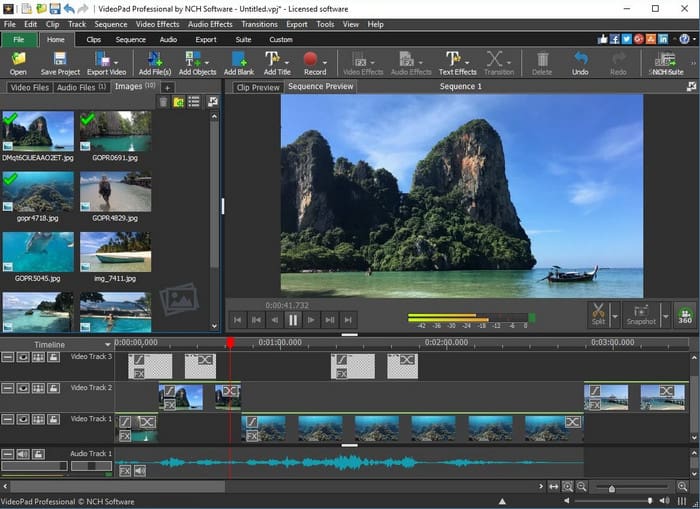
Videopad Video Editor is designed to become one of the most reliable editors you can use, available on all platforms. This multi-platform has already been used by users to perform medium pro editing yet in an easy way. Although the tool works on both PC and Mac, the features available on Mac are limited if we were about to compare it on PC. And most of the time there are alerts you will receive into its free version that can annoy you. Also, the interface of the editor looks too old and a bit unorganized. But the performance of the backward sound generator in this tool is a bit low compared to the other.
Prós
- A ferramenta é gratuita para download e é amigável.
- Ele suporta um recurso de edição semi-profissional.
- Disponível em PC e Mac.
Contras
- A interface é um pouco chata de se ver.
- A interface dele é um pouco confusa.
- Alguns recursos de ferramentas no PC não estão disponíveis no Mac.
Top 4. Reversor de vídeo
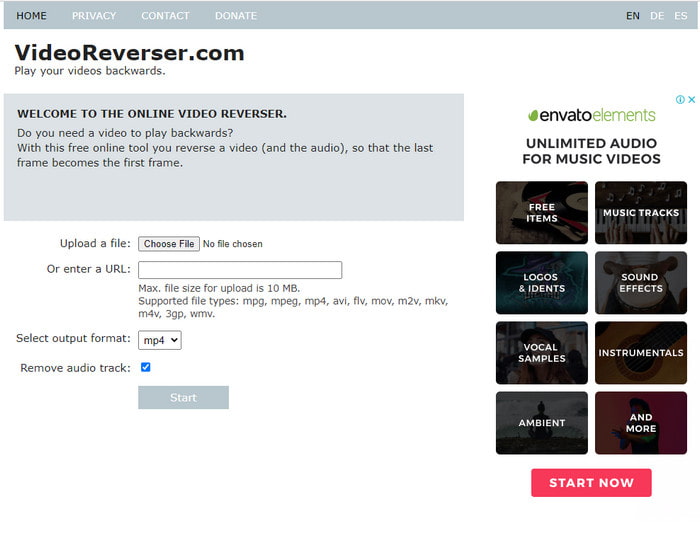
If you do want to try reversing online then we suggest you try the Video Reverser. This webtool doesn't have any advanced features other than editing the video backwards. So, if you just want to do a simple reversing of a video then try to use this webtool. Although this online reverser is free still it limits the user's file size to 10 mb. Now if your file size is more than the limited size then expect that you can't upload it in here. Also, not all of the formats are available to be inserted here. And most of the users use other web tools to reverse. However, if you want to reverse a short clip then this is the best backwards generator you might want to use.
Prós
- Esta ferramenta é gratuita para uso se você tiver uma conexão com a Internet.
- Interface simples e é fácil de usar.
Contras
- Ele limita as experiências do usuário em fazer o vídeo parecer incrível.
- O tamanho do arquivo é limitado a 10 MB por vídeo.
- Nem todos os formatos são suportados nesta ferramenta online.
Top 5. Clídeo
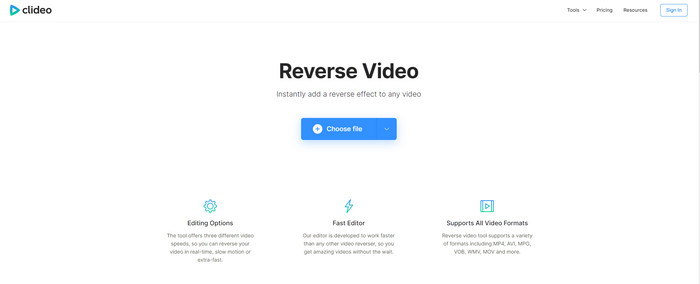
One of the best online editors you can access for free is Clideo. Unlike the Video Reverser, this online tool has a lot of editing features users can use for free. However, the uploading and downloading process of the file here is a bit slow compared because it is what we call internet dependent. Also, one of the reasons is that the web tools have no hardware acceleration or speed up. Moreover, if you want to make a simple editing on your video then it is a must to use this online tool. And no need to worry because this tool is safe, secured and malware-free.
Prós
- Gerador de música para trás no ponto de graça.
- Ele suporta uma escala de formato muito mais ampla em comparação com o Video Reverser.
- Recursos básicos de edição estão disponíveis nesta ferramenta.
Contras
- A visualização não está disponível em AVI, MKV e alguns formatos de arquivo não compactados.
- Precisa fazer login para remover a marca d'água da saída final.
Parte 2. Gráfico de comparação
| Recursos | Video Converter Ultimate | iMovie | Editor de vídeo do Videopad | Video Reverser | Clideo |
| Editor de vídeo reverso |  | | | | |
| Controle de velocidade reversa | | | |  | |
| Recursos de edição avançada como; Amplificador de áudio, sincronização de áudio e muito mais. | | | | | |
| Sistema operacional disponível | Todos os sistemas operacionais | Apenas Mac OS | Todos os sistemas operacionais | Todos os sistemas operacionais | Todos os sistemas operacionais |
| Ferramenta Baseada em Programa | Software baseado em desktop | Pré-instalado | Software baseado em desktop | Ferramenta baseada na Web | Ferramenta baseada na Web |
| Software baseado em desktop | |||||
| Faixa de preço | Para licença de 1 mês: $25.00 Licença Vitalícia: $55.20 Licença multiusuário: $119.00 | Gratuito Pré-instalado | Edição Master: $69.95 Edição Home: $34.99 | Grátis online | Grátis online |
Parte 3. Perguntas frequentes sobre o Backward Generator
Reverter meu vídeo 1080 ou 4k afeta a qualidade?
Bem, esta resposta depende da ferramenta ou software que você está usando atualmente. Porque alguns softwares não alteram a qualidade do vídeo mesmo que tenha sido revertido. Enquanto outras ferramentas diminuem a qualidade do vídeo porque não suportam qualidade de vídeo 1080 e 4k.
Como reverter um videoclipe?
If you want to learn how to reverse a video then click this link and proceed to the Top 6 Reverser Software you can use.
Como reverter um GIF animado?
GIF became the most popular image format that has been used in the entire web. So, if you want to reverse a GIF to make unique GIFs then try to read this article.
Conclusão
And now that we have the idea on what are the top 5 backward generators you can use whether it is on PC, Mac, or online. Moreover, the tools presented in here have already been tried by the writer of this article to only state straight facts about. Within trial and error, we prove that the Video Ultimate Converter provides the best output, affordable, and efficient reversing video and even enhancing it. So, if you want to try this tool then download it on your drive to be amazed on what are the capabilities of this software and what are the other offers this tool can bring to you.
-
 Como tocar Apple Music no Xbox One
 Como reproduzir música no Xbox One do telefone? Quer tocar música enquanto joga no Xbox One? 3 maneiras de ajudá-lo a reproduzir o Apple Music no Xbox One do telefone.
-
 Os 5 melhores jogadores WebM para Android / iPhone / Windows / Mac (download grátis)
 Se quiser reproduzir um WebM com sucesso em seu dispositivo, você deve aprender mais sobre os 5 melhores reprodutores WebM para Android, iPhone, Windows, Mac neste artigo.
-
 4 melhores reprodutores M3U8 para Windows e Mac que você não deve perder
 Quando quiser reproduzir um arquivo com o link de fluxo M3U8 com sucesso, você deve aprender mais sobre os 4 excelentes reprodutores M3U8 para Windows e Mac neste artigo.
