


 Video Converter Ultimate
 Gravador de ecrã
 Reparo de vídeo
Como acelerar os vídeos do TikTok no Tiktok ou usar outro software alternativo
One of the fastest growing video entertainment applications you can use on your mobile phone is TikTok. Although TikTok was released in 2016 it instantly became very popular within a few months of its release date. Also, some popular editing they do in here is the speed-up video to create a visual effect. So, if you are one of them and you want to know how to do it then you are in the right place. As we tackle different tools that will help you to learn how to speed up video on TikTok.

Parte 1. Como acelerar um vídeo no TikTok
As said earlier, TikTok has become one of the famous short video clips platforms so editing a video here can be done easily. Take note that you can do the speed-up video while filming and not after the video has been finished. Also, if you try to speed a video on TikTok then you will need to estimate the total speed without knowing if that is the speed you want to achieve. However, if you don't want to download a third-party tool to speed up a video then TikTok will do the work. So now, follow the steps below to speed up a video on TikTok.
Steps on How to Film a Speed-up Video on Tiktok:
Step 1. First download TikTok on your mobile phone and launch it after the downloading process is done.
Step 2. Hit the + sign to start filming. Then click the add sound to insert background music and filter if you want. So now, to speed up the video click the Speed and choose the options under it. To start the recording click the round button and re-click it if you want to stop it.
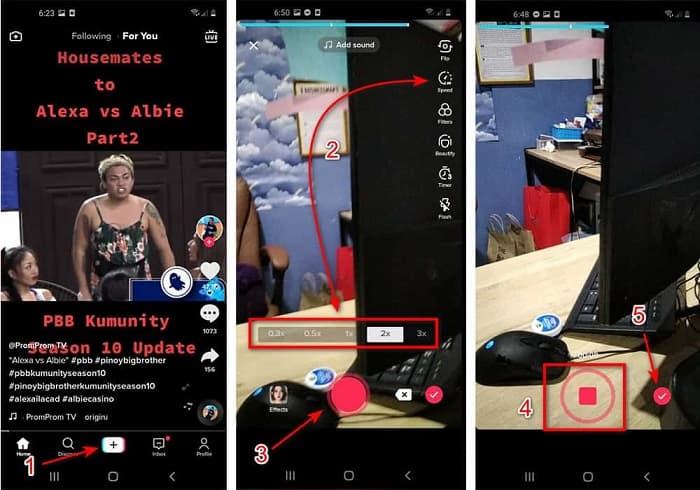
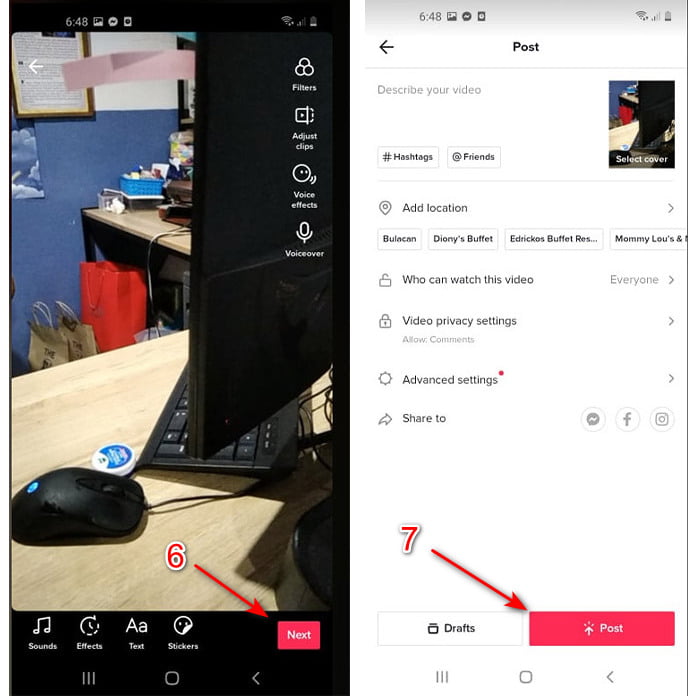
Step 3. To check the video, press the check button and click Next. Then click Post to upload it to TikTok.
Parte 2. Como acelerar qualquer vídeo do TikTok no Video Converter Ultimate
Unlike the built-in editing feature the TikTok provides to you, the Video Converter Ultimate lets you speed up manually but in an easier way. Also, while doing the speed-up there will be a preview to determine if the speed of the video matches your taste. Moreover, this phenomenal software already allows its users to experience an advanced pro level of editing features but in a simplified version of steps. Because of the advanced features this tool provides you will need to pay a few dollars. But no need to worry because it will not cause you a thousand or even a hundred. If you want to know what are the benefits or key features you will get if you have this tool then take a look at the list.
Best Key Features You will Find on the Video Converter Ultimate:
◆ Este é um software independente de plataforma, o que significa que você pode baixá-lo em seu PC, Mac ou Linux.
◆ Todos os recursos avançados de edição, conversor, criador de GIF e muito mais estão disponíveis nesta ferramenta.
◆ A usabilidade da ferramenta é muito útil para qualquer pessoa, mesmo para profissionais ou iniciantes em edição.
◆ Permite que os usuários expressem seu lado criativo através de vários recursos de edição disponíveis aqui.
◆ Embora a ferramenta seja paga ainda é mais barata e muito acessível para quem quiser experimentá-la.
So now, if you want to know how to speed up Tiktok videos with this phenomenal alternative editor then read and follow the instructions below to achieve 100% success.
Steps on How to Speed Up Videos on Tiktok with the Video Converter Ultimate:
Step 1. To use the software, you must download it first on your PC or Mac. Then Install it, do the simple manual set-up and click finish to proceed.
Free DownloadFor Windows 7 or laterSecure Download
Free DownloadFor MacOS 10.7 or laterSecure Download
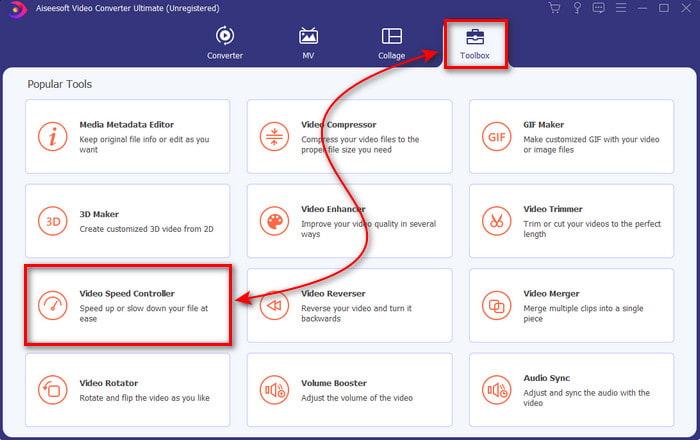
Step 2. Press the Toolbox and select the Video Speed Controller under.
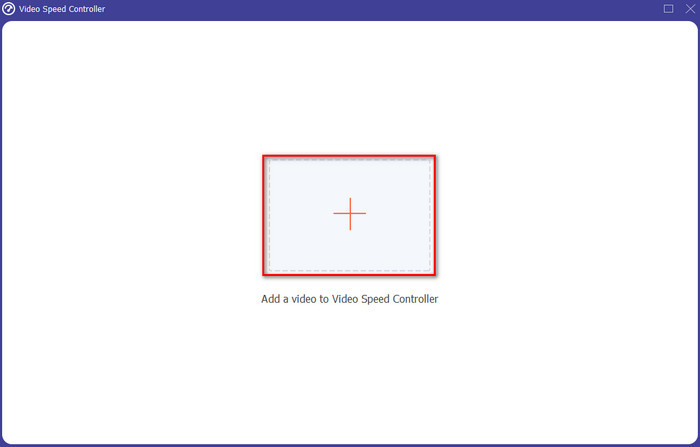
Step 3. To add the file you want to speed up click the + button. Then choose the file on the folder that will show next and click Open to proceed.
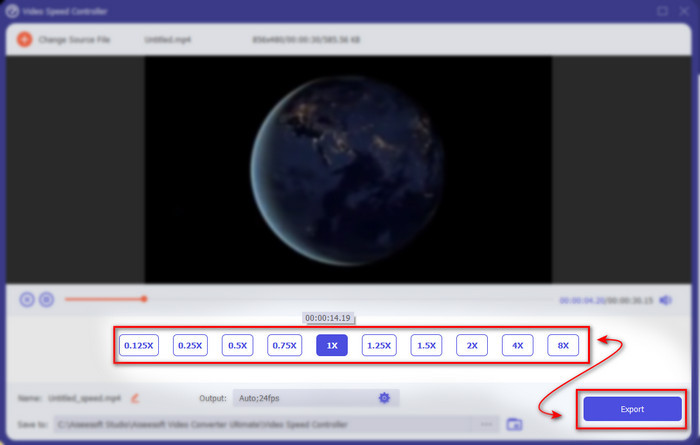
Step 4. So, to adjust the speed of the video choose the speed option below. And to download the file click Export to start the downloading process.
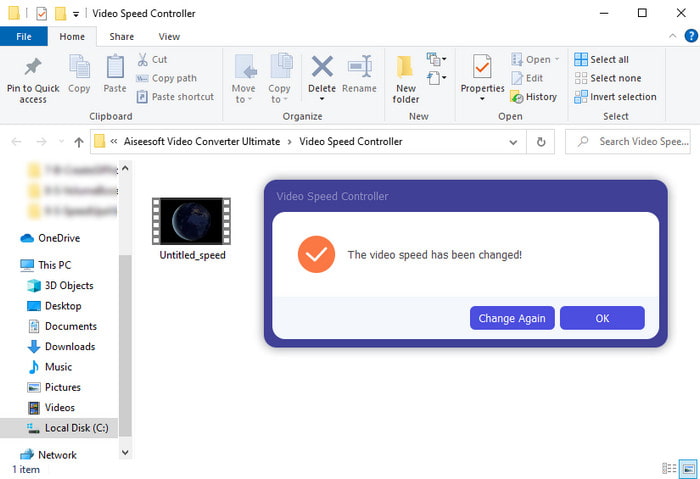
Step 5. No need to wait for a minute because the file will be ready after a few seconds. So, if a folder shows next on your screen, then it means that the file is already exported. Click the file to watch the video you speed-up.
Related:
Parte 3. Perguntas frequentes sobre como acelerar um vídeo no Tiktok
Como acelerar um vídeo do TikTok que não é seu?
If you want to speed up a video that isn't yours then you must download the TikTok videos first. Click the + button and Upload then choose the video in the gallery. Select the speed option and click Next to upload it. Or use the Video Converter Ultimate to speed it up by following the steps provided above.
Posso gravar um vídeo de 3 minutos no Tiktok?
Absolutamente sim, você pode se eles forem gravados separadamente, mas você não pode gravar um vídeo direto de 3 minutos. Porque a duração da gravação com este suporte de aplicativo é de 15 a 60 segundos completos. Portanto, se a duração do vídeo que você deseja gravar for superior a um minuto, é melhor gravá-lo separadamente. No entanto, se você é um dos usuários selecionados pelo Tiktok para experimentar a gravação de 3 minutos, você tem sorte, porque isso foi testado apenas para um pequeno grupo de pessoas.
Posso adicionar MP3 aos meus vídeos no Tiktok?
Quando o TikTok foi lançado, os usuários tinham permissão para adicionar música ao vídeo, mas agora eles removeram esse recurso. Por causa do problema de direitos autorais que foi arquivado no TikTok. Portanto, para evitar o problema, eles o removem e adicionam uma música de amostra disponível ou você pode usar outro aplicativo para fazer isso por você.
O Tiktok tem restrição de idade?
De acordo com os termos e condições do TikTok, 13 anos ou mais deve ser a idade do usuário que usará este aplicativo. Além disso, o Tiktok não possui verificação de idade quando você se inscreve, portanto, espere que mais de 16 conteúdos apareçam no seu feed.
Conclusão
And now that you know how to speed up a video on Tiktok this must be the time to enjoy it. Furthermore, choose the solution you see that will fit you the best. If you think the built-in speed up features the Tiktok provide is great then use it. But if you want to experience a much better speed up with previews then use the Video Converter Ultimate. Regardless of what options you would choose, you must expect a great output because of their function and overall performance.
-
 7 etapas fáceis sobre como corrigir problemas de atraso de áudio OBS [Resolvido]
 Você tem dificuldade para assistir ao seu videoclipe após a gravação devido ao atraso do áudio ao usar o OBS Studio? Leia o artigo abaixo para saber como corrigir o áudio fora de sincronia de forma eficaz.
-
 Excelentes Maneiras Possíveis | Como corrigir o atraso de áudio do VLC [2021]
 Você tem dificuldade em assistir seu filme favorito em seu reprodutor de mídia VLC por causa da incerteza de áudio? Continue lendo este artigo para saber todas as maneiras possíveis de corrigir o atraso de áudio do VLC.
-
 Melhores maneiras de aumentar o volume de MP4 online e offline
 Você tem dificuldade para ouvir os sons do seu videoclipe? Leia o artigo abaixo para saber como aumentar o volume do mp4 de diferentes maneiras.
