


 Video Converter Ultimate
 Gravador de ecrã
 Reparo de vídeo
Aprenda as 3 maneiras de converter VOB para AVI online e offline
Os arquivos VOB são usados para armazenar streams privados e usa compressão de vídeo com perdas, como o MPEG-2. Além disso, eles têm quase a mesma estrutura se comparássemos os dois. No entanto, os arquivos .vob têm uma limitação e especificação antes mesmo de você poder usá-los. E, por causa disso, você não pode reproduzir facilmente um arquivo VOB em seu reprodutor de mídia local. Portanto, agora, para economizar tempo pesquisando como abri-lo, sugerimos que você precise convertê-lo escolhendo um conversor abaixo. Nesse caso, apresentamos a você o melhor conversor que podemos criar e aprender como converter VOB para AVI online ou offline com as ferramentas que estão na lista.
Parte 1. Como converter VOB para AVI Online
If you are on a tight budget then we suggest that you will go with a free tool to be used by you. As we searched over the internet, we found out that there is a tool that is known as the best online converter and that is the FVC Free Video Converter. Other than that, this tool provides simplicity and simplicity to each user who already used this and all of them do feel impressed on how good this tool works. And so, if you want to be impressed as well on how good this converter is then try to change the VOB file to AVI format by following the indicated steps below.
Step 1. To go immediately to the website of the converter then click this link.
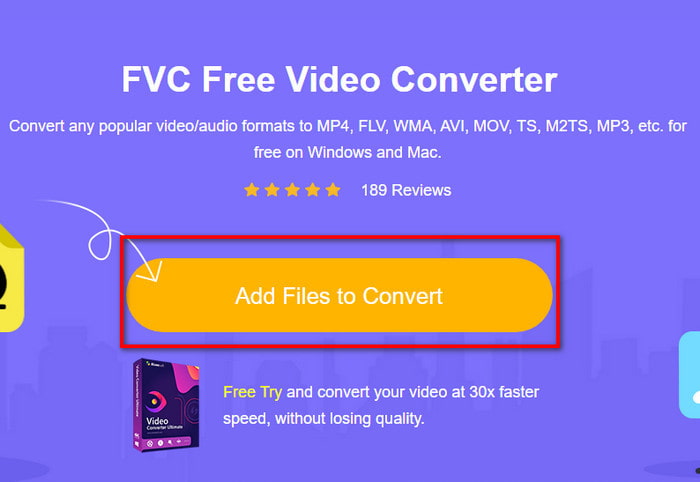
Step 2. On the website, click the Add Files to Convert to download the installer. No need to worry because it is only a few kb. Then re-click it to launch the tool and locate the file on the folder, if you already locate it click Open next.
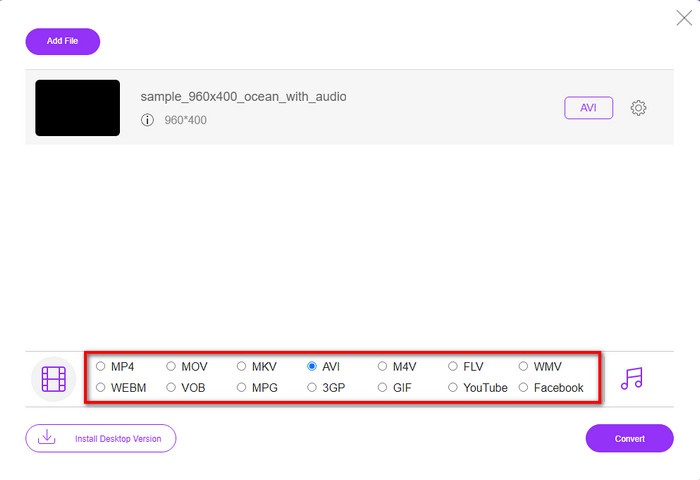
Step 3. A new interface of the FVC will show on your screen. On the list below, choose the AVI format or whatever format you want it to be transformed.
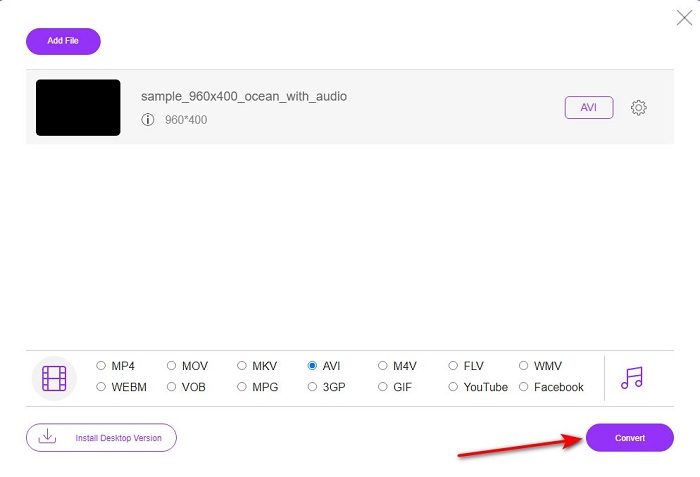
Step 4. After choosing the format is done, let's begin the converting of the file by clicking Convert.
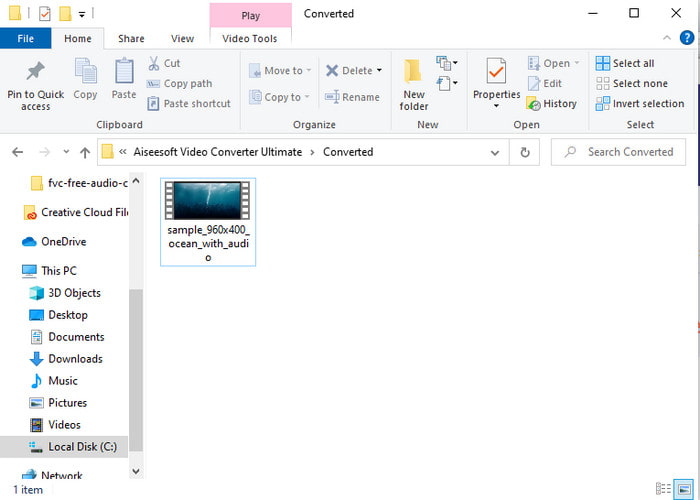
Step 5. This would take an estimated less than a minute, if the process of converting is done a folder will show with the newly converted file.
Parte 2. Como converter VOB para AVI no Windows e Mac
Use o conversor fenomenal: FVC Video Converter Ultimate
Se você está procurando fazer o download do conversor VOB para AVI, então esta deve ser a melhor escolha que você adoraria fazer. FVC Video Converter Ultimate sempre faz jus ao seu nome como a ferramenta definitiva que resolve todas as situações finais que você possa encontrar, especialmente na conversão. Este software é muito diferente das duas ferramentas mencionadas. Talvez você esteja pensando por quê, e é apenas porque se encaixa perfeitamente em qualquer pessoa, seja você um profissional ou iniciante. O desempenho geral que experimentamos quando experimentamos esta ferramenta já é incrível e estamos impressionados com a rapidez com que a conversão pode ser feita. E agora, se você deseja experimentar a conversão fenomenal da qual estamos falando, siga os passos indicados abaixo.
Step 1. Before you can use it, you will need to download it first. Then install it after the downloading is done, do the set-up and click Start Now.
Free DownloadFor Windows 7 or laterSecure Download
Free DownloadFor MacOS 10.7 or laterSecure Download
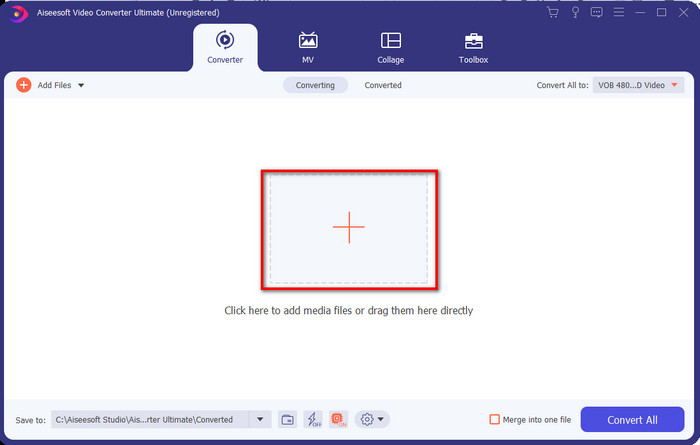
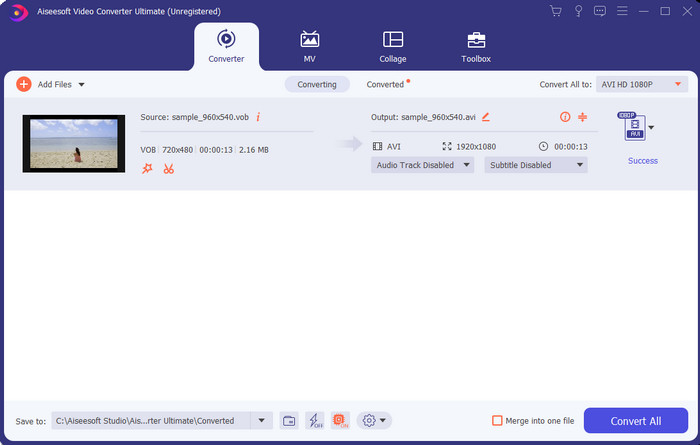
Step 2. Once the installation is done, open the software next. Then an interface like this shows on your screen. On the middle part of the interface click the + button and a folder will show on your screen. Click Open to proceed to the next step of the process.
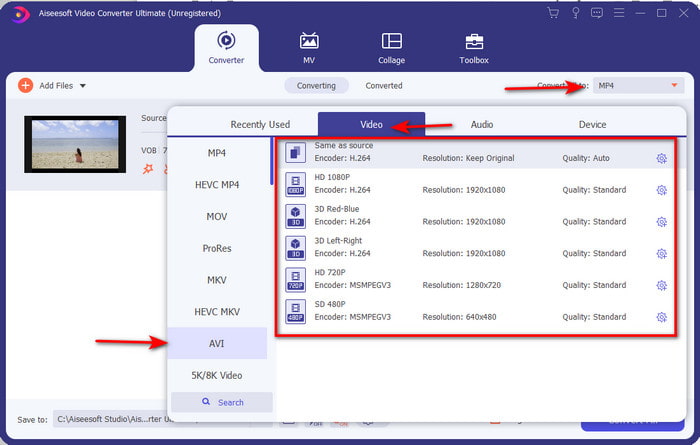
Step 3. Click the Convert All to button on the upper left side of the interface and choose AVI format from the video category list.
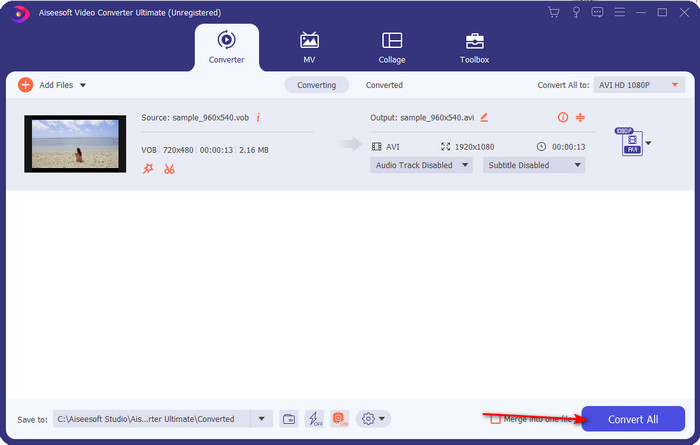
Step 4. If you are done on choosing what format, hit Convert All to start the conversion.
Step 5. No need to worry about waiting too long because it can be done for a few seconds. Then a folder will automatically be opened on your display with the converter media file you've made a minute ago. Then click it to watch and enjoy the newer version of your .vob file.
Use a ferramenta gratuita: HandBrake
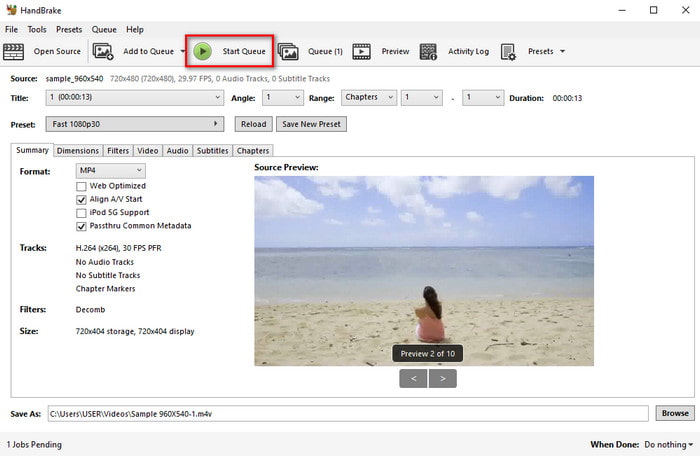
If you are looking for a free tool then HandBrake will help you on that and needed internet connectivity to function is not needed, just like the FVC Video Converter Ultimate. Also, it is free to download and to use by anyone who has a desktop on their home, work, or anywhere. However, if you download the tool you will need to download a separate file known as .NET 5.0 before you can even use it. Some users find it a little bit irritating because after you download the tool you will need to download another file one again. But if you want to do an effective and free converting process then try to use Handbrake VOB to AVI to convert and follow the steps below.
Step 1. Install the tool on your computer drive first.
Step 2. Click File and locate the .vob in your folder.
Step 3. Click the Format and choose from the list available then click Start Queue.
Parte 3. Qual é o melhor conversor a ser usado para converter arquivos VOB para o formato AVI
| Recursos | FVC Free Video Converter | FVC Video Converter Ultimate | HandBrake |
| Formato de conversão |  | | |
| Hardware e aceleração de conversão |  | | |
| Conectividade com a Internet | | | |
| Aprimorador ou edição de vídeo | | | |
| Suportado pelo programa | Ferramenta baseada na web | Ferramenta baseada em desktop | Ferramenta baseada em desktop |
Parte 4. Perguntas frequentes sobre VOB e AVI
Quais são os outros arquivos que VOB pode conter?
VOB é um formato de DVD multi-plex e, por isso, pode conter não apenas vídeos e áudio, mas também legendas, conteúdo de navegação e menu.
Por que não consigo reproduzir arquivos VOB no meu reprodutor de mídia?
One of the reasons VOB isn't playable on your media player is that this format only gains a small scale of support to the media player. You can click here to get VOB players available. If you still have this problem then one feasible solution to it is to convert it with the converters available above.
Por que os arquivos VOB são muito grandes?
O único motivo pelo qual esse formato é tão grande é que ele contém dados diferentes que um DVD deve conter. Além disso, não podemos deixar de fora a possibilidade de duração do vídeo. Ou clique aqui para saber como compactar arquivos VOB.
Conclusão
Agora, se você deseja converter o arquivo VOB, isso pode ser feito facilmente com a ajuda das ferramentas disponíveis acima. Fora isso, o FVC Video Converter Ultimate é o conversor que mais se destaca entre as demais ferramentas online e offline citadas. Porque você pode converter VOB para AVI no Windows e até no Mac facilmente. Se você ainda não tem ideia do que usar, então sugerimos fortemente que você baixe a ferramenta fenomenal para experimentar uma saída explícita e se surpreender.
-
 VOB para MP4 - 3 maneiras de converter arquivos VOB para MP4 gratuitamente em massa
 Este artigo apresenta três conversores VOB para MP4 gratuitos e os tutoriais relacionados. Você pode converter arquivos VOB para MP4 gratuitamente no Windows / Mac / online com facilidade.
-
 Melhores maneiras de converter VOB em FLV [gratuito e online incluído]
 Quer converter um arquivo VOB em um arquivo FLV? Você pode completar a tarefa facilmente com conversores de desktop ou online. Leia este guia e aprenda como transformar VOB em FLV com facilidade e rapidez.
-
 O que é o arquivo VOB e como transformar o arquivo VOB em GIF gratuitamente
 Quer saber mais sobre os arquivos VOB e como compartilhá-los depois de copiados? ou Por que você precisa converter VOB para GIF? Então leia este artigo com atenção.
