


 Video Converter Ultimate
 Gravador de ecrã
 Reparo de vídeo
Melhor dos melhores conversores que você pode usar para converter 3GP para AVI online e offline
3GP format is the flexible format that transfers the audio and video streams to the 3rd generation mobile phone using GSM. It matches the 3G connectivity for faster transmission of the file. This format is most commonly used on the old phone version because it is multi-purpose and quickly transferred. However, 3GP files can't be played on your local media player nowadays because this format doesn't allow the new media player to understand the structure of the format. So the best way to watch all the 3GP files on your phone or desktop is to convert. So now, instead of looking on the internet for what best converter you can use, we gather four converters you can choose from. The tools mentioned below are perfect and can convert 3GP to AVI format without any quality loss.

Parte 1. Converta 3GP para AVI Offline com o Ultimate Converter
FVC Video Converter Ultimate
Suppose you don't want to break any sweat on converting your 3GP files. In that case, we strongly suggest that you must use the FVC Video Converter Ultimate. This software is one of the best choices in converting the file, and converting the file within a few seconds is speedy. Moreover, a lot of customers who use this experience share the same thought. To sum it up, they clearly stated that this tool helped solve their converting problem within a blink of an eye.
Mais explicações, esta ferramenta não é apenas a melhor na conversão do arquivo; ele também tem os recursos mais avançados que você gostaria de experimentar. Exemplos são editor, criador de GIF, amplificador de volume, sincronização de áudio e vídeo, reversão e muito mais. Se você comprar esta ferramenta, receberá todas as ferramentas mencionadas anteriormente e há muito mais por vir. Então agora vamos tentar seguir o passo a passo para converter 3GP para AVI no Mac e PC sem perder a qualidade.
Step 1. Click the download button and choose whether you are a PC or Mac user, then install it next.
Free DownloadFor Windows 7 or laterSecure Download
Free DownloadFor MacOS 10.7 or laterSecure Download
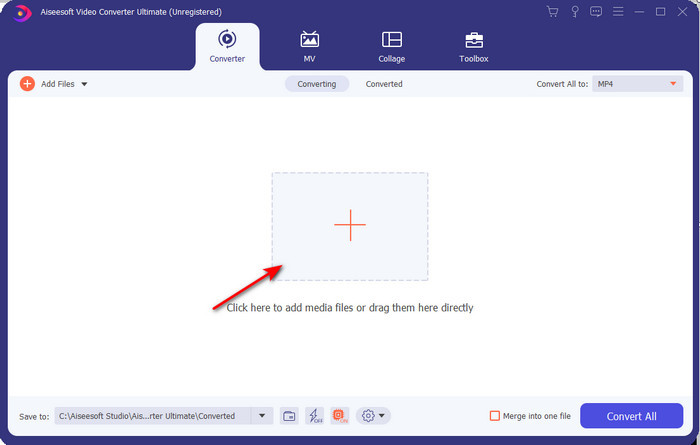
Step 2. Launch the tool, click the + sign in the middle of the interface, select the .3gp file on your folder and click Open. Also, you can do a batch conversion here if you may; click the Add Files to add more.
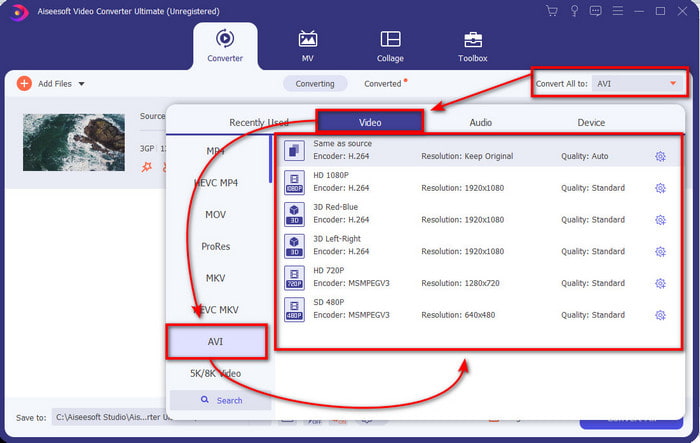
Step 3. To change the 3GP, click the Convert All to option and choose the AVI format under the Video category.
Step 4. To start the conversion process, click Convert All, and the process of converting your 3GP files will begin now.

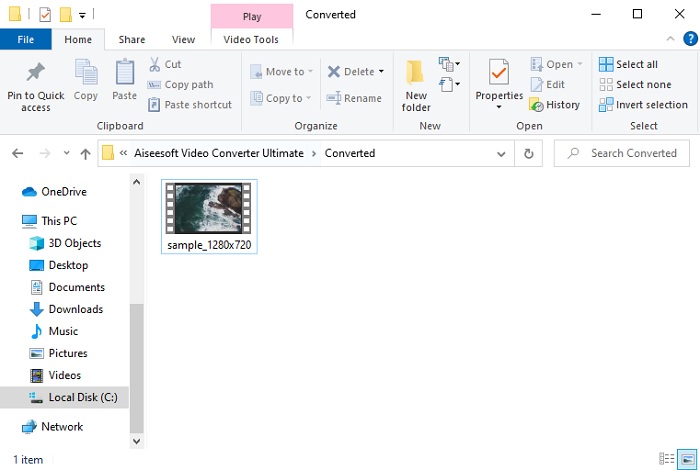
Step 5. After converting, a file folder will show on your screen with the converted 3GP file. Click the newly converted AVI you've made to watch and edit it later if you want.
Parte 2. 3 Conversores Online Disponíveis para Converter 3GP para AVI
1. Conversor de Vídeo Grátis FVC Online

We ensure that the tool in this list is the best 3GP to AVI converter online, and that is the FVC Free Video Converter Online. All of the features you would like to see on an online converter are here. It is the best online converter, we mention in all of the different aspects. For example, if you want an efficient online converter, safe conversion process, and no ads at all, then this is the web tool for you. Although the web tool looks great and works perfectly fine, it still supports a medium-range format. Advanced features that you might encounter while using the FVC Video Converter Ultimate are not available here. But the advantage of this to the software version is that you are free of charge. Without any more delays, let's proceed to the steps to convert your file into a new version.
Step 1. Hit this link to go to the website.
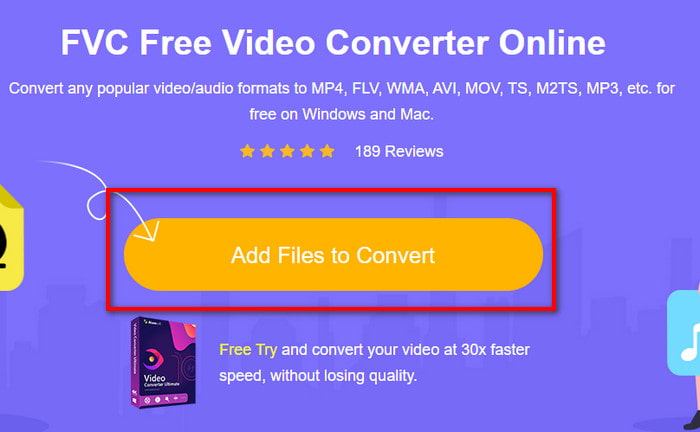
Step 2. Press the Add Files to Convert to launch the online tool, and a folder will show, then search for the .3gp file. If this is your first time using this tool, you will need to download the launcher by clicking the Add Files to Convert and then re-click it to launch.
Step 3. After selecting the file is done, choose the AVI format in the section below.
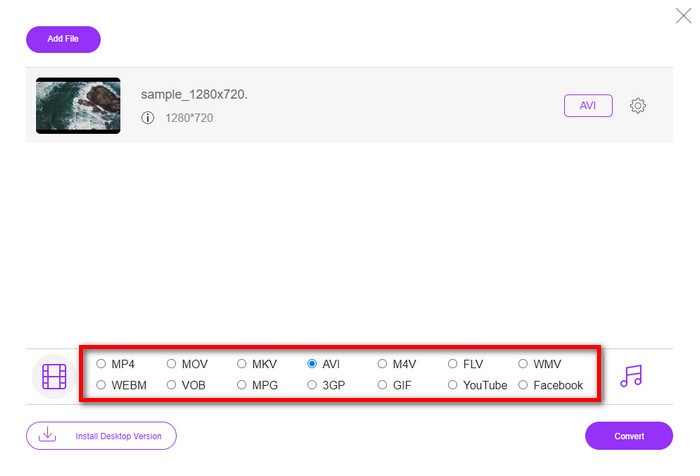
Step 4. If you are now ready to convert the file, click Convert.
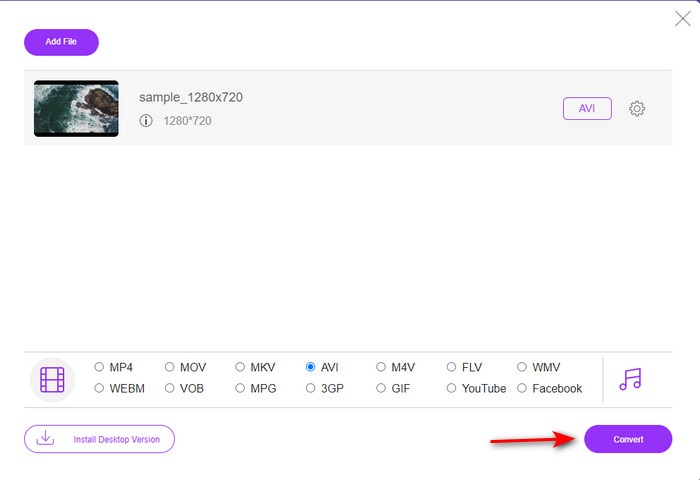
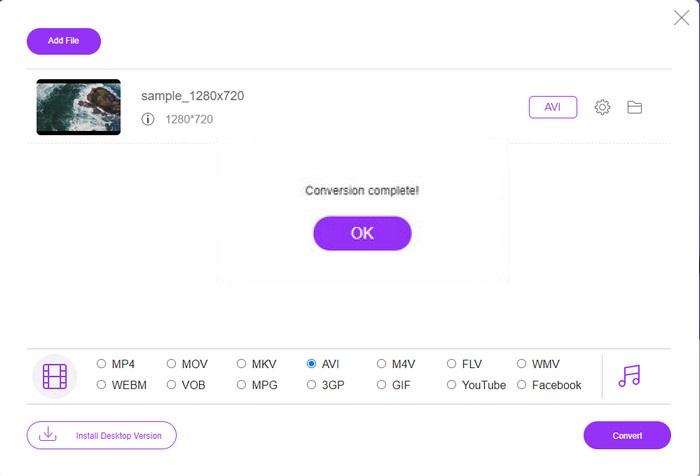
Step 5. After conversion, a folder will show again, but now with the file, you convert earlier.
2. Fconvert.com
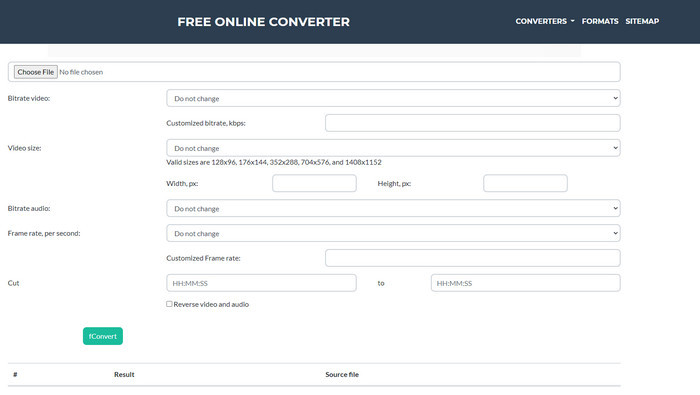
In the line of converting files, Fconvert.com must be on the list because this web tool is one of the fantastic converters you can use for free. This converter can convert almost all of the formats you know and maybe one of your files. However, there is a problem with this tool, and that is the ads. Because every time you click something on the website, an ad will be first before going on what you click. Although ads are killing, this app still looks neat and does perform great in converting format. So if you want to experience how great this tool is, follow these steps below and learn how to convert 3GP to AVI for free.
Step 1. Search the main website of this tool on your browser.
Step 2. Click the AVI under the video, click Choose File, locate the .3gp, then scroll it down and click fConvert.
Step 3. Scroll it under, and then you will see the Result; click the file to download it.
3. Qualquer conversão
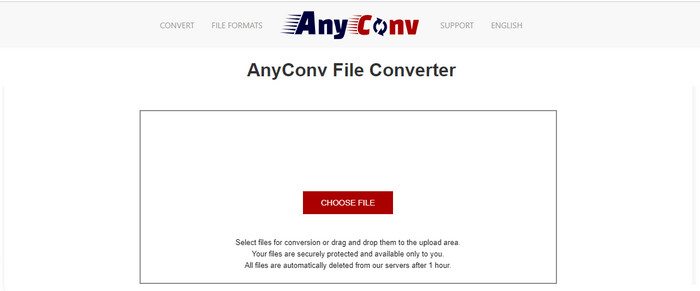
Another tool that specializes in converting formats is Anyconv. This web tool is far different on Fconvert.com because this tool is much better and faster. Also, this tool has fewer ads than the tool before this. Although it has fewer ads, they are more extensive compared to Fconvert.com, but performance-wise, this tool does well performance-wise. Let's test this tool to see if it works on converting 3GP to AVI for free without further delay.
Step 1. Open your search engine and find the Anyconv website.
Step 2. Press Choose File, and a folder will show, insert the .3gp file on the web tool and proceed. To change the format, you must click the drop-down button and find the AVI. To start the conversion process, click Convert.
Step 3. Wait for the process to end, then click Download AVI to download the converted file.
Parte 3. Qual formato é o melhor; 3GP ou AVI
Se você estiver usando um telefone de 3ª geração e quiser armazenar vídeo de alta qualidade, transfira-o mais rápido na 3ª geração de telefone, então 3GP é o formato para o trabalho. No entanto, se você tentar enviar o formato AVI para telefones de 3ª geração, o arquivo não será aberto porque esse formato não é suportado. Mas no caso de hoje, AVI é muito melhor. Ele já ganhou muito suporte de todos os players de mídia e editores em comparação com o 3GP. Embora o formato AVI seja a melhor escolha hoje, o tamanho do arquivo é enorme comparado ao 3GP, e se você estivesse prestes a salvá-lo em seu telefone, consumiria muito espaço. Além disso, ambos os formatos são ótimos, mas têm finalidades e usos diferentes.
Parte 4. Perguntas frequentes sobre 3GP e AVI
Posso usar o FFmpeg para converter 3GP para AVI?
You can use FFmpeg to convert your 3GP file; however, it is difficult to do, but it is manageable if you take your time. The first step is to download the zip file of FFmpeg on your computer then unzip it. The second step is to open your CDM to communicate with the tool. Then locate your file using the command prompt, ffmpeg -i input.3gp -vn -ar 44100 -ac 2 -b:a 192k output.avi copy this code and paste it on the CDM, and click Enter to start the conversion process.
O 3GP pode ser jogado em telefones de 4ª geração?
This format is used on 3rd gen phones, and you can still play videos under the 3GP format in some 4th gen phones but not in all. Because, as said earlier, 3GP are for 3rd gen and not in some 4th gen phones. Or you can turn to professional 3GP players to enjoy your videos.
Qual formato é melhor: 3GP ou MP4?
On quality and most supported format, MP4 is much better in this type of area. However, 3GP is much smaller and works better in 3G networks for faster transferring of this file format. Want to convert MP4 to 3GP or vice versa, click here to learn more details.
Conclusão
Toda jornada deve chegar ao fim, e agora você pode converter facilmente 3GP para AVI com a ajuda das ferramentas mencionadas acima. Além disso, todas as ferramentas apresentadas acima, vamos incluir o FFmpeg, funcionam muito bem. Ainda assim, a melhor escolha sempre recai no FVC Video Converter Ultimate. Esta ferramenta supera tudo o que os conversores online podem fazer em conversão e muitos outros aspectos. Então agora, se você deseja obter o software, clique no botão de download e faça a conversão rapidamente.
-
 [Online e gratuito] 3 métodos para converter MP4 para 3GP sem complicações
 Quer converter MP4 para 3GP de forma rápida e fácil? Aqui, vamos compartilhar 3 conversores MP4 para 3GP para alterar MP4 para 3GP para jogar em vários telefones celulares.
-
 As 3 principais maneiras gratuitas de converter FLV em 3GP no Windows / Mac
 Não é possível abrir arquivos FLV no smartphone ou tablet? Não se preocupe! Aqui compartilhamos três métodos para converter FLV para 3GP sem perder qualidade para jogar no celular.
-
 Excelente opção para converter MKV para um formato AVI
 Domine como converter vídeos MKV com etapas fáceis fornecidas exclusivamente para você. Você quer saber como? Então clique neste link para saber mais.
