


 Video Converter Ultimate
 Gravador de ecrã
 Reparo de vídeo
Conversor fenomenal de Mini DV para AVI disponível no Windows e Mac OS
DV files primary purpose is to contain digital video from video cameras or camcorders under the maker Panasonic and Sony in late 1995. This codec and tape format became famous for its transition from analog to digital production. But nowadays, you can't play the DV file on your default media player or even share it online. And now, if you want to play this file, you must consider converting the file into a most supported and playable format like the AVI. Moreover, the details below will help you understand DV, convert DV files to AVI, and play it to a media player if you don't want to convert.

Parte 1. Batalha dos Formatos: DV VS AVI
O arquivo DV e o AVI são quase semelhantes, pois esses dois formatos podem conter vídeo e áudio. No entanto, sua finalidade e como eles armazenam o arquivo de mídia estão longe um do outro. Nesse caso, vamos determinar quais são as diferenças entre DV e AVI comparando suas 3 habilidades únicas.
Compatibility of the Format
AVI gains more support and is one of the most compatible formats to play and edit a video. This format can contain a video playback in a synchronized format. In contrast, DV file is unsupported by numerous video editors and media players on PC and Mac. Because of that, this is one of the reasons you need a mini DV to AVI converter.
Compression Supported
AVI é um formato de arquivo sem perdas para armazenamento robusto e avançado de arquivos de mídia. No entanto, esse formato consumirá muito do armazenamento do disco rígido porque não é compactado. Enquanto o DV usa uma compactação com perdas para seu vídeo, mas o arquivo de áudio não é compactado. A razão pela qual o formato tem perdas é porque ele usa o DCT como base para o quadro a quadro usado para compactar o vídeo.
Audio Fidelity
O arquivo DV de fidelidade de áudio suporta entre qualidade de áudio média e melhor porque usa uma amostragem de áudio PCM de até 48 kHz com um comprimento de 20 bits de uma palavra. O AVI usa um PCM descompactado e a qualidade do áudio é excelente. Ainda assim, pode ser melhor se você usar DV como um codificador para obter DV-AVI que comprime.
Agora que entendemos quais são esses formatos, agora é a hora certa de converter DV para AVI no Mac ou no seu PC lendo o tutorial fornecido abaixo.
Parte 2. Melhor ferramenta de conversão fenomenal para converter DV para AVI no Mac e Windows
FVC Video Converter Ultimate
Do you have trouble choosing a converter that produces a phenomenal output? If that is the case, we would like you to use the FVC Video Converter Ultimate. This software became one of the most popular choices of the users who do convert format often. Also, the name ultimate is not just by name, but it is also in its performance provided. Moreover, generally speaking, this format is all-out for everyone who needs a helping hand on their conversion problem. Before we proceed to the steps, let's first determine the advantages you will get if you download this software.

Video Converter Ultimate
Mais de 30000 downloads- Converta seu arquivo de vídeo DV em mais de 200 formatos disponíveis.
- Suporta todos os sistemas operacionais como PC e Mac.
- Sua caixa de ferramentas inclui recursos avançados, como criar GIFs, editar vídeos, mesclar e muito mais.
- Interface intuitiva para todos.
- Ele suporta conversão 30x mais rápida em comparação com outros conversores online ou offline.
Free DownloadFor Windows 7 or laterSecure Download
Free DownloadFor MacOS 10.7 or laterSecure Download
Então sem mais delongas, vamos ao tutorial abaixo, e vamos converter DV para AVI sem perder a qualidade do vídeo.
Steps on How to Convert DV to AVI with the FVC Video Converter Ultimate:
Step 1. Press the Download button that is below, choose the OS you are currently using. Install the software to your drive and click Start Now to proceed to the next step.
Free DownloadFor Windows 7 or laterSecure Download
Free DownloadFor MacOS 10.7 or laterSecure Download
Step 2. Open the software and click the + button located in the middle of the interface of the tool. A folder will show, and to upload the .dv file, click Open.
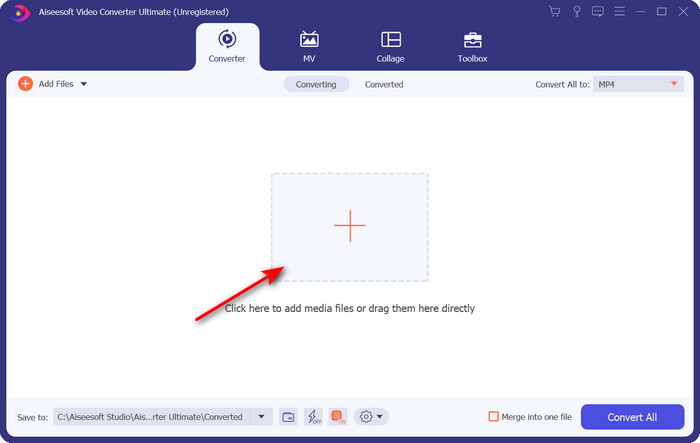
Step 3. To change the .dv file into a .avi, click the drop-down button and search the AVI format.
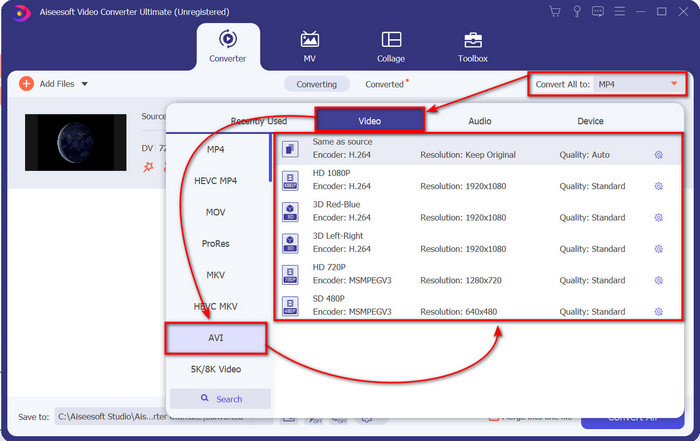
Step 4. Once you choose the format, it is now the right time to turn your DV to AVI by clicking Convert All.
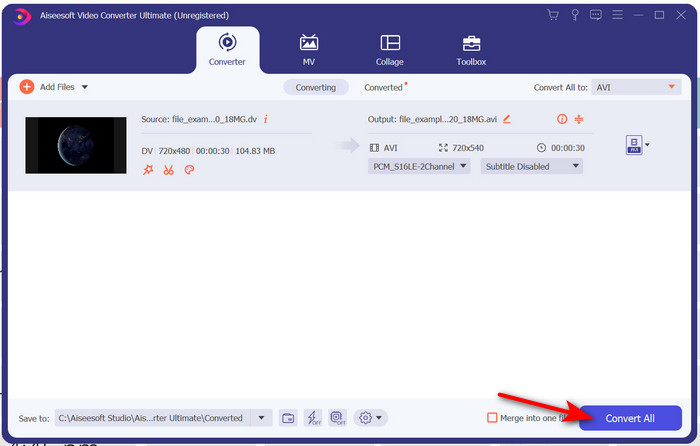
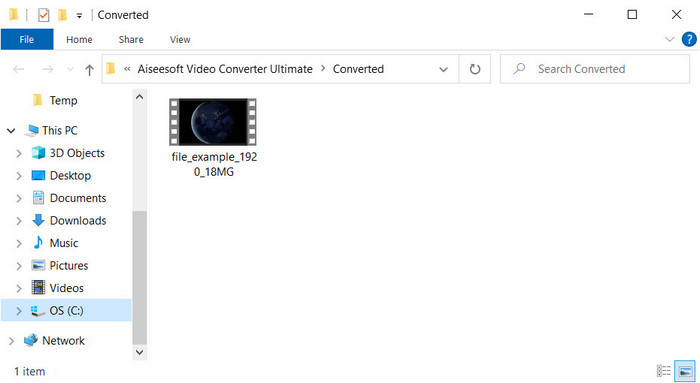
Step 5. Converting a file will take you less than a minute, so waiting is not necessary. Another folder will show with the converted files.
Parte 3: Reproduza seus arquivos DV com o player de vídeo DV disponível para PC e Mac
Leitor de Blu-ray
Don't want to convert mini DV to AVI, then try to use this media player that supports this type of format, the Blu-ray Player. This media player supports 300+ formats and codecs as well to play the video on your desktop without any hassle. Also, this media player has the most advanced features a media player should provide to make your watching experience better. You can also use a CD, DVD, or Blu-ray disk to play the video on your computer; basically, everyone uses a portable media player. So now, if you don't want to get into trouble with converting the .dv file, follow these steps to play the video.
Steps on How to Play the DV File with the Help of Blu-ray Player:
Step 1. To download this media player, click the button below, then install the player and launch it.
Free DownloadFor Windows 7 or laterSecure Download
Free DownloadFor MacOS 10.7 or laterSecure Download
Step 2. Click Open File, then locate the .dv file on your folder and press Open.
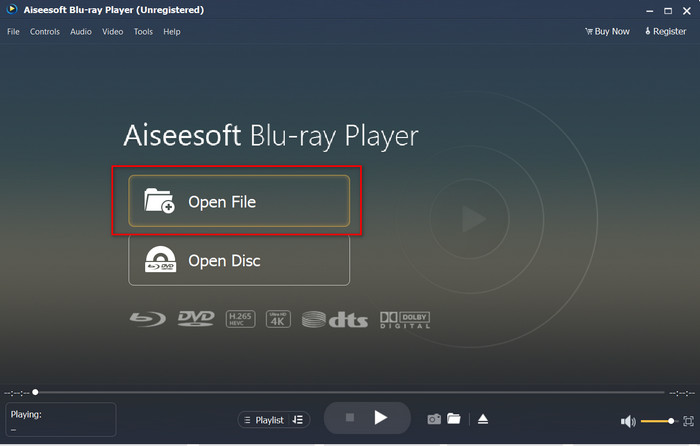
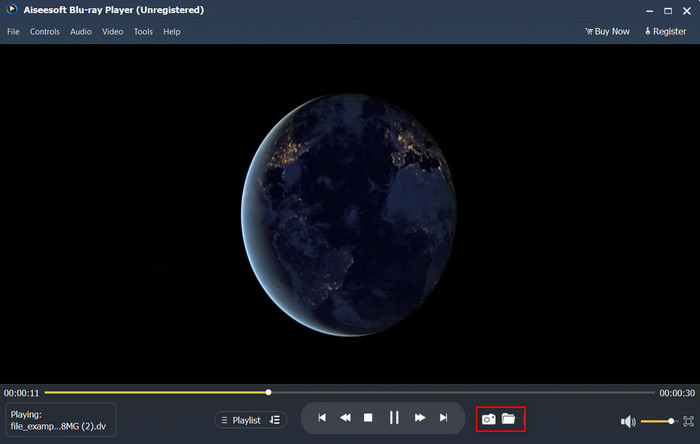
Step 3. The DV file will automatically play on your desktop. Additionally, click the camera button if you want to take a screenshot of what you are watching. Then if you're going to look for the snapshots you've taken, click the folder button.
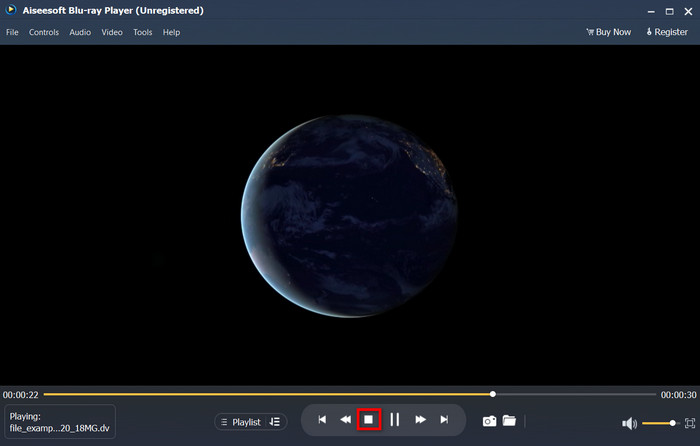
Step 4. If you want to stop watching the .dv file, click the cube button.
Step 5. To watch another file in a different format, follow steps 2 and 3, then enjoy watching the high-quality video.
Related:
Parte 4. Perguntas frequentes sobre conversão de DV para AVI
A conversão de arquivos DV perde sua qualidade?
Converter qualquer formato em uma nova versão não deve diminuir a qualidade do formato de vídeo original. No entanto, alguns conversores não suportam a conversão de qualidade de vídeo 1080 ou 4k porque levará tempo. Então, se você não quer perder qualidade, então use o FVC Video Converter Ultimate. Não espere nada menos porque este software não afetará sua qualidade e fornecerá a opção de torná-la superior ou mantê-la.
Posso reproduzir .dv no VLC?
Atualmente, o VLC não suporta nenhum arquivo .dv para reprodução; no entanto, se você compactar AVI e usar o DV-AVI, poderá reproduzir o vídeo no VLC.
Qual formato é o melhor substituto para DV?
Se você quiser saber o melhor substituto para um arquivo DV, tente usar o arquivo MP4. Este formato é conhecido como o formato multifuncional porque é compatível com todos os desktops e dispositivos que desejam reproduzir o vídeo ou editá-lo. Mas a qualidade do MP4 e do DV é muito diferente se compararmos. No entanto, o MP4 em termos de compatibilidade é o melhor formato de mídia que você pode usar como substituto.
Conclusão
To sum it up, we only presented one DV converter to AVI because this is the only software that performs well on converting this file type. As we continued reading this article, we found another way of playing the .dv file by using this DV player. Moreover, we present two tools to do their job, whether you want to play the .dv or convert the file. So now, if you choose the FVC Video Converter Ultimate, then expect a phenomenal quality output within an ample of time. But if you decide to play the DV file, then your go-to must be the Blu-ray Player.
-
 As 5 melhores opções para converter MPEG para formato AVI [Online e Offline]
 Você tem dificuldade em procurar um conversor para MPEG? Então tente ler este artigo enquanto aprendemos como alterar o formato MPEG para AVI com etapas detalhadas.
-
 4 Conversores Incríveis para Converter WMV para AVI Online Grátis [2021]
 Você está procurando um conversor WMV para AVI? E se sim, tente ler este artigo, pois selecionamos todas as ferramentas que podemos encontrar na web para ajudá-lo nessa tarefa.
-
 4 novos conversores online e offline para converter F4V para o formato AVI
 Você não tem idéia de qual conversor você deve usar para converter F4V para AVI ou qualquer outro formato de vídeo? Então leia este artigo enquanto aprendemos como converter com a ferramenta disponível.
