


 Video Converter Ultimate
 Gravador de ecrã
 Reparo de vídeo
Etapas descomplicadas que você precisa seguir na conversão de 3GP para MOV
The users can store video, audio, effects, or text in the MOV file, a multimedia container file (e.g., subtitles). However, created by the Third Generation Partnership Project (3GPP), it is intended to transmit audio and video data between 3G cell phones and over the Internet. These two video formats have their differences, but to know more about the comparison between them and the converters that can convert 3GP to MOV, read this article thoroughly. Fasten your thoughts, and let's dig in!

Parte 1. Introdução sobre 3GP e MOV
Projeto de parceria de terceira geração (3GPP) 3GP é um formato de arquivo de vídeo que os usuários podem reproduzir em dispositivos que suportam 3G. Codecs H.263 ou H.264 e fluxos de áudio baseados em AMR ou AAC, que são ideais para compressão com perdas de dados de vídeo, estão incluídos neste pacote. Para redes 3G e dispositivos multimídia, este formato de vídeo padrão ISO tem um tamanho de arquivo menor que o torna ideal para compartilhar vídeos. Embora tenha sido inicialmente projetado e destinado a dispositivos 3G, ainda funciona sem problemas em dispositivos e sistemas operacionais 4G modernos.
No entanto, MOV é um formato de vídeo criado pela Apple. Os usuários podem armazenar arquivos de vídeo e multimídia nesse tipo de contêiner de arquivo. Como a Apple o desenvolveu, ele é compatível apenas com produtos Apple ou reprodutores de vídeo Quicktime. Dados de vídeo armazenados em arquivos MOV em altas taxas de bits com mínima ou nenhuma compactação. Por causa dos tamanhos de arquivo grandes, no entanto, eles são de excelente qualidade.
Estas são apenas uma breve descrição desses dois formatos de vídeo. Você encontrará todos os conversores, software ou ferramentas online, que podem ajudá-lo a converter seu formato de vídeo 3GP para MOV para leitura adicional.
Parte 2. Melhor conversor que ajuda a converter 3GP para MOV no Mac
Let this article introduce you to the best software to consider converting 3GP video files to MOV. Video Converter Ultimate is a free-to-download tool available for Windows and Mac that can convert 3GP to MOV in just a minute. Aside from the great features it holds, this software also supports a massive amount of video formats that other software or online converters don't support.
Você tem sorte porque, além desses recursos, ele também possui ferramentas de aprimoramento de vídeo que podem melhorar a qualidade do seu vídeo das maneiras acessíveis possíveis. Agora que você aprendeu uma breve descrição deste software, agora você pode aprender todos os procedimentos que você precisa seguir para executar o processo de conversão corretamente.
Step 1. First, you have to click the Free Download button below this step to download the software. This software is available on both Windows and Mac so you don't have to worry about using it on both operating systems. After you download the software, you can now install the software and click Start Now to run it on your computer.
Free DownloadFor Windows 7 or laterSecure Download
Free DownloadFor MacOS 10.7 or laterSecure Download
Step 2. After you run the software, the interface of this software will pop up on your screen displaying the converter feature alongside the other features available in this software.
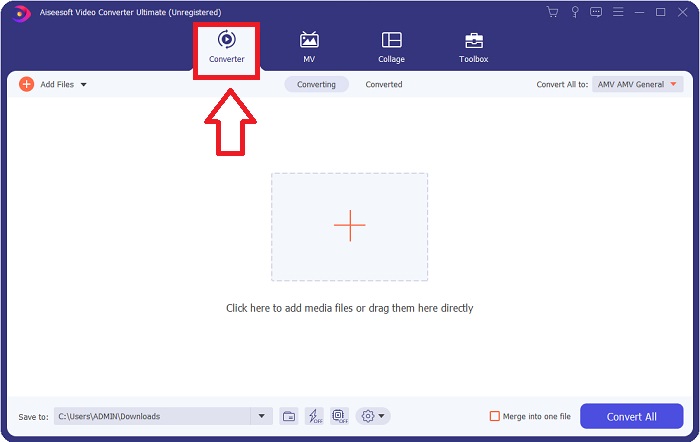
Step 3. You can now start uploading a video file you want to convert in this software by clicking the + icon or you can also drag your files from your desktop.

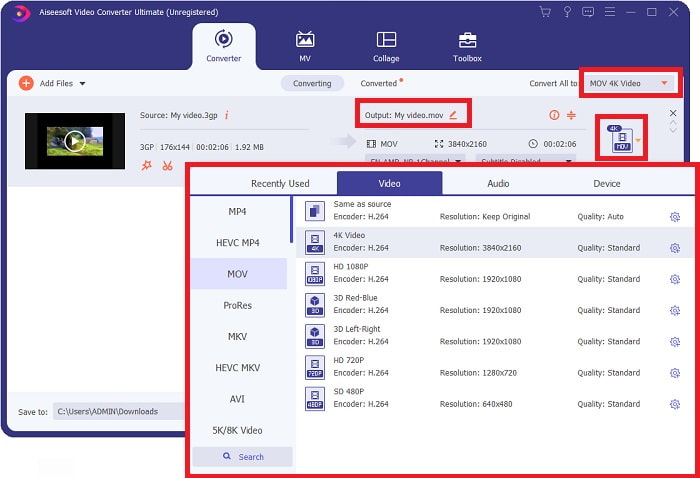
Step 4: Click the selection of format icon on the right corner of the interface. After that, you navigate and click the MOV format, proceed with choosing the preferred resolution you want to apply on your converted video file. In addition, you can also customize the quality or the output of the video by clicking the gear icon.
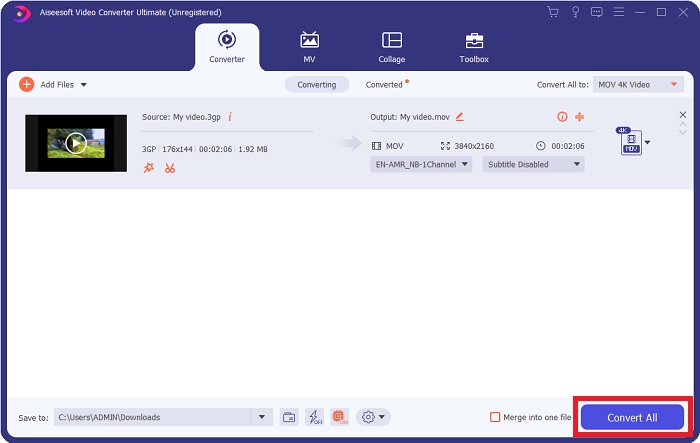
Step 5. After you finished customizing all the details that affect the video quality of the file you want to convert. You can now convert the file by clicking the Convert All button.
Parte 3. Outras dicas! Como converter 3GP para MOV online
Here's another choice you also need to consider using whenever you're in a rush of converting a video and you don't have time to download a software just to convert a file. Introducing Free Video Converter Online, the best online converter available on the internet that has the same feature as Video Converter Ultimate. For instance, it is able to convert a file faster than any other online tool and it also supports numerous video formats. Since this tool is easy to use it doesn't need any tutorial in order for you to use, but for some beginner users here are guidelines of procedure you need to follow:
Step 1: Click this link to proceed to the main webpage of Free Video Converter Online.
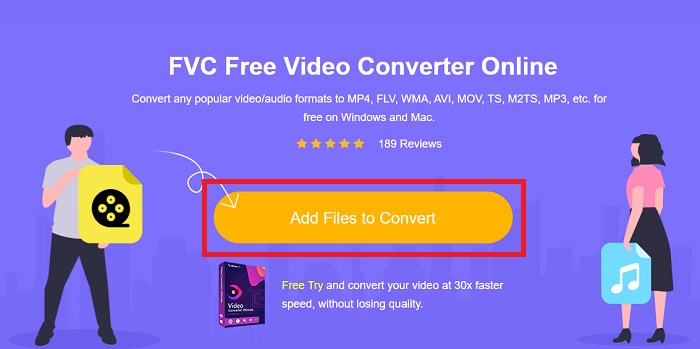
Step 2: When you're on the main webpage of Free Video Converter Online, you can now upload files from your computer by clicking Add Files to Convert.
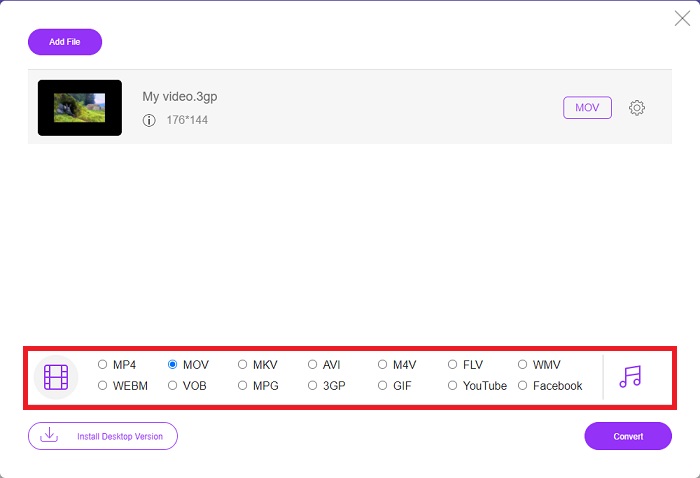
Step 3: After choosing a file you wish to convert, another window will pop up to your screen that displays your file and all the formats available below. Choose MOV at the video format selection.
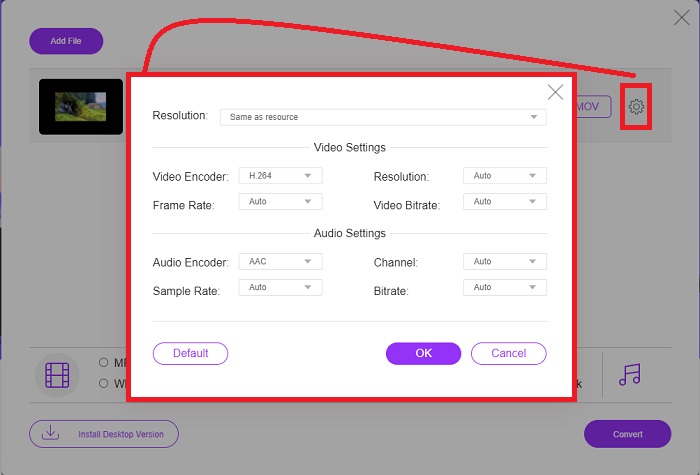
Step 4: You can also customize your video by clicking the gear icon and adjusting the resolution, video encoder, and frame rate of your video output.
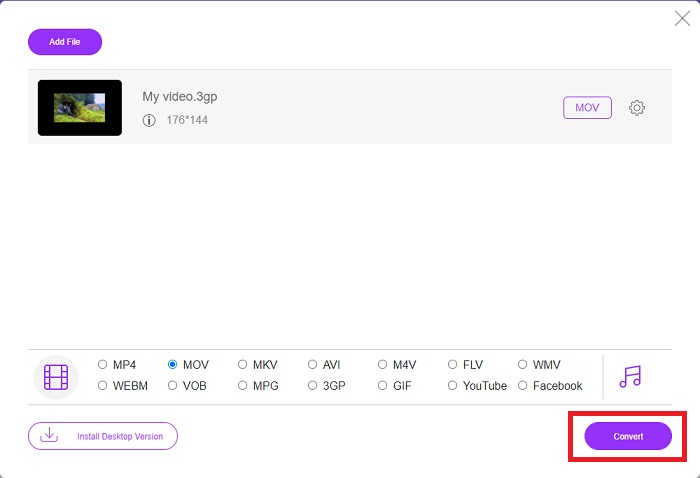
Step 5: After you adjust and customize all the details of the video output, you can now convert the file by clicking Convert.
Parte 4. Perguntas frequentes sobre como converter 3GP para MOV
Quais são as vantagens e desvantagens do MOV?
Um formato de arquivo de vídeo desenvolvido pela Apple, MOV é amplamente utilizado. Os arquivos MOV contêm uma variedade de tipos de mídia, incluindo vídeos, áudio, legendas, códigos de tempo e muito mais. As versões Mac e Windows do QuickTimePlayer são suportadas. Os arquivos MOV ocupam muito espaço em um computador porque são vídeos de alta qualidade.
O 3GP é um formato de vídeo adequado?
O formato MP4 é o preferido para streaming de vídeo na área de trabalho do computador ou no reprodutor de mídia portátil, pois pode suportar vídeo de resolução mais alta. O 3GP, por outro lado, deve ser usado apenas em telefones de rede projetados para 3G para esse dispositivo.
O 3GP é com ou sem perdas?
3GP, which stands for Third Generation Partnership Project (3GPP), is a video file format supported by 3G-enabled devices and named after its creator. It contains video streams encoded with the H. 263 or H. 264 codecs and audio streams encoded with the AMR or AAC codecs, making it ideal for lossy video compression. If your 3GP files are two large, you can continue reading and learn how to compress 3GP files effortlessly.
Conclusão
À medida que a discussão termina, existem diferentes opções indicadas acima para converter 3GP para MOV offline ou online. Esses dois são a melhor opção que você pode considerar na conversão de um arquivo, eles diferem apenas na plataforma a ser usada, mas quase dão uma sensação fácil na restauração de um arquivo.
-
 As 4 maneiras mais eficazes de converter 3GP para o formato AVI [2025]
 Posso converter meus arquivos 3GP para AVI? Bem, você pode convertê-lo facilmente se experimentar essas ferramentas disponíveis, pois reunimos todas as soluções possíveis para o seu problema de conversão de 3GP em AVI.
-
 Melhor conversor de GIF para converter GIF animado para o formato MOV [2025]
 Converta seu GIF para o formato MOV sem esforço, sem afetar a qualidade do arquivo de vídeo. Com etapas e ferramentas diferentes também.
-
 Como converter AVI em MOV com etapas e ferramentas fáceis
 Você quer saber como converter AVI em um MOV jogável? Você deve seguir este artigo para saber como fazê-lo e dicas para ter uma conversão bem-sucedida.
