


 Video Converter Ultimate
 Gravador de ecrã
 Reparo de vídeo
Um guia passo a passo que você deve considerar na conversão de M2TS para FLV [Offline e Online]
Media files like VOB, WMV, and MOV are all examples of M2TS. What exactly is M2TS? As it turns out, M2TS is a shorthand for MPEG-2 Transparent Stream. High-definition videos on Blu-ray discs, AVCHD, etc., can be stored in this container format. While FLV is a file with the extension .flv is an abbreviation for Flash Video. The FLV file extension refers to a video or audio file transmitted over the internet using the Adobe Flash Player or Adobe Air. These two video files might be unfamiliar to your ears, but to convert M2TS to FLV, you first need to know the use of these two video formats and all the choices you should consider in converting. Get your mind ready and enlightened to every information you will read.

Parte 1. Como converter M2TS para FLV no Windows e Mac
Com o Video Converter Ultimate, converter M2TS para FLV no Windows e no Mac é muito fácil. MP4/MOV/M4V/FLV/M4K/MTS/M2TS/ASF/MP3/VOB/AAC são apenas alguns dos muitos formatos de vídeo e áudio populares que este poderoso programa suporta. Seus vídeos de alta definição podem ser convertidos para formatos populares como FLV em questão de segundos, mantendo sua qualidade original. Possui um recurso de conversão em lote que permite converter muitos arquivos sem perder a qualidade. Supondo que você já esteja familiarizado com o software, agora você pode aprender todas as etapas necessárias para converter com sucesso:
Step 1: First, click the Free Download button below to download the software on your computer. Then, after you finish downloading the software, install it on your computer, you will see a window pop up on your screen that informs the software is ready to use. Click Start Now to run the software.
Free DownloadFor Windows 7 or laterSecure Download
Free DownloadFor MacOS 10.7 or laterSecure Download
Step 2: Second, after you run the software, it will lead you to the software's main interface, the Converter Menu.
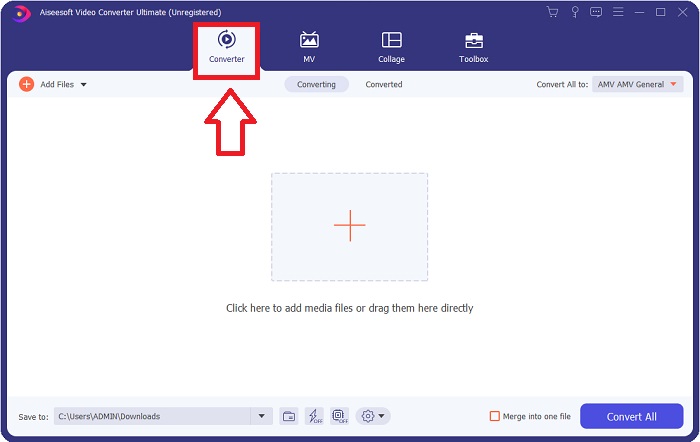
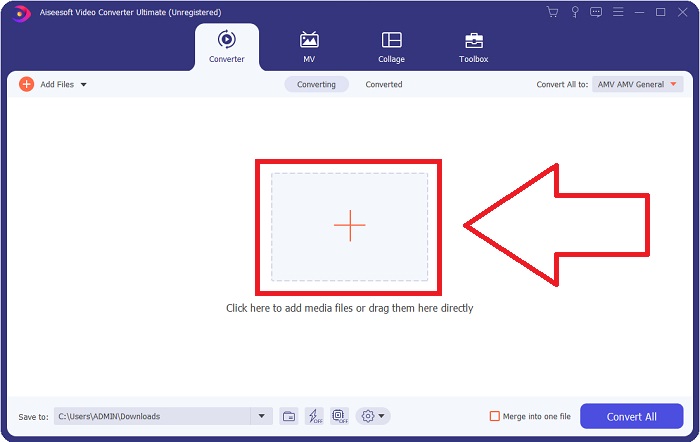
Step 3: To upload a file, click the + icon at the middle of the interface, or you can just drag a video from your computer.
Step 4: After uploading an M2TS file to the converter, navigate to the Convert All to the menu in the top right corner of the window and click it. A new window will appear that presents all the different kinds of formats the software supports, then choose FLV video format from the category list of Video.
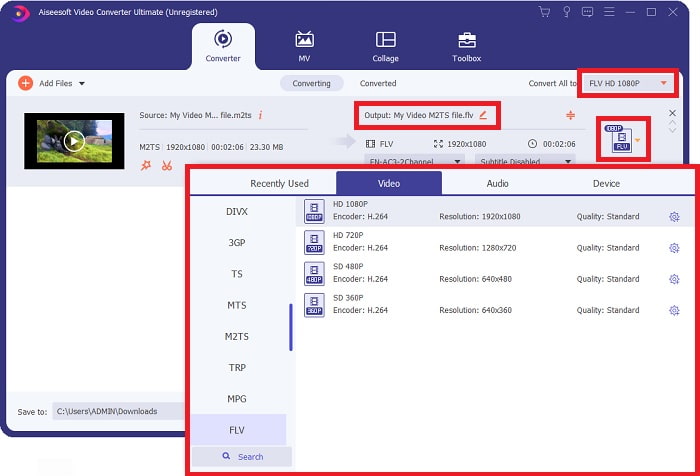
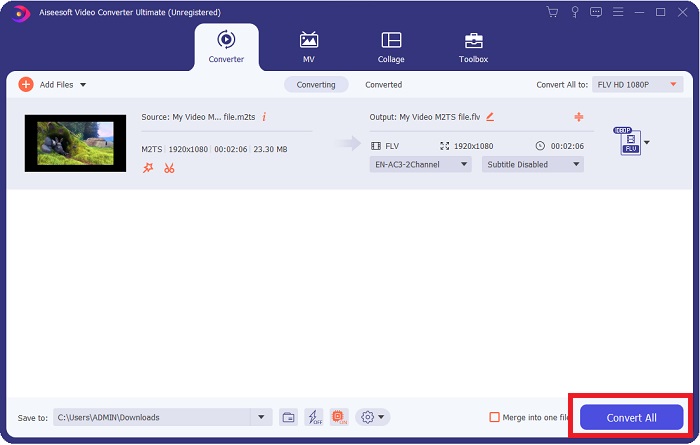
Step 5: If you still can't decide what quality to use because the quality you're looking for is not available on the choices. You can click the gear icon and change all the adjustments on bitrate, resolution, frame rate, etc. When you're satisfied with all the changes, you can now click Convert All to start converting your video file.
Parte 2. Outras maneiras gratuitas e eficazes de converter M2TS para FLV online
Free Video Converter Online is an online tool suitable for converting video formats like FLV, MP4, MOV, MKV, MTS, ASF, VOB, etc., with faster speed than other converting platforms. Despite its brief phase converting process, this online tool exports a video file without any problems in its quality. Without any further explanation, let's now dig into all the steps you need to follow:
Step 1: Click this link to proceed with the main website of the Free Video Converter Online.
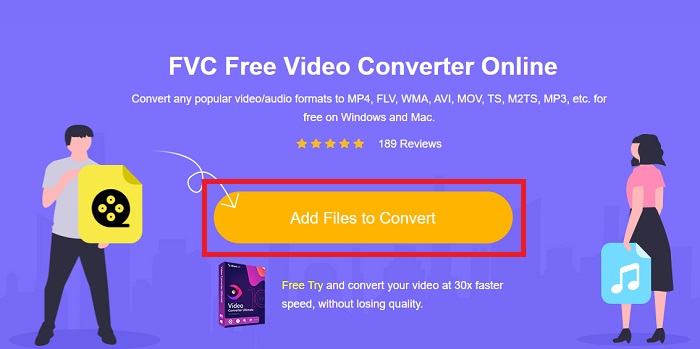
Step 2: Then click the Add Files to Convert button to upload the M2TS video file you want to convert to FLV video format.
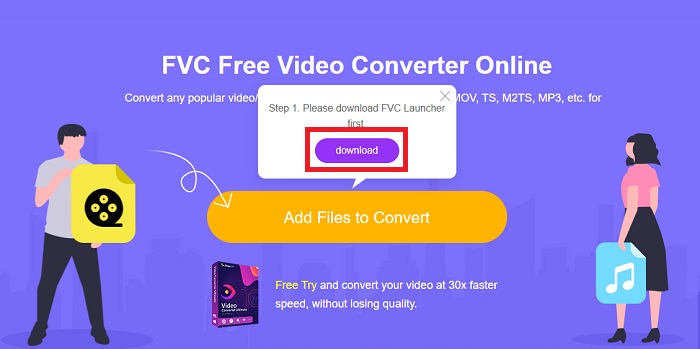
Step 3: After you upload a file, you will see a pop-up window above your screen that asks for permission about downloading the launcher for you to use the online tool. Click the downloaded launcher to install it on your computer and start converting.
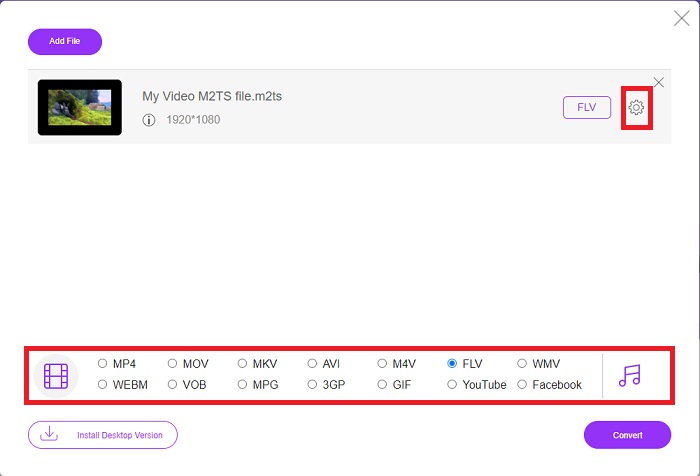
Step 4: Choose the FLV video format from the selection of formats below the interface. Also, you can edit the quality of your video output by clicking the gear icon next to the video format you chose. Another window will pop up that contains the bit rate, resolution, and frame rate. Start to adjust them and if once you finish adjusting, click OK and proceed with converting it.
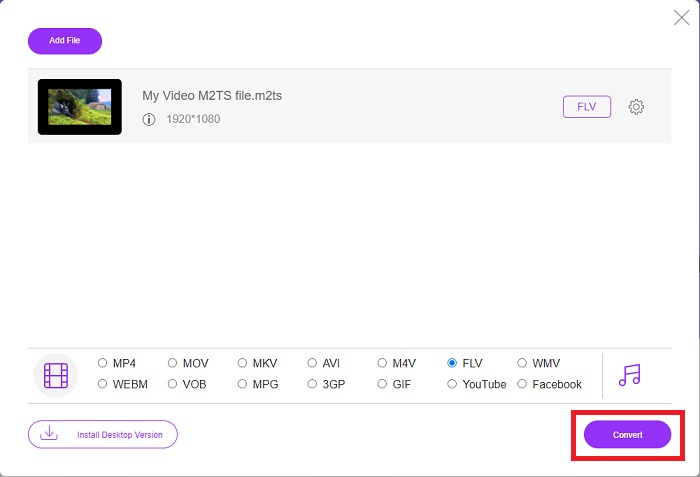
Step 5: You can now convert the file by clicking the Convert button at the right bottom of the window.
Parte 3. Comparação entre M2TS e FLV
O formato de contêiner de vídeo M2TS é usado para armazenar vídeos de alta definição em discos Blu-ray, AVCHD, discos rígidos e outros dispositivos que suportam o fluxo de transporte MPEG-2. Blu-ray Disc Audio-Video (BDAV) é o nome dado a este formato devido ao seu amplo uso em discos Blu-ray. Para reduzir o tamanho dos dados. Em vez de usar fluxos de transporte CBR, fluxos de transporte VBR são usados (taxa constante) devido ao conteúdo de áudio e vídeo de alta qualidade contido nos arquivos M2TS; VideoStudio Pro é um excelente aplicativo para editar arquivos M2TS.
| Extensão de arquivo | M2TS | FLV |
| Tipo de arquivo | Fluxo de transporte MPEG-2 de áudio e vídeo de disco Blu-ray | Arquivo de vídeo em Flash |
| Desenvolvido por | Associação de discos Blu-ray | Adobe System |
| Prós | Um arquivo de vídeo Blu-ray BDAV de alta definição baseado em fluxo de transporte MPEG-2; usado para armazenar dados de vídeo em discos Blu-ray; suporta resoluções 720p/1080i. | Um formato de vídeo predominante, o FLV é usado por dezenas de milhares de sites, oferece uma ampla variedade de recursos adicionais e produz tamanhos de arquivo menores do que a maioria dos outros formatos de vídeo. Os arquivos FLV são excelentes para fornecer vídeo de alta qualidade a uma taxa rápida. |
| Contras | Um arquivo m2ts não pode conter capítulos. Eles são mantidos em outro lugar na estrutura de pastas do Bluray. | É necessário ter plug-ins flash instalados para reproduzir arquivos de arquivos flash online. |
| Os programas abrem o formato de vídeo | ◆ALLPlayer ◆MPlayer ◆ VLC Media Player ◆PotPlayer | ◆ VLC Media Player ◆ Adobe Flash Player |
Parte 4. Perguntas frequentes sobre a conversão de M2TS para FLV
Como faço para reproduzir um arquivo M2TS?
Windows Media Player, SMPlayer, 5KPlayer, Splash e File Viewer Plus podem reproduzir arquivos M2TS. Alguns players M2TS são compatíveis com uma variedade de sistemas operacionais. O reprodutor de mídia VideoLAN VLC, por exemplo, pode reproduzir arquivos M2TS no Windows, Mac e Linux.
O FLV é um formato de gravação adequado?
Adobe Flash Player uses the FLV file format. One of the most popular and versatile video formats supports all video platforms and browsers. Online video streaming platforms such as YouTube benefit from using the FLV format. They're easy to download, thanks to their small file size. Click here to learn more FLV recorders available.
O FLV ainda é usado?
Vídeos, banners, animações e transmissões ao vivo são opções. Já faz muito tempo que filmes em flash, e eles usam clipes na internet. No entanto, mesmo que o formato FLV esteja saindo, ele continua sendo um padrão de vídeo para usuários da Internet em todo o mundo.
Conclusão
Para concluir a discussão, todos nós pensamos que não há nenhum tipo de conversor disponível para converter M2TS para FLV. Ainda assim, este artigo irá corrigi-lo, afinal, apresentando os dois melhores conversores que você precisa considerar usar, Free Video Converter Online ou Video Converter Ultimate. Esses dois conversores não são nada que você possa pedir, pois oferece todas as ferramentas e recursos profissionais possíveis que podem ajudá-lo a converter um arquivo para transformar um arquivo em uma aparência melhor.
-
 2 maneiras mais fáceis de converter arquivos WMV para FLV no PC / Mac
 Como você pode converter WMV para FLV? Em primeiro lugar, você precisa ler nossa recomendação e encontrar seu método favorito e, em seguida, seguir nosso guia para fazer o trabalho rapidamente.
-
 3 Soluções sobre como converter FLV em PSP sem perdas
 Como converter FLV para PSP? Aqui você obterá o guia passo a passo para converter vídeos em Flash para formatos compatíveis com PSP (WMV, MP4, AVI, FLV, etc.) no Windows e Mac.
-
 2 métodos para converter áudio FLV para WMA [Free & Online]
 Quer extrair áudio WMA de vídeo FLV? Aqui estão 2 extratores de áudio WMA gratuitos para converter FLV (Flash Video) em WMA (Windows Media Audio) com alta velocidade de conversão no Mac OS X e Windows 10/8/7.
