


 Video Converter Ultimate
 Gravador de ecrã
 Reparo de vídeo
Top of the Line OGV to MOV Converter para converter arquivos OGV no Mac
One of the best lossy video formats used often to store video content on web pages is the OGV. This format has almost the same structure as the OGG files, but this contains a video. As this format can store media files and transmit them on the internet, it still doesn't acquire global support from media players and editors. To make the format match the standards of the video player or editor on Mac, you must convert OGV files into an accepted format like MOV. Fortunately, we provide steps you can easily do to convert OGV to MOV without changing its quality.

Parte 1. Converta OGV para MOV no Mac com o melhor conversor de OGV para MOV
Want to know what the ultimate OGV to MOV converter on Mac is? If that is what you wish, then use FVC Video Converter Ultimate. Why? Well, it is the phenomenal converter you can use to make your encoding and decoding of OGV easy as 1-2-3. Also, you can finish converting in less than a minute or even seconds compared to the other online and offline converters.
Not only that, you can edit your video, merge them, make GIFs, speed up videos or slow it down and many more options. Undoubtedly, this is the phenomenal converter that has already helped a lot of users, and next will be you. To fix your problem, let's proceed to the tutorial on how to use the converter.
Step 1. To use this tool on your Mac, you must download it first then install it next. After that process, a welcome window will show, and click Start Now.
Free DownloadFor Windows 7 or laterSecure Download
Free DownloadFor MacOS 10.7 or laterSecure Download
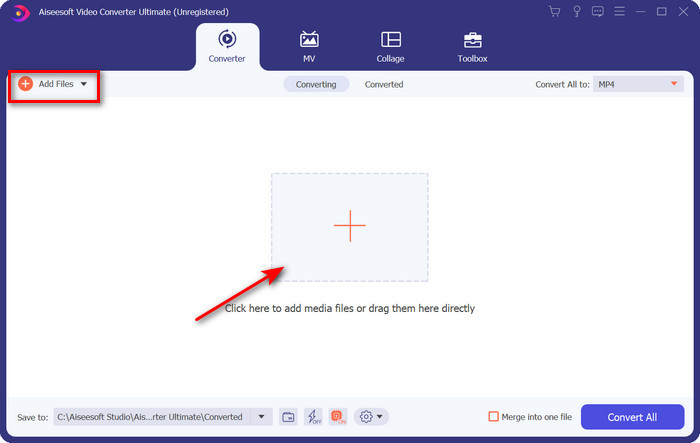
Step 2. Transfer your .ogv file here, then locate it on the folder by clicking Add Files or +.
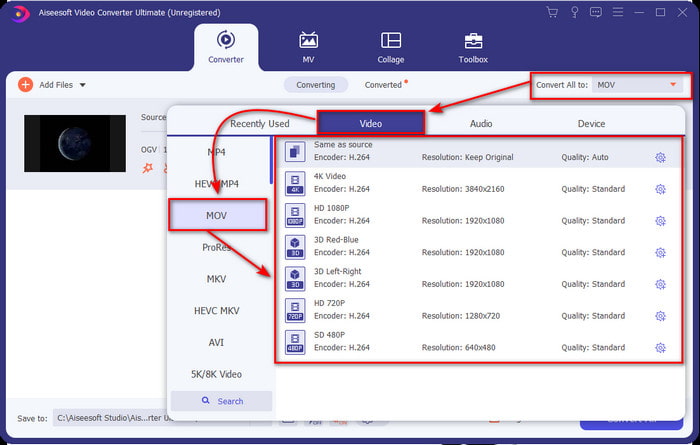
Step 3. After uploading the file, you must change the format to MOV under Convert All.
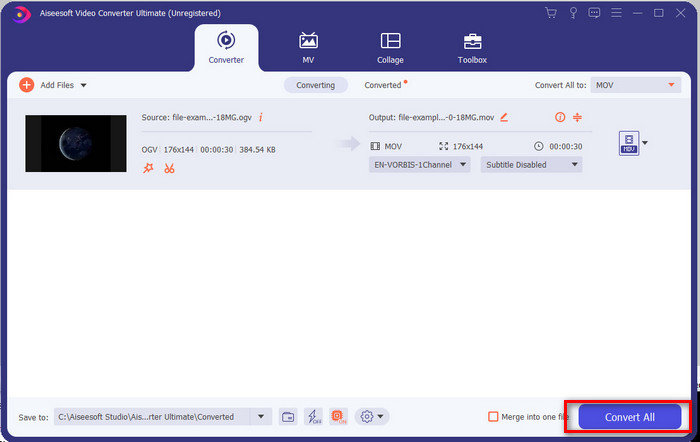
Step 4. Start the converting process by clicking the Convert All button.
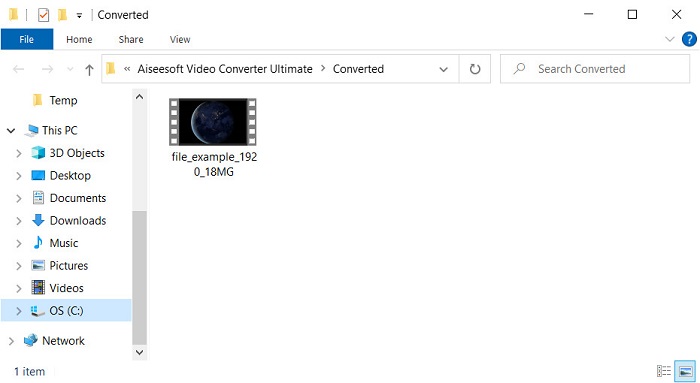
Step 5. Once converting OGV to MOV is finished, another folder will show where your file is. You can now freely click the file to watch or edit the media file inside the new MOV format.
Prós
- Conversor de próximo nível que você pode usar no Mac ou até mesmo no PC.
- Recursos avançados como edição, mesclagem, corte, recorte e muito mais estão na Caixa de ferramentas.
- Escolha favorável por usuários que fazem sempre a conversão devido à leveza deste software.
- Converta em lote seu formato OGV, MOV, AVI, MKV, MP4, mais de 200 aqui.
Contras
- Pague para usar o software.
Parte 2. Converta OGV para MOV Online com o Conversor Gratuito e Fácil de Usar
Doesn't want to get in trouble for downloading, installing, and setting up the converter? Then try to use this OGV to MOV converter online available in all search engines. FVC Free Video Converter Online is an innovative video converter online used to bring your unsupported format to a playable format. Many internet users already enjoy the overall performance of this web tool. Other than that, this tool doesn't need registration before using it and annoying ads on the website to interrupt your conversion. But, you can't use this if you don't have an internet connection. So now, if you want to change your usual converter, use this and follow the steps below.
Step 1. Hit this FVC Free Video Converter Online to go to the website of the webtool.
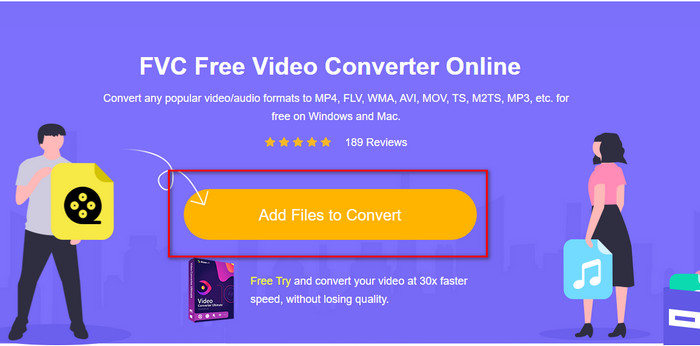
Step 2. On the web interface, click Add Files to Convert, and the folder will show where you can find the OGV file, then click Open.
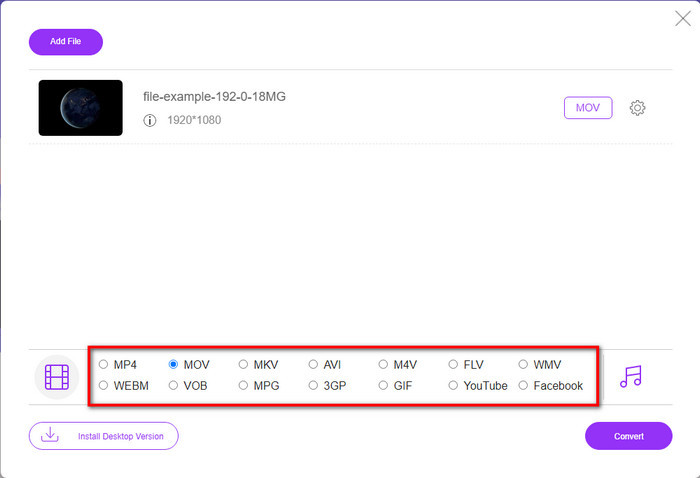
Step 3. Select the MOV format below or whatever format you want the final output.
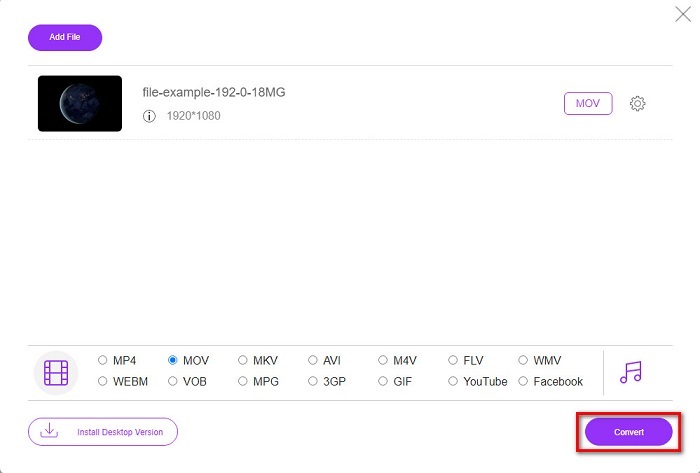
Step 4. Tick Convert to begin the operation of converting.
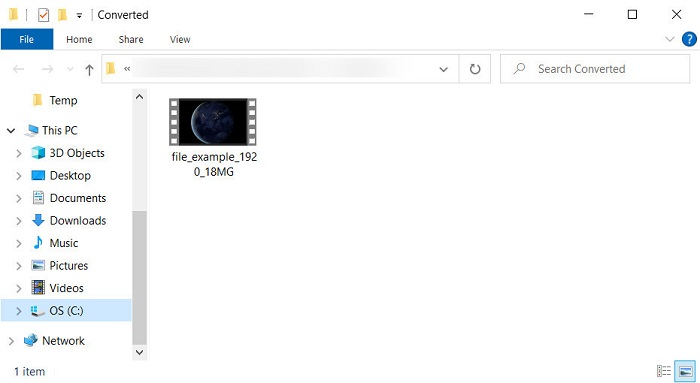
Step 5. File explorer will show next after converting; the file you convert will be there; click it to watch.
Prós
- Suporta formato de médio alcance e compatível em todos os navegadores da web.
- Livre para usar e sem necessidade de inscrição.
- Os anúncios irritantes não são apresentados na ferramenta da web e durante a conversão.
Contras
- Depende da Internet.
- Não suporta conversão em lote.
Parte 3. OGV vs. MOV
OGV é um formato de arquivo multimídia que usa vários codecs como Theora, Dirac ou Daala para tags de vídeo HTML 5. Mas quando você o usa em HTML, ele é chamado de .ogg mesmo que o arquivo contenha conteúdo de vídeo. Como está em um site, reproduzi-lo em um media player padrão é um desafio devido à estrutura exclusiva dos formatos e vários codecs. Mas se você deseja adicionar um excelente visual e áudio ao seu site, este é um uso obrigatório.
MOV é o formato feito pela Apple para armazenar várias faixas e dados de mídia, preservando a qualidade do áudio, vídeo e legendas. Além disso, você pode sincronizar faixas de mídia codificadas em MPEG-4 ou com outros codecs. Mesmo que o formato seja para Quicktime, você ainda pode reproduzi-lo no Windows Media Player porque é suportado.
Para finalizar, se você deseja inserir um vídeo e áudio em seu site e transferir dados mais rapidamente, vá com o OGV. Mas se você quiser editar o vídeo primeiro e reproduzi-lo no seu Mac, não use OGV porque ele não é compatível. Em vez disso, use MOV porque é compatível com todos os dispositivos Apple, seja Mac, iPhone, iPod ou iPad. Converter seu OGV para MOV é uma obrigação para ter a compatibilidade no Quicktime player, iMovie ou com as outras ferramentas que você pode encontrar na Apple.
Parte 4. Perguntas frequentes sobre conversão de OGV para MOV
Posso compactar OGV?
Compressing the file is needed, especially if you want to send them via email because it is limited to sending media files here. So now, if you want to make your file size smaller, read this article to know how to compress OGV files.
O VLC suporta arquivos OGV para reprodução?
Embora o objetivo desse formato seja estar na tag HTML 5, você ainda pode usar o player VLC para assistir aos arquivos OGV baixados. Mas você sabia que existem outras alternativas de VLC que você pode usar para reproduzir esse formato? Se você quiser saber quais são as alternativas do media player para o VLC, clique neste link.
A qualidade do OGV mudará após a conversão?
Depois de converter o arquivo OGV, a qualidade do mesmo deve manter a mesma do original. Mas você pode aumentar ou diminuir a taxa de vídeo com a ajuda do FVC Video Converter Ultimate. Ao contrário de outros conversores que não fornecem manipulação da qualidade em seu desejo. Além disso, você pode configurá-lo em 1080 ou 4k se quiser um vídeo de alta definição.
Conclusão
Como resultado das descobertas, a conversão do arquivo OGV baixado é uma obrigação antes que você possa reproduzir ou editar. Desta vez, está em suas mãos escolher a maneira de usar e converter seus arquivos OGV em MOV. Para ter uma breve recapitulação, se você deseja converter arquivos online gratuitamente e sem perturbações, vá com o FVC Free Video Converter Online. No entanto, se você deseja experimentar novos níveis de conversão, deve baixar o FVC Video Converter Ultimate. Escolha o melhor conversor que vai ajudar no seu problema com o formato OGV.
-
 4 maneiras de converter DivX em MOV gratuitamente [online e offline]
 Você luta contra as limitações de um DivX ou não tem reprodutores de mídia para acessar vídeos neste formato? Se você deseja convertê-lo para o formato MOV, continue lendo este artigo para preencher as lacunas.
-
 Conversor M4V para MOV grátis - Como converter M4V para MOV
 Se o seu media player não suporta M4V, você já se esforçou para assistir a um filme no seu iPhone? O tópico principal deste artigo é convertê-lo em um arquivo de vídeo MOV.
-
 3 métodos eficientes na conversão de MPEG para MOV [Offline e Online]
 Você está cansado de encontrar um reprodutor de mídia para reproduzir seu formato de vídeo MPEG? Tente convertê-lo para outros formatos que possam ser reproduzidos, especialmente no Mac, por exemplo, um formato de vídeo MOV. Leia este artigo para saber mais.
