


 Video Converter Ultimate
 Gravador de ecrã
 Reparo de vídeo
Como converter MTV para FLV em 2 abordagens incomparáveis

Parte 1. Como converter MTV para FLV offline
Video Converter Ultimate is one of the best MTV to FLV converters. You can change your video format from MTV to FLV in just a few clicks. It allows you to edit and compress MTV videos with the help of this software. This MTV-to-FLV converter is available for use on both Windows and Mac computers, and it is completely free. You can easily convert MTV files to FLV format by downloading and installing the converter app, then importing the videos you want to be converted. For a more in-depth explanation, please refer to the following guide.
Step 1: To start downloading the software, click the Free Download button below this step. After you click it, prepare to install it after a while.
Free DownloadFor Windows 7 or laterSecure Download
Free DownloadFor MacOS 10.7 or laterSecure Download
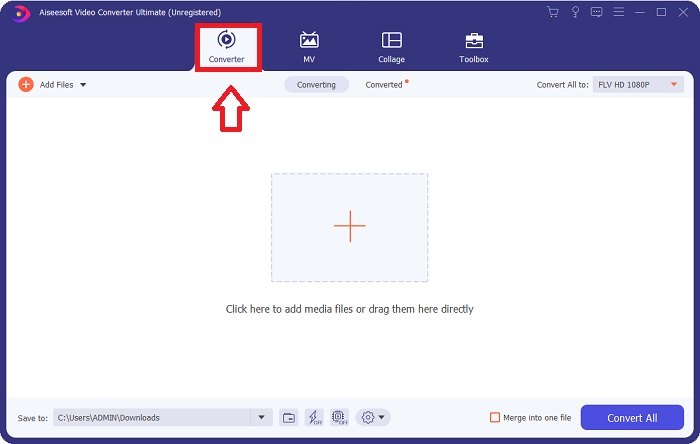
Step 2: After installing the software on your computer, run the software and a window will pop on your screen. The software displays the Converter interface on your screen, ready to import a file.
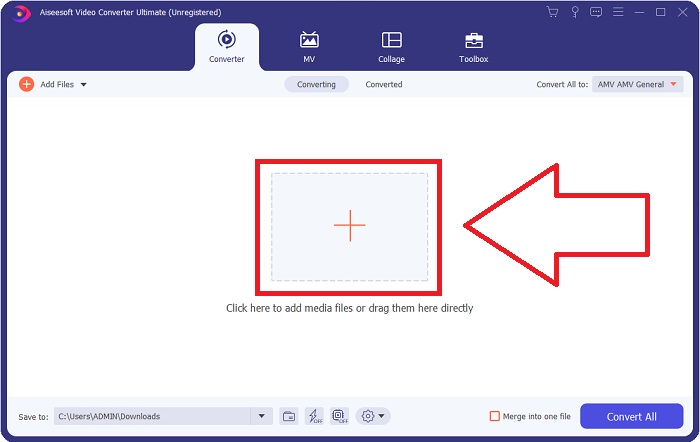
Step 3: To import a file to the software, you must click the + button in the middle of the software's window, or you can simply drag any video files.
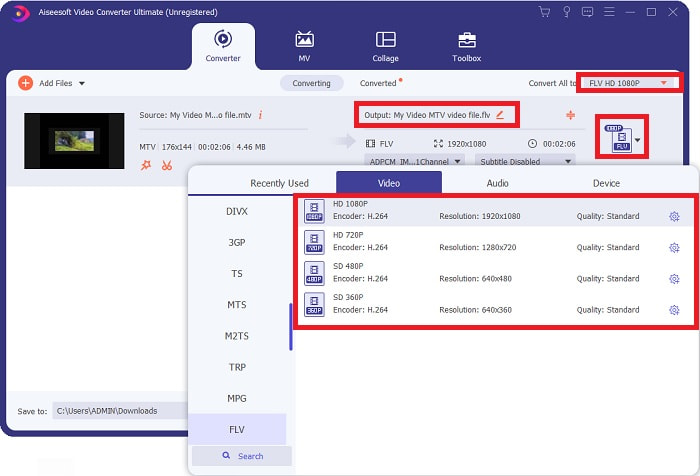
Step 4: It's time for you to choose the FLV video format, located at the right corner of the window near the video output. Click it and navigate the FLV video format and determine which quality you prefer.
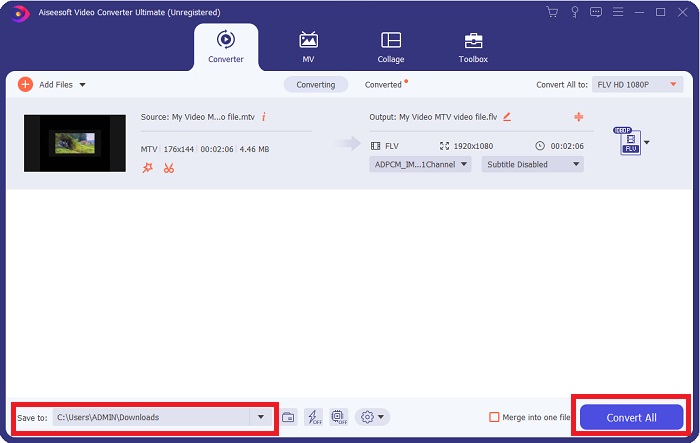
Step 5: You can now convert your file by clicking the Convert All button located at the bottom right corner of the window. And browse the location where you will transfer the converted file by clicking the drop down button near the Save to.
Parte 2. Como Converter MTV para FLV Online
Here's a free online tool for you to learn about that can convert MTV to FLV. The Free Video Converter Online can convert video and audio formats such as MP4, WMV, and ASF to various formats. You can restore your high-definition videos to popular file types in just a few clicks while maintaining their original visual quality. Converting multiple videos or audio files at once does not compromise quality. Here are the steps you need to take:
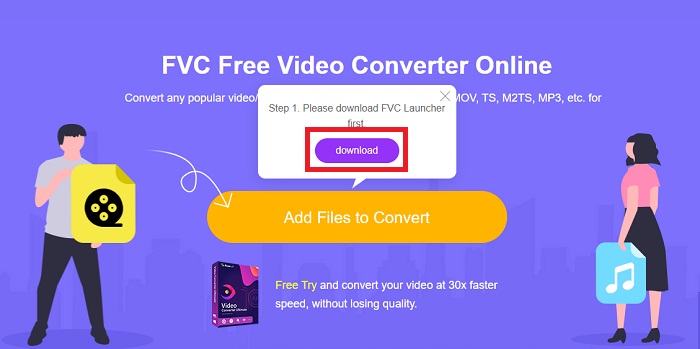
Step 1: Gain access to the main webpage of Free Video Converter Online by clicking this link. After that, you must click the Add Files to Convert button displayed on the main screen to download the launcher that will allow you to operate this online tool. After downloading, click it again to import files from your computer.
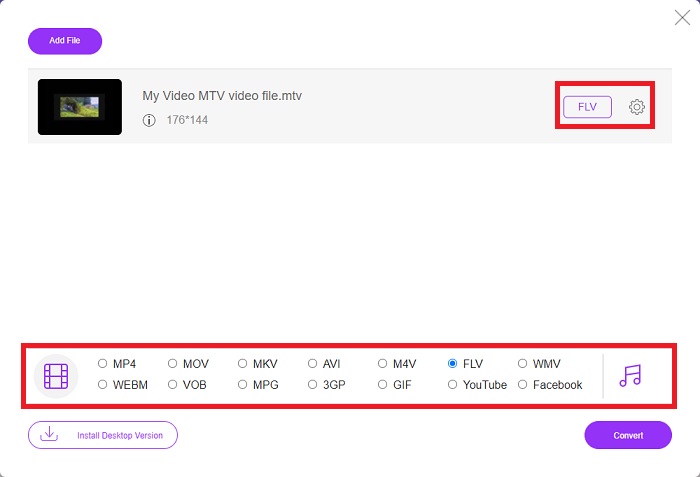
Step 2: Choose the FLV video format from the video format selection located at the bottom part of the window. If you want to know all the specifications of the output video, click the gear icon. Adjust it to your preferred settings and once you finish adjusting, click OK.
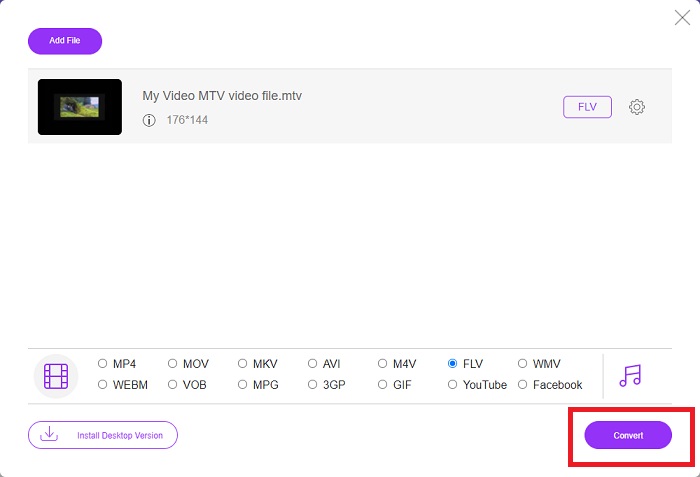
Step 3: Now that you are satisfied with all the adjustments, you can convert your MTV video format to FLV by clicking the Convert button.
Related:
Parte 3. Conhecimento estendido sobre MTV e FLV
Alguns players de vídeo MP4 portáteis chineses usam vasto conhecimento sobre arquivos de vídeo MTV e FLV no formato MTV para armazenar vídeos. A uma taxa de 12 quadros por segundo, combina áudio MP3 com uma enorme quantidade de imagens. Existem algumas semelhanças entre os arquivos MTV e os arquivos AMV, mas a formatação é um pouco diferente. Vários players de MP4 portáteis chineses baratos não armazenam ou reproduzem vídeos MP4. Os vídeos da MTV, por outro lado, são exibidos. Vídeos de baixa resolução (128x128 pixels) e de formato pequeno são as normas na MTV (um minuto de vídeo é aproximadamente 24 MB de dados). Os players de mídia não precisam de muito espaço de armazenamento ou poder de processamento. para armazenar e reproduzir muitos vídeos da MTV. Mesmo que o formato MTV seja como o formato AMV, que os reprodutores de mídia portáteis chineses também usam, os formatos diferem o suficiente para que nem todos os dispositivos ou reprodutores de mídia compatíveis com AMV possam reproduzir arquivos MTV.
No entanto, o Flash Video Format da Adobe Systems pode ser usado para vídeos online no YouTube, Hulu, Vevo e muitos outros serviços de streaming de vídeo. Exceto para iOS, quase todos os sistemas operacionais podem ler e visualizar arquivos FLV usando o Adobe Flash Player (incluindo plug-ins de navegador) e software de terceiros. O FLV pode ser reproduzido em dispositivos iPhone e Android por meio de software de código aberto e navegadores específicos. O Flash ainda está causando problemas no iOS. Os usuários da versão Android Jellybean podem usar arquivos FLV. Apenas os programas FLV player podem visualizar arquivos com a extensão FLV. A gravação de tela de vídeo FLV é possível usando software de captura e gravação de tela.
| Extensão de arquivo | MTV | FLV |
| Tipo de arquivo | Leitor de MP4/MTV chinês | Arquivo de vídeo em Flash |
| Desenvolvido por | Robert W. Pittman | Adobe Systems |
| Prós | Uma das vantagens mais significativas do formato MTV é sua capacidade de ser reproduzido na maioria dos computadores do mundo. | O formato FLV é predominante na internet. Milhares de sites o utilizam; ele fornece significativamente mais recursos do que outras extensões de arquivo de vídeo e produz arquivos significativamente menores do que a maioria dos outros formatos de vídeo. Os vídeos FLV são bons para exibir qualidade decente e carregar rapidamente. |
| Contras | Por causa de seus recursos de aprimoramento de som pobres, ele tem resolução de imagem limitada e não pode exibir vídeo em tela cheia e em movimento total. | É necessário ter plug-ins flash instalados para reproduzir arquivos de arquivos flash online. |
| Programas que suportam/abre | ◆ VLC Media Player ◆ Leitor de mídia AVS | ◆ VLC Media Player ◆ Adobe Flash Player |
Parte 4. Perguntas frequentes sobre a conversão de MTV para FLV
Como faço para converter MTV para FLV no Mac?
Você pode usar o Video Converter Ultimate mencionado acima para converter seus arquivos MTV para FLV. Primeiro, você precisa baixar o software no seu Mac e iniciá-lo após a instalação. Em seguida, adicione seus arquivos ao programa e escolha o formato FLV desejado. No final, clique no botão Converter tudo para iniciar a conversão de MTV para FLV.
Como faço para abrir um arquivo MTV?
Alguns arquivos MTV podem não ser reproduzidos no reprodutor de mídia VideoLAN ou VLC multiplataforma ou no reprodutor de mídia Online Media Technologies AVS somente para Windows. A parte de áudio de alguns arquivos da MTV, por exemplo, só pode ser reproduzida usando o VLC. Os vídeos MTV podem ser convertidos para AVI ou MP4 usando FFmpeg, AnyMP4 Video Converter ou AVS Video Converter da Online Media Technologies, todos os aplicativos de plataforma cruzada (Windows).
O VLC pode converter vídeos para FLV?
Reproduza um vídeo usando o VLC Media Player. Selecione a opção Converter/Salvar no menu suspenso na guia Mídia. Arquivos de vídeo .flv do sistema podem ser adicionados clicando no botão 'Adicionar' na página Abrir Mídia.
Conclusão
Given all the points stated in this entire article, there are two recommended converters you should consider using, its Free Video Converter Online and the Video Converter Ultimate. As stated above, these two have shown their full potential, and it's better than another converter available online.
-
 [Online e grátis] 3 métodos para converter MTV em AVI sem complicações
 Você já ouviu falar de um formato de vídeo como o MTV? Como você não sabe tudo sobre esse formato e deseja converter um vídeo MTV para AVI, leia este artigo com atenção para saber mais sobre o assunto.
-
 Guia concreto para ajudá-lo a converter AVI em FLV gratuitamente
 Para converter AVI em FLV, você precisa de um conversor de vídeo poderoso. Felizmente, você pode aprender dois e seu guia passo a passo neste único artigo.
-
 2 maneiras mais fáceis de converter arquivos WMV para FLV no PC / Mac
 Como você pode converter WMV para FLV? Em primeiro lugar, você precisa ler nossa recomendação e encontrar seu método favorito e, em seguida, seguir nosso guia para fazer o trabalho rapidamente.
