


 Video Converter Ultimate
 Gravador de ecrã
 Reparo de vídeo
Descubra os 4 melhores conversores offline e online de SWF para FLV no Windows e Mac
Atualmente, estou procurando uma solução para enviar meus arquivos SWF em sites de compartilhamento de vídeo como Youtube, Facebook, MySpace e muito mais. Você pode me ajudar a encontrar a maneira mais rápida de resolver esse problema?
This problem is common, especially if your video is under the .swf file extension. However, this format is usual on the web, but sharing the file on the video-sharing platform doesn't work. Moreover, if you want to share your SWF files, you must convert the format into a much supported one like the FLV. With that, let's see the four hidden gems offline and online SWF to FLV converters you can use by reading this article.

Parte 1. Converta SWF para FLV Online gratuitamente com o FVC Free Video Converter Online
FVC Free Video Converter Online is the unparalleled video converter you can use to convert SWF to FLV online free of charge. This web tool specializes in converting the file into a new format without downloading the tool on your desktop. Besides its converting capacity, you can also change the video and audio specifications according to your needs. Want to know how to use this lightweight web converter? Then copy the steps written below.
Step 1. Click this link to open a new tab that will locate you to the official webpage of the FVC Free Video Converter Online.
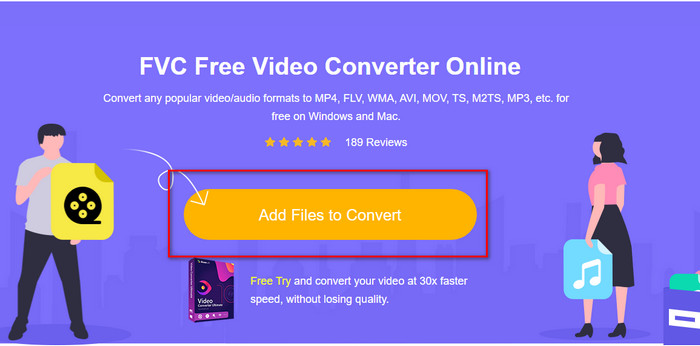
Step 2. On the website, click Add Files to Convert, then a computer folder will show; select the .swf file and press Open.
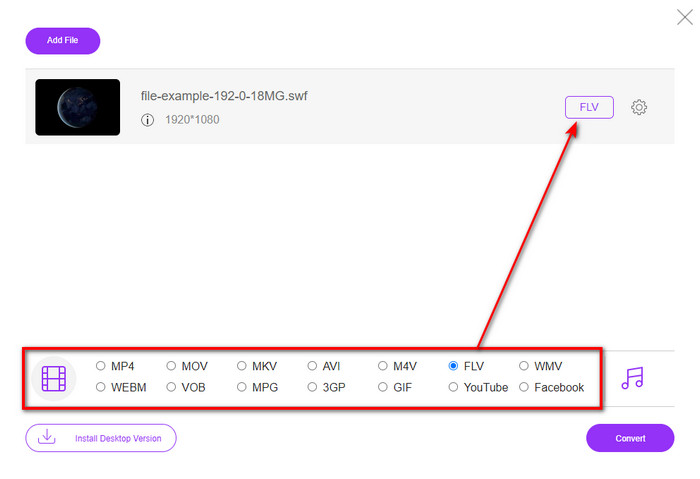
Step 3. After inserting the file, under the setlist, choose the FLV format.
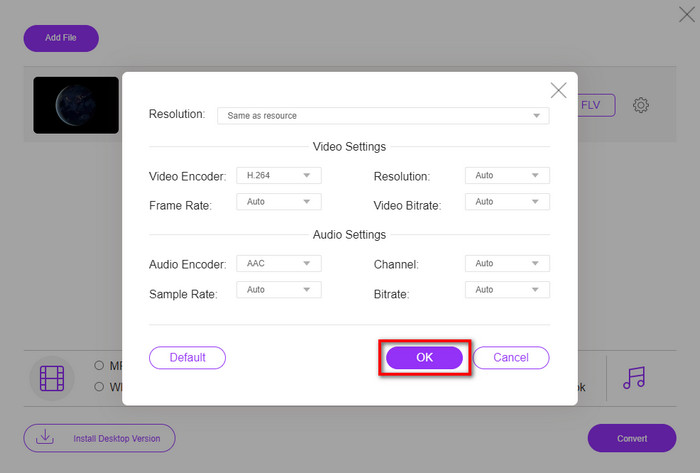
To change the video and audio specification, click the gear button.
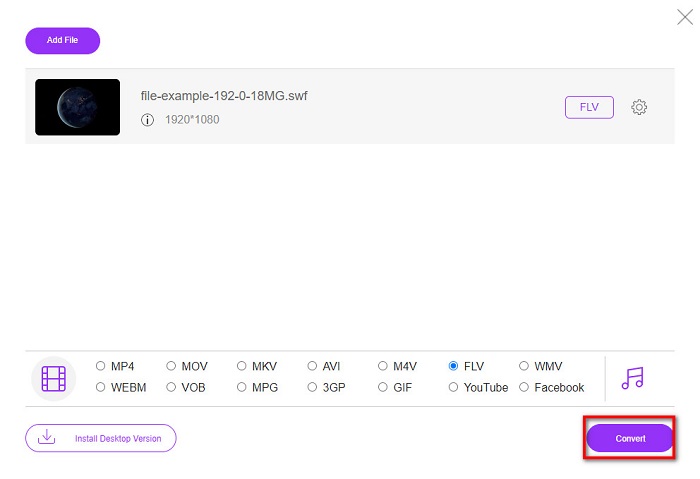
Step 4. To begin the converting process, click the Convert button.
Parte 2. Converter SWF para FLV com FFmpeg
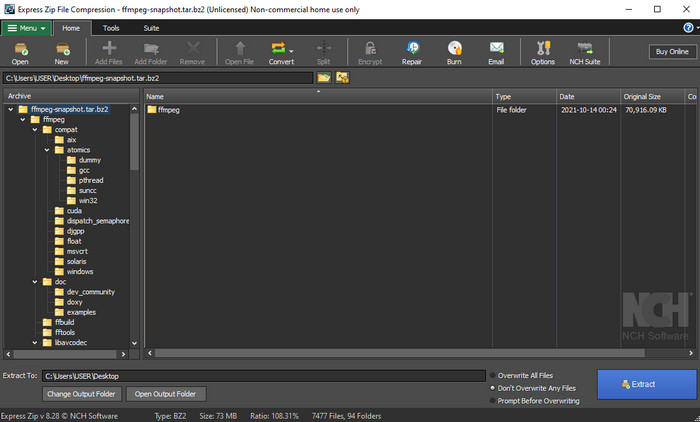
FFmpeg has a unique interface and command to convert SWF to FLV-free. If you know this converter, you already know how to use it; however, not all know this. A brief explanation, this converter isn't your typical video converter that has already been used on the web or downloaded. Instead of using a button to command, you will need a prompt to control this converter.
Step 1. Download the FFmpeg converter on your drive, then open it.
Step 2. On your computer, open your command prompt.
Step 3. Navigate the folder of your SWF file on CMD, then insert it. Copy this command and insert it on the command prompt ffmpeg -i input.swf -vn -ar 44100 -ac 2 -b:a 192k output.flv and press Enter for the process to begin.
Parte 3. Converter SWF para FLV em Flash
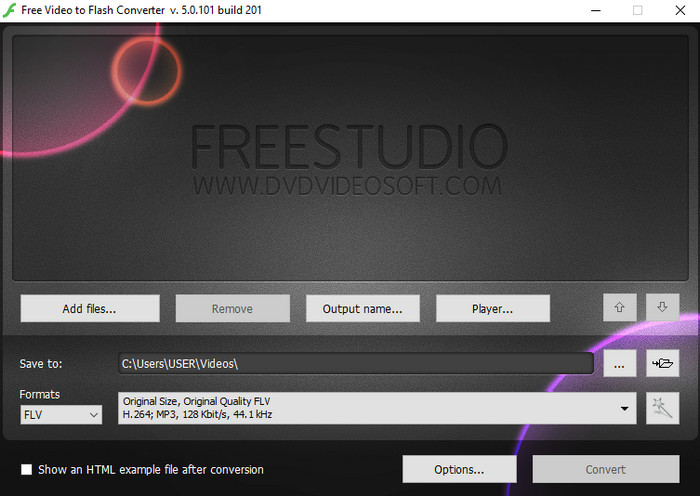
Free Video to Flash Converter is free to download converter on your Windows. This converter has two formats you can choose from. It is precisely for converting files into FLV or SWF format only. So, if you are looking at converting your SWF files into AVI, MP4, MOV, MKV, and more, you can't do it here. Let's learn how to convert SWF to FLV in Flash without more delay.
Step 1. Download the official software of the Flash Converter on your Windows and run the application.
Step 2. Hit the Add Files to upload the file on the converter. Then press Formats, look for the FLV, and you can also choose the quality as well.
Step 3. Start the conversion by clicking the Convert button on the bottom right side of the interface.
Parte 4. Como converter SWF para FLV com a ajuda do melhor conversor SWF no Windows e Mac
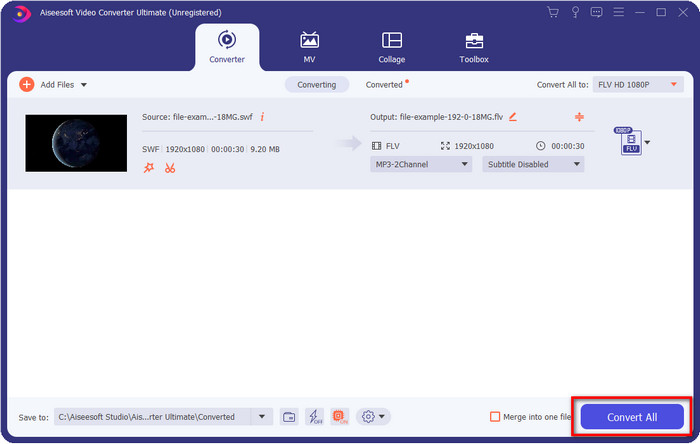
Still not satisfied with the first three SWF to FLV converters online and offline presented above? If so, try to use the FVC Video Converter Ultimate. This converter exceeds every customer's expectations, especially how fast the conversion process this tool provides. Besides its phenomenal conversion, it also has advanced editing features to better your video and Toolbox for other purposes. Moreover, the guide steps listed below will promise 101% success in converting your file.
Step 1. Before using the tool, you must download it on your Windows and Mac drive, follow the tool's installation process, and run it.
Free DownloadFor Windows 7 or laterSecure Download
Free DownloadFor MacOS 10.7 or laterSecure Download
Step 2. Once it runs on your system, click Add Files to upload the SWF files you want to convert.
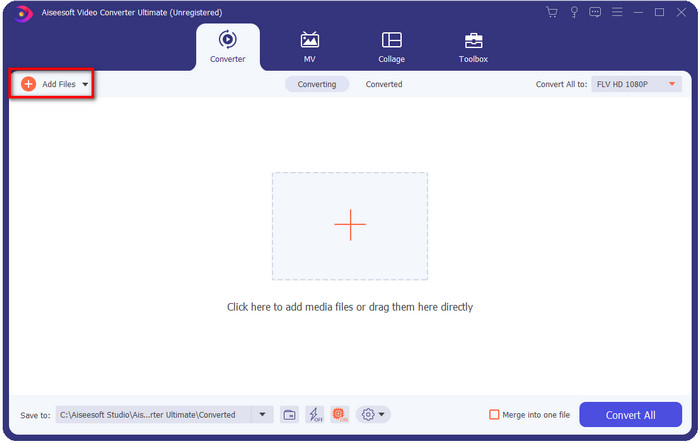
Step 3. Click the Convert All to option and choose the FLV format. You can also select the quality for high-definition or retain the original version.

If you want to make your video output even better, click the wand button. It will lead you to the different editing you can do, such as Crop, Rotate, Add Effects, Subtitle, Audio, and Watermark. To save the changes you've made, click OK.
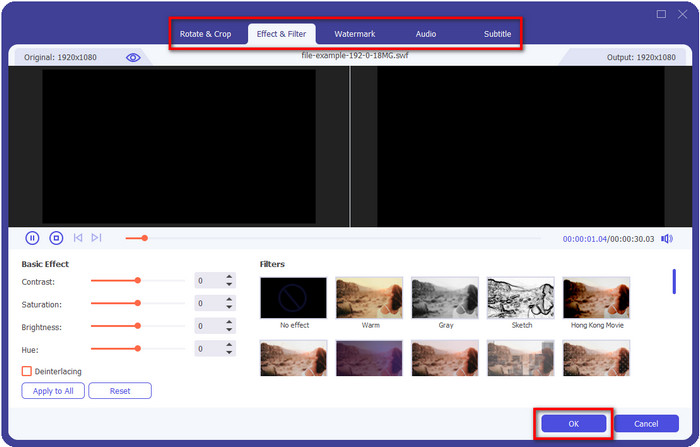
Step 4. Click Convert All and the process will begin. It will only take ample time to convert SWF to FLV; a folder will show on your screen with the FLV file after the conversion.
Parte 5. Conhecimento estendido de SWF e FLV
ShockWave File ou SWF é um formato da Adobe, mas foi criado pela Macromedia. É conhecido por manter animações e sons baseados em vetores usados na web. Além disso, por ser uma base vetorial, você pode ajustar facilmente o dimensionamento gráfico para ajustar ou aumentar o zoom. Além da animação vetorial, o tamanho do arquivo é tão pequeno para carregar o vídeo mais rapidamente, mesmo que você tenha uma conexão lenta à Internet. Mas o formato não é suportado se você deseja compartilhá-los nas plataformas de compartilhamento de vídeo.
Embora o FLV também esteja sob a Adobe, esse formato é melhor que o SWF. O formato FLV ou FlashVideo é o formato de vídeo padrão na maioria dos sites. Este formato pode conter dois codecs diferentes destinados a vídeo e áudio. E assim como o arquivo SWF, esse formato é pequeno para carregar o arquivo mais rápido na web; depois de baixar o arquivo FLV em sua unidade, você pode reproduzi-lo em seu reprodutor de mídia, mesmo que ainda não esteja completo.
Ajudaria se você convertesse o SWF para FLV porque o SWF tem muitas imperfeições que você pode encontrar no formato FLV. Especialmente se o arquivo de vídeo for longo, pois .swf só pode conter um quadro limitado por segundo, haverá uma chance de você não poder usá-lo. Mas o FLV pode armazenar vídeos longos com facilidade. Além disso, se você quiser se concentrar em qualidade, o FLV tem melhor qualidade que o SWF.
Parte 6. Perguntas frequentes sobre conversão de SWF para FLV
O arquivo SWF oferece suporte à transparência?
Como PNG e GIF, este formato também suporta tons de cinza com cores verdadeiras ou atribui uma cor para torná-la transparente.
Onde posso assistir a vídeos SWF?
As for now, you can't watch SWF files on your default media player because it is not supported. However, you can click this link and learn more about the Top 4 SWF Media Player on Windows or Mac.
Posso salvar o .swf do meu telefone?
É possível salvar arquivos SWF em seu telefone, mas reproduzi-los em seu reprodutor de mídia local não é. Porque este formato não é para compatibilidade com o telefone, mas com a web. Portanto, se você baixar um arquivo com essa extensão, espere que não possa usá-lo; no entanto, você pode convertê-lo em um formato reproduzível como MP4 em seu telefone.
Conclusão
This article un-boxes the converter gems you can use to convert SWF to FLV without degrading the quality of the SWF. As we collected all of these converters, we found out that FVC Video Converter Ultimate is the hidden gem you are looking for in this problem. It provides the most phenomenal output and the quickest process of converting compared to all of the tools mentioned. And now, you must choose the treasure you want to use in your converting problem by downloading or accessing the tool on the web.
-
 Conversores DV para FLV úteis para converter DV para FLV [2022]
 Se você está procurando as melhores e fáceis ferramentas para converter DV para FLV, aqui está o melhor artigo para você ler. Tenha uma excelente visão, vasculhando todas as informações deste artigo.
-
 Como converter MPG para FLV sem perder qualidade [comprovado]
 Você deve assistir ao seu filme favorito neste media player, mas ele não suporta MPG. Tente converter seu arquivo MPG para FLV usando esses conversores que este artigo apresenta.
-
 Converta TRP em FLV com os métodos offline e online mais fáceis
 Deseja converter seu arquivo de vídeo TRP para FLV rapidamente e sem problemas? Leia este artigo para fornecer o melhor software e serviço online que melhor se adapte à situação.
