


 Video Converter Ultimate
 Gravador de ecrã
 Reparo de vídeo
5 maneiras rápidas e fáceis de transformar MKV em FLV gratuitamente [online e offline]
Can't share your MKV files over the internet because the file size is too big? Why don't you convert instead of squeezing the file to avoid losing the quality? This issue is solved if you read the details below before sending it. No need to spend an hour reading this article, so without further ado, let's find out the six converters you can use to convert MKV to FLV.

Parte 1. Melhor Conversor de MKV para FLV top de linha para download
FVC Video Converter Ultimate can help you change MKV to FLV easily and effectively without breaking any sweat. This phenomenal converter is far different from the converter in this list or the other converters you already use or not. It is the top-notch coder and decoder you can download on your PC or Mac, and it works flawlessly offline even if you don't have a high-end desktop set-up.

FVC Video Converter Ultimate
Mais de 4.987.355 downloads- Converta MKV para FLV, AVI, MP4, MOV ou em mais de 200 formatos disponíveis no Windows e Mac.
- Torne seu formato MKV compatível com todos os desktops e dispositivos.
- Ele pode realizar a conversão em lote para seus formatos MKV ou outros formatos.
- Conversor infalível para ser usado por qualquer pessoa.
- Suporta saída de alta definição e até qualidade de vídeo de até 4k.
Free DownloadFor Windows 7 or laterSecure Download
Free DownloadFor MacOS 10.7 or laterSecure Download
Steps on How to Convert MKV to FLV with FVC Video Converter Ultimate
Step 1. Download the application to your drive, then follow the installation process.
Free DownloadFor Windows 7 or laterSecure Download
Free DownloadFor MacOS 10.7 or laterSecure Download
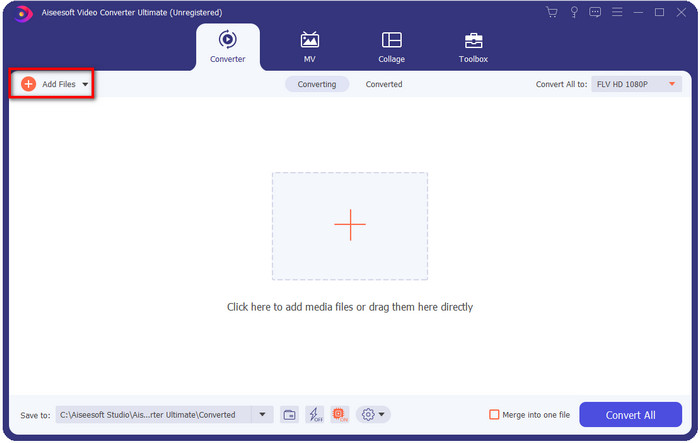
Step 2. After installation, open the application to add the MKV files; you can drag-drop the file to the interface or click the Add Files button.
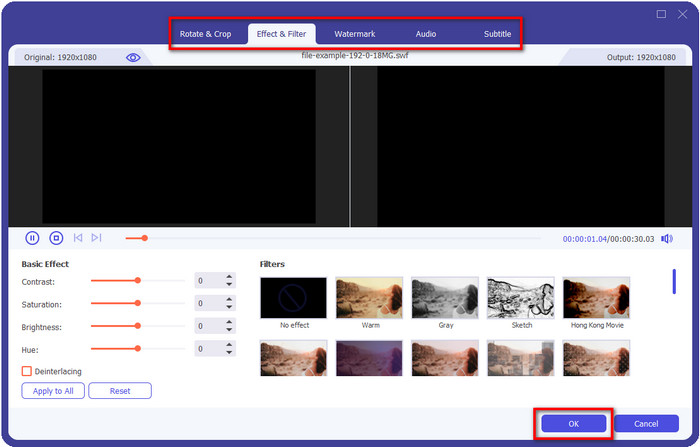
Suppose you want to edit your MKV files before converting them; you can click the wand button to add magic to your output, such as add Effects, Crop, add Subtitles, and more. To save the magic you've added to your video, click OK.
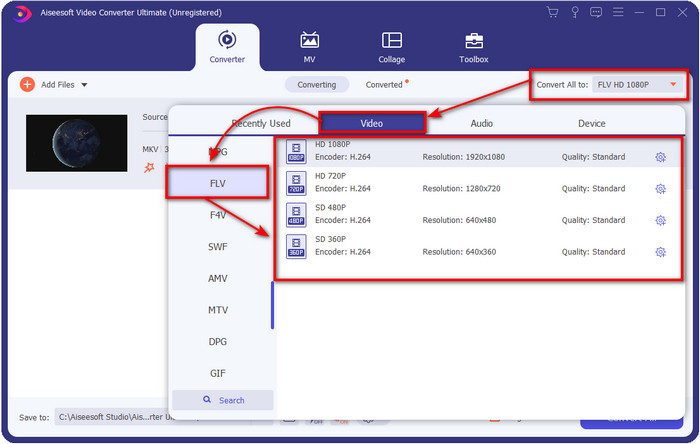
Step 3. Click the drop-down button and choose the FLV format on the setlist.
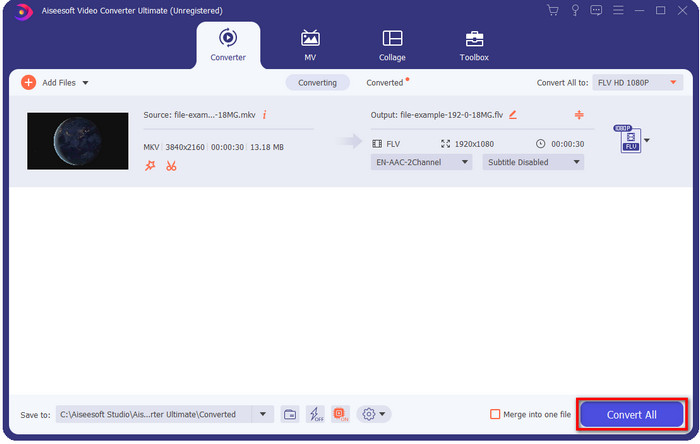
Step 4. Click the Convert All button to start changing MKV to FLV for free. A folder will show up after the process with the new FLV file.
Parte 2. 4 Melhor Conversor MKV para FLV baseado na Web
1. Conversor de Vídeo Grátis FVC Online
FVC Free Video Converter Online features the simple yet impressive MKV to FLV converter free online available in all browsers. It also supports a medium-scale format you can choose and upload into. Although the tool is internet-dependent, converting and uploading the file here is easier and faster. Want to know how to use it? Then follow the steps below.
Prós
- Está disponível para ser usado por qualquer pessoa com internet.
- Interface amigável e fácil de entender.
- Sem limitação para o tamanho do arquivo.
- Configurações avançadas de vídeo e áudio.
Contras
- Formato de médio porte.
Step 1. To open the online converter, click this link.
Step 2. Press the Add Files to Convert button to add the file on your computers’ folder, then click Open.
Download the Desktop Version to convert files in batch.
Although you can't edit videos here, you can change the video and audio settings by clicking the gear button.
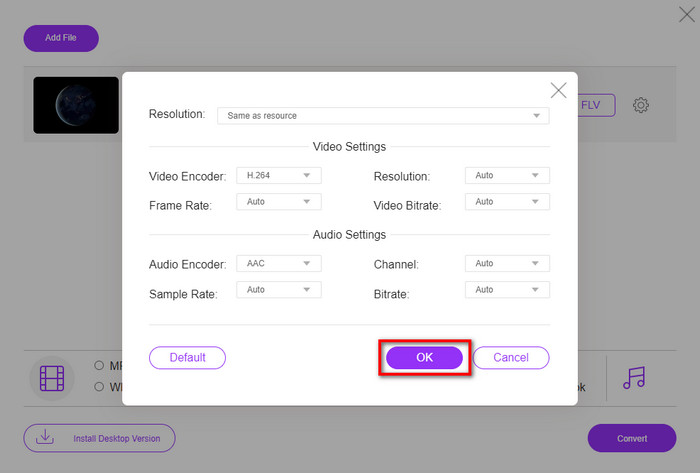
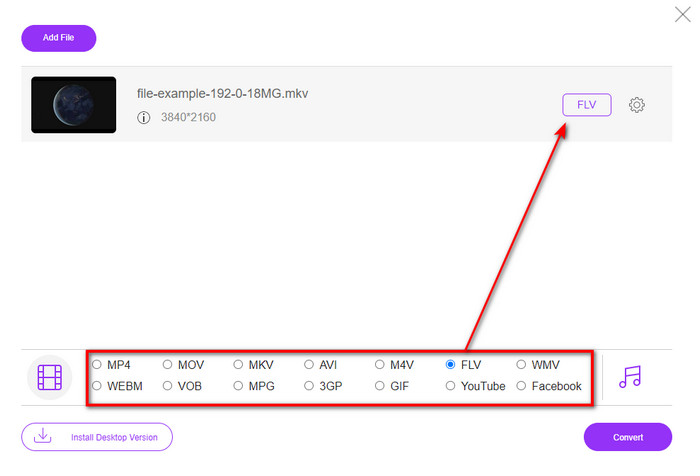
Step 3. Select the FLV format under the setlist.
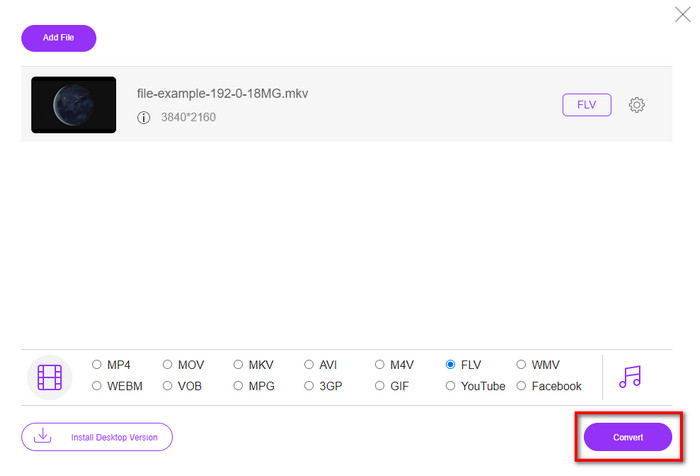
Step 4. Click Convert to start the process of conversion.
2. Conversor M
One of the safest MKV to FLV converters online you can use is the Mconverter. Besides converting video and audio formats, you can also convert your images, archive, documents, and many more media formats here. Even though this converter is free to use, there is a limit for every file you can insert.
Prós
- Converta vídeos, áudio, documentos e muito mais online.
- Ele suporta várias conversões.
- Fácil de usar.
Contras
- O tamanho do arquivo não deve exceder 200 MB.
- Alguns anúncios ao converter o arquivo.
Step 1. Open the Mconverter on your browser, drag the .mkv file, and drop it into the box.
Step 2. Click the FLV format, and it will automatically begin the process.
Step 3. Once done, it will automatically download in your drive.
3. Freeconvert.com
Freeconvert.com will help you to convert MKV to FLV online for free. This web converter supports an easy-to-understand interface that anyone can use. However, this online converter supports small-scale formats you can choose from, and there are a lot of ads on the web interface.
Step 1. Search Freeconvert.com on your search engine.
Step 2. Click Choose File to upload the .mkv file to your computer's folder, press the drop-down button and choose the FLV format.
Step 3. Click Convert FLV to begin converting, and to download it, click Download FLV.
Prós
- Um conversor online gratuito que você pode usar.
- Conversor web seguro e simples.
- Ele suporta um arquivo de 1 GB para converter.
Contras
- Ele suporta um formato de pequena escala.
- O processo de conversão e download levará muito do seu tempo.
4. Conversor de vídeo online Movavi
Movavi Online Video Converter is one of the recommended converters you should convert MKV to FLV online. It is the free web version of Movavi Video Converter used by many users on the entire web because of the efficiency this tool provides and the professional look of it.
Step 1. Open your favorite browser and search for the website of Movavi.
Step 2. Hit +Add Your Media to add the file you want to convert. Click the drop-down button and press Video; find the FLV format and click it.
Step 3. Press Convert to start the converting process.
Prós
- Nenhuma interface da web de anúncios.
- Conversor simples que qualquer um pode usar.
- Ele suporta um formato de escala média.
Contras
- O processo de conversão de formato leva mais tempo.
- Dependente da Internet como os outros conversores da web.
Parte 3. Gráfico de comparação
| Recursos | FVC Video Converter Ultimate | FVC Free Video Converter Online | Mconverter | Freeconvert.com | Conversor de Vídeo Movavi Online |
| Convertendo recursos de formato |  | | | | |
| Dependente da Internet |  | | | | |
| Conversão em lote | | | | | |
| Recursos avançados de edição | | | | | |
| Plataformas Disponíveis | Ferramenta baseada em desktop | Ferramenta baseada na Web | Ferramenta baseada na Web | Ferramenta baseada na Web | Ferramenta baseada na Web |
MKV vs. FLV
O formato de contêiner multimídia Matroska, lançado em 2002, é um formato de código aberto que pode incluir várias faixas de vídeo, áudio, imagem e legendas. Assim, você pode usá-lo para armazenar clipes de vídeo curtos, programas de TV e filmes facilmente. É bastante popular para legendas de fãs de anime.
O Adobe Flash Player usou o FLV para fornecer conteúdo de vídeo, como filmes e programas de TV. Atualmente, a Adobe não desenvolve mais o player e recomenda que os usuários o desinstalem por motivos de segurança. No entanto, você ainda pode usar o formato FLV em muitos programas que não são da Adobe/Macromedia.
Parte 4. Perguntas frequentes sobre a conversão de MKV para FLV
Por que os arquivos MKV são muito grandes?
There are two primary reasons why MKV files are too big. The first reason is that this format holds unlimited contents and elements for video, audio, metadata into one file. The second reason is that if your video is lengthy, then expect that the size of this file will extend. However, you can compress the MKV file with the help of this MKV compressor you can use. But if you want an easier way, you must consider converting the MKV files into MP4, AVI, MOV, FLV, etc.
MKV é melhor que AVI?
MKV and AVI are almost alike formats as they can contain high-definition video and large file sizes. However, these containers have different purposes and structures that make them unique. For example, the AVI format is an uncompressed format that can hold raw video content best for playback purposes. It is also the basis of the development of the MKV file. Although MKV files have a compressor, their content and elements are much more than the AVI can keep. So now, if you want to retain your videos' high-quality, then go with the MKV format. But if you want to have compatibility, then AVI it is. If you want to know how to convert MKV to AVI, click this link.
O Handbrake lida com a conversão de MKV para FLV?
O Handbrake pode lidar com esse trabalho, mas este conversor não suporta programas macOS e Windows que não sejam 10 acima.
Conclusão
To end things off, you now know how to convert MKV to FLV online and offline. These tools above aren't randomly selected, but we choose them according to users' preferences. As we searched and investigated, we found out that these six tools perform best in their job as a converter. But the FVC Video Converter Ultimate does what exceeds what we expected as a converter. Do you want to know the other aptitude of this phenomenal converter? Then what are you waiting for? You must download it now.
-
 MKV para MOV - Como converter MKV para MOV
 Como faço para converter MKV para MOV no Mac? O iMovie consegue ler MKV? O que significa o formato MOV? Esta postagem mostra 2 maneiras simples de ajudá-lo a converter MKV em MOV com conversores de vídeo profissionais e online gratuitos.
-
 Como converter vídeos MKV em GIFs animados sem Photoshop / FFmpeg
 Depois de baixar e assistir a filmes MKV em seu computador, você pode querer compartilhar alguns momentos maravilhosos com amigos ou na Internet como GIFs. Neste artigo, você pode aprender sobre as 2 maneiras mais fáceis de converter MKV em GIF.
-
 Dicas e truques sobre como converter arquivos MKV para MP3 [2025]
 Está tendo problemas para escolher o conversor certo de MKV para MP3? Então continue lendo este post, pois apresentamos diferentes soluções para um problema.

