


 Video Converter Ultimate
 Gravador de ecrã
 Reparo de vídeo


2 maneiras fáceis de converter M4V para WMV sem esforço e sem perdas
Algumas empresas têm formatos de compressão de vídeo. A Apple e a Microsoft desenvolveram arquivos de vídeo exclusivos para seus players de mídia. Portanto, quando alguém baixou ou comprou arquivos M4V da Apple iTunes Store e deseja compartilhá-los com amigos ou familiares com PCs, converter M4V para WMV pode ser o melhor a fazer antes de fazê-lo. Por isso, fornecemos a você o conversor único que realiza esse trabalho de forma rápida, eficiente e excepcionalmente livre de problemas.

Parte 1. Como converter M4V para WMV com facilidade no Mac e Windows
Free Video Converter Ultimate is a simple yet effective video converter from FVC Studio. Your Windows or Mac computer allows you to convert video and audio files. Furthermore, the video formats supported by this video conversion are diverse and include the most widely used ones – it supports popular MP4, FLV, M4V, WMV, TS, M2TS, iPhone/Android files. This software uses HEVC technology, so you would not need to worry about the quality for high-quality converting. Speaking of quality, it is also 4K UHD supported. To use this, here are the simple steps you need to follow:
Step 1: Download the .exe file by clicking the Free Download button below according to your operating system, for Windows or Mac. Once you finish downloading, open it and start installing the software. After that, run the software ahead.
Free DownloadFor Windows 7 or laterSecure Download
Free DownloadFor MacOS 10.7 or laterSecure Download
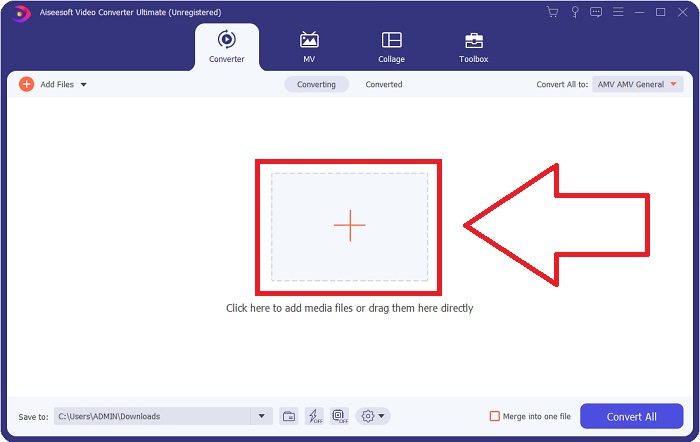
Step 2: A window will open, and there will be an interface with a + button in the middle. You have to click on it to import the video file you wish to convert. Or you can drag and drop the file with ease.
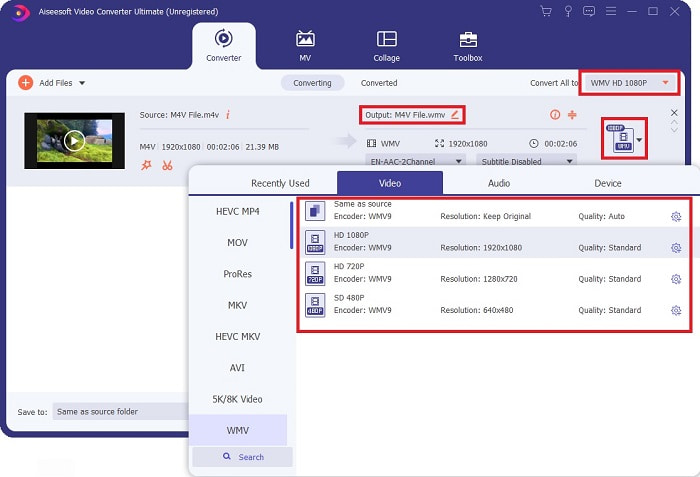
Step 3: You will see the file you imported on the interface. On its right, it shows the current format of the video is. Click on it, and it will show all the available formats you have to choose. In this case, scroll down and find the WMV or just type it in the search bar for a faster approach. Moreover, all the video qualities are available to choose from on the right side of the tab. You can select whichever you prefer.
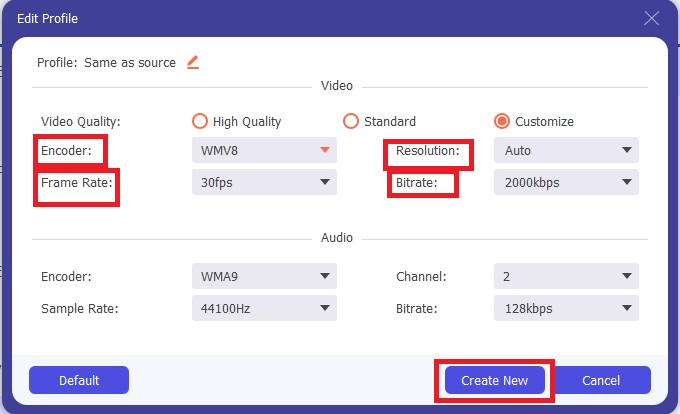
Step 4: In addition to the said quality selection, you can further edit the outcome of your video by clicking on the gear icon on the right side of the video quality you chose. It will show you all the possible adjustments, including the frame rate, resolution, bitrate, sample rate, encoder, and many more. Just click the Create New button to save the changes made.
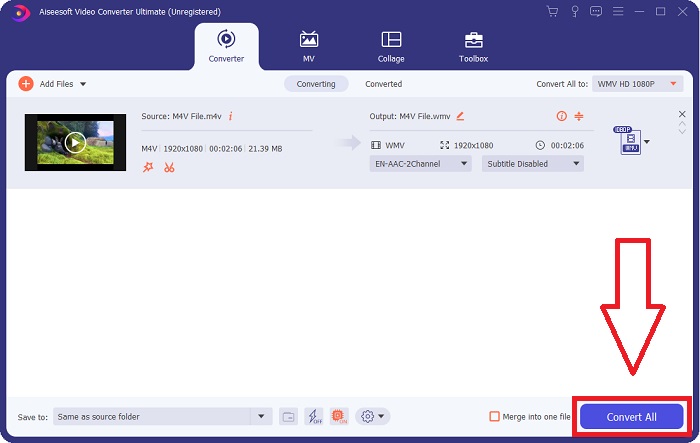
Step 5: To finish the conversion process, click the Convert All button found on the bottom right corner of the tab, wait for it to finish, and then you will get your converted file.
Parte 2. Como converter M4V para WMV usando o Handbrake
Handbrake é um programa de conversão gratuito popular que roda em plataformas Windows, Macs e Linux. Os usuários podem fazer upload de vídeos em qualquer formato de fontes de DVD e Blu-ray para este transcodificador de código aberto para conversão em WMV. O procedimento de conversão é rápido e fácil, graças a uma interface amigável. Siga estas instruções fáceis para converter M4V em WMV usando um Handbrake.
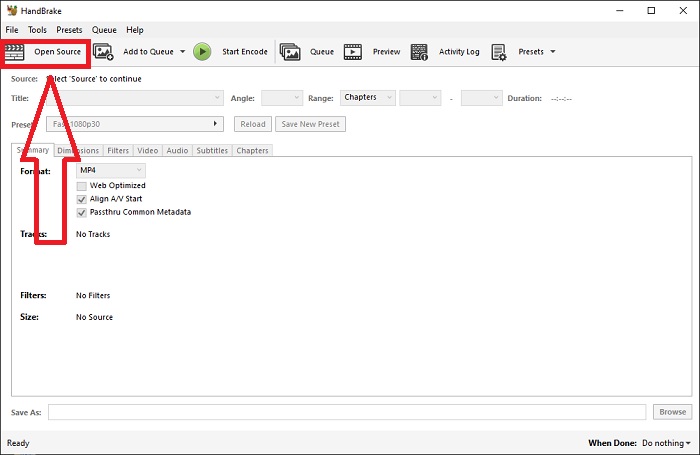
Step 1: Start the Handbrake application on your computer. Click the Open Source button on the main screen to browse and add WMV files converted. You may also just drag and drop the videos into the interface.
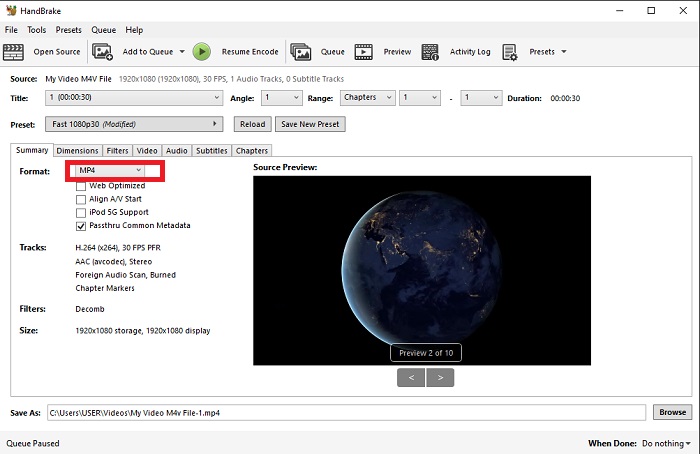
Step 2: The newly inserted file will show in the Source area. Then, choose WMV as the desired output format from the Format drop-down option on the Summary tab. Filters, video codecs, and other file properties may be tweaked if necessary.
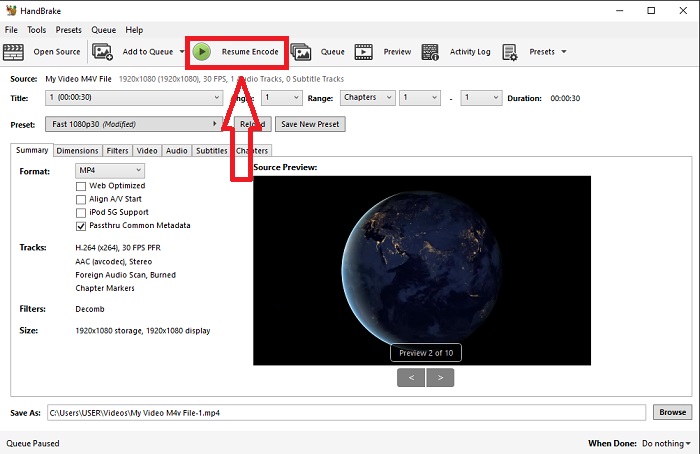
Step 3: Choose the output file name and location on your PC under the Destination section. Finally, click on the Start Encode button to convert the M4V file to WMV.
Parte 3. Outra ferramenta útil para converter M4V para WMV Online
Como uma ferramenta gratuita de internet, o FVC Free Video Converter é útil. MP4, MOV, MKV, AVI, M4V, FLV, WMV, WEBM, VOB, MPG, 3GP, GIF e formatos de vídeo aprovados pelo YouTube e Facebook estão entre os tipos que ele suporta. Além disso, este conversor de vídeo online gratuito também pode converter arquivos de áudio, permitindo que você converta seu vídeo ou música para MP3, AAC, AC3, WMA, WAF, FLAC e outros formatos. O FVC Free Video Converter também permite especificar arquivos antes de iniciar a conversão. Você pode alterar a resolução do vídeo, a taxa de quadros e a taxa de bits do vídeo, bem como o canal do áudio, a taxa de amostragem e a taxa de bits.
Step 1: Click this link to go to the online tool itself. First, you have to download a launcher quickly. You can do this by clicking the Add Files to Convert button found in the middle of the page. This step will allow you to import your files.
Step 2: Click on the said button again to finally upload the video. You will know the upload is successful once all the presented formats are in the interface. From there, select WMV among the others.
Step 3: You can find a gear icon on the right for the additional options in the software. Click on it, and it will allow you to make changes to the video and audio settings in terms of resolution, frame rate, and others alike. Once done, click OK and then the Convert button to finish the conversion process.
Related:
Parte 4. Conhecimento estendido sobre M4V e WMV
Para obter informações adicionais sobre os dois formatos, você pode ler o que fornecemos abaixo:
M4V é um formato de arquivo criado pela Apple. É extremamente semelhante ao formato de arquivo MP4, exceto que os arquivos M4V podem ter a proteção Fairplay DRM da Apple. O formato M4V pode ser encontrado em material de vídeo adquirido na loja iTunes. Se o arquivo M4V tiver DRM ativado, a conta do iTunes usada para comprar o arquivo deve ser autorizada na máquina que o reproduz.
Por outro lado, os arquivos WMV são arquivos de vídeo criados pela Microsoft que geralmente incluem áudio. Nas plataformas Mac e PC, os usuários podem reproduzir esses arquivos com vários players de vídeo. A proteção de gerenciamento de direitos digitais (DRM) pode ser incluída em determinados arquivos WMV, impedindo que os usuários façam cópias ilegais de arquivos comprados de varejistas online.
| M4V | WMV | |
| Extensão de arquivo | .m4v | .wmv |
| Desenvolvedor | Apple Inc. | Microsoft |
| Programas de apoio | ◆ Media Player Clássico ◆ VLC Media Player ◆ KMPlayer ◆ Reprodutor de Zoom | ◆ VLC Media Player ◆ MPlayer ◆ Media Player Clássico ◆ Windows Media Player |
Parte 5. Perguntas frequentes sobre a conversão de M4V e WMV
O M4V é de qualidade superior ao MP4?
Agora sabemos que não há diferença fundamental entre MP4 e M4V depois de fazer uma comparação M4V MP4 lado a lado. Depois de remover a proteção DRM do arquivo de vídeo M4V, os arquivos de vídeo MP4 e M4V são idênticos.
O Handbrake remove o DRM?
É uma biblioteca para visualização de DVDs criptografados com o Content Scramble System (CSS), um método amplamente utilizado pelo software de player gratuito para descriptografar discos protegidos. É compatível com Windows, macOS, Linux e vários sistemas operacionais. O HandBrake é capaz de remover efetivamente o DRM de DVDs e copiá-los.
Qual é o melhor uso do WMV?
A Microsoft criou o formato de vídeo WMV amplamente usado em players de mídia do Windows. Os arquivos WMV são menores e mais compactados do que os arquivos MP4. É por isso que é popular para streaming de vídeo na Internet.
Conclusão
Há inegavelmente muitas maneiras de converter M4V para WMV, mas apenas algumas podem fazê-lo enquanto fazem ajustes em algumas especificações adicionais. É por isso que recomendamos o Video Converter Ultimate, pois estará ao seu lado sempre que precisar de um conversor. Se o tempo não permitir a instalação do software, sua versão online estará sempre disponível para uso. Então, ajude-nos a oferecer a melhor experiência de edição de vídeo usando o FVC Video Converter Ultimate.
-
 Grátis | 3 melhores métodos para converter MP4 em WMV sem perder qualidade
 Esta postagem mostra como converter vídeo MP4 para o formato WMV no Mac ou Windows. Também ofereceremos várias opções, incluindo software de desktop e conversores on-line baseados na web. Pronto para conhecer as melhores ferramentas de conversão de MP4 em WMV?
-
 3 maneiras principais de converter FLV em WMV no Windows e Mac
 Procurando a melhor maneira de converter FLV em WMV sem perder qualidade no PC ou Mac? Você tem sorte, pois aqui compartilhamos três métodos para fazer o trabalho facilmente.
-
 Um guia simples sobre como transformar seu GIF em WMV no Windows / Mac
 Você quer saber como converter GIF para o formato WMV? Em seguida, siga este artigo, pois ele apresenta diferentes soluções que você pode escolher.

