


 Video Converter Ultimate
 Gravador de ecrã
 Reparo de vídeo
Guia Simplificado Como Converter DV para WMV no Windows e PC
DV files are standard raw broadcasting formats commonly used on camcorders. After it debuted as a standard camcorder format, Sony and Panasonic introduced a more professional format different from the DV format. Although this DV file is excellent for editing, playing it on Windows, you will need to use a software program to view the video. So now, we present below two converters you can use to convert DV to WMV and watch it without any hassle.

Parte 1. Use o conversor mais incrível para converter DV para WMV
FVC Video Converter Ultimate can aid your problem in converting the format into a new version. This tool supports different varieties of functions other than converting. So, if you attain this converter, you must expect that you can do more and not only stay on converting. Moreover, suppose you will need an immediate conversion process; this is the best converter choice to convert DV to WMV, AVI, MOV, MP4, MKV, and 200+ media format. Want an experience with new expertise of converter that provides professional output without any hassle? If so, this demonstration will help you distinguish how to convert the file into a new WMV format.
Steps on How to Convert DV to WMV with FVC Video Converter Ultimate:
Step 1. Download the FVC Video Converter Ultimate on your desktop drive, click the download button, follow the installation steps, and run the tool next.
Free DownloadFor Windows 7 or laterSecure Download
Free DownloadFor MacOS 10.7 or laterSecure Download
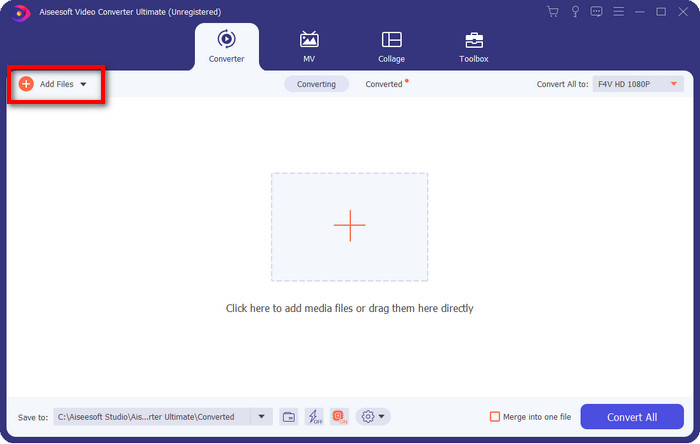
Step 2. After setting it all up, insert the file on the converter by clicking Add Files, search the DV file save on your desktop to the folder that will show, and hit Open.
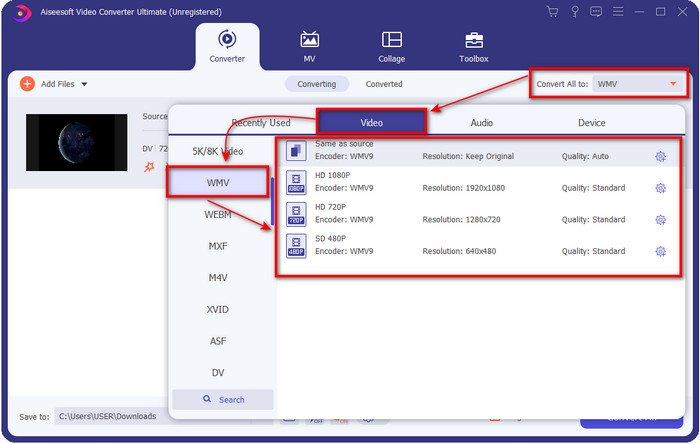
Step 3. Change the format by clicking the drop-down button at the upper right part of the user interface. Then choose the WMV format on the list that will show, and now you can select the quality of the video output.
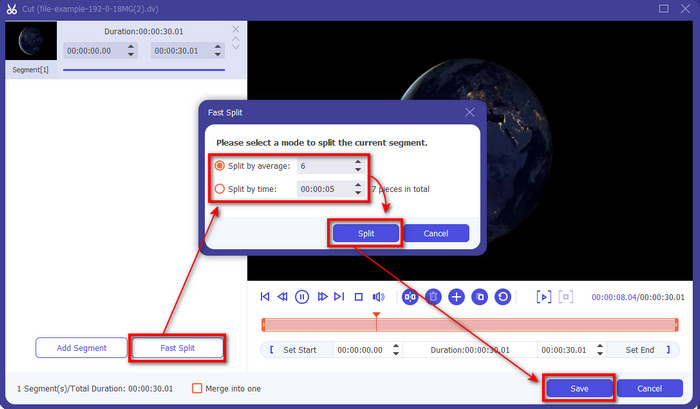
Want to split your videos into different segments? If so, press the scissors button, click Fast Split to set the number of segments you want and how long per segment, and press Split to continue. To save the splitting output you've made, click Save.
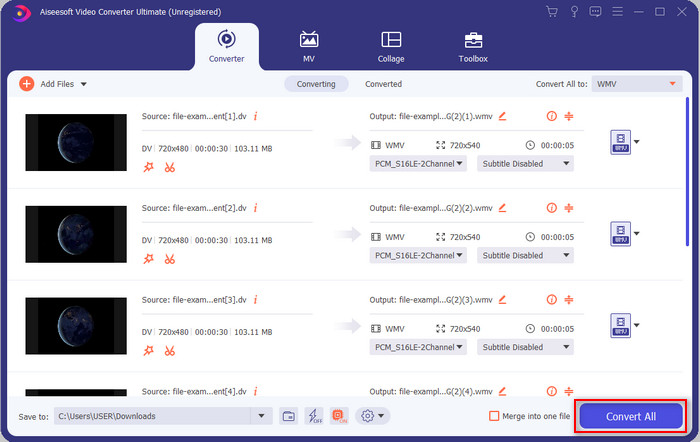
Step 4. Click Convert All for the process of converting the DV file to begin. After the procedure, a new folder will show on your display with the new WMV file.
Parte 2. Use o conversor online para converter DV para WMV online
Are you looking for an online solution to convert DV to WMV, and is it hassle-free? Then FVC got you covered with the FVC Free Video Converter Online. This web converter will help in converting, but you will need to access this tool on the browser instead of downloading it. Moreover, it is easy, free, and safe to make your conversion better. Want to know how to use this web tool? Then follow these steps below to know how to do the converting online.
Step 1. You can click this link to open the web converter, and a tab will open.
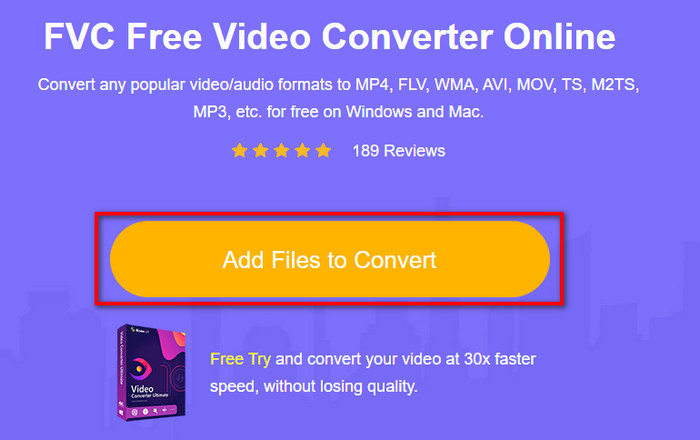
Step 2. Click Add Files to Convert on the website; a folder will directly show on your screen, select the DV file, and press Open.
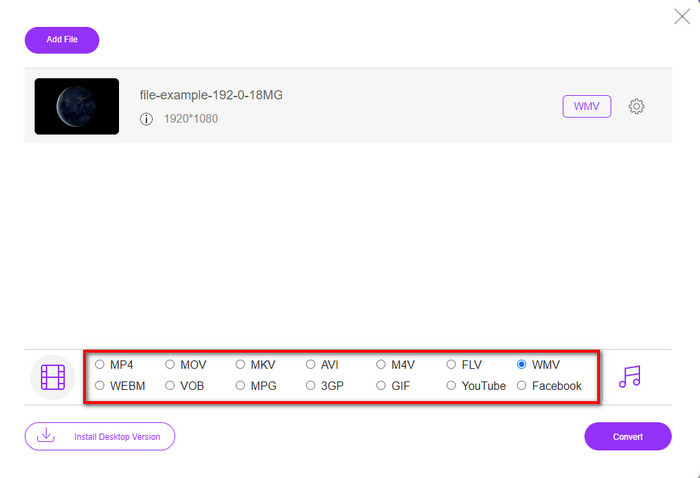
Step 3. Once the file is uploaded, please choose the format on the catalog presented below or click WMV to save it as WMV format.
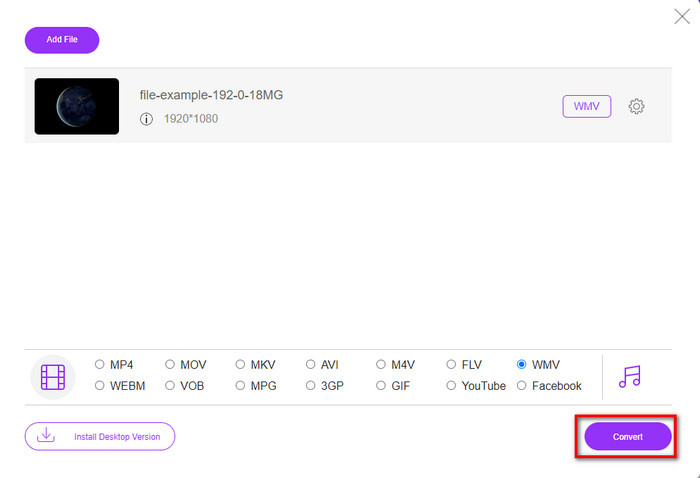
Step 4. By clicking Convert, the process of converting will begin. After the process, the file will be downloaded automatically on your desktop drive.
Parte 3. Qual é a diferença entre DV e WMV
A diferença entre DV e WMV é fácil de entender de várias maneiras. Então, se você quiser saber quais são, você deve ler as informações na lista abaixo.
Gravando vídeo em uma filmadora, o DV é a melhor escolha, pois pode armazenar esse tipo de conteúdo. Além disso, esse formato pode conter detalhes essenciais, como metadados, subcódigo, hora e codificação de data. Além disso, este formato utiliza uma compressão intraframe dentro de cada frame e, por isso, é ideal para edição detalhada. Embora o formato seja excelente e armazenado em fitas DV, a compatibilidade que esse formato obtém é baixa e seu tamanho de arquivo é enorme em comparação com o WMV. Por outro lado, WMV é o melhor formato para usar como reprodução de vídeo no Windows. E agora adapta o formato da versão 9 para HD DVD e Blu-ray Disc, agora conhecido como VC-1.
Parte 4. Perguntas frequentes sobre conversão de DV para WMV
Por que não posso usar o software DV no Mac?
DV format is unsupported in Mac, especially on iMovie and QuickTime Player. But you can convert your DV file into a MOV format to make it work on your macOS. If you don't know how to convert DV to MOV, you must spend 5 minutes or less of your time reading this article to know-how.
Os arquivos DV ainda são o melhor formato para edição?
Os formatos DV são conhecidos por serem um dos melhores contêineres de edição. Porque o DV armazena vídeo de alta qualidade e armazena cada quadro para fins de edição mais acessíveis. Mas hoje, a capacidade desse formato já foi adotada pela maioria dos formatos. Portanto, se você está perguntando se ainda é o ideal, a resposta é não devido à baixa compatibilidade desse formato.
Como diminuir meus arquivos DV?
If you already knew, DV files are enormous because this format is a unique compressor. So, it is very typical to look for a compressor to make the file less in size to save space on your drive. Have trouble choosing and doing how to compress DV files? If so, click this link.
Conclusão
All of the converters presented above will help you in your journey of converting DV into WMV format. So now, let's end our journey because this is the last stop as we have already gained enough knowledge on how to convert your DV files. Right now, you will need to choose which converter best suits you. The choice is in your hand; whatever converter you use, these FVC tools will surely guarantee your success. FVC Free Video Converter Online or FVC Video Converter Ultimate two converters will make your converting process hassle-free.
-
 Melhor estratégia para converter arquivo DV em formato AVI com etapas detalhadas
 Deseja converter seu arquivo DV em AVI? Então leia este artigo para conhecer a ferramenta exclusiva que você pode usar para converter e um media player para reproduzir seu DV no seu PC ou Mac.
-
 Conversores DV para FLV úteis para converter DV para FLV [2022]
 Se você está procurando as melhores e fáceis ferramentas para converter DV para FLV, aqui está o melhor artigo para você ler. Tenha uma excelente visão, vasculhando todas as informações deste artigo.
-
 3 maneiras principais de converter FLV em WMV no Windows e Mac
 Procurando a melhor maneira de converter FLV em WMV sem perder qualidade no PC ou Mac? Você tem sorte, pois aqui compartilhamos três métodos para fazer o trabalho facilmente.
